

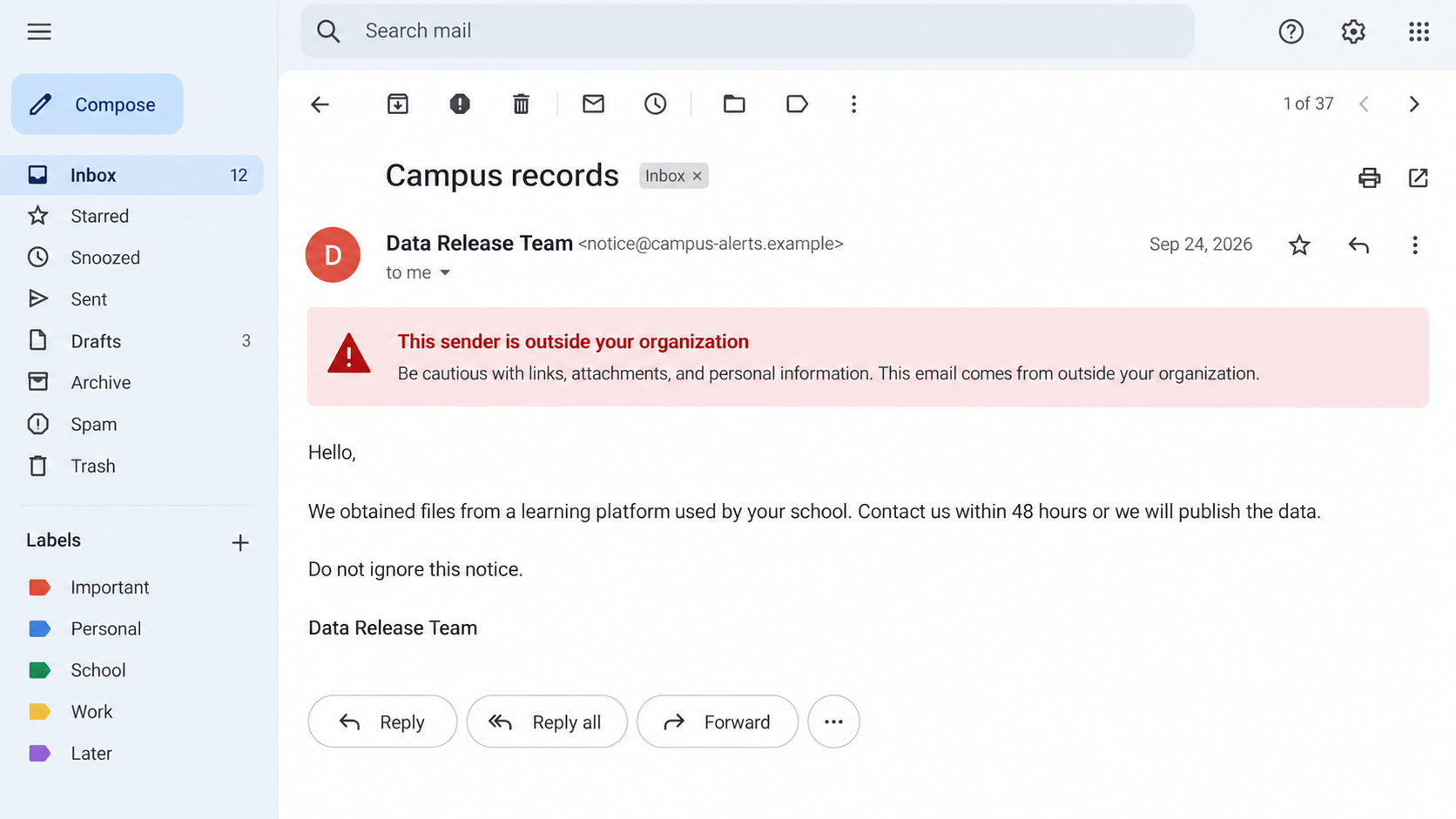
An email arrives just after your school reports a technology outage. The sender says it has student records and gives you a short deadline.
It is frightening precisely because the disruption was real. Before answering, separate what the school knows from what the stranger wants you to believe.
Overview
The disruption and the message
School data extortion emails can follow a cyberattack on a platform used by students and institutions. A sender claims to possess private files and threatens to release them.
The message may use details from public reports or stolen records. Those details can make a threat feel specific without proving that every claim is true.
A family receiving such an email should not have to investigate an incident alone. The affected institution and law enforcement hold the most useful verified information.
What the FBI confirmed and warned about
In a May 2026 alert, the FBI described a cyberattack that interrupted an online learning management system used by educational institutions.
The FBI said ShinyHunters claimed the attack. It warned that people may receive extortion emails signed with that name, plus threatening calls or texts.
The agency also explained that attackers sometimes exaggerate access or falsely claim to hold embarrassing photographs and videos.
- A real service interruption does not verify a particular sender’s claims.
- An intimidating email can contain genuine, exaggerated, or invented details.
- Replying or paying is not a reliable way to protect records.
- Wait for verified guidance from the institution while preserving the message.
Why this article is carefully limited
The FBI did not say every student received an email or that every record in a threatened dump was authentic.
Nor does an email signature prove the sender belongs to ShinyHunters. Other criminals can borrow a well-known group name to make a threat louder.
The screenshots in this guide are fictional examples. They show the kind of pressure involved, not evidence from the FBI’s specific investigation.
Why a School Platform Incident Can Reach Families
Learning systems hold practical information: names, class activity, contact details, and sometimes links to other campus services. What a particular platform stored varies.
Students and parents often do not know which vendor runs a school portal. A breach warning can therefore leave them unsure which accounts to check.
An attacker may exploit that uncertainty. A message can mention a real school, a true outage, or a familiar course platform without revealing actual access.
Public news alone can supply enough context to write a convincing email. That is one reason the sender’s evidence must be judged separately from the incident.
The FBI’s concern extends beyond direct demands. Exposed information, if obtained, could support tailored phishing that appears to come from faculty or financial aid staff.
A message about class enrollment or aid may be more believable than a generic prize scam. It fits the recipient’s ordinary school life.
Do not conclude that a student’s entire academic record was taken from one threat. The institution should identify affected systems and data types when it can.
How the School Data Extortion Scam Works
Step 1: A real event provides the opening
A school platform outage or incident becomes public. Students, teachers, and families are already waiting for updates, making unfamiliar messages more likely to be read.
The FBI said the learning management system in its alert had suffered an attack and a service interruption. The platform later returned to operation.
That operational fact does not establish the contents of an extortion email. It does give the sender a believable event to invoke.
A criminal can also target people who only heard about the attack through friends or social media. The recipient need not be in a confirmed affected group.
Step 2: The sender claims to hold records
An email may say the group copied student records and will publish them unless someone responds. It can use a known group name to increase fear.
The FBI said threat actors may use real or exaggerated claims of access. Some claim to have compromising images that do not exist.
Even when a sample file is attached, do not open it casually. The file could be malicious, unrelated, or selected to imply a larger cache.
Ask the institution for verified incident updates rather than asking the sender to prove its access. A reply confirms your address and opens a negotiation channel.
Step 3: A deadline tries to force a private response
The email sets a clock. It may promise silence if paid, threaten publication, or warn that contact with the school will make matters worse.
Deadlines are a pressure device. They do not give the sender lawful authority over the recipient or reliable control over copies of data.
A payment cannot guarantee deletion. Files may have been copied, shared, or never held by the sender in the first place.
The FBI recommends not sending payment or responding to demands. Preserve the communication and move to verified channels instead.
For a school or district, decisions about incident response should follow its professional and legal process, not an individual’s email exchange.
Step 4: Harassment broadens the pressure
The FBI warned that actors may send threatening texts or place calls to people and their families. In some incidents, they may use swatting.
Swatting means making a false emergency report to send police to a location. It is a serious criminal tactic, not evidence that the threatened data exists.
A caller might know a student’s name or number. Those details could come from an incident, an old leak, a directory, or other sources.
Do not interpret familiarity as proof of current access. Keep records of the caller’s claims, time, number, and any immediate safety concern.
If a threat involves immediate danger, contact local emergency services. Do not try to negotiate with the person making it.
Step 5: New phishing messages may appear
After a high-profile incident, a second email may claim to be from campus IT, faculty, a vendor, or a financial aid office.
The FBI warned that stolen information could help criminals create convincing messages. It did not say every follow-up email is malicious.
A fake notice might ask recipients to “review affected data” through a link. That link can lead to a credential form or an unexpected download.
Open the school’s known portal through a saved address. Do not sign in from a message simply because it mentions a real incident.
If an instructor genuinely needs action, the request should be verifiable through established school channels.
Step 6: Silence from the attacker does not end the issue
An extortionist may stop writing after a few days, but the institution’s investigation can continue. A later notice may clarify whether records were actually exposed.
Keep the original message so you can compare it with official guidance. Report any new contact rather than assuming it is part of a completed matter.
For individuals, the useful timeline is practical: secure accounts, watch for targeted phishing, and update your response when the school publishes reliable findings.
Avoid repeatedly searching for rumored leak sites. That can spread unverified claims and expose you to hostile pages.
How to Separate a Confirmed Incident From an Unverified Threat
Look for an announcement published through the institution’s own site or established email channel. Identify what it confirms, what remains under investigation, and whom to contact.
A school’s statement may initially mention service disruption without knowing whether personal data was copied. That is an honest limit, not proof of a cover-up.
Compare the email’s claims with official notices, but do not expect a perfect match. An attacker may mix true details with false assertions.
Do not forward a threatening message widely with personal information exposed. Share it with the institution’s security team or authorities through a secure route.
The FBI specifically advises people to await formal guidance from educational institutions about the scope and nature of any affected data.
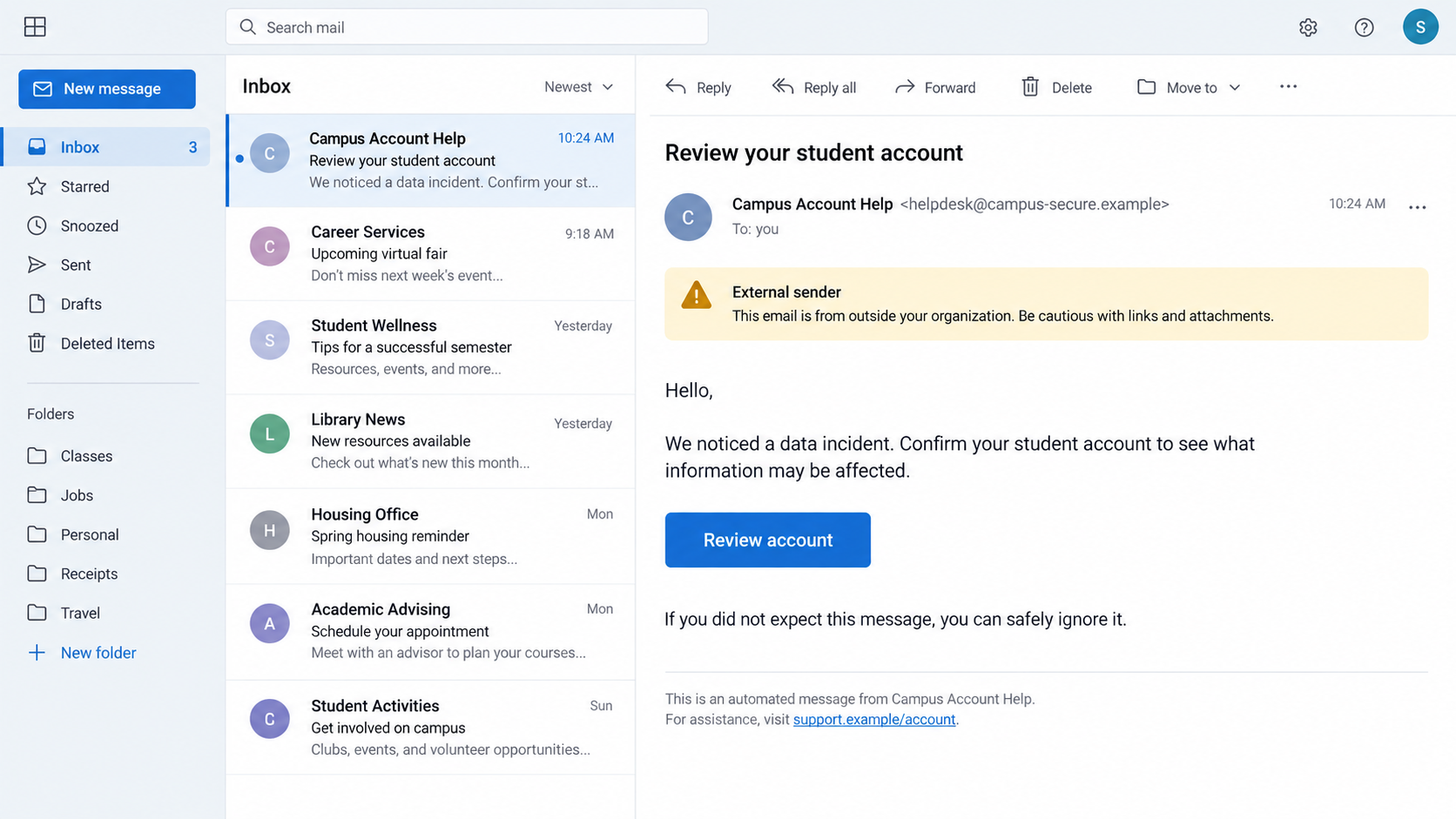
A school-looking follow-up should be checked against a known contact. An external sender warning or unfamiliar domain deserves attention, even when the message sounds helpful.
Real notices may ask people to reset passwords. Do it by visiting the institution’s official portal directly, not by clicking a button in an unexpected email.
If the institution offers credit or identity monitoring, confirm the enrollment route through its announcement. Do not assume a vendor link in a random message is approved.
What Students and Families Should Watch For Next
Protect the email account tied to school services. A compromised inbox can be used to reset other accounts or intercept official updates.
Use a unique password and multifactor authentication where available. Check recent sign-ins and forwarding rules if you suspect account access.
Watch for requests that use school vocabulary: course schedules, tuition balances, financial aid, transcripts, or a professor’s name.
Verify payment changes especially carefully. An attacker impersonating a billing office might ask for a transfer to a new account after the breach.
Families should agree on a simple rule: no one pays a person who threatens to publish data. Bring the message to the institution and authorities.
For younger students, explain that a frightening email is not their fault. Encourage them to show it to a trusted adult without replying.
Parents should avoid pressing a child to search for their own information on alleged leak pages. The safer route is the school’s verified incident process.
If the School Later Confirms Data Exposure
A formal notice may identify which records were involved. Read that list before taking every possible precaution, because the response should fit the information exposed.
If an account password was involved, change it wherever reused. A separate email password is especially important because inbox access can enable account resets.
If financial or identity details were exposed, follow the school’s guidance and consider monitoring accounts for unfamiliar activity. The exact steps depend on the data type.
Keep the notice for your records. It may explain the incident date, affected service, recommended protections, and a contact for questions.
Do not send identity documents to anyone who volunteers to “check the leak” through social media. Such offers can create another exposure.
An attacker may cite the confirmed notice later to make a separate phishing message look official. The verification rule remains the same after the investigation ends.
A school can update its findings. An early notice may be narrower or less certain than a later one, so check the institution’s latest dated statement.
If you are a staff member, follow the school’s incident instructions rather than privately warning families with unverified lists. Well-meant rumors can spread sensitive details.
For students, practical reassurance matters. An institution’s data incident is not something a student caused by opening a class portal or submitting an assignment.
Take the protective actions that match the confirmed facts, then return to normal routines. Constantly checking threats from strangers will not improve security.
What to Do if You Received a School Data Extortion Email
- Do not reply or pay. The FBI recommends ignoring extortion demands. A response can confirm your contact details without proving what the sender actually possesses.
- Preserve the evidence. Save the message with full headers if possible, plus related texts, voicemails, caller numbers, dates, and any claimed file names.
- Check the school’s own updates. Visit its known site or call an established number. Ask whether your group is affected and what data, if any, is confirmed exposed.
- Secure related accounts. Change a reused school password, enable multifactor authentication, and review sign-ins. Contact account providers if you notice unfamiliar access.
- Report threats. Give the evidence to the institution’s security team and file a report with IC3. Contact local law enforcement if harassment or safety threats occur.
- Treat links and files as separate risks. If you opened an attachment or installed something, run a Malwarebytes scan. AdGuard may reduce malicious web destinations, but neither removes exposed records.
- Get support if the pressure is overwhelming. A trusted adult, school counselor, health professional, or victim-support resource can help you respond without facing the threat alone.
If a sender claims to hold intimate images, do not assume those images exist. The FBI says such claims can be fabricated to increase fear.
If immediate harm is threatened, prioritize personal safety and contact emergency services. Evidence preservation matters, but safety comes first.
Frequently Asked Questions
Does a real school outage prove my records were stolen?
No. The FBI confirmed an attack and service interruption in its example, but the scope of data exposure requires a separate investigation.
Is every email signed ShinyHunters genuine?
No. A signature is easy to copy. Treat the message as a threat to report, not as proof of who sent it.
Should I pay to keep student records private?
The FBI advises against payment. A sender cannot reliably guarantee deletion or prevent other copies from spreading.
What if the email includes my real name and school?
That makes it more concerning, but still does not prove access to every claimed file. Report it and await verified guidance about affected data.
Could a later campus email also be phishing?
Yes. The FBI warned that incident context may support targeted impersonation. Confirm unusual requests through established school contact details.
What if the message threatens my family?
Save the details, tell the institution, and report the threat to law enforcement. For immediate danger, contact emergency services promptly.
The Bottom Line
School data extortion emails exploit a genuine disruption and the uncertainty around it. The threat may mix real facts with claims that remain unproven.
Do not negotiate from your inbox. Preserve the evidence, use the school’s verified updates, secure related accounts, and report threats through official channels.

Join the discussion
0 commentsShare your experience or ask a question about this article.
Discussion
Start the conversation
Have a question or something useful to share? Add the first comment.