

A bottle of green foam, a dirty sneaker, and a few satisfying brush strokes can make shoe cleaning look effortless on social media.
Shoelada has turned that familiar transformation into a recognizable brand. The harder questions concern value, expectations, service, and what its guarantee actually covers.
Overview
Shoelada sells a real shoe-cleaning product
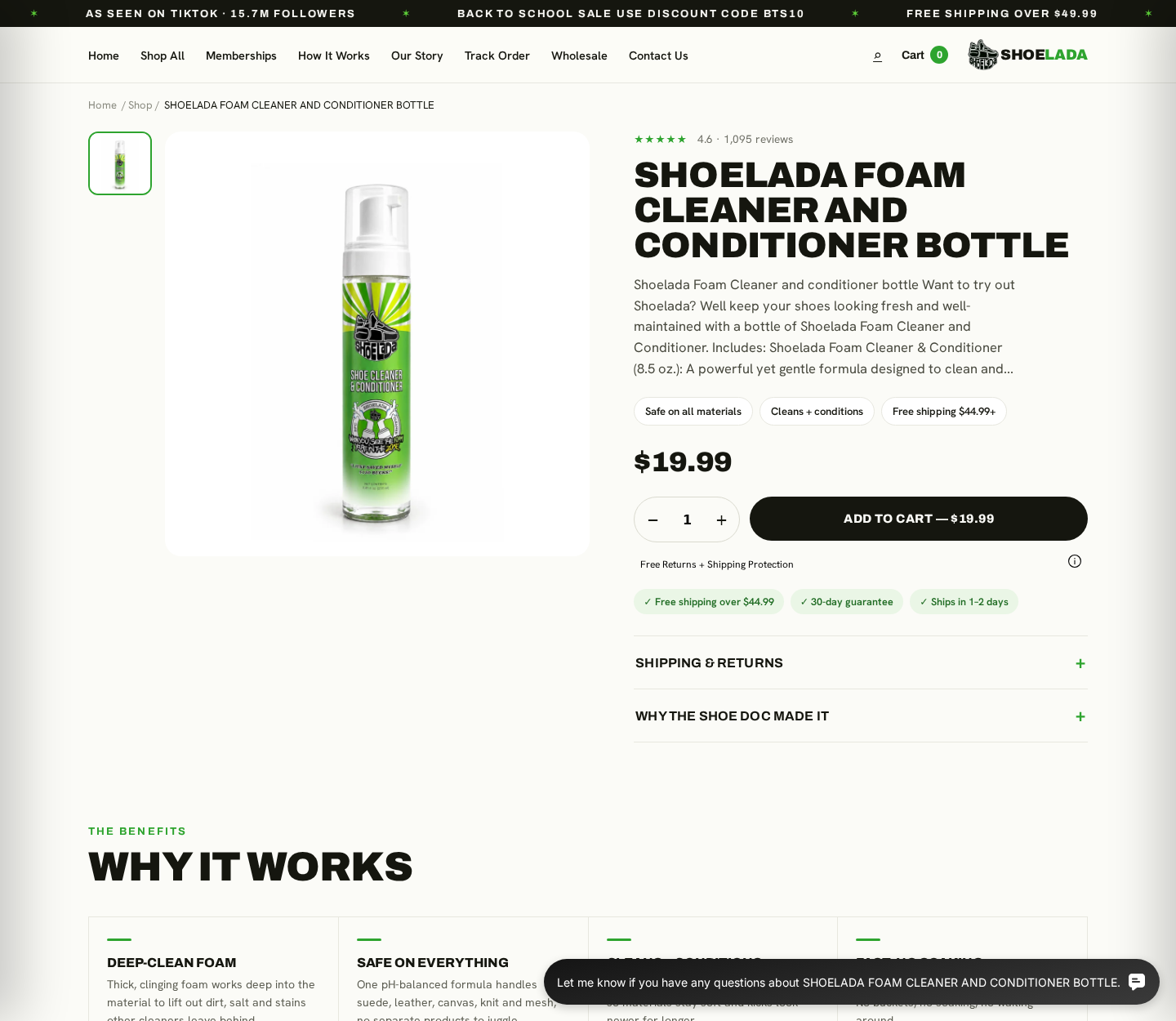
Shoelada Foam Cleaner and Conditioner is an actual bottled cleaner available through the brand’s online store.
The listing reviewed for this article showed an 8.5-ounce pump bottle priced at $19.99, with cleaning and conditioning claims.
The company presents the formula as suitable for materials including leather, canvas, knit, mesh, and suede.
Customers can also purchase brushes, wipes, sneaker laundry bags, memberships, and other shoe-care items from the same storefront.
The marketing is built for dramatic visual demonstrations
Shoe cleaning performs well in short videos because the result appears quickly. White foam and dark runoff create an especially persuasive contrast.
A demonstration can show that surface dirt moved, but it cannot prove universal safety, restoration, or superiority over cheaper alternatives.
Lighting, editing, shoe material, stain age, brush pressure, preparation, and drying all influence the final appearance.
The official site advertises a large social-media following and displays strong on-site product ratings. Those figures are marketing signals, not independent laboratory evidence.
- The cleaner exists and is sold by an established branded store.
- The $19.99 price excludes tools some cleaning jobs may require.
- “Safe on all materials” is broader than cautious fabric-care guidance.
- The product page promotes a 30-day guarantee.
- The detailed refund policy contains meaningful conditions and exclusions.
- Independent review profiles show a more mixed experience than the store page.
The main concern is a gap between simple promises and detailed policies
The product page uses reassuring badges for free returns, shipping protection, rapid dispatch, and a 30-day guarantee.
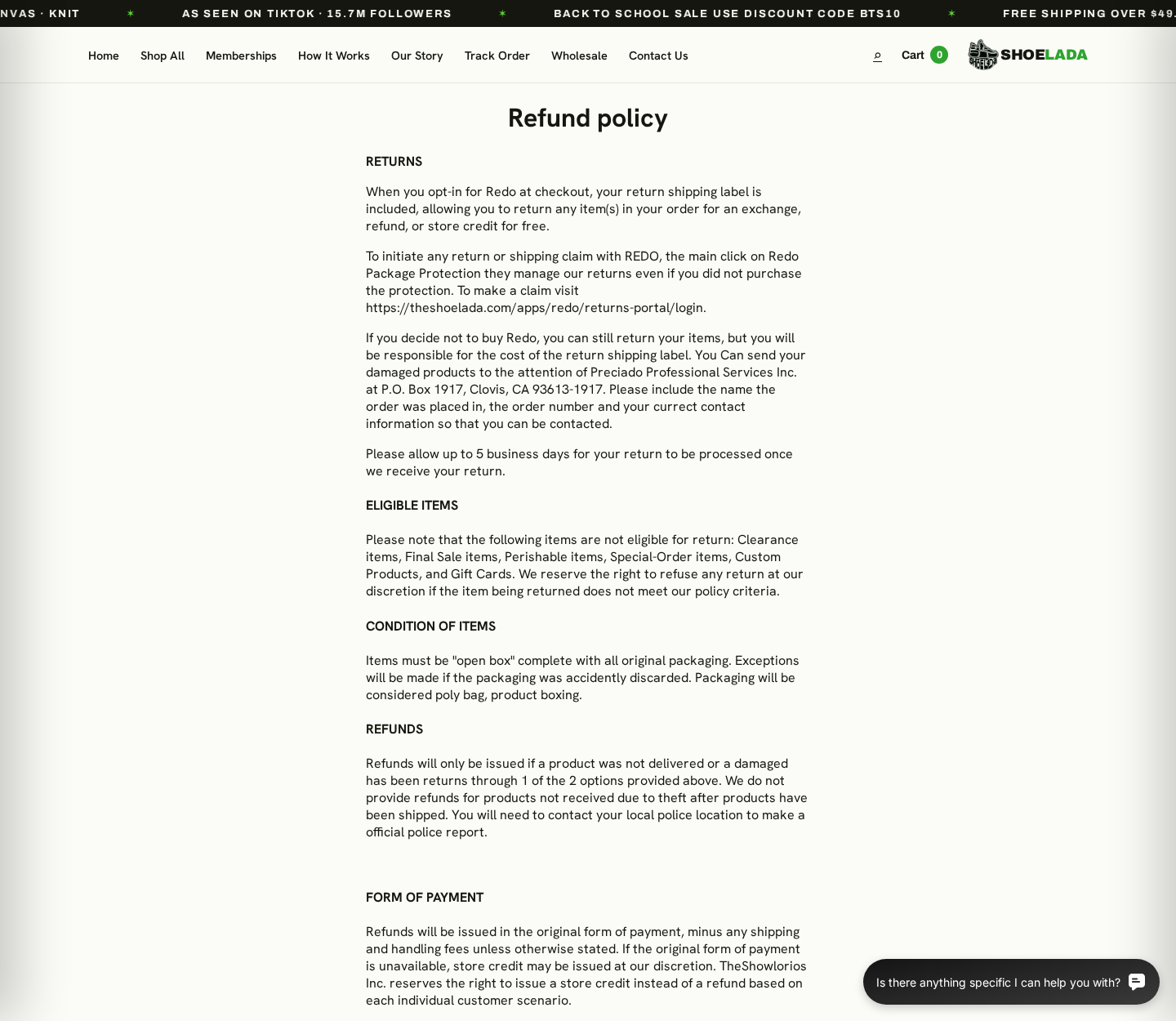
The refund policy is considerably more specific. It describes optional return protection, customer-paid labels, eligibility restrictions, packaging rules, and limited refund circumstances.
That difference does not make the company fictitious. It means buyers should read the formal policy before relying on a short badge.
A real product can still produce a poor purchase when a customer misunderstands return costs, expected cleaning power, or material risk.
Our conclusion is cautious, not sensational: Shoelada is legitimate merchandise, but its sales presentation deserves a close policy check.
How the Shoelada Offer and Returns Work
Step 1: A visual transformation creates the first impression
Most shoppers encounter Shoelada through cleaning clips, creator content, before-and-after pictures, or a product page built around visible results.
The format is effective because viewers can understand the promise without technical explanation. Dirty material appears brighter after foam and brushing.
What the video may not communicate is the shoe’s starting condition, preparation, drying time, repeated applications, or off-camera work.
Use demonstrations as examples, not guarantees that every stain and textile will respond identically.
Step 2: The store packages cleaner and reassurance together
The $19.99 bottle sits beside badges about material safety, cleaning, conditioning, shipping, and a 30-day guarantee.
These short labels answer common objections quickly. A shopper sees price, trust signals, and an apparently easy exit if dissatisfied.
However, a badge has little room for definitions. It may not explain exclusions, return condition, postage responsibility, or how satisfaction is measured.
The full policy, not the badge, usually governs what happens when a customer requests money back.
Step 3: Optional protection changes who pays for return shipping
Shoelada’s refund page refers to Redo, a checkout option connected with return labels and package protection.
Customers who opt in can receive a return label under that program for eligible exchanges, refunds, or store credit.
Those who decline the option can still seek a return, but the policy says they are responsible for the label cost.
This makes the final checkout important. A small protection fee may affect the later return route and total recovery.
Step 4: Eligibility depends on the item and its condition
The policy excludes categories including clearance, final sale, perishable, special-order, custom products, and gift cards.
Returned merchandise generally must be complete with original packaging and meet the company’s stated condition requirements.
A used bottle presents an obvious tension. Testing a cleaner requires opening it, yet opened or depleted products can complicate return eligibility.
Ask for written approval before shipping a used product when dissatisfaction, not damage, is the reason.
Step 5: The refund language is narrower than a broad satisfaction promise
The formal page says refunds will be issued when a product was not delivered or when a damaged product was returned through provided options.
It also says the company may issue store credit when the original payment method is unavailable.
That wording may not match a shopper’s everyday understanding of a 30-day guarantee covering simple dissatisfaction.
Before purchasing, ask whether “I tested it and it did not clean as expected” qualifies for a refund to the original payment method.
Step 6: The customer sends approved returns to a processing address
The policy directs certain damaged-product returns to Preciado Professional Services Inc. at a post office box in Clovis, California.
A post office box can legitimately receive returns or correspondence. It does not establish where the cleaner is manufactured or bottled.
Include the purchaser’s name, order number, and current contact information as instructed. Missing identifiers can delay matching the parcel.
Keep tracking and delivery proof until the refund appears, not merely until the carrier marks the package delivered.
Step 7: Public ratings tell different stories depending on the platform
The official product page displays a high average based on more than one thousand store reviews.
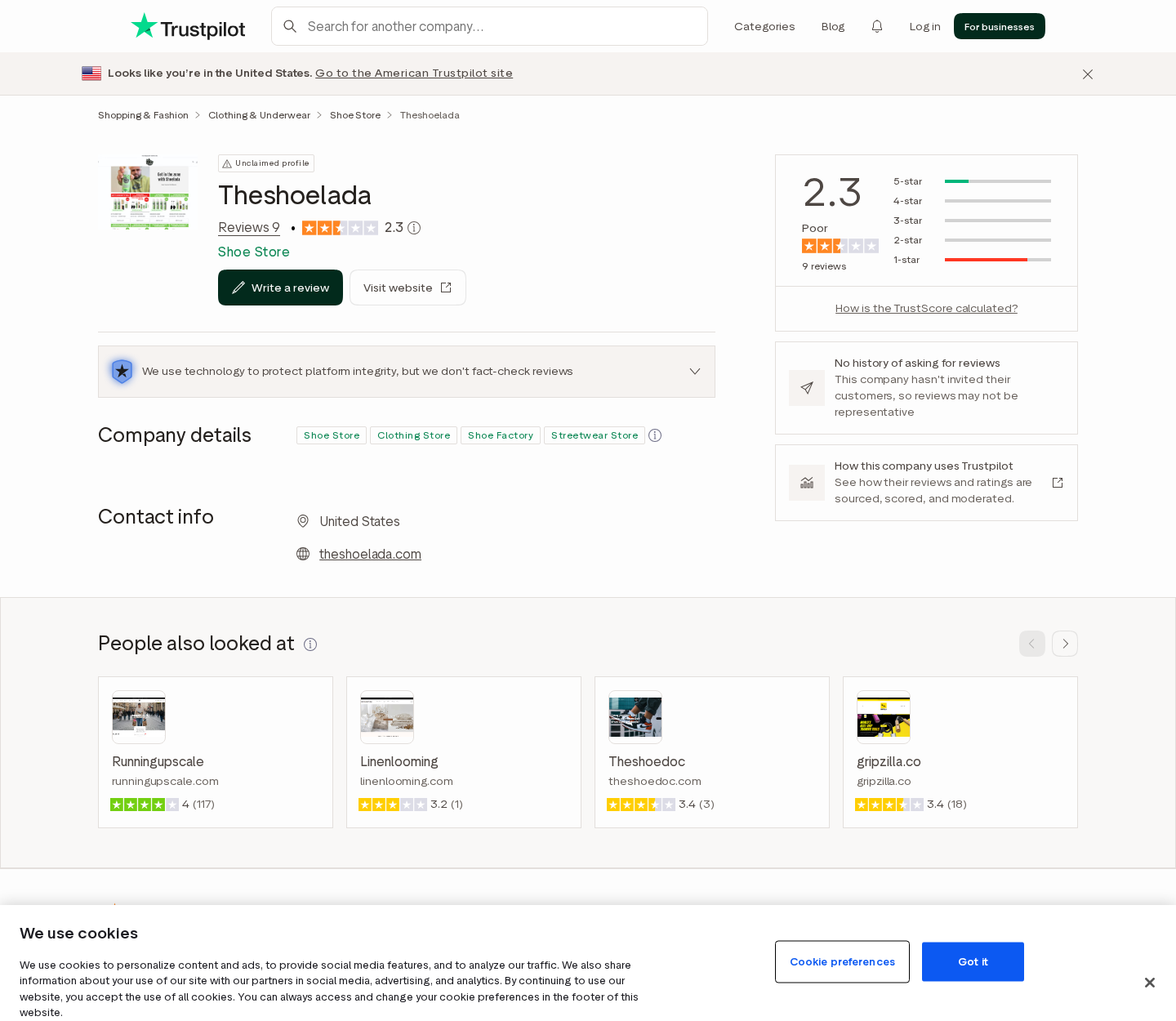
A Trustpilot profile observed during this review showed a much smaller sample and a low score. Nine reviews cannot represent every customer.
Small independent profiles can swing dramatically with one new rating, while on-site systems may collect feedback differently.
Read the underlying complaints for repeated, specific issues rather than treating any single average as a final verdict.
What the Cleaner Can Reasonably Be Expected to Do
Foam helps control moisture and loosen ordinary soil
A pump foam can be convenient because it places cleaner on a brush or surface without soaking the entire shoe immediately.
Gentle agitation can loosen dust, street grime, salt residue, and recent surface marks from many washable materials.
Conditioning ingredients may reduce the dry appearance that stronger detergents sometimes leave on finished leather or synthetic surfaces.
Results depend as much on technique as formula. Removing loose dirt first and working in small areas often matters.
No cleaner can reverse every form of damage
Oxidized midsoles, dye transfer, deep oil, bleach marks, worn coatings, cracking, and permanent discoloration are not ordinary removable dirt.
A cleaner cannot replace missing pigment, rebuild degraded foam, or restore fibers physically worn away.
Repeated aggressive brushing may make a stained area brighter while damaging texture, stitching, printed graphics, or suede nap.
Expect maintenance and improvement, not factory-new restoration from every pair shown in a dramatic clip.
“Safe on all materials” should not replace spot testing
Shoes combine adhesives, dyes, coatings, metals, plastics, foams, natural fibers, and synthetic fabrics with different tolerances.
Even water can alter suede, release unstable dye, create tide marks, or affect glue on older footwear.
Test a hidden section using minimal product. Let it dry completely before treating a visible panel.
For valuable, vintage, hand-painted, or delicate shoes, consult the maker or a professional cleaner rather than relying on general advertising.
Is Shoelada Good Value at $19.99?
Convenience and brand support are part of the price
A buyer is not paying only for liquid volume. The price also reflects branding, demonstrations, packaging, customer acquisition, creator reach, and retailer overhead.
Some people value a ready-to-use foam and familiar tutorial ecosystem. Others can achieve satisfactory maintenance with a cheaper specialist cleaner.
Compare cost per use, not merely bottle price. Heavy application and frequent cleaning can empty a small container quickly.
Include brushes, microfiber cloths, protection fees, tax, and shipping when calculating the actual first-order cost.
Memberships deserve separate attention
The Shoelada navigation includes memberships. Buyers should distinguish a one-time cleaner purchase from any recurring program or discount arrangement.
Do not assume a promotional benefit is free forever. Read its billing frequency, renewal method, cancellation route, and included products.
Review the final cart line by line. Remove optional services or quantities you do not intentionally want.
After payment, compare the receipt with the checkout total immediately while changes may still be possible.
Review Signals That Matter More Than Stars
Look for material-specific reports
A reviewer cleaning white synthetic leather provides limited guidance for someone treating black suede or delicate knit.
Useful reviews name the shoe, stain, process, drying time, and result. Photographs taken in consistent lighting add context.
Be cautious with sweeping claims such as “works on everything” or “ruined everything” when the material and method are omitted.
Separate product performance from delivery service
A low rating may concern a missing brush, delayed parcel, damaged bottle, unanswered email, or disappointing cleaning.
Those are different risks. Grouping them together can make the formula look better or worse than the evidence supports.
Repeated order problems still matter because a good cleaner has little value when it arrives incomplete or customer service cannot resolve mistakes.
Company replies can reveal the practical remedy
Read whether the seller requests an order number, replaces missing items, offers store credit, issues refunds, or cites exclusions.
A courteous reply is useful only when the promised action occurs. Look for customer updates confirming delivery or payment.
Likewise, one unanswered complaint should not define a business with many orders. Patterns across time deserve more weight.
Company, Address, and Fulfillment Checks
The policies use more than one corporate name
TheShowlorios Inc. appears in the store’s policy language, while Preciado Professional Services Inc. is named for certain damaged-product returns.
Different entities can handle brand operations and logistics. Buyers should still know which company accepted payment and owes the contractual remedy.
Compare the legal names across terms, refund policy, receipt, card statement, shipping label, and support response.
The published locations serve different purposes
Store terms reference 14241 E Firestone Boulevard. The refund page gives P.O. Box 1917, Clovis, CA 93613-1917 for specified returns.
Do not send a package to the Firestone address simply because it appears in legal text.
Use the destination supplied for your approved return and obtain confirmation that the address is current.
The return location is not proof of manufacturing origin
A logistics company can receive parcels without formulating, testing, bottling, or owning the cleaner.
The retail page reviewed did not provide enough manufacturing detail to determine every facility involved in production.
Consumers with allergy or sourcing concerns should request a complete ingredient disclosure and country-of-origin information directly.
Contact details contain avoidable inconsistencies
Different pages have displayed email spellings resembling orders@thesholada.com and cs@theshoelada.com, including a likely missing letter in one address.
A typographical error can misdirect a time-sensitive return request. Use the current contact form and copy a clearly working address.
Save the automatic acknowledgment. If nothing arrives, try the alternate official channel before the return window closes.
What to Do if Your Shoelada Order Has a Problem
- Photograph the package immediately. Capture the shipping label, outer damage, bottle seal, leakage, quantity, accessories, and packing slip before using anything.
- Review the checkout record. Confirm whether Redo protection, membership, shipping insurance, extra products, or unexpected quantities were added.
- Test cautiously. Patch-test a hidden area, use little product, follow material guidance, and photograph the dried result in neutral lighting.
- Contact support promptly. Provide the order number, precise defect, requested remedy, and photographs. Ask for written return authorization.
- Follow the approved return route. Include required identification, retain packaging, pay for tracking when necessary, and save proof of delivery.
- Challenge an unresolved billing or delivery issue. Give the payment provider the receipt, policy, correspondence, images, tracking, and promised remedy.
- Watch for recurring charges. If you joined a membership, cancel through the stated process and preserve confirmation before the next billing date.
- Protect devices after suspicious redirects. Malwarebytes can check for unwanted programs, while AdGuard can reduce malicious advertisements and tracking.
Is Your Device Infected? Run a Free Malware Scan
Slow performance, constant pop-ups, or strange behavior? These are classic signs of a malware infection. The fastest way to find out is to scan your device with Malwarebytes Free — one of the most trusted malware removal tools available.
The free version detects and removes the most common threats, including:
- Adware — the cause of those annoying pop-ups
- Browser hijackers — unwanted redirects and changed homepages
- Trojans and spyware — hidden programs stealing your data
- Potentially unwanted programs (PUPs) — software you never asked for
👉 Select your device below — Windows, Mac, or Android — then follow the simple steps to download Malwarebytes, scan your system, and remove any threats it finds. The scan usually takes 5 to 20 minutes.
Run a Malware Scan with Malwarebytes for Windows
Malwarebytes is one of the most popular and trusted anti-malware tools for Windows — and it’s completely free for removing infections. It catches threats that many antivirus programs miss, including adware, browser hijackers, and trojans. Follow the steps below to scan and clean your PC in just a few minutes.
Download Malwarebytes
Click the button below to download the latest version of Malwarebytes for Windows from the official source. The free version is all you need — it will scan your computer and remove adware, browser hijackers, and other malicious software at no cost.
Download MalwarebytesOfficial installer for Windows 11 and 10. Your download starts right away.Want real-time protection? See Malwarebytes Premium Malwarebytes Free for WindowsScans and removes malware at no cost
-
Install Malwarebytes
When the download finishes, open your Downloads folder and double-click the MBSetup file. If Windows shows a User Account Control pop-up, click “Yes” to allow the installation.

Follow the On-Screen Prompts to Install Malwarebytes
The setup wizard will walk you through a few quick screens:
-
Choose where you’re installing the program — “Personal Computer” or “Work Computer” — then click Next.

-
Malwarebytes will now install on your device. This usually takes under a minute.

-
When installation is complete, the “Welcome to Malwarebytes” screen will open automatically.

-
On the final screen, click Open Malwarebytes to launch the program.

-
Enable “Scan for Rootkits”
Before scanning, turn on rootkit detection so Malwarebytes can find even the most hidden threats. Click the Settings gear icon on the left side of the screen.

In the settings menu, find “Scan for rootkits” and click the toggle so it turns blue.

Done? Click “Dashboard” in the left pane to return to the main screen.
Start the Scan
Click the blue Scan button. Malwarebytes will automatically update its virus database and start checking your computer for malware.

-
Wait for the Scan to Finish
The scan checks your entire system for browser hijackers and other malicious programs, so it can take 5 to 20 minutes depending on your computer. Feel free to do something else — just check back occasionally to see the progress.

-
Quarantine the Detected Threats
When the scan is done, you’ll see a list of everything Malwarebytes found — malware, adware, and potentially unwanted programs. Click the “Quarantine” button to remove all of them at once.

Malwarebytes will now remove the malicious files and registry entries and move them safely into quarantine.

-
Restart Your Computer
Some threats can only be fully removed after a reboot. If Malwarebytes asks you to restart, click Yes. Once you’re logged back in, Malwarebytes has finished removing the threats it found.

That’s it — your Windows PC is now clean of trojans, adware, and other malware, and should be back to running smoothly.
If you are still having problems with your computer after completing these instructions, then please follow one of the steps:
- Run a computer scan with ESET Online Scanner
- Ask for help in our Windows Malware Removal Help & Support forum.
Run a Malware Scan with Malwarebytes for Mac
Malwarebytes for Mac is a free on-demand scanner that removes the malware other security software tends to miss — adware, browser hijackers, and unwanted programs included. Cleaning an infected Mac with Malwarebytes has always been completely free, and it’s our go-to recommendation. Follow the steps below to scan and clean your Mac in just a few minutes.
-
Download Malwarebytes for Mac
Click the button below to download the latest version of Malwarebytes for Mac.
Download MalwarebytesOfficial installer for macOS. Your download starts right away.Want real-time protection? See Malwarebytes PremiumMalwarebytes Free for MacScans and removes malware at no cost -
Open the Malwarebytes setup file
When the download finishes, open your Downloads folder and double-click the setup file to begin the installation.

-
Follow the On-Screen Prompts to Install Malwarebytes
The Malwarebytes for Mac Installer will guide you through a few quick screens. Click “Continue” and keep following the prompts until the installation completes.



When the installation is complete, Malwarebytes opens to the Welcome to Malwarebytes screen. Click “Get started“.
-
Select “Personal Computer” or “Work Computer”
Malwarebytes will ask what type of computer you’re installing it on. Click either Personal Computer or Work Computer, whichever applies.

-
Start the Scan
Click the “Scan” button. Malwarebytes will automatically update its detection database and begin checking your Mac for malware.

-
Wait for the Scan to Finish
Malwarebytes will scan your Mac for adware, browser hijackers, and other malicious programs. This can take a few minutes, so feel free to do something else — just check back occasionally to see the progress.

-
Quarantine the Detected Threats
When the scan is done, you’ll see a list of everything Malwarebytes found. Click the “Quarantine” button to remove all the threats at once.

-
Restart Your Mac
Malwarebytes will now remove all the malicious files it found. Some threats can only be fully removed after a reboot — if Malwarebytes asks you to restart, allow it. Once you’re logged back in, your Mac is clean.

That’s it — your Mac is now free of adware, rogue browser extensions, and other potentially harmful software.
If you are still experiencing problems while trying to remove a malicious program from your computer, please ask for help in our Mac Malware Removal Help & Support forum.
Run a Malware Scan with Malwarebytes for Android
Malwarebytes for Android automatically detects and removes dangerous threats like malware and ransomware so you don’t have to worry about your most-used device being compromised. Aggressive detection of adware and potentially unwanted programs keeps your Android phone or tablet running smooth.
-
Download Malwarebytes for Android.
You can download Malwarebytes for Android by clicking the link below.
Get Malwarebytes for AndroidOpens Google Play in a new tab.Want real-time protection? See Malwarebytes Premium for AndroidMalwarebytes for AndroidScans your phone and removes malware at no cost -
Install Malwarebytes for Android on your phone.
In the Google Play Store, tap “Install” to install Malwarebytes for Android on your device.

When the installation process has finished, tap “Open” to begin using Malwarebytes for Android. You can also open Malwarebytes by tapping on its icon in your phone menu or home screen.

-
Follow the on-screen prompts to complete the setup process
When Malwarebytes will open, you will see the Malwarebytes Setup Wizard which will guide you through a series of permissions and other setup options.
This is the first of two screens that explain the difference between the Premium and Free versions. Swipe this screen to continue.
Tap on “Got it” to proceed to the next step.
Malwarebytes for Android will now ask for a set of permissions that are required to scan your device and protect it from malware. Tap on “Give permission” to continue.
Tap on “Allow” to permit Malwarebytes to access the files on your phone.
-
Update database and run a scan with Malwarebytes for Android
You will now be prompted to update the Malwarebytes database and run a full system scan.

Click on “Update database” to update the Malwarebytes for Android definitions to the latest version, then click on “Run full scan” to perform a system scan.

-
Wait for the Malwarebytes scan to complete.
Malwarebytes will now start scanning your phone for adware and other malicious apps. This process can take a few minutes, so we suggest you do something else and periodically check on the status of the scan to see when it is finished.

-
Click on “Remove Selected”.
When the scan has been completed, you will be presented with a screen showing the malware infections that Malwarebytes for Android has detected. To remove the malicious apps that Malwarebytes has found, tap on the “Remove Selected” button.

-
Restart your phone.
Malwarebytes for Android will now remove all the malicious apps that it has found. To complete the malware removal process, Malwarebytes may ask you to restart your device.
That’s it — your Android phone is now clean — no more malicious apps, adware, or browser redirects.
If you are still having problems with your phone after completing these instructions, then please follow one of the steps:
- Restore your phone to factory settings by going to Settings > General management > Reset > Factory data reset.
- Ask for help in our Mobile Malware Removal Help & Support forum.
Stay Protected: Block Ads and Malicious Sites
Now that your device is clean, keep it that way. Most infections start with a malicious ad or a fake download button — so blocking them at the source is your best defense.
We recommend AdGuard, which blocks malicious ads, phishing pages, and dangerous redirects before they can reach you.
👉 Download AdGuard and browse safely
Do not keep scrubbing after color transfer, texture change, adhesive softening, or surface damage appears. Stop, rinse only if instructions permit, and document the result.
A payment dispute should describe a concrete failure. Missing merchandise, refusal of an approved return, or contradictory guarantee wording is more useful than general frustration.
Frequently Asked Questions
Is Shoelada Foam Cleaner a scam?
We found a real branded product, operating store, published policies, active customer base, and established fulfillment process.
The concerns involve claim breadth, value, return conditions, and mixed service experiences, not evidence that every sale is fraudulent.
How much does the Shoelada bottle cost?
The 8.5-ounce Foam Cleaner and Conditioner page displayed $19.99 during our review.
Shipping, tax, optional protection, tools, bundles, or membership choices can change the final amount.
Does the 30-day guarantee cover dissatisfaction?
The product page promotes a 30-day guarantee, while the detailed policy emphasizes non-delivery, damage, return conditions, and program choices.
Ask support to confirm coverage for an opened product that simply failed expectations before purchasing.
Can Shoelada be used on suede?
The store lists suede among supported materials, but suede varies and can show water marks, flattened nap, or dye movement.
Test a hidden spot, avoid saturation, use a suitable brush, and let the sample dry completely.
Why are the store and Trustpilot ratings different?
The platforms collect feedback from different audiences through different methods. The independent profile also contained only a small number of reviews.
Neither average alone proves typical performance. Read specific, recent accounts and the company’s responses.
Who pays to return a Shoelada order?
The policy says Redo participants may receive a label for eligible claims, while customers without that option can bear return postage.
Obtain instructions for your exact order before mailing the product.
The Bottom Line
Shoelada Foam Cleaner is real, visually marketable shoe-care merchandise. Calling the entire business a scam would go beyond the evidence.
Buyers should still look past transformation clips and short guarantee badges. Material limits, return eligibility, postage, memberships, and support details determine the practical value.
For ordinary cleaning, it may be convenient. Test carefully, preserve the checkout terms, and decide whether its branded price fits your actual footwear needs.

Join the discussion
0 commentsShare your experience or ask a question about this article.
Discussion
Start the conversation
Have a question or something useful to share? Add the first comment.