

Imagine landing abroad, placing two earbuds in your ears, and instantly understanding every conversation around you. Qinux Talkbuds sells precisely that dream.
The offer is visually convincing, yet the practical details are scattered across an advertorial, a sales page, technical requirements, and unusually revealing store terms.

Overview
Qinux Talkbuds appear to be real Bluetooth earbuds
The product shown online is not an invisible invention. It resembles translator earbuds sold under other names through marketplaces and direct-response stores.
Buyers should expect physical earbuds, a charging case, and translation functions that depend on a paired smartphone application.
That makes this different from a pure non-delivery storefront. The central question is whether the delivered hardware matches the remarkable advertising story.
Generic electronics can work adequately for basic audio while falling far short of the effortless interpretation suggested by promotional pages.
The advertising promises more than ordinary wireless audio
The advertorial says a former ChatGPT engineer invented earbuds that let people understand any language instantly, directly through their ears.
It promotes translation across more than 140 languages, several conversation modes, offline operation, and freedom from continuing subscription fees.
Those claims create a picture of a self-contained interpreter. Elsewhere, the offer explains that users connect the earbuds to a smartphone and select languages inside an app.
Software, microphone quality, internet access, local language packs, background noise, and speaking style can all affect real-world translation.
- The page is labeled as an advertorial, not independent technology journalism.
- The supposed inventor story is not supported by verifiable engineering credentials.
- The translation system relies on a phone application.
- Offline features may support fewer languages or functions than online modes.
- A 50% discount appears central to the urgency pitch.
The seller openly discloses a dropshipping model
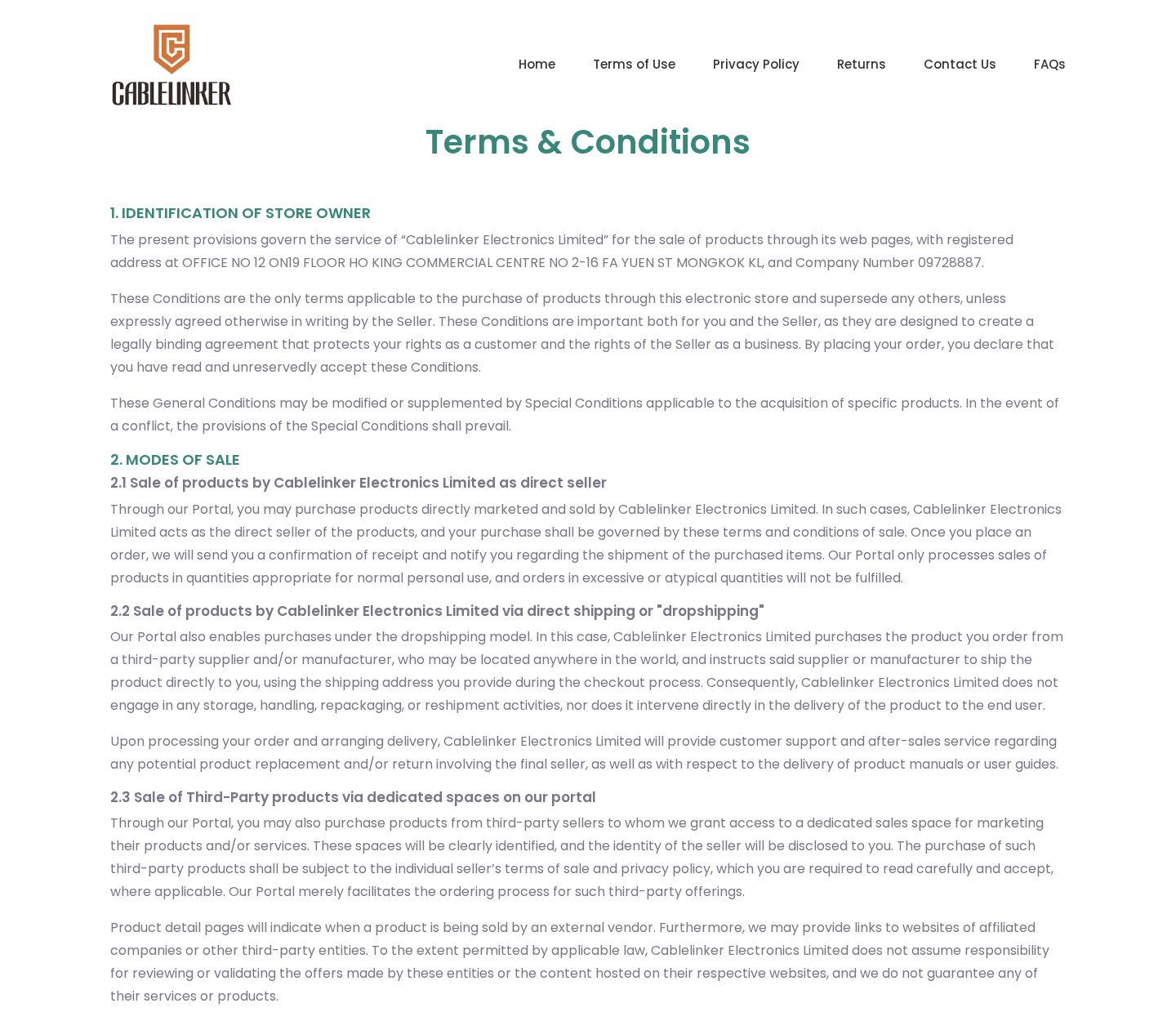
The terms identify Cablelinker Electronics Limited and state that some purchases use direct shipping, commonly called dropshipping.
Under that model, a third-party supplier or manufacturer can send the item directly from anywhere in the world.
Cablelinker says it may not store, handle, repackage, or personally deliver those goods before they reach the final customer.
Dropshipping is legal and widespread. However, it can produce long delivery chains, generic hardware, inconsistent packaging, and expensive international returns.
The disclosure undermines the impression that Talkbuds necessarily emerged from a unique engineering breakthrough controlled from design through manufacturing.
How the Qinux Talkbuds Sales Funnel Works
Step 1: A news-style story introduces an impressive inventor
The first page resembles a technology feature rather than a conventional store listing. A headline announces that a former ChatGPT engineer created the device.
This framing borrows authority from artificial intelligence and a famous product name without showing employment records, patents, interviews, or an identifiable engineer.
The article format encourages readers to treat marketing copy as reporting. Star graphics, a publication date, and a named writer strengthen that impression.
A small “Advertorial” label is visible, but many readers focus on the dramatic headline and oversized demonstration image.
Step 2: The page turns normal translation limits into an emotional problem
Travel anxiety is familiar. People fear ordering incorrectly, missing directions, misunderstanding a doctor, or appearing rude during an important conversation.
The pitch contrasts those frustrations with instant, natural communication. The earbuds appear to remove effort, delay, awkward phone handling, and language study.
That comparison is stronger than a basic product demonstration. It sells confidence and independence rather than merely selling wireless earphones.
When a product promises relief from embarrassment, shoppers may test the emotional solution before investigating technical limitations.
Step 3: Broad claims compress complicated technology into simple slogans
Accurate live interpretation is difficult. Systems must capture speech, separate voices from noise, recognize accents, understand context, translate meaning, and play useful audio quickly.
An advertisement can summarize that process as “instant translation.” The phrase does not explain latency, error rates, supported dialects, or privacy handling.
Similarly, “offline” can mean downloaded language support for selected pairs, not identical performance across every advertised language.
“No subscription” addresses cost, but it does not establish that the companion app will remain available, compatible, or supported indefinitely.
Step 4: A large discount pushes the reader toward immediate checkout
The Qinux page repeatedly presents a 50% reduction and describes the offer as available only during its final days.
Persistent discounts are common in direct-response retail. The crossed-out reference price may not represent what most customers have historically paid.
Scarcity language also discourages comparison shopping. A buyer worried about losing the deal may not search for visually similar earbuds elsewhere.
Reverse image searches and model-number comparisons can reveal generic alternatives whose prices, manuals, and reviews provide a better performance benchmark.
Step 5: The order enters an international dropshipping chain
The store terms permit the seller to source an ordered product from a third-party supplier or manufacturer located anywhere.
That supplier may ship straight to the customer. The branded website manages the sale while another business controls packaging and physical dispatch.
Delivery estimates can therefore depend on inventory, export processing, customs, local carriers, and the accuracy of tracking information passed between companies.
The parcel may display a model name or manufacturer that differs from the prominent Qinux branding used in the advertisement.
Step 6: The phone app determines whether translation is genuinely useful
Once the earbuds arrive, ordinary Bluetooth pairing is only the beginning. Translation requires installation, permissions, language selection, and working microphone access.
Some conversation modes may require both participants to share earbuds, use the phone screen, or take turns speaking into the device.
That experience can be less seamless than two people talking naturally. Delay becomes especially noticeable during longer sentences or noisy public settings.
Before traveling, test the exact language pair, offline behavior, call handling, battery duration, and privacy permissions under realistic conditions.

Step 7: Return rights may be narrower than the marketing confidence
The terms describe a 14-day withdrawal period, subject to conditions. Customers can be responsible for the cost of sending merchandise back.
International tracked postage can consume much of the expected refund for inexpensive electronics. Customs documentation adds another practical hurdle.
The seller states that orders generally cannot be canceled once placed. A quick change of mind may therefore become a return rather than a cancellation.
Refund processing may wait until goods arrive or acceptable proof of return is supplied. Buyers should obtain written instructions before mailing anything.
What Talkbuds Can and Cannot Realistically Do
Machine translation can be helpful without being magical
Modern translation apps are genuinely useful for travel. They can handle common phrases, menus, directions, and simple exchanges surprisingly well.
Performance declines when people overlap, use slang, speak rapidly, discuss specialized topics, or stand near traffic and music.
An earbud interface can make translated audio more private, but the intelligence generally comes from software running on the paired phone or remote servers.
The hardware does not possess human cultural judgment. It cannot reliably replace a qualified interpreter during medical, legal, immigration, or financial conversations.
Offline translation deserves a precise test
Travelers often want offline service because roaming data is expensive or unavailable. That makes the phrase especially persuasive.
Ask which languages work offline, what must be downloaded beforehand, how much storage is required, and which conversation modes remain active.
Do not assume that a claim covering 140 languages applies equally without internet access. Online and downloaded models may have different coverage.
Put the phone in airplane mode before departure and test full conversations. A successful menu translation does not guarantee reliable spoken interpretation.
Privacy matters when microphones and cloud services are involved
Translation software may process voices, transcripts, device identifiers, or usage information. Review the app developer’s privacy policy before granting broad permissions.
Check whether recordings are retained, used to improve models, shared with service providers, or linked to an account.
Never use consumer earbuds to transmit confidential client information, protected health details, passwords, or payment numbers without understanding the data path.
A private sound in your ear does not mean the underlying conversation stayed entirely on your device.
How to Evaluate the Offer Before Buying
Search the hardware, not only the brand
Compare the case shape, screen, charging contacts, control layout, and model code with marketplace listings from unrelated sellers.
If identical hardware appears widely, read those customer reviews. They may reveal the actual app name, supported languages, and recurring technical problems.
A rebranded device can still be useful. The issue is whether a premium story and price are justified by unique support or capabilities.
Request details that can be verified
Ask support for the exact manual, companion app listing, supported phone versions, offline language table, warranty length, and return destination.
Vague answers are informative. A seller making extraordinary accuracy claims should readily provide ordinary technical specifications.
Confirm whether the advertised price includes tax, shipping, protection plans, and any quantity automatically selected at checkout.
Calculate the true return cost
A 14-day right sounds reassuring until return postage, tracking, insurance, customs forms, and delivery time are considered.
Ask whether the 14 days run from ordering, delivery, or notice of withdrawal. Save the answer and the policy shown on purchase day.
Use a payment method with buyer protection. Bank transfer, cryptocurrency, and gift cards remove many practical recovery options.
Company, Address, and Fulfillment Checks
The disclosed seller is Cablelinker Electronics Limited
The Talkbuds terms name Cablelinker Electronics Limited and display company number 09728887.
They list an office in Ho King Commercial Centre on Fa Yuen Street in Mong Kok, Kowloon.
Consumers should compare that identity with the invoice, card descriptor, parcel label, and return instructions instead of relying on the Qinux logo alone.
A second Hong Kong address appears for complaints
The same terms also reference Room 1501, Prosperity Tower, 39 Queen’s Road Central, Hong Kong for complaint-related communication.
Multiple addresses are not inherently improper. However, buyers should establish which location accepts legal notices and which actually receives returns.
Never mail electronics to an address found independently without written authorization. The refund team may reject an unregistered parcel.
The dropshipping disclosure changes the fulfillment picture
Cablelinker openly states that suppliers or manufacturers may be located anywhere and can ship products directly to purchasers.
This means the selling company may never physically inspect the specific Talkbuds unit before it reaches the customer.
Generic packaging, overseas tracking, or an unfamiliar return country would be consistent with that disclosed model, not automatic evidence of fraud.
The support number should be tested before checkout
The published terms display +1-218-250-3200. Call and ask whether the agent supports Talkbuds specifically, then request the app and return details.
Record the date, time, and substance of the response. Do not record audio unless local law permits it.
An answered call does not validate performance claims, but a knowledgeable response can reduce uncertainty about post-purchase assistance.
What to Do if You Already Ordered Qinux Talkbuds
- Save the complete offer. Capture the advertorial, product page, price, promised languages, offline wording, delivery estimate, guarantee, and checkout total.
- Inspect the confirmation carefully. Check quantity, add-ons, shipping protection, taxes, merchant descriptor, and whether any unexpected service appears.
- Test promptly after delivery. Verify pairing, microphone quality, advertised language pairs, offline operation, latency, battery life, and each translation mode.
- Ask for written return authorization. Contact the seller within the stated period and request the exact address, reference number, packaging rules, and refund conditions.
- Use tracked postage. Photograph the device, serial information, accessories, packaging, label, and sealed parcel before sending it.
- Escalate a materially misrepresented purchase. Provide your card issuer or payment platform with the saved claims, test results, correspondence, and return proof.
- Remove unnecessary app permissions. Uninstall software you no longer trust, revoke microphone access, delete stored accounts, and change any reused password.
- Check devices after risky redirects. Malwarebytes can detect unwanted software, while AdGuard can block many aggressive advertisements and tracking pages.
Is Your Device Infected? Run a Free Malware Scan
Slow performance, constant pop-ups, or strange behavior? These are classic signs of a malware infection. The fastest way to find out is to scan your device with Malwarebytes Free — one of the most trusted malware removal tools available.
The free version detects and removes the most common threats, including:
- Adware — the cause of those annoying pop-ups
- Browser hijackers — unwanted redirects and changed homepages
- Trojans and spyware — hidden programs stealing your data
- Potentially unwanted programs (PUPs) — software you never asked for
👉 Select your device below — Windows, Mac, or Android — then follow the simple steps to download Malwarebytes, scan your system, and remove any threats it finds. The scan usually takes 5 to 20 minutes.
Run a Malware Scan with Malwarebytes for Windows
Malwarebytes is one of the most popular and trusted anti-malware tools for Windows — and it’s completely free for removing infections. It catches threats that many antivirus programs miss, including adware, browser hijackers, and trojans. Follow the steps below to scan and clean your PC in just a few minutes.
Download Malwarebytes
Click the button below to download the latest version of Malwarebytes for Windows from the official source. The free version is all you need — it will scan your computer and remove adware, browser hijackers, and other malicious software at no cost.
Download MalwarebytesOfficial installer for Windows 11 and 10. Your download starts right away.Want real-time protection? See Malwarebytes Premium Malwarebytes Free for WindowsScans and removes malware at no cost
-
Install Malwarebytes
When the download finishes, open your Downloads folder and double-click the MBSetup file. If Windows shows a User Account Control pop-up, click “Yes” to allow the installation.

Follow the On-Screen Prompts to Install Malwarebytes
The setup wizard will walk you through a few quick screens:
-
Choose where you’re installing the program — “Personal Computer” or “Work Computer” — then click Next.

-
Malwarebytes will now install on your device. This usually takes under a minute.

-
When installation is complete, the “Welcome to Malwarebytes” screen will open automatically.

-
On the final screen, click Open Malwarebytes to launch the program.

-
Enable “Scan for Rootkits”
Before scanning, turn on rootkit detection so Malwarebytes can find even the most hidden threats. Click the Settings gear icon on the left side of the screen.

In the settings menu, find “Scan for rootkits” and click the toggle so it turns blue.

Done? Click “Dashboard” in the left pane to return to the main screen.
Start the Scan
Click the blue Scan button. Malwarebytes will automatically update its virus database and start checking your computer for malware.

-
Wait for the Scan to Finish
The scan checks your entire system for browser hijackers and other malicious programs, so it can take 5 to 20 minutes depending on your computer. Feel free to do something else — just check back occasionally to see the progress.

-
Quarantine the Detected Threats
When the scan is done, you’ll see a list of everything Malwarebytes found — malware, adware, and potentially unwanted programs. Click the “Quarantine” button to remove all of them at once.

Malwarebytes will now remove the malicious files and registry entries and move them safely into quarantine.

-
Restart Your Computer
Some threats can only be fully removed after a reboot. If Malwarebytes asks you to restart, click Yes. Once you’re logged back in, Malwarebytes has finished removing the threats it found.

That’s it — your Windows PC is now clean of trojans, adware, and other malware, and should be back to running smoothly.
If you are still having problems with your computer after completing these instructions, then please follow one of the steps:
- Run a computer scan with ESET Online Scanner
- Ask for help in our Windows Malware Removal Help & Support forum.
Run a Malware Scan with Malwarebytes for Mac
Malwarebytes for Mac is a free on-demand scanner that removes the malware other security software tends to miss — adware, browser hijackers, and unwanted programs included. Cleaning an infected Mac with Malwarebytes has always been completely free, and it’s our go-to recommendation. Follow the steps below to scan and clean your Mac in just a few minutes.
-
Download Malwarebytes for Mac
Click the button below to download the latest version of Malwarebytes for Mac.
Download MalwarebytesOfficial installer for macOS. Your download starts right away.Want real-time protection? See Malwarebytes PremiumMalwarebytes Free for MacScans and removes malware at no cost -
Open the Malwarebytes setup file
When the download finishes, open your Downloads folder and double-click the setup file to begin the installation.

-
Follow the On-Screen Prompts to Install Malwarebytes
The Malwarebytes for Mac Installer will guide you through a few quick screens. Click “Continue” and keep following the prompts until the installation completes.



When the installation is complete, Malwarebytes opens to the Welcome to Malwarebytes screen. Click “Get started“.
-
Select “Personal Computer” or “Work Computer”
Malwarebytes will ask what type of computer you’re installing it on. Click either Personal Computer or Work Computer, whichever applies.

-
Start the Scan
Click the “Scan” button. Malwarebytes will automatically update its detection database and begin checking your Mac for malware.

-
Wait for the Scan to Finish
Malwarebytes will scan your Mac for adware, browser hijackers, and other malicious programs. This can take a few minutes, so feel free to do something else — just check back occasionally to see the progress.

-
Quarantine the Detected Threats
When the scan is done, you’ll see a list of everything Malwarebytes found. Click the “Quarantine” button to remove all the threats at once.

-
Restart Your Mac
Malwarebytes will now remove all the malicious files it found. Some threats can only be fully removed after a reboot — if Malwarebytes asks you to restart, allow it. Once you’re logged back in, your Mac is clean.

That’s it — your Mac is now free of adware, rogue browser extensions, and other potentially harmful software.
If you are still experiencing problems while trying to remove a malicious program from your computer, please ask for help in our Mac Malware Removal Help & Support forum.
Run a Malware Scan with Malwarebytes for Android
Malwarebytes for Android automatically detects and removes dangerous threats like malware and ransomware so you don’t have to worry about your most-used device being compromised. Aggressive detection of adware and potentially unwanted programs keeps your Android phone or tablet running smooth.
-
Download Malwarebytes for Android.
You can download Malwarebytes for Android by clicking the link below.
Get Malwarebytes for AndroidOpens Google Play in a new tab.Want real-time protection? See Malwarebytes Premium for AndroidMalwarebytes for AndroidScans your phone and removes malware at no cost -
Install Malwarebytes for Android on your phone.
In the Google Play Store, tap “Install” to install Malwarebytes for Android on your device.

When the installation process has finished, tap “Open” to begin using Malwarebytes for Android. You can also open Malwarebytes by tapping on its icon in your phone menu or home screen.

-
Follow the on-screen prompts to complete the setup process
When Malwarebytes will open, you will see the Malwarebytes Setup Wizard which will guide you through a series of permissions and other setup options.
This is the first of two screens that explain the difference between the Premium and Free versions. Swipe this screen to continue.
Tap on “Got it” to proceed to the next step.
Malwarebytes for Android will now ask for a set of permissions that are required to scan your device and protect it from malware. Tap on “Give permission” to continue.
Tap on “Allow” to permit Malwarebytes to access the files on your phone.
-
Update database and run a scan with Malwarebytes for Android
You will now be prompted to update the Malwarebytes database and run a full system scan.

Click on “Update database” to update the Malwarebytes for Android definitions to the latest version, then click on “Run full scan” to perform a system scan.

-
Wait for the Malwarebytes scan to complete.
Malwarebytes will now start scanning your phone for adware and other malicious apps. This process can take a few minutes, so we suggest you do something else and periodically check on the status of the scan to see when it is finished.

-
Click on “Remove Selected”.
When the scan has been completed, you will be presented with a screen showing the malware infections that Malwarebytes for Android has detected. To remove the malicious apps that Malwarebytes has found, tap on the “Remove Selected” button.

-
Restart your phone.
Malwarebytes for Android will now remove all the malicious apps that it has found. To complete the malware removal process, Malwarebytes may ask you to restart your device.
That’s it — your Android phone is now clean — no more malicious apps, adware, or browser redirects.
If you are still having problems with your phone after completing these instructions, then please follow one of the steps:
- Restore your phone to factory settings by going to Settings > General management > Reset > Factory data reset.
- Ask for help in our Mobile Malware Removal Help & Support forum.
Stay Protected: Block Ads and Malicious Sites
Now that your device is clean, keep it that way. Most infections start with a malicious ad or a fake download button — so blocking them at the source is your best defense.
We recommend AdGuard, which blocks malicious ads, phishing pages, and dangerous redirects before they can reach you.
👉 Download AdGuard and browse safely
Keep the earbuds until the seller or payment provider tells you what to do. Discarding them can weaken a merchandise dispute.
Describe the problem precisely. “Offline translation failed for the advertised language” is stronger than simply saying the product felt disappointing.
Frequently Asked Questions
Are Qinux Talkbuds completely fake?
No. The listing appears to offer real Bluetooth earbuds paired with translation software. The concern is advertising accuracy, product origin, and return practicality.
Receiving hardware does not prove that every language, offline, accuracy, or inventor claim is reliable.
Were Talkbuds invented by a former ChatGPT engineer?
The advertorial makes that statement, but it does not provide a verifiable identity, employment history, patent, or technical publication supporting the story.
Treat the inventor narrative as marketing unless independent evidence confirms it.
Do the earbuds translate without a phone?
The sales material shows a companion smartphone application and describes choosing languages and modes through the phone.
Buyers should assume the app is central unless the seller supplies documentation proving fully independent operation.
Does offline mode support every advertised language?
The broad marketing language does not establish identical offline coverage for more than 140 languages.
Request a current offline-language table and test downloaded packs in airplane mode while the return window remains open.
Why does dropshipping matter?
Dropshipping can separate the brand, seller, supplier, shipper, and return destination across several businesses and countries.
That arrangement can increase delivery uncertainty and make an inexpensive return disproportionately costly, even when the product actually arrives.
Can I cancel immediately after ordering?
The published terms say orders generally cannot be canceled once placed. Contact support immediately anyway and preserve the response.
If shipment proceeds, follow the written withdrawal and return process within the applicable deadline.
The Bottom Line
Qinux Talkbuds appear to be real translator earbuds sold through a direct-response, dropshipping funnel, not a revolutionary device proven by its advertorial.
The biggest risks are inflated expectations, unclear offline limits, generic hardware, international fulfillment, and return costs that can erode the refund.
Compare identical devices, demand the app specifications, and preserve every promise before deciding whether the convenience justifies the price.

Join the discussion
0 commentsShare your experience or ask a question about this article.
Discussion
Start the conversation
Have a question or something useful to share? Add the first comment.