

A familiar purple skincare tube now carries a different name, while the promise remains striking: firmer, smoother skin that looks transformed by morning.
The Skynflow name has recently given way to Dr.Delagen, wrapped in a polished new storefront. We followed the trail to see what changed and what did not.
Overview
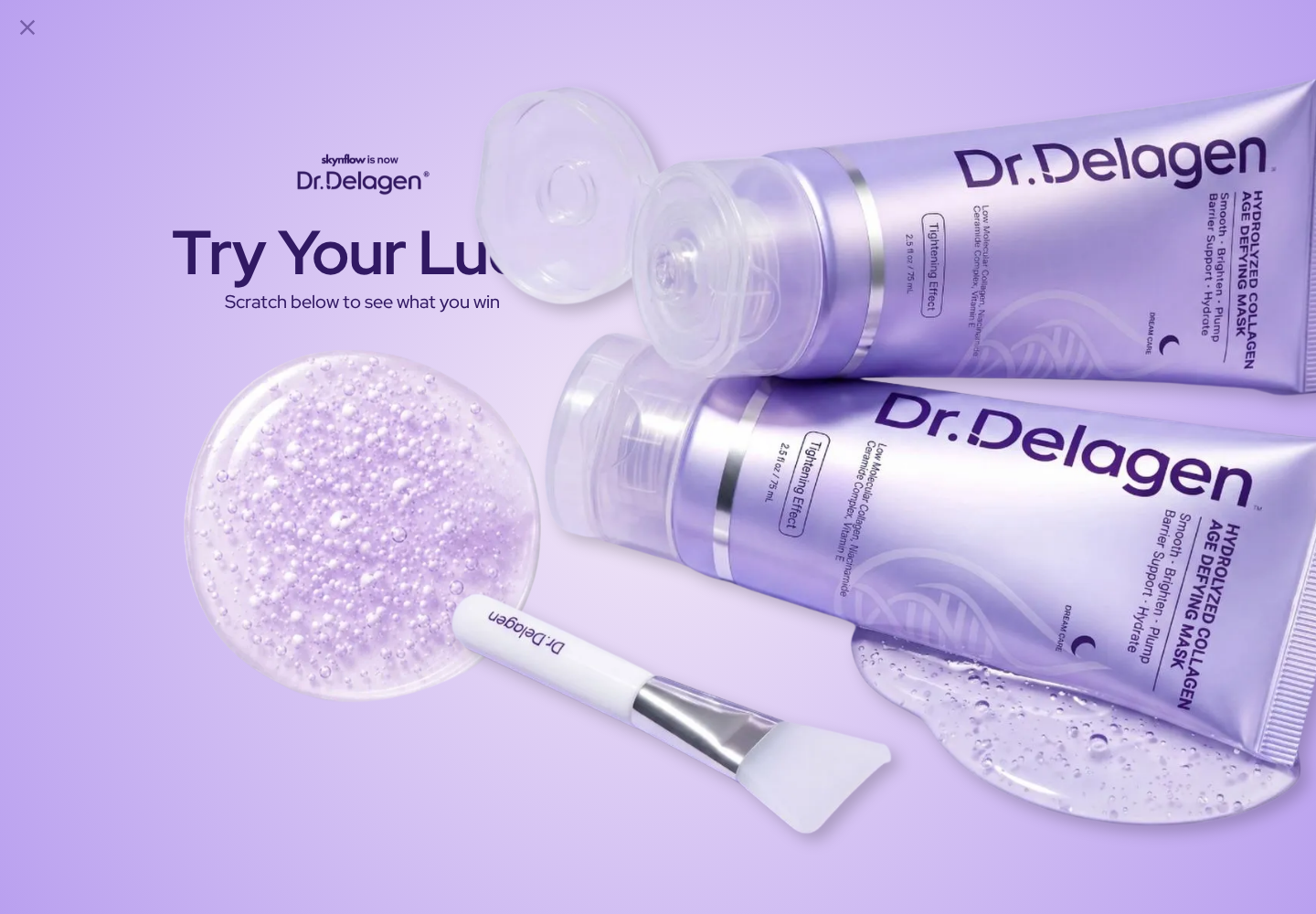
Skynflow is now Dr.Delagen
Visitors to Skynflow are redirected to Dr.Delagen. The current store explicitly states that Skynflow has evolved into the new brand.
The featured product is a 2.54-fluid-ounce hydrolyzed collagen peel-off mask priced at $34.99 during our review.
The seller says transitional orders may still arrive in old Skynflow packaging. That statement helps explain why customers may see different labels.
A rebrand is not evidence of fraud. It does, however, make continuity, ingredient changes, guarantees, and customer-service records important.
The beauty claims are unusually ambitious
Dr.Delagen promises overnight smoothing, visible tightening, deeper hydration, firmer-looking skin, and progressively reduced wrinkles.
The page says 92% of women reported visible wrinkle reduction within two weeks during a 60-day consumer test.
Elsewhere, it presents 100%, 97%, and 97% perception results from 88 subjects after four weeks.
Those figures may describe different questionnaires, yet the storefront does not prominently provide full protocols or a peer-reviewed product study.
- Skynflow redirects into the Dr.Delagen store.
- The seller acknowledges old and new packaging may overlap.
- The mask contains recognizable cosmetic ingredients.
- The clinical-sounding percentages need fuller documentation.
- Several refund timeframes appear across the site.
The product can be real while the expectations are inflated
A peel-off film can temporarily make skin feel tight. Humectants and emollients may improve surface hydration and appearance.
That is different from rebuilding facial structure, permanently reversing aging, or delivering results comparable with an injectable treatment.
Our review found a purchasable cosmetic and a named company. It also found marketing language that outruns the evidence displayed to ordinary shoppers.
How the Skynflow and Dr.Delagen Offer Works
Step 1: The advertorial sells a Korean beauty discovery
The older Skynflow presentation frames the mask as a Korean beauty secret used by thousands of women over 40.
That story gives the formula cultural authority before a shopper sees the complete ingredient list or testing details.
It also makes an ordinary peel-off cosmetic feel like an imported breakthrough unavailable through routine skincare.
Korean skincare includes many credible products and manufacturers. A geographic theme alone does not validate any specific result.
Step 2: Immediate tightness is connected with longer-term change
Polyvinyl alcohol appears near the top of the ingredient list. It forms a removable film and contributes to the characteristic tightening sensation.
The store describes that feeling after 15 to 20 minutes, followed by deeper absorption and smoother-looking skin the next morning.
A visible film effect can be real. The questionable leap comes when a temporary sensory change supports broader wrinkle-reduction expectations.
Hydrated skin may look plumper for a time. That appearance should not be confused with permanent repair of deeper tissue.
Step 3: Scientific percentages make the pitch feel settled
The sales page provides impressive consumer percentages, named actives, and a week-by-week transformation timeline.
However, a consumer perception questionnaire measures what participants report noticing. It is not automatically equivalent to blinded clinical measurement.
Important missing context includes recruitment, comparison product, blinding, photographic standardization, dropouts, statistical methods, and who funded the work.
Without that information, precise percentages should be read as seller-provided marketing data rather than independent confirmation.
The phrase “consumer results, may vary” appropriately signals uncertainty, but it does not supply the missing methodology.
Step 4: The rebrand mixes old and new identities
Dr.Delagen says copycat sellers on Amazon caused confusion and motivated a stronger protected identity.
That is the company’s explanation. Our investigation did not independently establish the extent of those copycat listings.
The new product page says the formula was refined and certain ingredients were removed. It also says transitional serums may retain old packaging.
Meanwhile, the guarantee page still directs customers to support@skynflow.com, while the footer displays support@drdelagen.com.
Old links and addresses can survive an ordinary migration. They can also create practical problems when a refund deadline is approaching.
Step 5: “Risk-free” depends on documenting two months of use
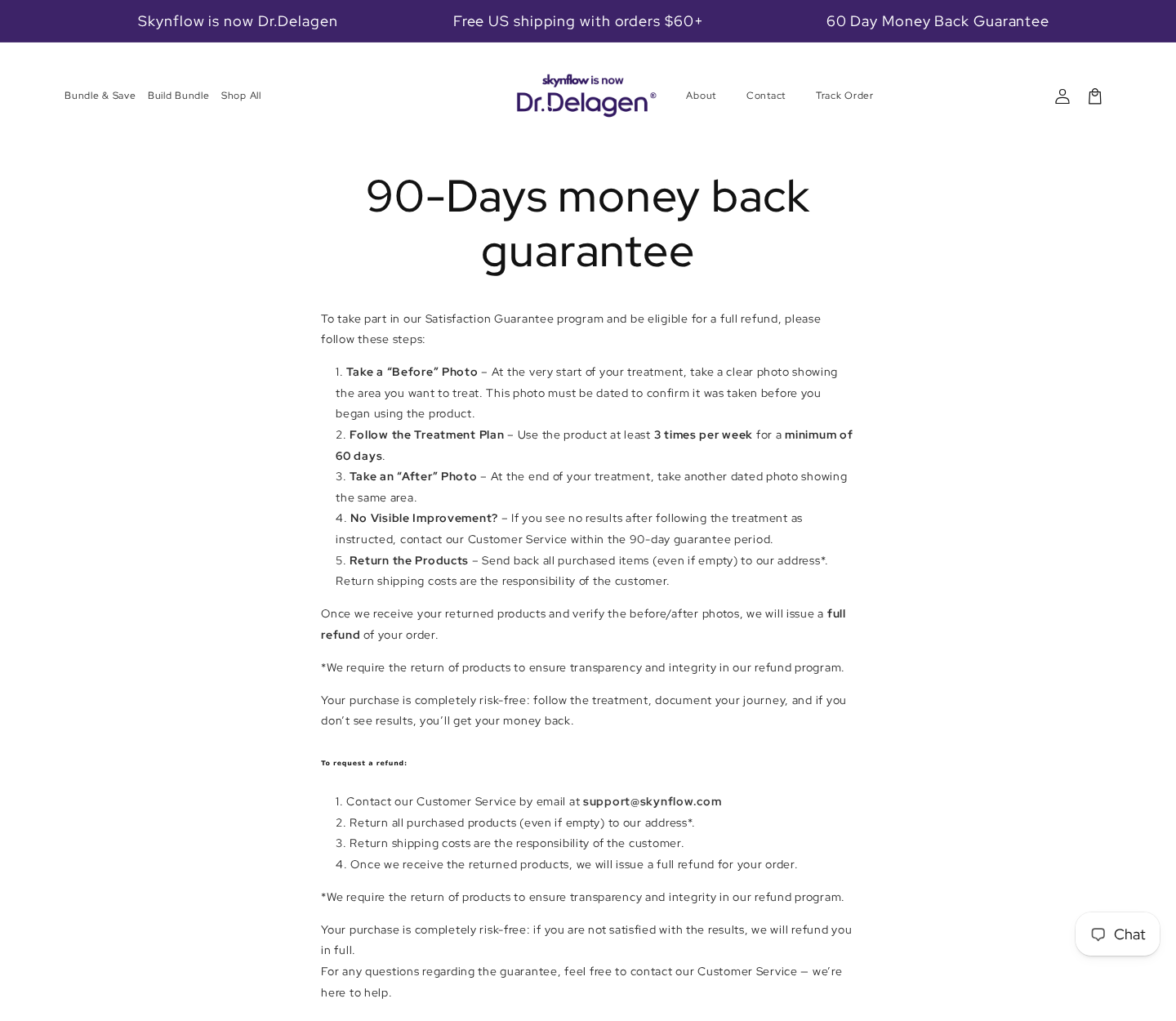
The dedicated guarantee page carries a 90-day heading, although the store header and product page prominently promote 60 days.
To qualify, customers are told to photograph the treatment area before use and date the image.
They must use the product at least three times weekly for a minimum of 60 days, then take a dated after photograph.
The instructions require returning every purchased item, including empty containers, while paying the return postage.
This is not a simple satisfaction return. Missing one documentary step could make an otherwise sincere claim difficult to prove.
Step 6: The ordinary return policy follows different rules
The updated refund policy allows requests within 30 days after delivery for products that remain unused, unopened, and in original packaging.
Opened products are directed to the separate money-back guarantee, if applicable. That distinction is reasonable but easy to overlook.
The ordinary policy says logistics and laboratories are in Asia, so approved returns may need international shipping.
Damaged-product reports must arrive within 48 hours and may require photographs or video.
Cancellation is even tighter. Requests must be submitted within two hours, after which the order is considered processed.
What the Ingredients Can Reasonably Support
Hydration can soften the look of fine lines
The formula lists glycerin, sodium hyaluronate, meadowfoam seed oil, ceramides, and other ingredients that can support moisture retention or surface conditioning.
Well-hydrated skin often looks smoother and feels more supple. That modest benefit is biologically plausible.
It still varies with skin type, climate, other products, irritation, application frequency, and the condition of the skin barrier.
Topical collagen has limits
Hydrolyzed collagen can function as a moisturizing or film-forming cosmetic ingredient. Its presence does not prove reconstruction of lost facial collagen.
The skin barrier restricts penetration, and a label phrase such as “low molecular” does not establish the depth or clinical importance of absorption.
Consumers should distinguish ingredient rationale from finished-product evidence. Both matter, but they answer different questions.
Niacinamide and ceramides are not overnight facelifts
Niacinamide is widely used for barrier support, uneven tone, and oil regulation. Ceramides can help support the skin’s protective layer.
Those credible uses do not make every concentration equally effective. The store lists ingredients but does not show percentages for most actives.
A dramatic before-and-after presentation can also be influenced by lighting, expression, angle, camera processing, or other products.
Facial masks are supplementary care
The American Academy of Dermatology explains that a suitable mask may moisturize or support certain concerns, but it does not replace a daily routine.
Fragrance, botanicals, adhesives, and film-forming ingredients may irritate sensitive skin. Patch testing is sensible before overnight application.
Anyone experiencing swelling, blistering, persistent burning, or eye exposure should remove the product and seek appropriate medical advice.
How to Read the Dr.Delagen Evidence
A percentage is only as useful as its study design
The sales page’s exact figures create an impression of scientific certainty, but consumer perception data has important limits.
Participants know what they applied, may expect improvement, and can be influenced by repeated photographs or favorable instructions.
A stronger trial would define one primary outcome in advance and compare the mask with a credible control under standardized conditions.
Independent evaluators would grade photographs taken with identical lighting, expression, distance, camera settings, and skin preparation.
Published methods would also show how many people withdrew, whether irritation occurred, and whether unfavorable results were included.
None of this means the reported participants noticed nothing. It limits what their impressions can prove for a new customer.
Several claim sets appear on one product page
One section mentions 92% wrinkle reduction within two weeks during a 60-day consumer test.
Another reports 100% greater suppleness and 97% improvements in firmness and smoothness among 88 subjects after four weeks.
Different studies can legitimately produce different numbers. Shoppers need enough labeling to understand which formula, schedule, comparison, and questionnaire produced each result.
The page also recommends four weekly applications and suggests one tube lasts roughly two to three weeks.
Following that routine for 60 days could require several tubes, which increases the cost and the quantity potentially involved in a refund.
Expert quotations require independent verification
The page includes endorsements attributed to skincare professionals and a board-certified dermatologist.
A name and title on a merchant page do not reveal whether the person reviewed the final copy, received compensation, or examined the finished formula.
Consumers can search licensing directories, professional profiles, and disclosed brand relationships before assigning weight to a quotation.
Even a genuine expert opinion should be separated from a controlled product trial.
An advisor may discuss ingredient theory without proving the seller’s timeline or percentage results.
The formula changed, so old reviews need context
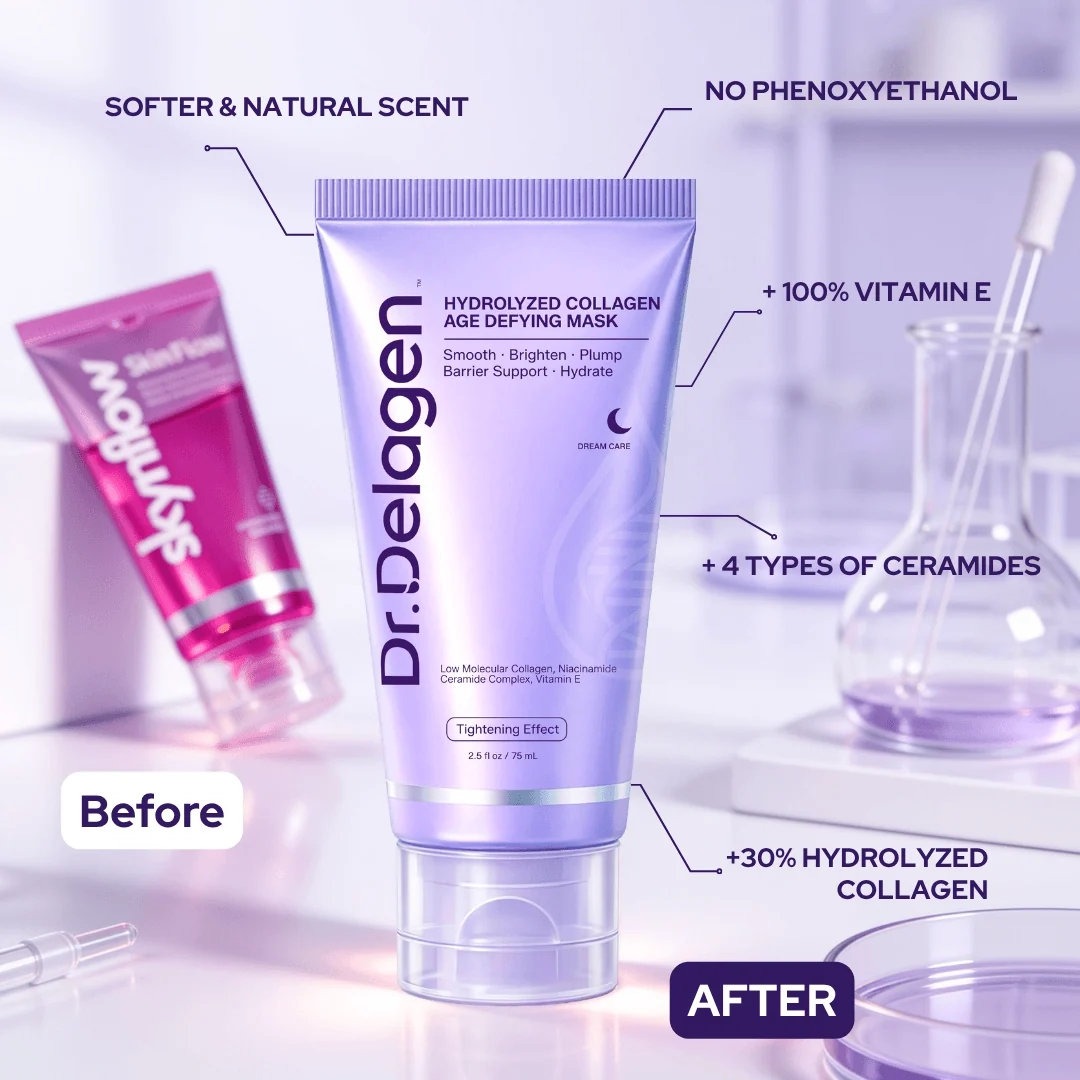
Dr.Delagen says the new formula removed phenoxyethanol and synthetic fragrance while adding more collagen, bifida ferment, vitamin E, and ceramide types.
Those are seller descriptions of a revised formula. Reviews written for earlier Skynflow versions may not describe the same ingredient balance.
The transition notice also says some serums may arrive in old packaging while retaining the same formula.
Customers should photograph the ingredient panel received and compare it with the page viewed when ordering.
Anyone with known sensitivities should rely on the package label for that batch, not an older screenshot or testimonial.
Cost, Routine, and Practical Expectations
The recommended schedule is demanding
Using a peel-off mask three or four nights weekly for two months requires time, tolerance, and several containers.
The guarantee depends on following that schedule, which means discontinuing because of irritation may complicate a results-based claim.
Ask support beforehand how adverse reactions are handled and whether the ordinary damaged-product route applies.
Do not continue an irritating product merely to satisfy a refund condition.
Calculate a complete course, not one tube
At the stated eight to ten treatments per tube, four weekly uses can consume one tube within roughly two to three weeks.
An eight-week routine may therefore require three or four tubes, depending on application thickness and treated area.
Bundles can appear economical while increasing the amount exposed to international return postage.
Before buying, compare total product cost, delivery, likely return shipping, and any customs requirements.
Set a realistic success measure
Decide whether success means softer skin, less dryness, temporary smoothness, reduced visible texture, or a measured change in wrinkles.
Those outcomes are not interchangeable. A pleasant overnight glow does not confirm every anti-aging claim printed above the purchase button.
Consistent neutral photographs are more informative than memory alone, provided lighting and facial expression remain similar.
Give ordinary skincare improvements appropriate credit without turning them into evidence of permanent rejuvenation.
Keep the rest of the routine unchanged during evaluation. New serums, acids, retinoids, or procedures can confuse both results and reaction causes.
Notice whether improvement remains after washing. A disappearing effect is still potentially pleasant, but it should be described as temporary.
Company, Address, and Fulfillment Checks
Kaiscaler Group LLC is the named legal entity
The Dr.Delagen footer names Kaiscaler Group LLC and calls Dr.Delagen a registered trademark of that company.
A buyer should compare this name with the checkout, receipt, parcel documentation, and card descriptor.
A different payment descriptor is not automatically suspicious, but the seller should explain the relationship promptly.
The Casper address is administrative evidence, not manufacturing proof
The site lists 5830 East 2nd Street, Suite 7000, Casper, Wyoming 82609.
That listing identifies a contact point. It does not demonstrate that cosmetics are formulated, tested, made, or stored at that address.
The refund policy separately says the company’s logistics and laboratories are located in Asia.
Customer-service routes remain partly transitional
Current pages publish support@drdelagen.com and info@drdelagen.com, with weekday customer-service hours.
The guarantee still uses support@skynflow.com, and some policy links point back toward the former domain.
Send important requests to both documented addresses when appropriate, then preserve delivery confirmations and automated responses.
Fulfillment can create a costly return
International shipping is not inherently improper. It becomes important when the shopper expected a domestic return based on a Wyoming address.
Before ordering several tubes, request the actual return country and an estimate for tracked postage from your location.
Also ask whether customs forms, original packaging, empty tubes, or a particular carrier are mandatory.
What to Do if Your Skynflow or Dr.Delagen Order Has a Problem
- Identify which policy applies. An unopened return follows the 30-day policy. A used-product results claim follows a separate and more demanding guarantee process.
- Capture the current promises. Save the 60-day banner, 90-day guarantee heading, product page, receipt, ingredient list, rebrand notice, and every checkout selection.
- Preserve treatment documentation. Keep dated before and after photographs, usage dates, all tubes, packaging, batch information, and any adverse-reaction images.
- Contact both relevant addresses. Write to the current Dr.Delagen support address and the Skynflow address printed in the guarantee. Request one case number.
- Get the return destination first. Do not mail cosmetics to the Wyoming footer address unless support authorizes it. Use tracked postage and retain customs records.
- Stop after a concerning reaction. Remove the mask, rinse as directed, and seek medical help for swelling, breathing difficulty, severe pain, or continuing irritation.
- Escalate with an organized timeline. Give the payment provider precise dates, policy captures, communications, tracking, and the remedy requested if the merchant does not resolve the issue.
- Check the device used to purchase. Malwarebytes can examine suspicious downloads or redirects. AdGuard can block many aggressive advertising and tracking elements.
Is Your Device Infected? Run a Free Malware Scan
Slow performance, constant pop-ups, or strange behavior? These are classic signs of a malware infection. The fastest way to find out is to scan your device with Malwarebytes Free — one of the most trusted malware removal tools available.
The free version detects and removes the most common threats, including:
- Adware — the cause of those annoying pop-ups
- Browser hijackers — unwanted redirects and changed homepages
- Trojans and spyware — hidden programs stealing your data
- Potentially unwanted programs (PUPs) — software you never asked for
👉 Select your device below — Windows, Mac, or Android — then follow the simple steps to download Malwarebytes, scan your system, and remove any threats it finds. The scan usually takes 5 to 20 minutes.
Run a Malware Scan with Malwarebytes for Windows
Malwarebytes is one of the most popular and trusted anti-malware tools for Windows — and it’s completely free for removing infections. It catches threats that many antivirus programs miss, including adware, browser hijackers, and trojans. Follow the steps below to scan and clean your PC in just a few minutes.
Download Malwarebytes
Click the button below to download the latest version of Malwarebytes for Windows from the official source. The free version is all you need — it will scan your computer and remove adware, browser hijackers, and other malicious software at no cost.
Download MalwarebytesOfficial installer for Windows 11 and 10. Your download starts right away.Want real-time protection? See Malwarebytes Premium Malwarebytes Free for WindowsScans and removes malware at no cost
-
Install Malwarebytes
When the download finishes, open your Downloads folder and double-click the MBSetup file. If Windows shows a User Account Control pop-up, click “Yes” to allow the installation.

Follow the On-Screen Prompts to Install Malwarebytes
The setup wizard will walk you through a few quick screens:
-
Choose where you’re installing the program — “Personal Computer” or “Work Computer” — then click Next.

-
Malwarebytes will now install on your device. This usually takes under a minute.

-
When installation is complete, the “Welcome to Malwarebytes” screen will open automatically.

-
On the final screen, click Open Malwarebytes to launch the program.

-
Enable “Scan for Rootkits”
Before scanning, turn on rootkit detection so Malwarebytes can find even the most hidden threats. Click the Settings gear icon on the left side of the screen.

In the settings menu, find “Scan for rootkits” and click the toggle so it turns blue.

Done? Click “Dashboard” in the left pane to return to the main screen.
Start the Scan
Click the blue Scan button. Malwarebytes will automatically update its virus database and start checking your computer for malware.

-
Wait for the Scan to Finish
The scan checks your entire system for browser hijackers and other malicious programs, so it can take 5 to 20 minutes depending on your computer. Feel free to do something else — just check back occasionally to see the progress.

-
Quarantine the Detected Threats
When the scan is done, you’ll see a list of everything Malwarebytes found — malware, adware, and potentially unwanted programs. Click the “Quarantine” button to remove all of them at once.

Malwarebytes will now remove the malicious files and registry entries and move them safely into quarantine.

-
Restart Your Computer
Some threats can only be fully removed after a reboot. If Malwarebytes asks you to restart, click Yes. Once you’re logged back in, Malwarebytes has finished removing the threats it found.

That’s it — your Windows PC is now clean of trojans, adware, and other malware, and should be back to running smoothly.
If you are still having problems with your computer after completing these instructions, then please follow one of the steps:
- Run a computer scan with ESET Online Scanner
- Ask for help in our Windows Malware Removal Help & Support forum.
Run a Malware Scan with Malwarebytes for Mac
Malwarebytes for Mac is a free on-demand scanner that removes the malware other security software tends to miss — adware, browser hijackers, and unwanted programs included. Cleaning an infected Mac with Malwarebytes has always been completely free, and it’s our go-to recommendation. Follow the steps below to scan and clean your Mac in just a few minutes.
-
Download Malwarebytes for Mac
Click the button below to download the latest version of Malwarebytes for Mac.
Download MalwarebytesOfficial installer for macOS. Your download starts right away.Want real-time protection? See Malwarebytes PremiumMalwarebytes Free for MacScans and removes malware at no cost -
Open the Malwarebytes setup file
When the download finishes, open your Downloads folder and double-click the setup file to begin the installation.

-
Follow the On-Screen Prompts to Install Malwarebytes
The Malwarebytes for Mac Installer will guide you through a few quick screens. Click “Continue” and keep following the prompts until the installation completes.



When the installation is complete, Malwarebytes opens to the Welcome to Malwarebytes screen. Click “Get started“.
-
Select “Personal Computer” or “Work Computer”
Malwarebytes will ask what type of computer you’re installing it on. Click either Personal Computer or Work Computer, whichever applies.

-
Start the Scan
Click the “Scan” button. Malwarebytes will automatically update its detection database and begin checking your Mac for malware.

-
Wait for the Scan to Finish
Malwarebytes will scan your Mac for adware, browser hijackers, and other malicious programs. This can take a few minutes, so feel free to do something else — just check back occasionally to see the progress.

-
Quarantine the Detected Threats
When the scan is done, you’ll see a list of everything Malwarebytes found. Click the “Quarantine” button to remove all the threats at once.

-
Restart Your Mac
Malwarebytes will now remove all the malicious files it found. Some threats can only be fully removed after a reboot — if Malwarebytes asks you to restart, allow it. Once you’re logged back in, your Mac is clean.

That’s it — your Mac is now free of adware, rogue browser extensions, and other potentially harmful software.
If you are still experiencing problems while trying to remove a malicious program from your computer, please ask for help in our Mac Malware Removal Help & Support forum.
Run a Malware Scan with Malwarebytes for Android
Malwarebytes for Android automatically detects and removes dangerous threats like malware and ransomware so you don’t have to worry about your most-used device being compromised. Aggressive detection of adware and potentially unwanted programs keeps your Android phone or tablet running smooth.
-
Download Malwarebytes for Android.
You can download Malwarebytes for Android by clicking the link below.
Get Malwarebytes for AndroidOpens Google Play in a new tab.Want real-time protection? See Malwarebytes Premium for AndroidMalwarebytes for AndroidScans your phone and removes malware at no cost -
Install Malwarebytes for Android on your phone.
In the Google Play Store, tap “Install” to install Malwarebytes for Android on your device.

When the installation process has finished, tap “Open” to begin using Malwarebytes for Android. You can also open Malwarebytes by tapping on its icon in your phone menu or home screen.

-
Follow the on-screen prompts to complete the setup process
When Malwarebytes will open, you will see the Malwarebytes Setup Wizard which will guide you through a series of permissions and other setup options.
This is the first of two screens that explain the difference between the Premium and Free versions. Swipe this screen to continue.
Tap on “Got it” to proceed to the next step.
Malwarebytes for Android will now ask for a set of permissions that are required to scan your device and protect it from malware. Tap on “Give permission” to continue.
Tap on “Allow” to permit Malwarebytes to access the files on your phone.
-
Update database and run a scan with Malwarebytes for Android
You will now be prompted to update the Malwarebytes database and run a full system scan.

Click on “Update database” to update the Malwarebytes for Android definitions to the latest version, then click on “Run full scan” to perform a system scan.

-
Wait for the Malwarebytes scan to complete.
Malwarebytes will now start scanning your phone for adware and other malicious apps. This process can take a few minutes, so we suggest you do something else and periodically check on the status of the scan to see when it is finished.

-
Click on “Remove Selected”.
When the scan has been completed, you will be presented with a screen showing the malware infections that Malwarebytes for Android has detected. To remove the malicious apps that Malwarebytes has found, tap on the “Remove Selected” button.

-
Restart your phone.
Malwarebytes for Android will now remove all the malicious apps that it has found. To complete the malware removal process, Malwarebytes may ask you to restart your device.
That’s it — your Android phone is now clean — no more malicious apps, adware, or browser redirects.
If you are still having problems with your phone after completing these instructions, then please follow one of the steps:
- Restore your phone to factory settings by going to Settings > General management > Reset > Factory data reset.
- Ask for help in our Mobile Malware Removal Help & Support forum.
Stay Protected: Block Ads and Malicious Sites
Now that your device is clean, keep it that way. Most infections start with a malicious ad or a fake download button — so blocking them at the source is your best defense.
We recommend AdGuard, which blocks malicious ads, phishing pages, and dangerous redirects before they can reach you.
👉 Download AdGuard and browse safely
Frequently Asked Questions
Is Skynflow the same company as Dr.Delagen?
The current store says Skynflow evolved into Dr.Delagen and names Kaiscaler Group LLC in its footer.
Is the Dr.Delagen collagen mask fake?
A real cosmetic appears to be sold. The concern is whether its dramatic wrinkle claims are supported as strongly as the presentation suggests.
Can the mask remove wrinkles permanently?
Hydration and film tightening may temporarily soften their appearance. The reviewed evidence did not establish permanent wrinkle removal.
Why do the refund pages mention 30, 60, and 90 days?
Thirty days covers unopened returns, 60 days is the prominent product promise, and the dedicated results guarantee carries a 90-day heading with requirements.
Must customers return empty tubes?
The results-guarantee instructions say all purchased products, including empty containers, must be returned at the customer’s expense.
Does Dr.Delagen use a subscription?
No automatic subscription for this mask was established in our reviewed purchase presentation. Always inspect the final checkout before authorizing payment.
The Bottom Line
Skynflow is now Dr.Delagen, and the mask contains legitimate cosmetic ingredients. That does not independently validate the store’s most dramatic age-defying numbers.
The rebrand, mixed guarantee periods, photographic requirements, and potential international return deserve attention before buying bundles. Treat this as skincare, not a facelift.

Reviews & discussion
0 commentsShare a firsthand experience, or ask a question.
Community reviews
dr.delagen
Moderated reader experiences, not an editorial verdict.
Start the conversation
Have a question or something useful to share? Add the first comment.