


The Standardmetahelpbusiness.com scam targets Facebook users by sending them messages claiming their account or Page has violated Facebook’s terms of service. The message states that the account will be deleted or restricted unless the user appeals by clicking a link and providing personal information. However, standardmetahelpbusiness.com is not associated with Facebook at all – it is a scam website designed to steal users’ information and access their accounts.
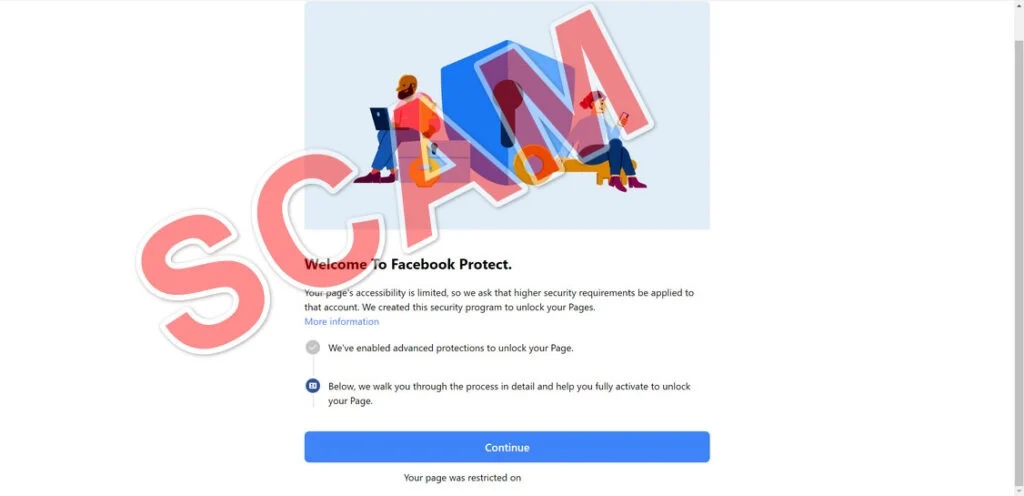
Overview of the Standardmetahelpbusiness.com Facebook Scam
The Standardmetahelpbusiness.com scam is a method cybercriminals are using to steal Facebook users’ personal information and account access. This scam has become increasingly common, with many users receiving messages out of the blue saying their account has been restricted.
The message claims the recipient’s Facebook account or Page has been limited due to suspicious activity or community standards violations. It states the user must provide personal details such as their name, email address, and phone number via a link to Standardmetahelpbusiness.com in order to appeal the restriction.
However, standardmetahelpbusiness.com has no relation to Facebook at all. It is a fraudulent website impersonating Facebook, using their branding and logos. This is done intentionally to mislead victims into believing the site is legitimate and associated with Facebook.
In reality, standardmetahelpbusiness.com is an elaborate scam operation run by cybercriminals to harvest users’ personal data. The information entered on the site can be used to gain access to Facebook accounts, compromise identities, and perpetrate further fraud.
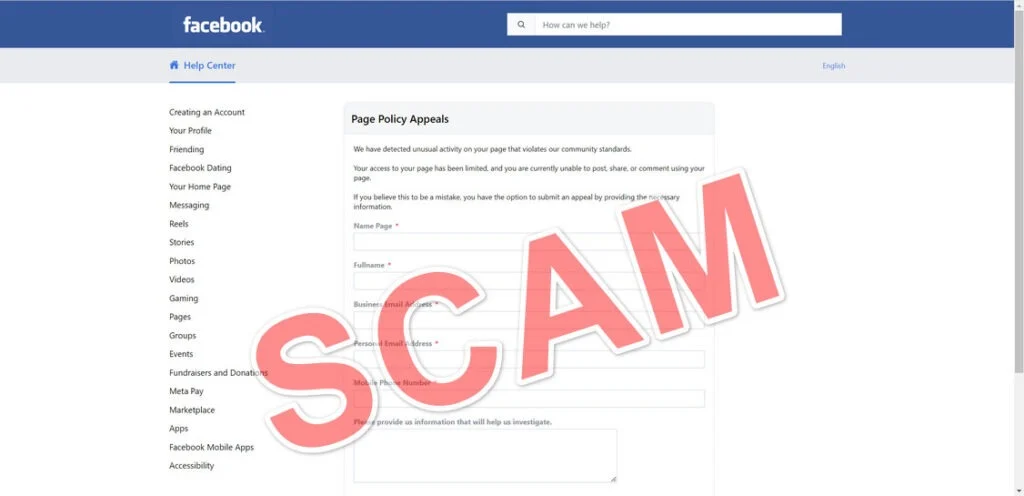
Unfortunately, many users fall victim to this scam. The messages come out of nowhere, but appear to be from an official Facebook notification system. Victims are worried their account is about to be banned, so they urgently follow the instructions without thinking it through.
The professional branding of standardmetahelpbusiness.com also tricks users into believing the site is operated by Facebook. But in fact, scammers have fabricated the entire site to steal information.
Once personal details are entered, the scammers can gain full access to victims’ Facebook accounts. This gives them an intimate look at private conversations, personal information, connected apps, and more. Victims may have their account hacked, taken over, or deleted altogether.
Scammers can also use the information obtained to steal identities. With names, emails and phone numbers in hand, they can commit identity fraud and other cybercrimes.
How the Standardmetahelpbusiness.com Facebook Scam Works
The Standardmetahelpbusiness.com scam is orchestrated in a strategic step-by-step process designed to mimic Facebook’s account restriction process and trick users into providing their personal information. Here is a breakdown of how the scam operates:
Step 1: Sending Fraudulent Notification Messages
The first step involves sending out scam messages to a wide range of Facebook users stating their account has been restricted. These messages are made to look like official notifications from Facebook support.
The messages claim the recipient’s account has been “limited” due to suspicious activity or community standards violations. They state urgent action is required or the account will be deleted.
Tactics like using Facebook branding, logos, formatting, and language are used to make the messages appear legitimate. But the messages actually come from scammers, not Facebook.
Step 2: Providing a Fake Appeal Link
The message provides a link for users to supposedly appeal the restriction on their account. The link goes to standardmetahelpbusiness.com rather than Facebook.
This step is crucial since the site is made to look like Facebook’s official account appeal portal. The professional branding convinces users the site is real and part of the Facebook account restriction process.
Step 3: Collecting Personal Information
Once on standardmetahelpbusiness.com, users are prompted to enter personal details such as their name, Facebook page name, email addresses, and phone number.
Scammers claim this information is needed to verify identity and investigate the restrictions. In reality, they are harvesting users’ data.
The requested information includes:
- Full name
- Facebook page name
- Business email address
- Personal email address
- Mobile phone number
Users willingly provide these details believing it will help unlock their account. But in fact, it gives scammers the keys to access their account.
Step 4: Stealing Account Access and Identities
With users’ personal information, scammers can now easily access their Facebook accounts. They use the details obtained to reset passwords and security measures.
Once inside accounts, scammers can post spam links and messages using the victim’s identity. They can view private data, conversations, photos, and connected apps.
Scammers may also use their control of the account to reach out to the user’s connections seeking more information or money. They could even delete the account altogether.
The personal information harvested also paves the way for full identity theft beyond just Facebook. Email addresses, phone numbers, and names can help scammers steal and exploit users’ identities.
Step 5: Spreading to More Victims
With accessed accounts in hand, scammers can repeat the process by targeting the user’s friends with the same scam message. This helps spread the scam rapidly to more potential victims.
The cycle continues with scammers sending restriction messages, harvesting information, and gaining account access to steal identities.
Step 6: Leveraging Trust
A core element of the scam is leveraging Facebook users’ trust and urgency to trick them. The fear of losing an account spurs users to act quickly.
Their trust in Facebook is turned against them, as scammers exploit Facebook’s brand recognition and authority. Even savvy users can be deceived and hand over personal data out of fear their access will be cut off.
The Standardmetahelpbusiness.com scam demonstrates how even reputable brands can be impersonated if users don’t think twice before providing their information.e in Facebook to collect the information needed to exploit accounts and compromise sensitive data.
What To Do If You Have Fallen For The Standardmetahelpbusiness.com Facebook Scam
If you entered your personal information on the fraudulent Standardmetahelpbusiness.com website, don’t panic. Here are the steps you should take right away to protect yourself and secure your accounts:
1. Change your Facebook password immediately
If scammers have your login info, they can access your account. Go to Facebook and reset your password quickly to lock them out. Make sure you are on the real Facebook.com domain when doing this.
2. Turn on two-factor authentication
Two-factor authentication adds an extra layer of security, requiring you to enter a code from your phone when logging in. This prevents scammers from accessing your account even if they have your password.
3. Check your Facebook activity log
Review your Facebook activity log to see if any suspicious posts or messages have been sent from your account recently. Delete anything unauthorized.
4. Remove third-party app access
Check your app settings and remove access to any unknown third-party apps the scammers may have connected to your account. This cuts off access points.
5. Monitor your friends list
Scammers may have added other accounts as friends to expand their scam reach. Review your friends and remove any suspicious or unknown accounts.
6. Place a fraud alert and monitor your credit
Since scammers have your personal information, place a fraud alert on your credit and monitor your credit reports for any suspicious activity indicating identity theft.
7. Reset passwords on other accounts
If you reuse passwords across accounts, scammers may gain access to your email, bank accounts or other online services. Reset all your major account passwords.
8. Run antivirus and malware scans
Run thorough scans on your devices to check for any malware, keyloggers or spyware the scammers may have installed through compromised accounts.
9. File a report
File a report about the scam with the FBI’s Internet Crime Complaint Center at ic3.gov and notify Facebook directly so they can take action.
10. Educate your friends and family
Spread awareness about this scam to help prevent it from victimizing more people. Let your friends know to avoid suspicious Facebook messages asking for personal information.
Taking quick action minimizes the potential damage from providing your information to scammers. Remember to always use caution online and never hand over personal details unless you have fully verified the request. If you have any other concerns after falling for the Standardmetahelpbusiness.com scam, contact Facebook support for help.
Is Your Device Infected? Run a Free Malware Scan
Slow performance, constant pop-ups, or strange behavior? These are classic signs of a malware infection. A quick way to check is to scan your device with Malwarebytes Free, one of the most trusted malware removal tools available. If you only visited a scam page and didn’t download or install anything, this scan is optional.
The free version detects and removes the most common threats, including:
- Adware — the cause of those annoying pop-ups
- Browser hijackers — unwanted redirects and changed homepages
- Trojans and spyware — hidden programs stealing your data
- Potentially unwanted programs (PUPs) — software you never asked for
👉 Select your device below — Windows, Mac, or Android — then follow the simple steps to download Malwarebytes, scan your system, and remove any threats it finds. The scan usually takes 5 to 20 minutes.
Run a Malware Scan with Malwarebytes for Windows
Malwarebytes is one of the most popular and trusted anti-malware tools for Windows — and it’s completely free for removing infections. It catches threats that many antivirus programs miss, including adware, browser hijackers, and trojans. Follow the steps below to scan your PC and remove what Malwarebytes finds.
Download Malwarebytes
Click the button below to download the latest version of Malwarebytes for Windows from the official source. The free version is all you need — it will scan your computer and remove adware, browser hijackers, and other malicious software at no cost.
Download MalwarebytesOfficial installer for Windows 11 and 10. Your download starts right away.Want real-time protection? See Malwarebytes Premium Malwarebytes Free for WindowsScans and removes malware at no cost
-
Install Malwarebytes
When the download finishes, open your Downloads folder and double-click the MBSetup file. If Windows shows a User Account Control pop-up, click “Yes” to allow the installation.
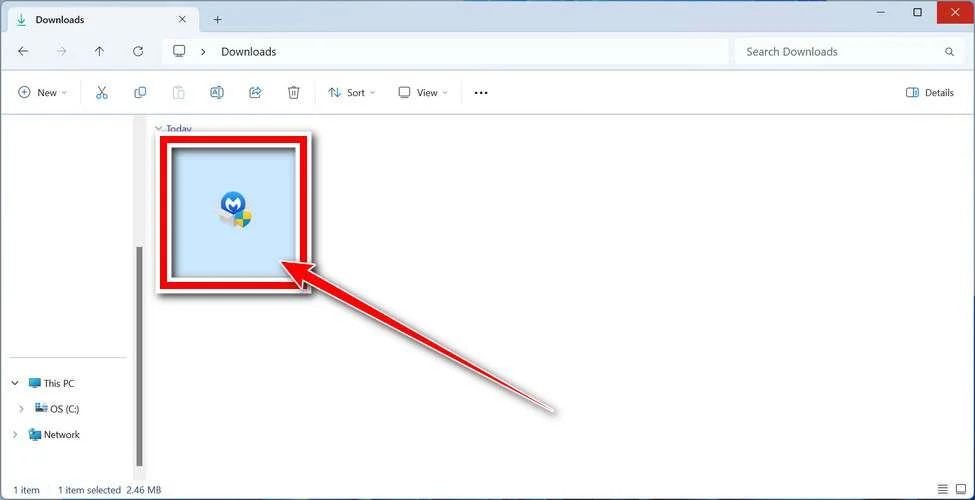
Follow the On-Screen Prompts to Install Malwarebytes
The setup wizard will walk you through a few quick screens:
-
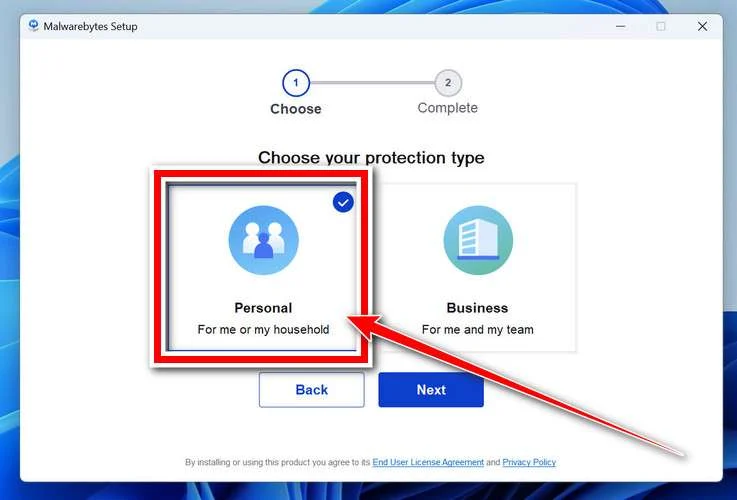
Choose where you’re installing the program — “Personal Computer” or “Work Computer” — then click Next.
-
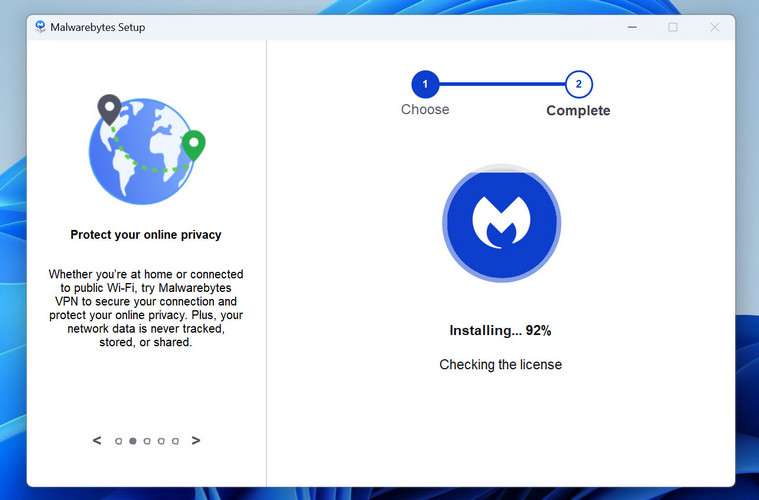
Malwarebytes will now install on your device. This usually takes under a minute.
-
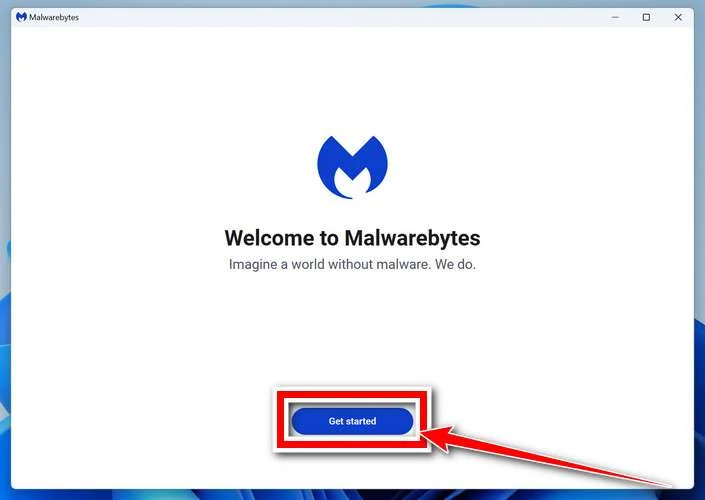
When installation is complete, the “Welcome to Malwarebytes” screen will open automatically.
-
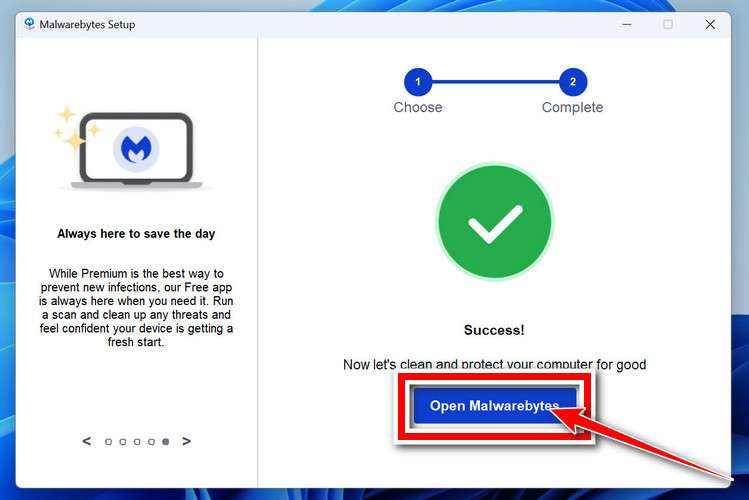
On the final screen, click Open Malwarebytes to launch the program.
-
Optional: Check for rootkits with a Custom Scan
You don’t need to change any settings for a normal scan. The standard Threat Scan in the next step is enough for most problems, so you can go straight to it.
If you also want to check for rootkits, use a Custom Scan. In current versions of Malwarebytes, rootkit scanning is only available there:
- On the Scanner tile, click the three-dot menu and select Advanced Scan.
- Choose Custom Scan. In its options, check Scan for rootkits.
- Select your system drive (usually C:\) as the location to scan, then start the scan. It takes longer than a Threat Scan.
- When it finishes, review and quarantine the results as described in the steps below.
Rootkit scanning isn’t available on Windows devices with ARM processors.
Start the Scan
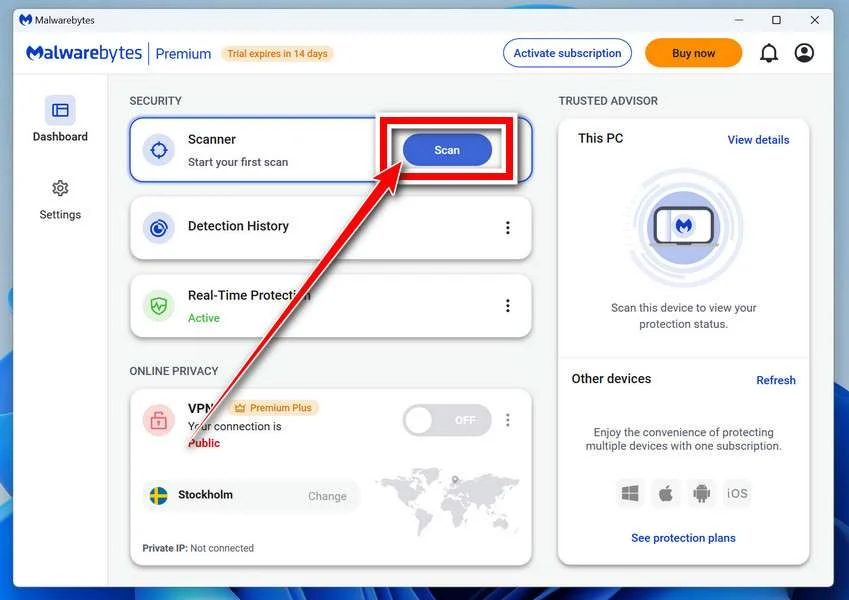
Click the blue Scan button. Malwarebytes will automatically update its virus database and start checking your computer for malware.
-
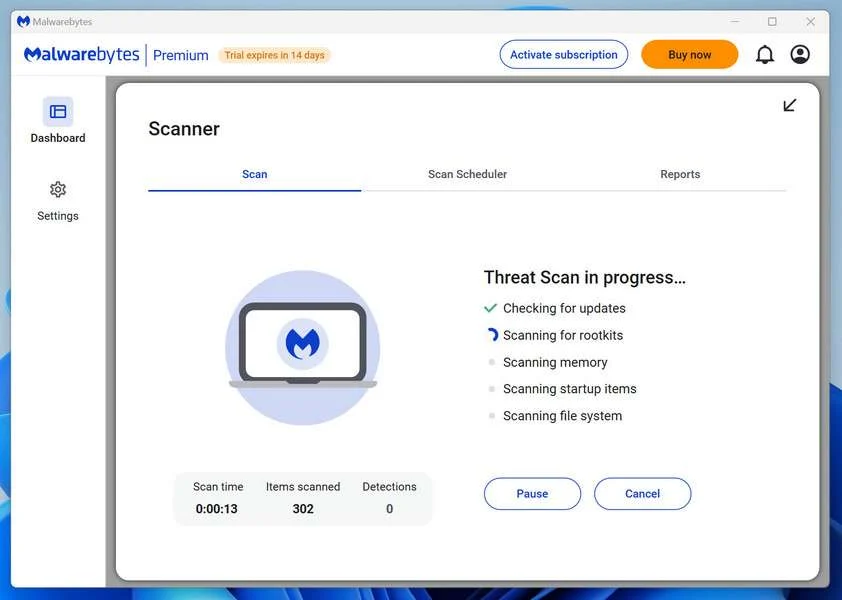
Wait for the Scan to Finish
The scan checks your entire system for browser hijackers and other malicious programs, so it can take 5 to 20 minutes depending on your computer. Feel free to do something else — just check back occasionally to see the progress.
-
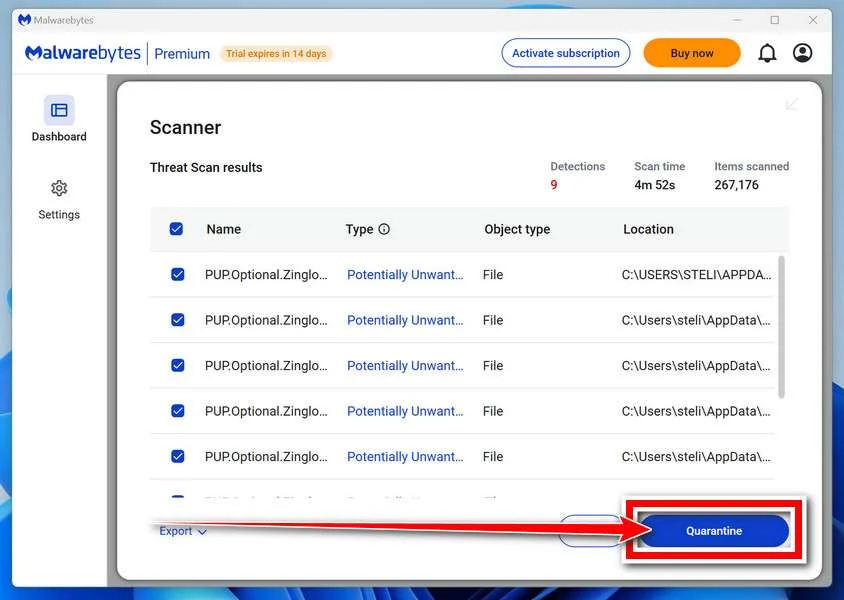
Quarantine the Detected Threats
When the scan is done, you’ll see a list of everything Malwarebytes found — malware, adware, and potentially unwanted programs. Click the “Quarantine” button to remove all of them at once.
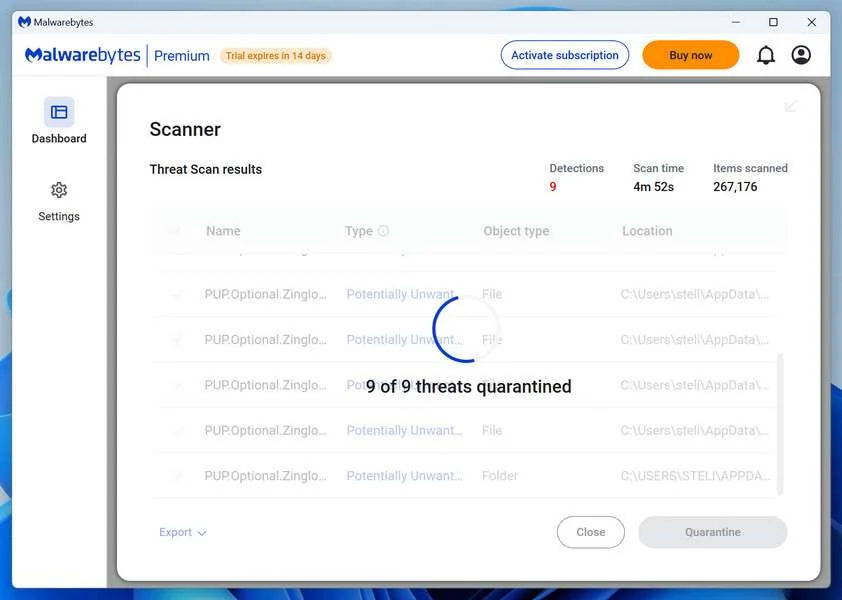
Malwarebytes will now remove the malicious files and registry entries and move them safely into quarantine.
-
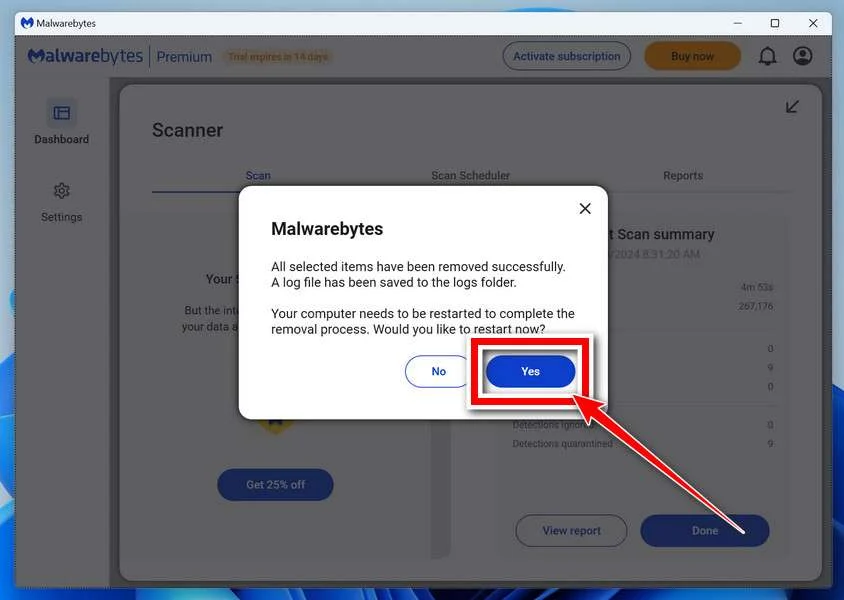
Restart Your Computer
Some threats can only be fully removed after a reboot. If Malwarebytes asks you to restart, click Yes. Once you’re logged back in, Malwarebytes has finished removing the threats it found.
When the scan is done, check whether the problems you noticed have stopped. If they continue, see the options below.
If you are still having problems with your computer after completing these instructions, then please follow one of the steps:
- Run a computer scan with ESET Online Scanner
- Ask for help in our Windows Malware Removal Help & Support forum.
Run a Malware Scan with Malwarebytes for Mac
Malwarebytes for Mac is a free on-demand scanner that removes the malware other security software tends to miss — adware, browser hijackers, and unwanted programs included. Cleaning an infected Mac with Malwarebytes has always been completely free, and it’s our go-to recommendation. Follow the steps below to scan your Mac and remove what Malwarebytes finds.
-
Download Malwarebytes for Mac
Click the button below to download the latest version of Malwarebytes for Mac.
Download MalwarebytesOfficial installer for macOS. Your download starts right away.Want real-time protection? See Malwarebytes PremiumMalwarebytes Free for MacScans and removes malware at no cost -
Open the Malwarebytes setup file
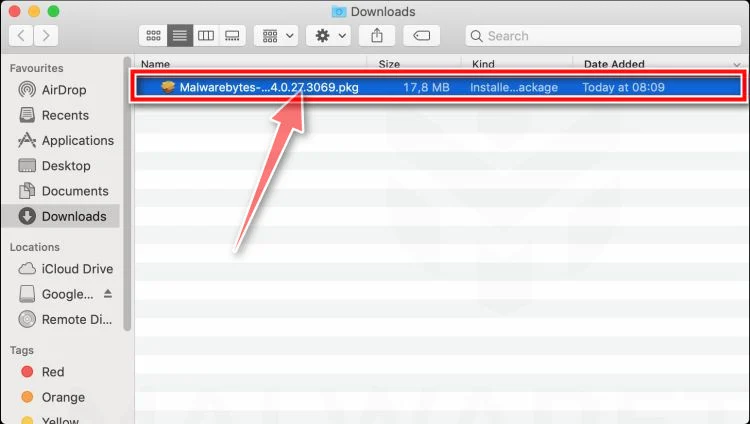
When the download finishes, open your Downloads folder and double-click the setup file to begin the installation.
-
Follow the On-Screen Prompts to Install Malwarebytes
The Malwarebytes for Mac Installer will guide you through a few quick screens. Click “Continue” and keep following the prompts until the installation completes.
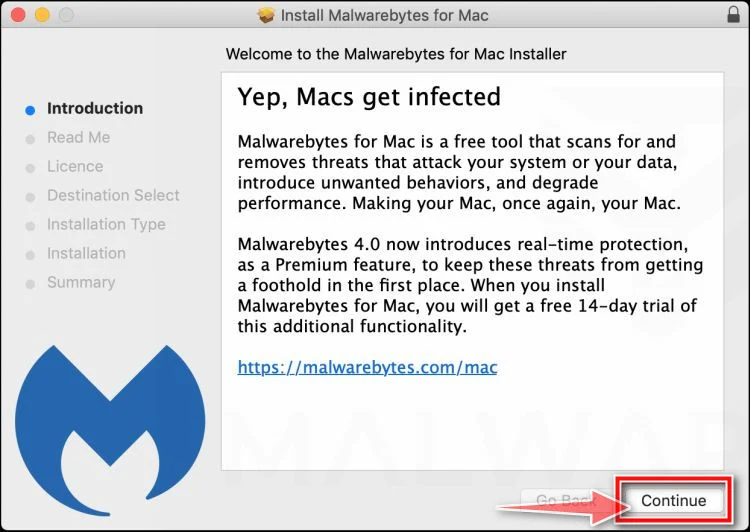
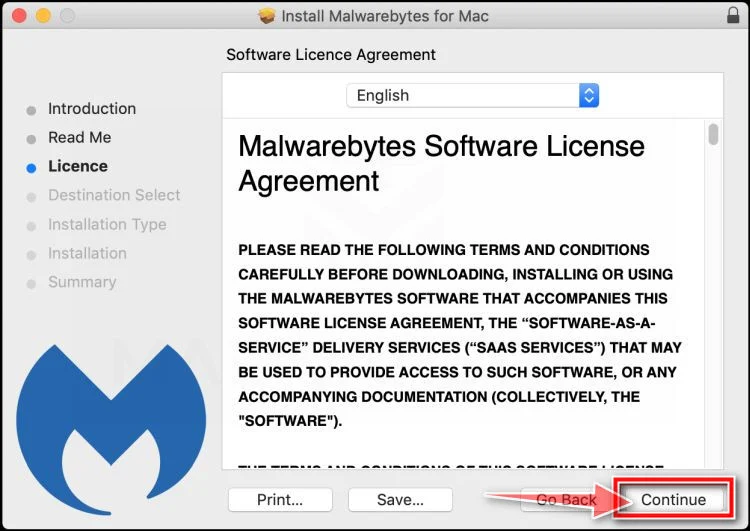
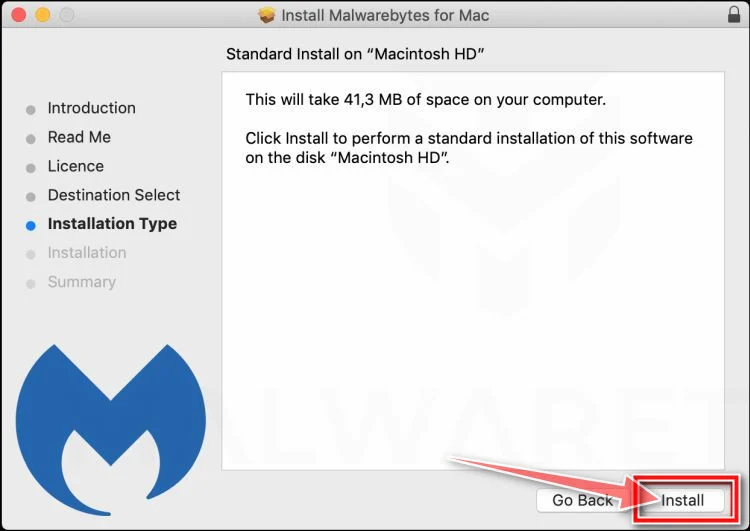
When the installation is complete, Malwarebytes opens to the Welcome to Malwarebytes screen. Click “Get started“.
Malwarebytes needs Full Disk Access to check your whole Mac. When it asks, open System Settings > Privacy & Security > Full Disk Access, turn on Malwarebytes (it may be listed as Malwarebytes Protection), and confirm with your password or Touch ID. Then return to Malwarebytes. On macOS Monterey and earlier, this setting is in System Preferences > Security & Privacy > Privacy.
-
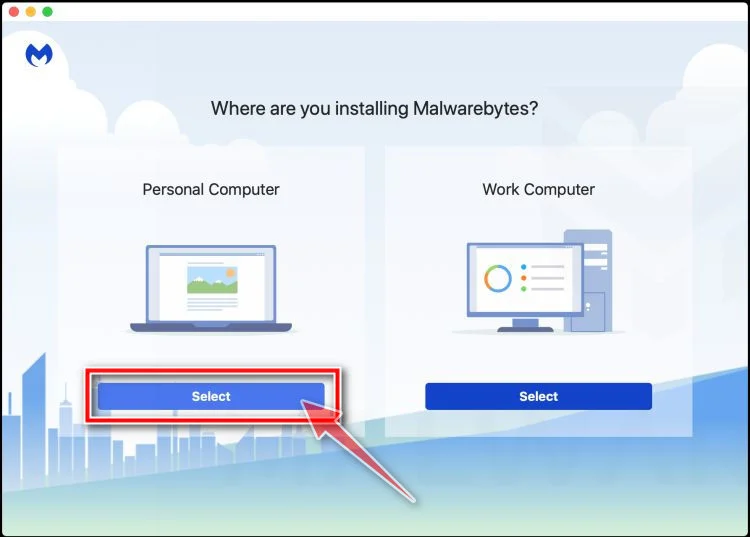
Select “Personal Computer” or “Work Computer”
Malwarebytes will ask what type of computer you’re installing it on. Click either Personal Computer or Work Computer, whichever applies.
-
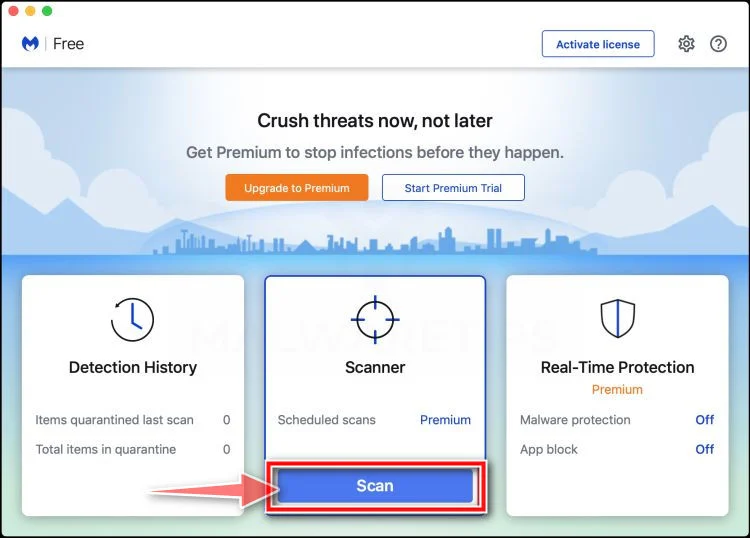
Start the Scan
Click the “Scan” button. Malwarebytes will automatically update its detection database and begin checking your Mac for malware.
-
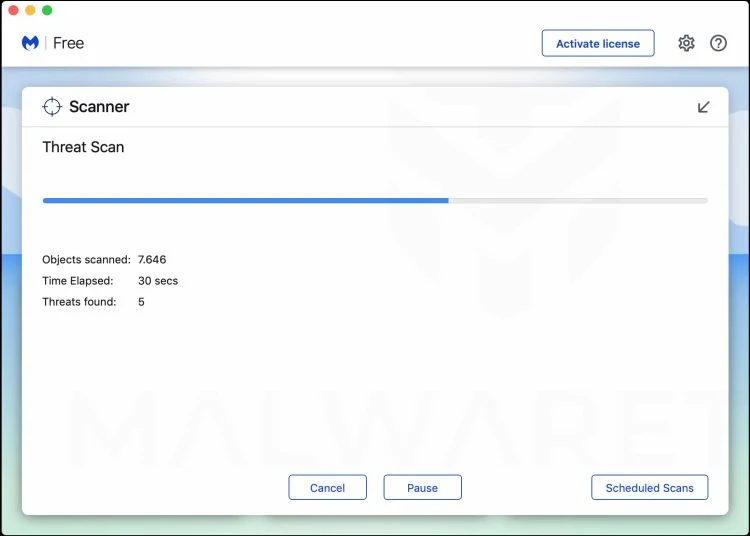
Wait for the Scan to Finish
Malwarebytes will scan your Mac for adware, browser hijackers, and other malicious programs. This can take a few minutes, so feel free to do something else — just check back occasionally to see the progress.
-
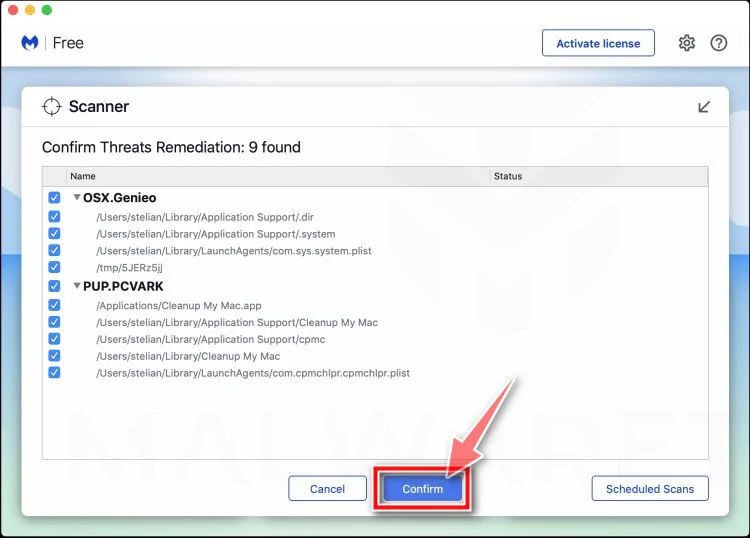
Quarantine the Detected Threats
When the scan is done, you’ll see a list of everything Malwarebytes found. Click the “Quarantine” button to remove all the threats at once.
-
Restart Your Mac
Malwarebytes will now remove all the malicious files it found. Some threats can only be fully removed after a reboot — if Malwarebytes asks you to restart, allow it. Once you’re logged back in, check whether the problems you noticed have stopped. If they come back, save the scan report and ask for help in our forum.
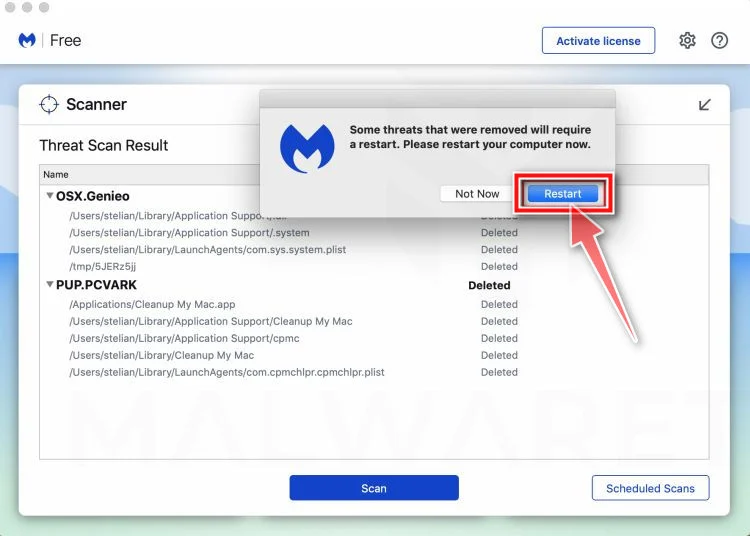
If the problems you noticed continue after the scan, see the options below.
If you are still experiencing problems while trying to remove a malicious program from your computer, please ask for help in our Mac Malware Removal Help & Support forum.
Run a Malware Scan with Malwarebytes for Android
Malwarebytes for Android scans your phone or tablet for malware, adware, and potentially unwanted apps. The free version scans only when you start a scan. Real-time protection, which checks apps automatically, is part of the paid Premium version.
-
Download Malwarebytes for Android.
You can download Malwarebytes for Android by clicking the link below.
Get Malwarebytes for AndroidOpens Google Play in a new tab.Want real-time protection? See Malwarebytes Premium for AndroidMalwarebytes for AndroidScans your phone and removes malware at no cost -
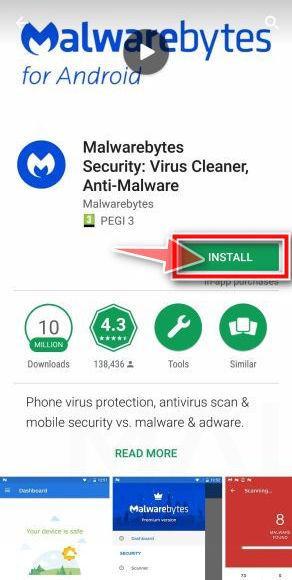
Install Malwarebytes for Android on your phone.
In the Google Play Store, tap “Install” to install Malwarebytes for Android on your device.
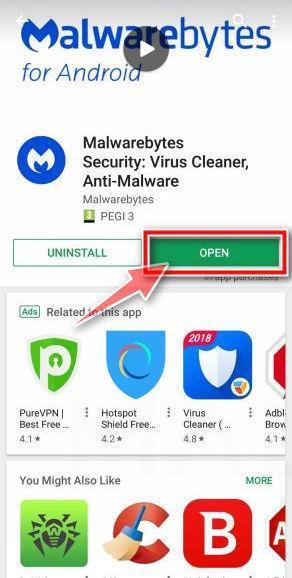
When the installation process has finished, tap “Open” to begin using Malwarebytes for Android. You can also open Malwarebytes by tapping on its icon in your phone menu or home screen.
-
Follow the on-screen prompts to complete the setup process
When Malwarebytes opens, it walks you through a short setup. Tap Get started and follow the prompts. If you see an offer for a trial or a paid plan, read it before you accept. You can skip it and keep using the free scanner.
Malwarebytes will ask for permission to access the files on your phone so it can scan them. Tap Allow, or turn on the permission in the Android screen that opens, then return to Malwarebytes.
-
Run a scan with Malwarebytes for Android
On the main screen, tap Scan now. In some versions, you open the menu, tap Scanner, and then tap Run a scan.
-
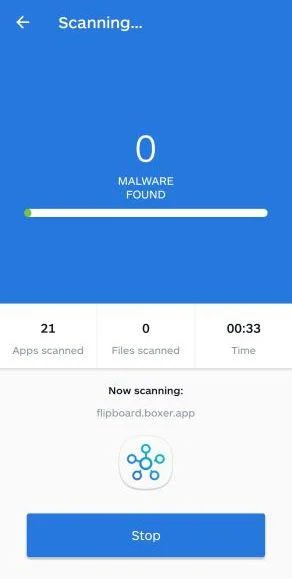
Wait for the Malwarebytes scan to complete.
Malwarebytes will now start scanning your phone for adware and other malicious apps. This process can take a few minutes, so we suggest you do something else and periodically check on the status of the scan to see when it is finished.
-
Remove the detected apps.
When the scan has been completed, you will see a list of the threats that Malwarebytes for Android has detected. Next to each detected item, tap the menu icon (three dots), then choose to uninstall the app or delete the file. Android then asks you to confirm. Tap OK or Uninstall to remove the app.
-
Restart your phone.
When the detected apps are removed, restart your phone if Malwarebytes asks you to. Then check whether the problems you noticed have stopped.
If the problems you noticed continue after the scan, see the options below.
If you are still having problems with your phone after completing these instructions, then please follow one of the steps:
- Ask for help in our Mobile Malware Removal Help & Support forum.
- Only as a last resort, reset your phone to factory settings. Read the warning below first.
- Back up your photos, videos, files, and messages, for example to your Google account or a computer.
- Make sure you know your Google account email and password. The phone asks for them after the reset. If you changed the password recently, Google recommends waiting 24 hours before you reset.
- On a Samsung phone, also make sure you know your Samsung account password.
- If you use an authenticator app for two-step verification, move your accounts to another device or save your backup codes first.
Stay Protected: Block Ads and Malicious Sites
No scan can prove a device is completely clean, so it helps to block threats before they reach you. Most infections start with a malicious ad or a fake download button — so blocking them at the source is your best defense.
We recommend AdGuard, which blocks malicious ads, phishing pages, and dangerous redirects before they can reach you.
👉 Download AdGuard and browse safely
Protecting Yourself from the Scam
If you receive a message about your Facebook account or Page being restricted, do not click any links or provide any personal information. Instead, log into Facebook directly through the official website or app and check your account status.
Here are some tips to avoid falling victim to the standardmetahelpbusiness.com scam:
- Don’t click on links or provide information to unsolicited messages. Facebook will never message you out of the blue about your account being restricted.
- Verify message is from an official Facebook domain. Scam messages often come from odd email addresses.
- Check your Facebook account directly. Login to the Facebook website or app to see if there are any warnings or restrictions on your account.
- Use two-factor authentication. This adds an extra layer of security to your Facebook account.
- Be wary of any messages requesting personal information. Facebook does not need your email address, full name or phone number to resolve account issues.
- Ignore threats about your account being deleted. Facebook will not immediately delete your account without warning, even if you have violated their terms.
- Report suspicious messages. Forward scam messages to phish@fb.com so Facebook can investigate and shut them down.
- Change your Facebook password. If you did provide information, change your password immediately to protect your account.
Frequently Asked Questions about the Standardmetahelpbusiness.com Facebook Scam
1. What is the Standardmetahelpbusiness.com Facebook scam?
The Standardmetahelpbusiness.com Facebook scam is a phishing scam where users receive fraudulent messages claiming their Facebook account has been restricted. The messages provide a link to standardmetahelpbusiness.com and trick users into entering personal details on the fake site, allowing scammers to steal their information and access their Facebook accounts.
2. How does the Standardmetahelpbusiness.com scam work?
The scam works by sending Facebook users messages that impersonate Facebook. The messages claim their account has been limited and they must enter personal information on standardmetahelpbusiness.com to unlock it. However, standardmetahelpbusiness.com is an elaborate fake site designed to harvest users’ data.
3. What information do scammers ask for?
The scam site requests information like your full name, Facebook page name, email addresses, and phone number. Scammers claim they need this to verify your identity and investigate the restriction.
4. What do scammers do with my information?
Scammers use the personal information provided to access and take over your Facebook account. They can post spam, view private data, and reach out to your friends and followers to perpetrate more scams. They also use it to steal identities.
5. Why do people fall for the Standardmetahelpbusiness.com scam?
People fall for it because the messages come disguised as Facebook notifications and seem urgent. The professional look of standardmetahelpbusiness.com also tricks users. People trust Facebook and provide their info believing it will help unlock their account.
6. How can I tell if a message is really from Facebook?
Real messages from Facebook only come from an official facebook.com address. Check the sender’s email. Facebook also does not threaten immediate account deletion without warning.
7. I entered my information on standardmetahelpbusiness.com – now what?
If you provided your information, change your Facebook password immediately. Review your security settings. Check your account for suspicious posts or messages. Run antivirus scans to check for malware. Place a fraud alert and monitor your credit.
8. How can I protect myself from the Standardmetahelpbusiness.com scam?
Don’t click unsolicited links. Verify odd messages by logging in directly. Use two-factor authentication. Don’t provide personal info to any third-parties. Be wary of threats about your account being deleted. Report suspicious messages to Facebook.
9. How can I help others avoid this scam?
Share information about this scam to warn others. Report scam messages to Facebook to shut them down. Advise friends and family to use caution with unsolicited messages and verify requests directly with Facebook before providing any personal details.
10. Who can I contact if I have more questions?
If you have any other questions or concerns about the Standardmetahelpbusiness.com Facebook scam, you can contact Facebook directly through their help pages. You can also file a report with the FBI’s Internet Crime Complaint Center.
The Bottom Line
The standardmetahelpbusiness.com scam is designed to steal Facebook users’ personal information and account access by impersonating Facebook. If you receive a message about your account or Page being restricted, ignore it and log into Facebook directly to verify there is no issue. Don’t provide any information or click links in unsolicited messages. Be vigilant against scams aiming to take advantage of Facebook users.

Reviews & discussion
0 commentsShare a firsthand experience, or ask a question.
Community reviews
standardmetahelpbusiness.com
Moderated reader experiences, not an editorial verdict.
Start the conversation
Have a question or something useful to share? Add the first comment.