

It starts with a friendly face and a familiar logo.
You are scrolling through social media when you see a short video of “Starbucks employees” handing out shiny Yeti Tumblers, smiling behind the counter and talking about a limited time giveaway. The caption is simple and tempting: claim your free Starbucks Yeti Tumbler, just pay a small $9.96 shipping fee.
You click, because why not. It looks real, the branding is perfect, and the instructions are clear. But behind that simple “Claim Offer” button is a subscription trap that can quietly drain $50 to $82 from your account every month.
This guide walks you through exactly how the Starbucks Yeti Tumbler Giveaway Scam works, why it is so convincing, and what to do if you already gave them your details.
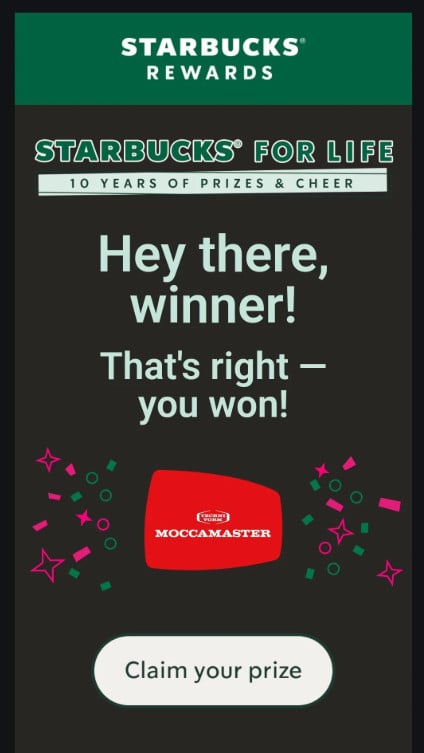
Scam Overview
The Starbucks Yeti Tumbler Giveaway Scam is part of a growing wave of “survey reward” and “free gift” schemes that misuse famous brands to trick people into hidden subscription memberships.
Instead of a genuine Starbucks promotion, you are dealing with a network of marketers and fraudsters who use Starbucks imagery, fake urgency, and cleverly worded offers to get your card details. Once they have your information, they enroll you in expensive recurring charges that are difficult to cancel.
At first glance, the giveaway looks harmless. The scam usually appears in one of these forms:
- Sponsored social media ads that look like Starbucks content
- Short clips of supposed Starbucks staff handing out tumblers
- AI generated videos using celebrity voices or influencers praising the offer
- Email campaigns or push notifications dressed up as “Starbucks survey rewards”
The message is always similar:
“Congratulations! You are today’s lucky winner!
- Click ‘Claim Offer’ below.
- Fill out the form and pay $9.96 for shipping.
- Your Yeti Tumbler is delivered within 2–7 days.”
It sounds simple and risk free. No mention of subscriptions. No mention of monthly fees. Just a small shipping charge in exchange for an expensive tumbler from a brand you already trust.
The real operation, however, has nothing to do with Starbucks or Yeti. It is built around a subscription billing model that hides behind reward language and aggressive upsell funnels.
Here is what typically happens behind the scenes.
You click the ad and are redirected to a page that uses Starbucks colors, fonts, and logos. It might say “Starbucks Rewards” or “Starbucks Survey Thank You Gift.” The branding is familiar enough that you let your guard down. This first page may show a short “survey” that asks a few meaningless questions about your coffee preferences or how often you visit Starbucks.
The survey is not real market research. It is simply there to keep you engaged and collect some basic information. No matter how you answer, you are told that you qualify for a special reward.
From there, you are redirected again, often to a domain you have never heard of, such as something like nationwideluckywinners-usa.com or another generic “lucky winners” site. This second or third page no longer looks like Starbucks, but the text still references the Yeti Tumbler, and it insists that your prize is waiting.
On this “Special Offer” page you might see something like:
- “Special Offer – Today’s Offer Yeti Tumbler”
- A countdown timer, for example “Attention, this offer expires in: 04:26”
- “100 left in stock” to increase the fear of missing out
- A form asking for your name, address, email, phone number, and card details
The layout and wording are carefully designed to create urgency. You feel like you have to act quickly before the timer runs out or the stock is gone.
The key detail is hidden in the fine print near the bottom of the page or tucked away inside the terms and conditions. When you enter your card information to pay the $9.96 shipping fee, you are also agreeing to a monthly membership program.
Typical buried terms look something like:
- You are “automatically enrolled in a monthly membership”
- You will be charged between $50 and $82 every 30 days
- The subscription continues until you cancel
- The trial period is very short, often 7 or 21 days, after which full billing begins
The scam works because most people never see this text. It is written in small font, hidden behind links, or phrased in vague language about “benefits” and “exclusive savings.” All the attention is on the free tumbler and the ticking timer.
Victims often do not realize what has happened until they check their bank statement later. By then, the $9.96 “shipping” charge has been followed by much larger amounts for services they never wanted. In many cases, no Yeti Tumbler ever arrives. If something does show up, it is usually a low quality item that has nothing to do with Starbucks or Yeti.
To make the offer look more legitimate, the scammers stack on additional tricks:
- Fake Starbucks branding
Logos, colors, and product photos are copied from real Starbucks and Yeti marketing materials. This visual familiarity makes the whole thing feel official. - AI generated celebrity videos
Some campaigns use AI generated voiceovers or deepfake style videos of celebrities and influencers praising the “free Yeti Tumbler” deal. These videos are designed to go viral and lower your defenses. - Fake reviews and comments
Social proof is powerful. The scam sites often include glowing reviews, five star ratings, and comments from supposed customers who “received their tumbler in 3 days.” These are fabricated and recycled across multiple scam sites. - Multiple domain redirections
You rarely stay on one website. From the initial ad you are bounced through different domains and tracking links. This makes it harder to follow the trail and easier for the scammers to rotate sites as others get reported or blocked. - Confusing or obstructive customer service
If you try to cancel, you are forced to navigate a maze of generic support emails, busy phone lines, or agents who stall and offer “discounts” instead of cancellations. The goal is to keep your subscription active for as long as possible.
Security researchers and scam tracking sites have already documented this type of Starbucks Yeti Tumbler email and giveaway scam as a subscription trap that has nothing to do with Starbucks itself.
In short, what looks like a fun little coffee themed freebie is actually a polished piece of fraud that mixes brand theft, AI content, and deceptive billing practices.
How The Scam Works
To really protect yourself, it helps to see the Starbucks Yeti Tumbler Giveaway Scam as a sequence of deliberate steps. Each step is designed to move you forward, lower your guard, and make backing out feel harder.
Below is a detailed, step by step breakdown of how the funnel usually plays out.
1. The viral “Starbucks Yeti Tumbler” hook
The journey often starts with content that appears to show Starbucks staff or baristas giving away tumblers for special reasons. The videos might claim:
- It is employee appreciation week and leftover gifts are being offered to customers
- Starbucks is celebrating a milestone and partnering with Yeti to give back
- You have been selected as a “loyal customer” or “survey participant”
This content can appear as:
- Facebook or Instagram ads
- TikTok clips that people share quickly
- Sponsored posts that blend into your feed
- Email subject lines about “Starbucks survey rewards” or “Starbucks Yeti Tumbler offer”
Some scammers now use AI generated voices and faces to create believable “employees” or even celebrity endorsements. A famous country singer or lifestyle influencer might appear to say how excited they are about the Starbucks Yeti Tumbler giveaway. In reality, the video is synthetic and created solely to sell the illusion.
The messaging is always clear and simple: claim your free tumbler, just pay a small shipping fee.
2. The “Claim Offer” landing page
When you click “Claim Offer,” you are usually redirected to a landing page that still leans heavily on Starbucks branding. This page might:
- Show Starbucks stores and tumblers in the background
- Mention “Starbucks Rewards” or “customer appreciation”
- Tell you that you are “today’s lucky winner”
You will often see text similar to:
“Congratulations! You are today’s lucky winner!
- Click ‘Claim Offer’ below.
- Fill out the form and pay $9.96 for shipping.
- Your Yeti Tumbler is delivered within 2–7 days.”
This page is designed to feel like the official gate between Starbucks and your prize. It appears polished and trustworthy, which makes you less likely to scrutinize details like the domain name or the privacy policy.
3. Survey or distraction pages
In many versions of the scam, the landing page prompts you to complete a short “survey.” The questions are usually generic:
- How often do you visit Starbucks
- What is your favorite drink
- What is your age range
The survey serves three purposes:
- It keeps you engaged and invested.
- It gives the impression that the giveaway is connected to research.
- It collects marketing and demographic data that can be reused.
No matter what you select, the survey ends with a celebratory message telling you that you qualify for the Yeti Tumbler. There is no scenario where you do not qualify, because the “survey” is a scripted step, not a real selection process.
4. Multiple domain redirections
After the survey, you are frequently redirected again, this time to a more generic “reward” site. It may have a name like nationwideluckywinners-usa.com or something similar, containing words such as “lucky,” “reward,” “winner,” or “special offer.”
These domains are intentionally disposable. When enough complaints or blocks pile up, the scammers simply switch to a new domain and keep the same funnel. This is why the exact site name might differ between victims, even though the offer looks identical.
At this stage, Starbucks branding might be less prominent, but the page still references the Yeti Tumbler and includes some copied logos or product photos to maintain the illusion.
5. The high pressure “Special Offer” page
This is where the real manipulation happens. The page usually includes several classic scam design elements:
- A big headline such as “Special Offer – Today’s Offer Yeti Tumbler”
- A countdown timer, for example “Attention, this offer expires in 04:26”
- Stock counters such as “100 left in stock”
- Testimonials with photos and five star ratings
The form below asks for:
- First name and last name
- Country and state
- Zip or postal code
- Full address and apartment or suite number
- City
- Email address
- Phone number
- Credit card details
The promise is still the same: pay only $9.96 for shipping and get your Starbucks Yeti Tumbler in 2 to 7 days. There is no visible mention of any membership or monthly charges.
The countdown and “100 left” messages are not real. They are designed to create urgency and a sense of scarcity so that you rush to complete the form without investigating further. If you refresh the page, the timer usually resets, which proves that it is fake.
6. Hidden subscription terms in the fine print
Below the “Place Order” or “Claim Offer” button, there is often a block of tiny text or a link to “Terms and Conditions.” This is where the real scam is buried.
In that text, you will usually find something along these lines:
- By placing your order you agree to be enrolled in a monthly membership program
- After a trial period, you will be billed between $50 and $82 every 30 days
- The membership continues until canceled
- Additional fees or “processing” charges may apply after 21 days
- Cancellation requires contacting customer support within a very limited time frame
The wording is intentionally vague and long. It might describe the membership as access to “exclusive deals,” “premium content,” or a “VIP savings club,” none of which are connected to Starbucks or Yeti in any real way.
Most people never notice these terms. Their attention is on the big promise of a free tumbler and the ticking timer, not on a block of gray text at the bottom of the screen.
7. Payment, data harvesting, and recurring charges
Once you enter your card details and hit submit, several things happen at once.
- The scammers capture your full payment information and personal data.
- The $9.96 fee is processed as shipping or as part of the trial.
- Your card is silently enrolled in the membership program described in the fine print.
In the best case, you might receive a generic cup or low quality tumbler with no Starbucks branding, shipped from a cheap supplier. In many cases, you receive nothing at all.
Within a short period, usually after 7, 14, or 21 days, the real bills begin. Victims report charges of $50 to $82 every 30 days for subscriptions they never knowingly agreed to. The descriptors on the bank statement may use vague company names that do not mention Starbucks or Yeti at all.
At the same time, your email address and phone number can be sold or shared with other marketers. This leads to more “congratulations” emails, more spammy offers, and sometimes more targeted scams.
8. Difficult, frustrating cancellation
Trying to cancel often turns into a second ordeal.
The customer service email may reply slowly, if at all. Phone numbers connect to call centers where agents read from scripts and attempt to talk you out of canceling. They might offer discounts or claim that your account has already been closed while still billing you.
Some victims are told that they can only cancel by following specific steps that are confusing on purpose. Others never receive any response and have to rely on their bank to block further charges.
In the end, the scammers hope that some people will simply give up, accept the losses, and leave the membership active for months. That recurring revenue is where the real profits are.
9. Why this scam works so well
The Starbucks Yeti Tumbler Giveaway Scam succeeds because it combines several psychological triggers:
- Brand trust
Starbucks and Yeti are both well known, popular brands. Using their names makes the offer feel safe by default. - Free gift framing
People love “free” rewards, especially when the only cost is framed as shipping. - Artificial scarcity and urgency
Timers, stock counters, and “today only” messages push you to act before thinking. - Social proof and AI generated buzz
Fake reviews, AI influencer videos, and “customer photos” create the illusion that everyone else is getting in on the deal. - Complex billing language
Hiding key terms in dense fine print ensures that only a tiny percentage of people realize what they are signing up for.
Once you understand how each piece fits together, the entire operation becomes much easier to spot and avoid.
What To Do If You Have Fallen Victim to This Scam
If you entered your details for a Starbucks Yeti Tumbler giveaway and later realized it was a scam, do not panic. Many people have been caught by similar offers. The important thing is to act quickly and methodically.
Use the steps below as a practical checklist.
- Stop using the compromised card
Contact your bank or card issuer immediately. Explain that you believed you were paying a small shipping fee for a Starbucks Yeti Tumbler but later discovered it was a subscription scam.Ask them to:- Block further charges from the merchant
- Cancel your card and issue a new one if needed
- Help you dispute any unauthorized or deceptive charges
- Review your statements carefully
Look at your bank or credit card statements from the date of the “shipping” payment onward. Identify:- The initial $9.96 charge
- Any recurring charges of $50 to $82, or similar amounts
- Company names or descriptors you do not recognize
- Search your email for confirmation messages
Check the inbox of the email address you used when signing up. Look for:- Order confirmations
- Subscription welcome emails
- Receipts or billing notices from unfamiliar services
- Attempt to cancel directly with the merchant
If your bank requests that you try to cancel with the company first, follow the steps in any confirmation emails or on the scam website.- Use any “Account” or “Subscription” links you can find
- Follow the cancellation form or process, even if it feels tedious
- Take screenshots of each step, especially any message confirming cancellation
- File a formal dispute or chargeback
Once you have tried to cancel, return to your bank or card issuer and request a dispute or chargeback for the unauthorized subscription charges.Provide:- Your list of suspicious transactions
- Screenshots of the original offer or website if you have them
- Copies of emails and any replies from the merchant
- A clear explanation that you were misled by a fake Starbucks Yeti Tumbler promotion
- Secure your email and online accounts
While the main goal of this scam is to obtain money, it also collects personal data. If you used the same password on the scam site that you use elsewhere, change it immediately.Focus first on:- Email accounts
- Online banking and payment services
- Shopping accounts where your card details are stored
- Report the scam to Starbucks and the platform
Go to the official Starbucks website and look for a contact or support form. Provide as much detail as you can about the fake Yeti Tumbler offer.Then report the ad or post on the platform where you saw it, whether that was Facebook, Instagram, TikTok, or somewhere else. Choose the category related to fraud or scam.These reports help Starbucks and the platforms identify and shut down the accounts and domains involved. - Warn friends, family, and online communities
If you shared or commented on the original offer, go back and add a warning so others know it was a scam.Talk to friends and relatives who may have seen the same ad, especially those who are more trusting of big brand giveaways. Sharing your experience can prevent someone else from losing money. - Stay alert for follow up scams
Once scammers know that your email and phone number are active, they may target you with new offers. Be especially cautious of:- Emails claiming to “help you claim your tumbler” or “verify your account”
- Phone calls pretending to be from customer service trying to “resolve” your issue
- New giveaways that look suspiciously similar, just with a different brand or prize
- Learn the pattern to avoid future traps
Finally, take a moment to reflect on the pattern you experienced. The more familiar you are with the signs of a subscription scam, the easier it will be to spot the next one.
In particular, watch out for:
- Free or “almost free” gifts that require a card
- Countdown timers and stock counters that feel too dramatic
- Reward pages that redirect between multiple domains
- Offers that are not mentioned on the brand’s official website
Turning one bad experience into a lesson can protect you and others going forward.
Is Your Device Infected? Run a Free Malware Scan
Slow performance, constant pop-ups, or strange behavior? These are classic signs of a malware infection. The fastest way to find out is to scan your device with Malwarebytes Free — one of the most trusted malware removal tools available.
The free version detects and removes the most common threats, including:
- Adware — the cause of those annoying pop-ups
- Browser hijackers — unwanted redirects and changed homepages
- Trojans and spyware — hidden programs stealing your data
- Potentially unwanted programs (PUPs) — software you never asked for
👉 Select your device below — Windows, Mac, or Android — then follow the simple steps to download Malwarebytes, scan your system, and remove any threats it finds. The scan usually takes 5 to 20 minutes.
Run a Malware Scan with Malwarebytes for Windows
Malwarebytes is one of the most popular and trusted anti-malware tools for Windows — and it’s completely free for removing infections. It catches threats that many antivirus programs miss, including adware, browser hijackers, and trojans. Follow the steps below to scan and clean your PC in just a few minutes.
Download Malwarebytes
Click the button below to download the latest version of Malwarebytes for Windows from the official source. The free version is all you need — it will scan your computer and remove adware, browser hijackers, and other malicious software at no cost.
Download MalwarebytesOfficial installer for Windows 11 and 10. Your download starts right away.Want real-time protection? See Malwarebytes Premium Malwarebytes Free for WindowsScans and removes malware at no cost
-
Install Malwarebytes
When the download finishes, open your Downloads folder and double-click the MBSetup file. If Windows shows a User Account Control pop-up, click “Yes” to allow the installation.
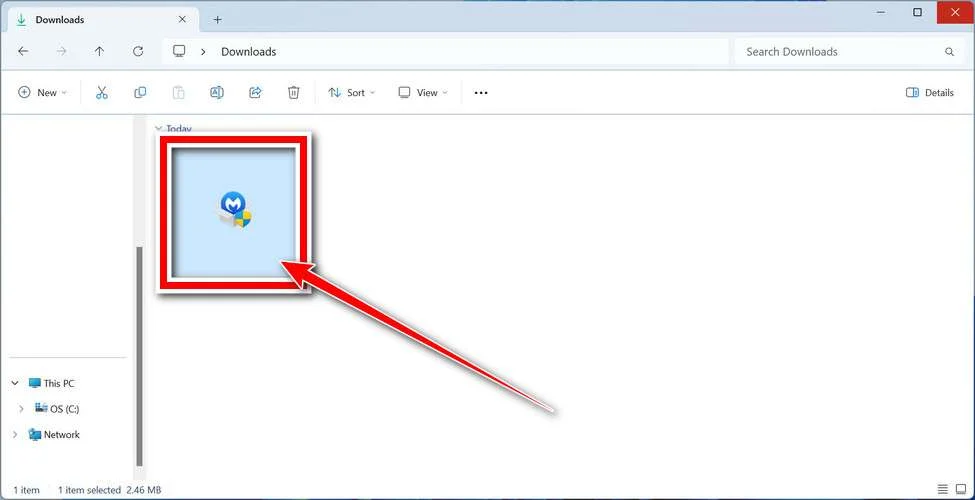
Follow the On-Screen Prompts to Install Malwarebytes
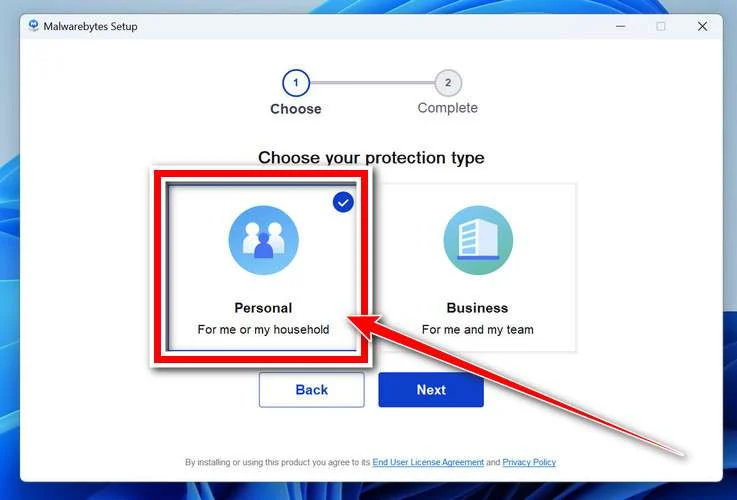
The setup wizard will walk you through a few quick screens:
-
Choose where you’re installing the program — “Personal Computer” or “Work Computer” — then click Next.
-
Malwarebytes will now install on your device. This usually takes under a minute.

-
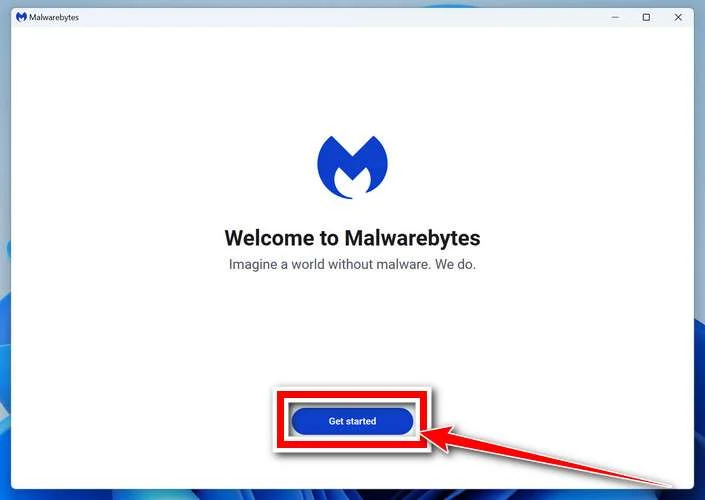
When installation is complete, the “Welcome to Malwarebytes” screen will open automatically.
-
On the final screen, click Open Malwarebytes to launch the program.

-
Enable “Scan for Rootkits”
Before scanning, turn on rootkit detection so Malwarebytes can find even the most hidden threats. Click the Settings gear icon on the left side of the screen.
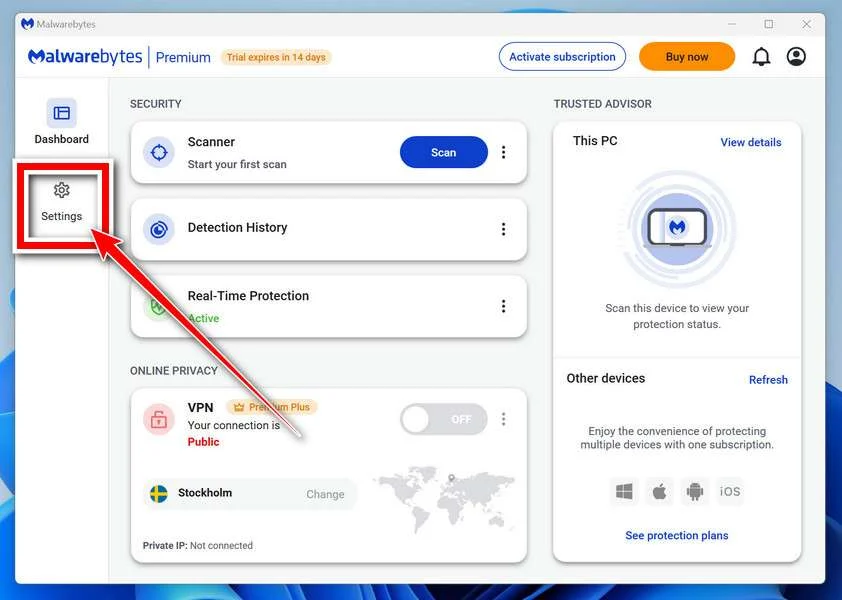
In the settings menu, find “Scan for rootkits” and click the toggle so it turns blue.

Done? Click “Dashboard” in the left pane to return to the main screen.
Start the Scan
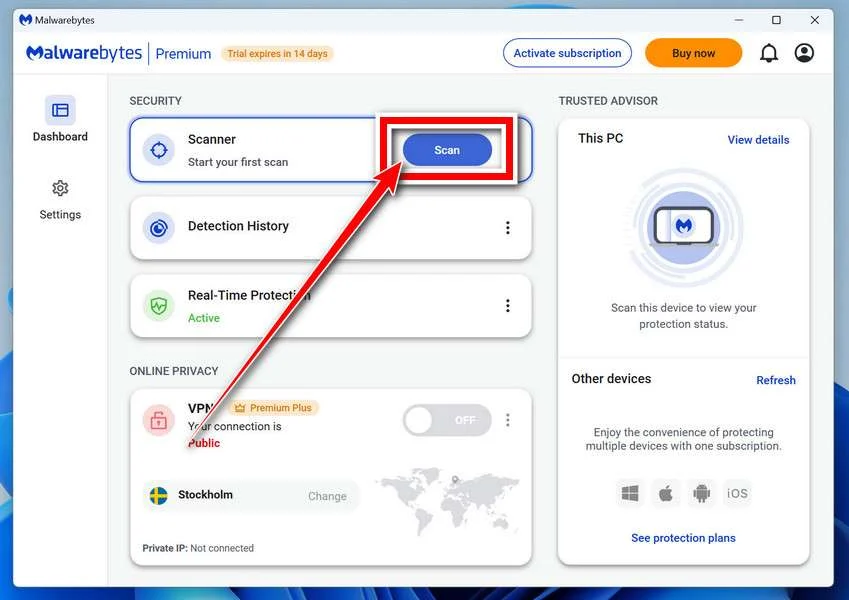
Click the blue Scan button. Malwarebytes will automatically update its virus database and start checking your computer for malware.
-
Wait for the Scan to Finish
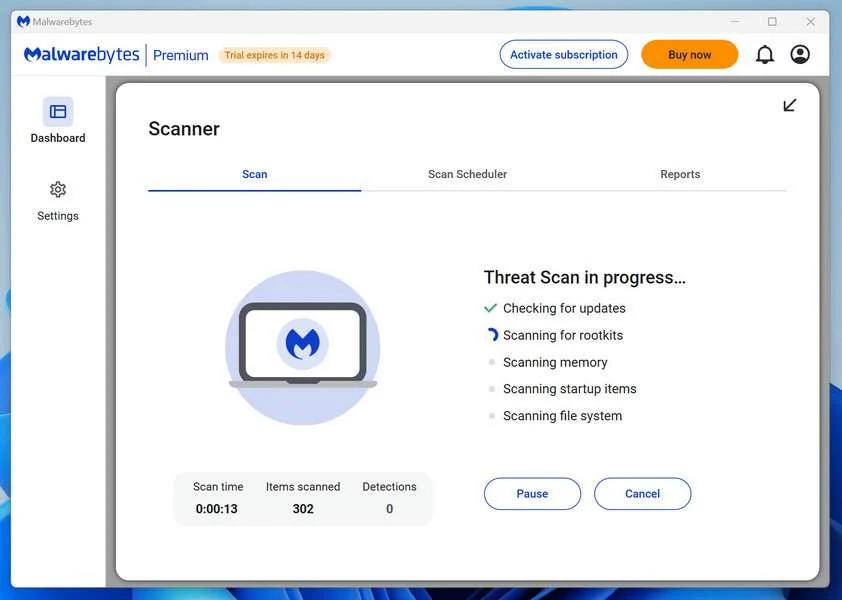
The scan checks your entire system for browser hijackers and other malicious programs, so it can take 5 to 20 minutes depending on your computer. Feel free to do something else — just check back occasionally to see the progress.
-
Quarantine the Detected Threats
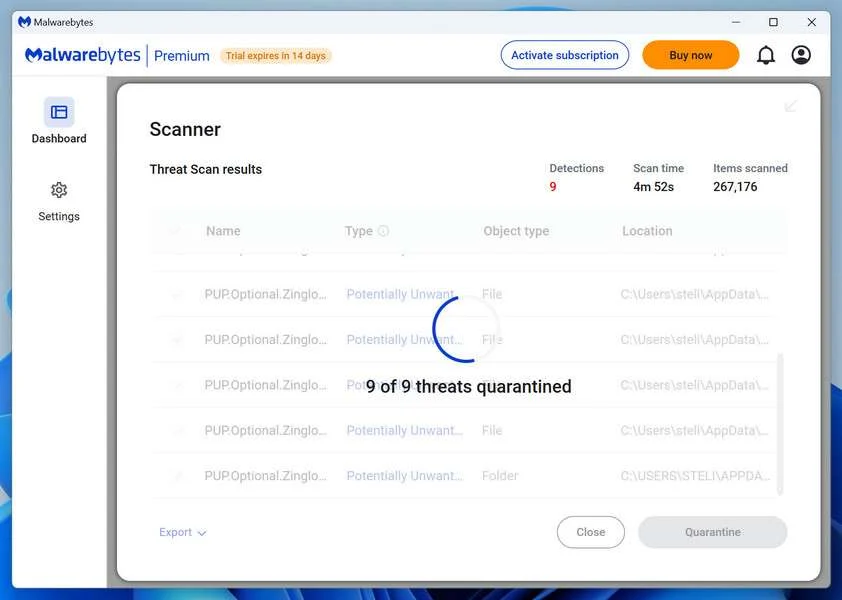
When the scan is done, you’ll see a list of everything Malwarebytes found — malware, adware, and potentially unwanted programs. Click the “Quarantine” button to remove all of them at once.
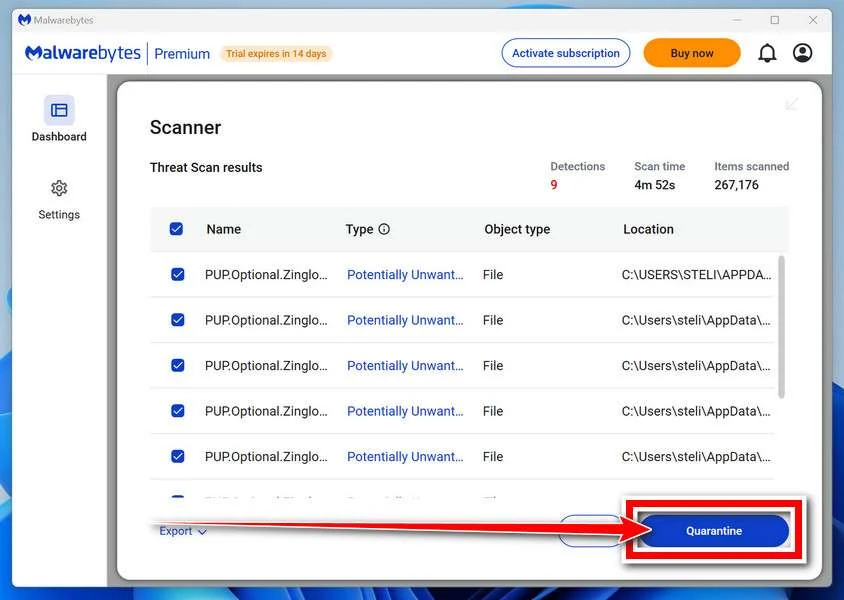
Malwarebytes will now remove the malicious files and registry entries and move them safely into quarantine.
-
Restart Your Computer
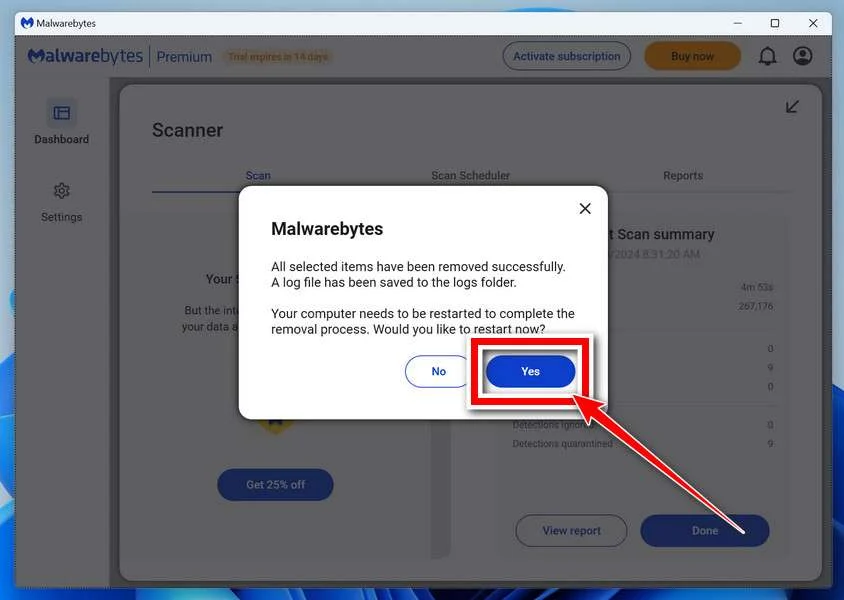
Some threats can only be fully removed after a reboot. If Malwarebytes asks you to restart, click Yes. Once you’re logged back in, Malwarebytes has finished removing the threats it found.
That’s it — your Windows PC is now clean of trojans, adware, and other malware, and should be back to running smoothly.
If you are still having problems with your computer after completing these instructions, then please follow one of the steps:
- Run a computer scan with ESET Online Scanner
- Ask for help in our Windows Malware Removal Help & Support forum.
Run a Malware Scan with Malwarebytes for Mac
Malwarebytes for Mac is a free on-demand scanner that removes the malware other security software tends to miss — adware, browser hijackers, and unwanted programs included. Cleaning an infected Mac with Malwarebytes has always been completely free, and it’s our go-to recommendation. Follow the steps below to scan and clean your Mac in just a few minutes.
-
Download Malwarebytes for Mac
Click the button below to download the latest version of Malwarebytes for Mac.
Download MalwarebytesOfficial installer for macOS. Your download starts right away.Want real-time protection? See Malwarebytes PremiumMalwarebytes Free for MacScans and removes malware at no cost -
Open the Malwarebytes setup file
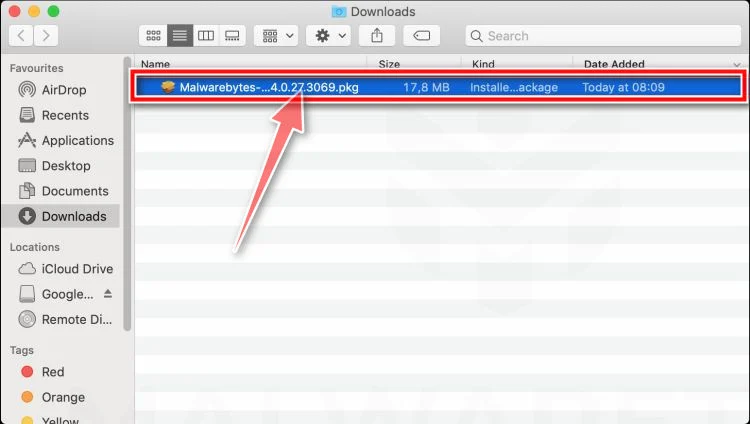
When the download finishes, open your Downloads folder and double-click the setup file to begin the installation.
-
Follow the On-Screen Prompts to Install Malwarebytes
The Malwarebytes for Mac Installer will guide you through a few quick screens. Click “Continue” and keep following the prompts until the installation completes.
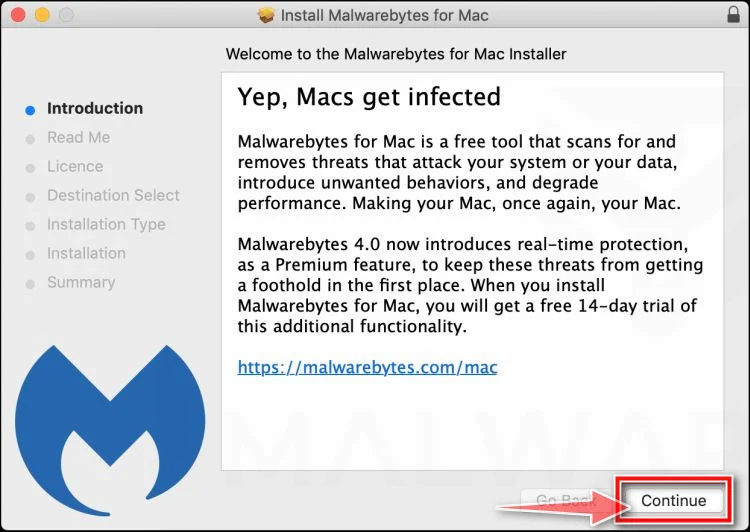
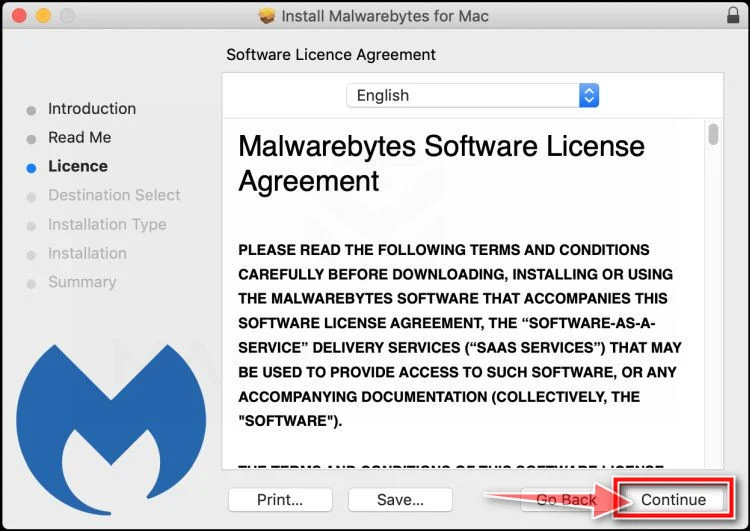
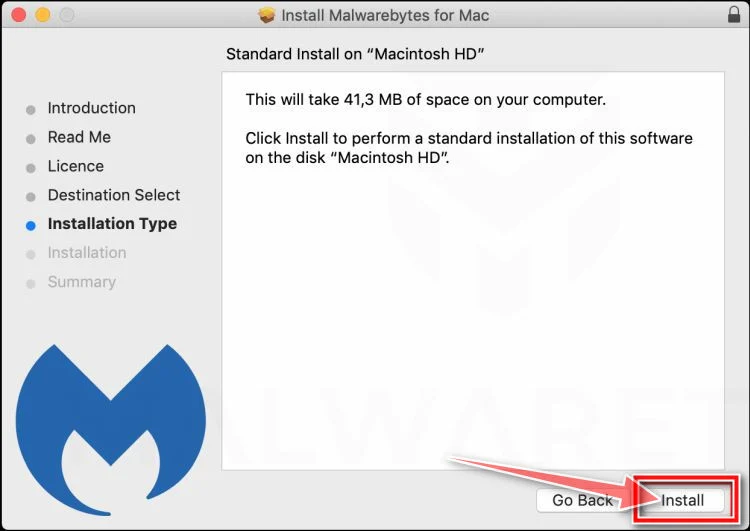
When the installation is complete, Malwarebytes opens to the Welcome to Malwarebytes screen. Click “Get started“.
-
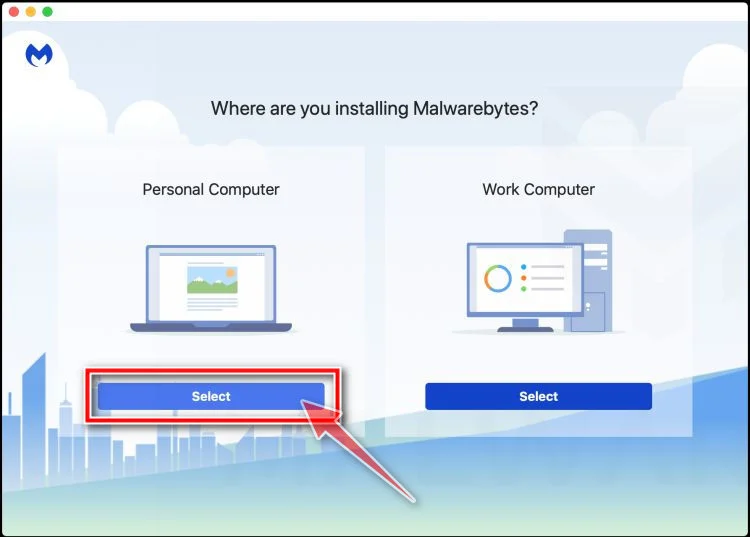
Select “Personal Computer” or “Work Computer”
Malwarebytes will ask what type of computer you’re installing it on. Click either Personal Computer or Work Computer, whichever applies.
-
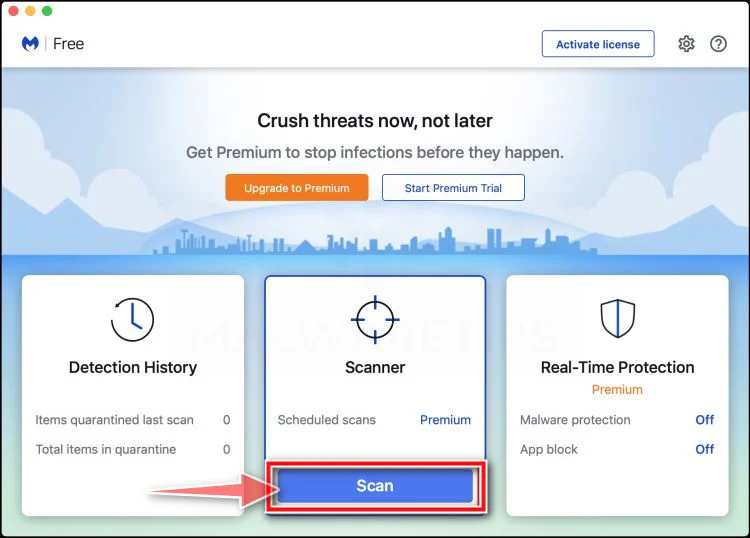
Start the Scan
Click the “Scan” button. Malwarebytes will automatically update its detection database and begin checking your Mac for malware.
-
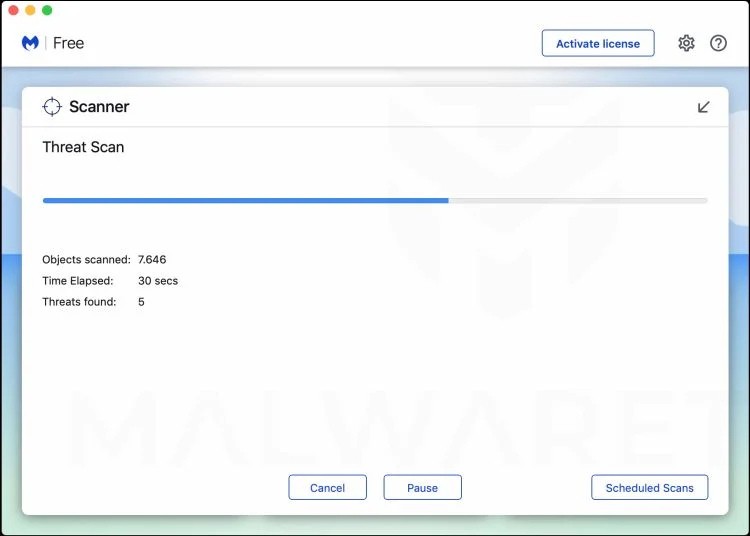
Wait for the Scan to Finish
Malwarebytes will scan your Mac for adware, browser hijackers, and other malicious programs. This can take a few minutes, so feel free to do something else — just check back occasionally to see the progress.
-
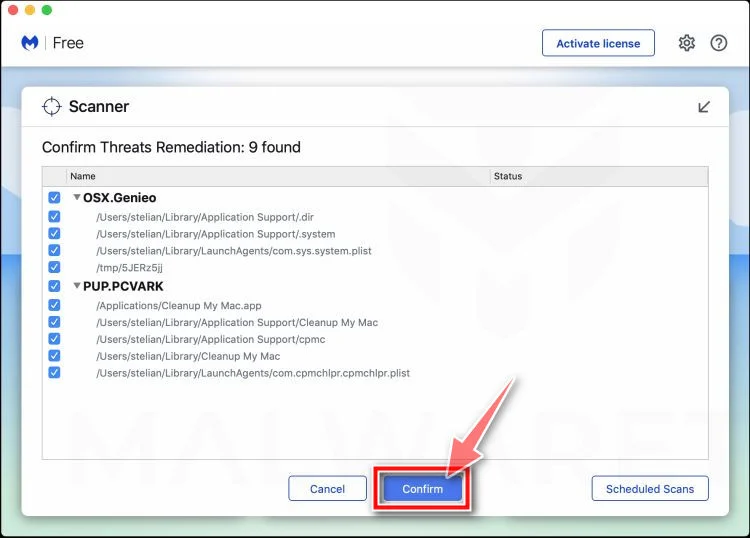
Quarantine the Detected Threats
When the scan is done, you’ll see a list of everything Malwarebytes found. Click the “Quarantine” button to remove all the threats at once.
-
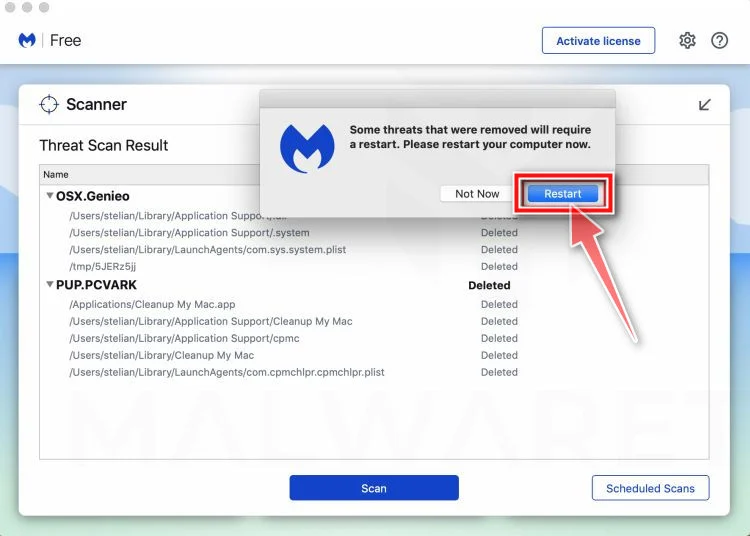
Restart Your Mac
Malwarebytes will now remove all the malicious files it found. Some threats can only be fully removed after a reboot — if Malwarebytes asks you to restart, allow it. Once you’re logged back in, your Mac is clean.
That’s it — your Mac is now free of adware, rogue browser extensions, and other potentially harmful software.
If you are still experiencing problems while trying to remove a malicious program from your computer, please ask for help in our Mac Malware Removal Help & Support forum.
Run a Malware Scan with Malwarebytes for Android
Malwarebytes for Android automatically detects and removes dangerous threats like malware and ransomware so you don’t have to worry about your most-used device being compromised. Aggressive detection of adware and potentially unwanted programs keeps your Android phone or tablet running smooth.
-
Download Malwarebytes for Android.
You can download Malwarebytes for Android by clicking the link below.
Get Malwarebytes for AndroidOpens Google Play in a new tab.Want real-time protection? See Malwarebytes Premium for AndroidMalwarebytes for AndroidScans your phone and removes malware at no cost -
Install Malwarebytes for Android on your phone.
In the Google Play Store, tap “Install” to install Malwarebytes for Android on your device.

When the installation process has finished, tap “Open” to begin using Malwarebytes for Android. You can also open Malwarebytes by tapping on its icon in your phone menu or home screen.

-
Follow the on-screen prompts to complete the setup process
When Malwarebytes will open, you will see the Malwarebytes Setup Wizard which will guide you through a series of permissions and other setup options.
This is the first of two screens that explain the difference between the Premium and Free versions. Swipe this screen to continue.
Tap on “Got it” to proceed to the next step.
Malwarebytes for Android will now ask for a set of permissions that are required to scan your device and protect it from malware. Tap on “Give permission” to continue.
Tap on “Allow” to permit Malwarebytes to access the files on your phone.
-
Update database and run a scan with Malwarebytes for Android
You will now be prompted to update the Malwarebytes database and run a full system scan.

Click on “Update database” to update the Malwarebytes for Android definitions to the latest version, then click on “Run full scan” to perform a system scan.

-
Wait for the Malwarebytes scan to complete.
Malwarebytes will now start scanning your phone for adware and other malicious apps. This process can take a few minutes, so we suggest you do something else and periodically check on the status of the scan to see when it is finished.

-
Click on “Remove Selected”.
When the scan has been completed, you will be presented with a screen showing the malware infections that Malwarebytes for Android has detected. To remove the malicious apps that Malwarebytes has found, tap on the “Remove Selected” button.

-
Restart your phone.
Malwarebytes for Android will now remove all the malicious apps that it has found. To complete the malware removal process, Malwarebytes may ask you to restart your device.
That’s it — your Android phone is now clean — no more malicious apps, adware, or browser redirects.
If you are still having problems with your phone after completing these instructions, then please follow one of the steps:
- Restore your phone to factory settings by going to Settings > General management > Reset > Factory data reset.
- Ask for help in our Mobile Malware Removal Help & Support forum.
Stay Protected: Block Ads and Malicious Sites
Now that your device is clean, keep it that way. Most infections start with a malicious ad or a fake download button — so blocking them at the source is your best defense.
We recommend AdGuard, which blocks malicious ads, phishing pages, and dangerous redirects before they can reach you.
👉 Download AdGuard and browse safely
The Bottom Line
The Starbucks Yeti Tumbler Giveaway Scam is not a generous promotion from Starbucks or Yeti. It is a subscription trap that uses trusted brands, AI powered videos, fake reviews, and high pressure tactics to convince you to hand over your card details for a “simple” $9.96 shipping fee.
Instead of receiving a premium tumbler in 2 to 7 days, many victims get nothing at all, while their cards are quietly hit with recurring charges of $50 to $82 for vague memberships they never wanted and often struggle to cancel.
If you see an offer that promises a free Starbucks Yeti Tumbler in exchange for a small shipping payment, treat it as a red flag. Verify promotions on Starbucks official channels, read all fine print before entering your card information, and do not let countdown timers rush your decision.
Staying skeptical of “too good to be true” giveaways is one of the most effective ways to protect your money, your data, and your peace of mind online.
FAQ
Is the Starbucks Yeti Tumbler Giveaway real?
No. The Starbucks Yeti Tumbler Giveaway circulating on social media is not an official Starbucks promotion. It is a subscription scam that uses Starbucks and Yeti branding without permission to trick people into entering their card details.
Why are Starbucks employees shown in the ads?
Scammers use images and videos that look like real Starbucks employees to build instant trust. Some content may be staged, stolen from other sources, or even AI generated. The goal is to make the giveaway feel like a genuine in store or company backed campaign.
What exactly is the scam part of the offer?
The scam is that you think you are only paying a small $9.96 shipping fee for a “free” Yeti Tumbler, but in reality you are being enrolled into a subscription membership. After a short trial period, victims are charged $50 to $82 every 30 days for a service they never knowingly agreed to.
Do people actually receive a Starbucks Yeti Tumbler?
Most victims either receive nothing at all or get a cheap, generic cup that is not a real Starbucks or Yeti product. The real money is made from the hidden recurring charges, not from sending out high quality tumblers.
How can I tell if a Starbucks giveaway is legit?
Check Starbucks official channels:
- The official Starbucks website
- The Starbucks app
- Verified Starbucks social media accounts
If a giveaway is not mentioned there and only appears on random ads or unknown domains, it is safest to assume it is not legitimate.
Why does the page say the offer expires in a few minutes?
Countdown timers and “100 left in stock” messages are fake urgency tactics. They are designed to make you act quickly so you do not stop to read the fine print or research the offer. If you refresh the page and the timer resets, that is a clear sign of manipulation.
Where are the hidden subscription terms usually placed?
They are usually buried in:
- Tiny text below the “Claim Offer” button
- Long, dense terms and conditions pages
- Links labeled as “Policies” or “Details”
These sections often state that by paying shipping you agree to a recurring membership that renews every 30 days until you cancel.
I already paid the shipping fee. What should I do now?
Act quickly:
- Contact your bank or card issuer and explain it was a subscription scam
- Ask them to block further charges and consider a chargeback
- Look for confirmation emails and cancel any subscriptions linked to the payment
- Monitor your statements for any new or recurring charges
The sooner you respond, the better your chances of limiting the damage.
Can I get my money back from this scam?
In many cases, yes, at least partially. If you report the scam early, some banks are willing to reverse recent charges, especially when you can show that recurring fees were hidden behind a “free gift” or “shipping only” offer. Results vary, but it is always worth trying.
How can I avoid similar “free gift” scams in the future?
Use this quick checklist:
- Be wary of offers that say “free, just pay shipping”
- Always check the domain and look for a real company name and contact details
- Read all fine print around payment forms
- Verify giveaways directly with the brand’s official site or app
- Be suspicious of ads that rely heavily on timers, stock counters, and personal “lucky winner” messages
If something feels too good to be true, especially when it involves a big brand and a very cheap offer, stepping back and double checking can save you a lot of money and stress.

Join the discussion
0 commentsShare your experience or ask a question about this article.
Discussion
Start the conversation
Have a question or something useful to share? Add the first comment.