

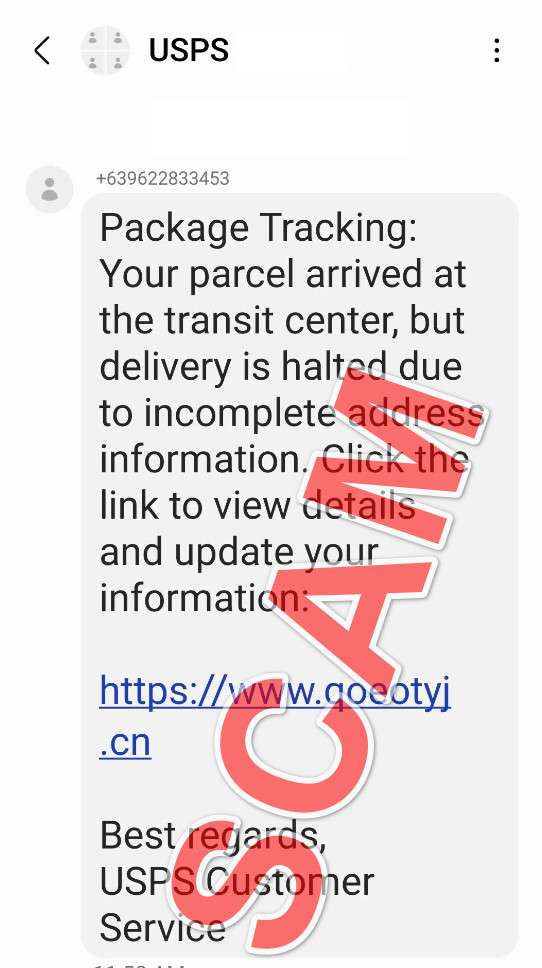
A text pops up on your phone: USPS could not deliver your package. To reschedule delivery, you need to confirm your address or pay a small fee. The message feels routine, especially if you have been shopping online.
That is exactly why this scam works. The USPS Reschedule Delivery Scam is a smishing attack that uses urgency, a convincing story, and a lookalike website to trick you into handing over personal and payment details.
In this guide, you will learn what these messages look like, how the scam works step by step, and what to do if you clicked or entered information.
Scam Overview
What the USPS reschedule delivery scam is
The USPS Reschedule Delivery Scam is a phishing scam delivered by text message (smishing) or email. The criminal impersonates USPS and claims there is a delivery problem that requires action.
Most versions say one of the following:
- Your package could not be delivered due to an address issue
- Your package is awaiting action and will be returned if you do not respond
- You must reschedule delivery or confirm delivery preferences
- You owe a small fee for redelivery or “unpaid postage”
The link in the message leads to a fake website that looks like a USPS tracking or delivery page. The site then asks for personal details and often requests a small payment to “reschedule.” The payment is bait. The real goal is your card details and personal data.
The U.S. Postal Inspection Service describes this pattern directly: unsolicited messages with strange links that push you to provide personal or financial information.
Why the scam is so convincing
This scam is built around everyday habits.
People are already primed to believe delivery updates
Delivery notifications are common. Many people receive legitimate order updates from retailers and carriers all the time, so a “delivery exception” does not feel unusual.
The FTC warns that these texts often claim a package is out for delivery or there is a problem like unpaid postage, a missed delivery, or you need to update shipping preferences, then they push you to click a link.
The message creates urgency
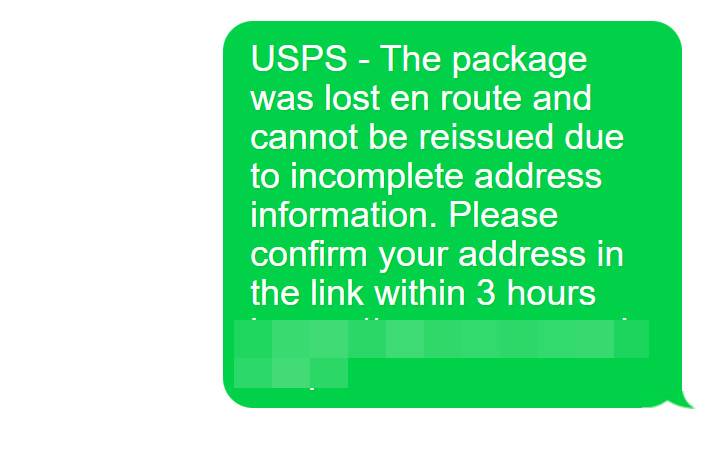
Scammers want you to act before you think. The text often includes a short deadline like:
- “Final notice”
- “Returned to sender today”
- “Action required within 12 hours”
USPS has warned that smishing messages often use urgency phrasing and that USPS does not send unsolicited text messages.
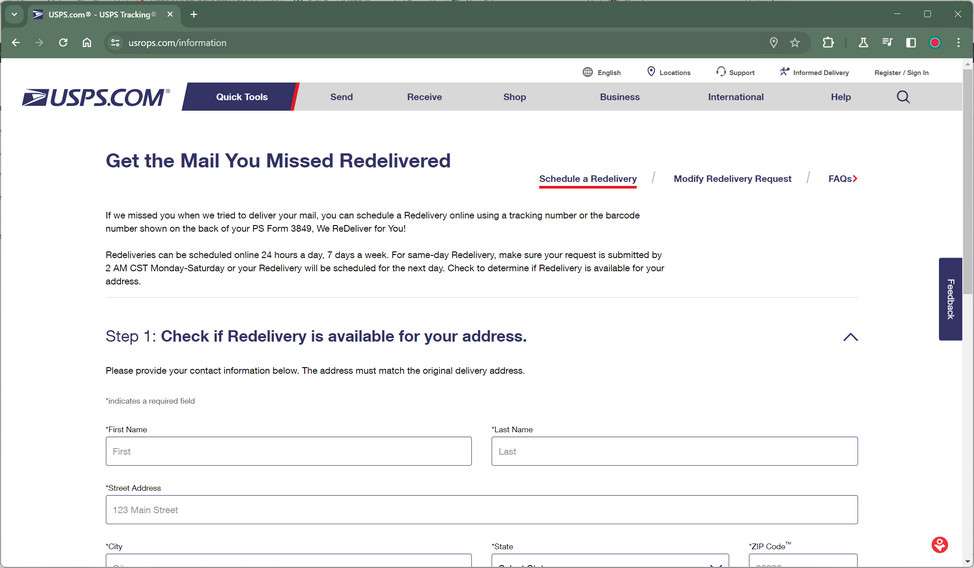
The fake site looks legitimate on a phone
Most victims view the page on mobile. The scam site is designed to look clean and official on a small screen, with familiar wording like “track,” “confirm,” or “reschedule.”
What USPS says about legitimate tracking texts
Knowing how real USPS texts work makes these scams easier to spot.
According to the U.S. Postal Inspection Service:
- USPS offers free tracking tools, but the customer must register or initiate the request and provide a tracking number
- USPS does not charge for these tracking services
- USPS will not send customers text messages or emails without the customer first requesting the service with a tracking number
- It will not contain a link
- USPS uses 5-digit short codes for sending and receiving SMS
This is a big deal. Many scam texts rely on a link. If you did not request USPS tracking updates for a specific package and the message contains a link, treat it as suspicious.
What scammers want from you
The reschedule delivery story is just a wrapper. The real goal is data theft.
Common targets include:
- Full name and address
- Date of birth
- Email address and phone number
- Credit or debit card number, expiration date, and security code
- Account usernames and passwords
- PINs or one-time passcodes in more aggressive variants
Even if you never pay, personal details can be used later for identity fraud, account takeover attempts, or more targeted scams.
The “small fee” trick and why it is not harmless
A classic version claims you must pay a small amount to reschedule delivery. It might be framed as:
- Redelivery fee
- Address correction fee
- Processing fee
- Unpaid postage
The fee is usually small (often a few dollars) because it lowers your resistance. After you enter your card details, criminals can attempt larger unauthorized charges or reuse the card details elsewhere.
The FTC explains the core problem: if you pay on the lookalike site, your money and the information you entered goes straight to the scammer.
Common red flags that separate scam from real USPS updates
Use this quick checklist.
High-confidence red flags:
- You did not request tracking updates for a specific package
- The message contains a link and pressures you to click it
- It asks for payment to reschedule delivery
- It asks for sensitive personal details you would not normally need for a delivery
- It uses urgency and threats like “returned to sender”
Other warning signs:
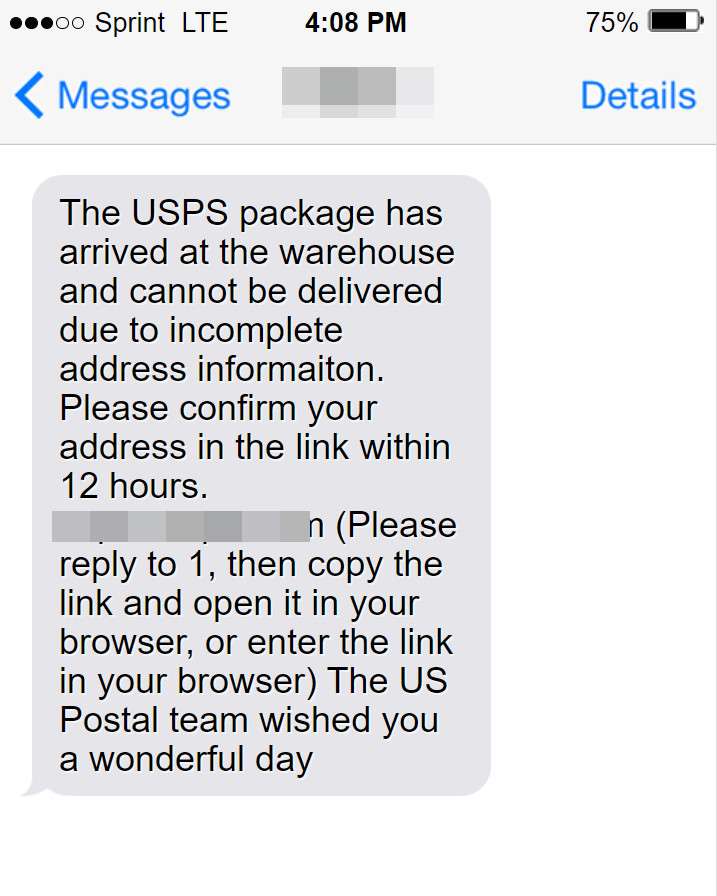
- Strange sender format or nonstandard phone number
- Poor grammar or awkward phrasing
- A tracking number that does not work on the official USPS site
- A website address that looks slightly off (extra words, misspellings, random characters)
Variants of the USPS Reschedule Delivery Scam Emails and Texts
Scammers constantly rotate wording, sender names, and URLs, but the structure stays the same: a delivery “problem,” urgency, and a link that leads to a fake USPS-style page asking for personal data and often a small fee.
Text message variants (SMS)
- Address incomplete
“USPS: Delivery could not be completed due to an incomplete address. Update details to reschedule: hxxps://usps-address[.]com/” - Returned to sender deadline
“USPS FINAL NOTICE: Your parcel will be returned to sender today. Reschedule delivery now: hxxps://usps-reschedule[.]info/” - Unpaid postage fee
“USPS: Your package is on hold. Unpaid postage of $2.99 is required to release it. Pay here: hxxps://usps-fee[.]site/” - Delivery attempt failed
“USPS Alert: We attempted delivery but were unable to deliver your package. Choose a new delivery time: hxxps://usps-redelivery[.]live/” - Missing delivery preferences
“USPS: Action required. Confirm delivery preferences for your parcel to avoid delays: hxxps://usps-confirm[.]top/” - Fake tracking ID included
“USPS Tracking: #US74291 delivery failed. Confirm address within 12 hours: hxxps://usps-track[.]online/US74291” - Held at facility
“USPS: Your parcel is being held at our facility. Reschedule delivery to continue: hxxps://usps-hold[.]com/” - “Second attempt” pressure
“USPS: Second delivery attempt failed. Reschedule now to avoid cancellation: hxxps://usps-2ndattempt[.]net/” - Payment failure bait
“USPS: Delivery could not be scheduled due to payment issue. Update info to proceed: hxxps://usps-payment[.]help/” - Generic “shipment suspended” wording
“USPS: Shipment temporarily suspended. Confirm details to reactivate delivery: hxxps://usps-reactivate[.]site/”
Email variants (subject lines + realistic body snippets)
- Subject: USPS Delivery Attempt Failed: Reschedule Required
Body snippet:
“We attempted to deliver your item but were unable to complete delivery. Please reschedule within 24 hours to prevent return to sender. Reschedule here: hxxps://usps-reschedule[.]info/” - Subject: Action Required: Package On Hold (Address Confirmation Needed)
Body snippet:
“Your package is currently on hold due to missing address information. Please confirm your address and phone number to continue delivery.” - Subject: Unpaid Postage Notice: $2.99 Required
Body snippet:
“Your shipment cannot be delivered until the outstanding postage fee is paid. Click below to pay and reschedule delivery.” - Subject: Final Notice: Delivery Will Be Returned Today
Body snippet:
“Important: This is your final reminder. If you do not confirm delivery today, your package will be returned to sender.” - Subject: USPS Delivery Update: Verify Recipient Details
Body snippet:
“For security reasons, we require verification of recipient information. Please confirm your full name, date of birth, and address.” - Subject: Delivery Scheduling Failed: Confirm Payment Method
Body snippet:
“Your delivery request could not be processed. Please confirm your payment method to reschedule.” - Subject: USPS Package Awaiting Instructions
Body snippet:
“Your package is awaiting instructions. Select a new delivery date/time to avoid delays.” - Subject: USPS Notification: Delivery Exception
Body snippet:
“We experienced a delivery exception due to an incomplete address. Update your information to complete delivery.” - Subject: Shipment Held: Confirm Address to Release
Body snippet:
“Your item is being held. Confirm your address to release your shipment for delivery.” - Subject: USPS Delivery Confirmation Needed
Body snippet:
“Confirm delivery details to proceed. Failure to respond may result in return to sender.”
Important pattern note: these scams often use generic greetings (“Dear customer”), high urgency, and links that do not belong to USPS. If a message asks for a “reschedule fee” or “unpaid postage” through an unsolicited link, treat it as suspicious.nk to “fix” the issue, the safest move is to avoid the link and verify tracking independently through official channels.
How The Scam Works
Step 1: Mass texting to catch people who are expecting packages
Most of these scams start as volume attacks. Criminals send huge batches of messages hoping a percentage of recipients are currently waiting on a delivery.
They do not need to know who ordered what. They just need the message to land at the right time for enough people.
USPS and the Postal Inspection Service warn that people receive unsolicited texts with unfamiliar links claiming a USPS delivery requires a response.
Step 2: The message creates a believable delivery problem
The scam text usually claims one of a few “everyday” issues:
- Address is incomplete
- Delivery failed
- Package is waiting at a facility
- Postage is unpaid
- Delivery preferences must be updated
These explanations are chosen because they feel plausible. People know deliveries can fail for simple reasons.
The FTC notes that scam texts often mention missed delivery, unpaid postage, or needing to update shipping preferences.
Step 3: Urgency is added to override careful thinking
Next comes pressure.
Common tactics include:
- A deadline of a few hours
- “Final notice” language
- Threats that the parcel will be returned to sender
USPS has explicitly warned that smishing relies on urgent messaging and that unsolicited USPS texts should not be trusted.
Step 4: The link leads to a convincing lookalike page
Once you click, the scam shifts from persuasion to imitation.
The fake page often includes:
- USPS-like branding and colors
- A “tracking” layout
- A package status like “Held,” “Exception,” or “Awaiting Action”
- A big button for “Reschedule delivery” or “Confirm address”
At this point, the victim feels they are inside a normal tracking flow, not on a random website.
Step 5: The site asks for personal details first
Many scams start with a form that looks harmless:
- Name
- Address
- Phone
- Date of birth
This step serves two purposes:
- It makes the process feel official, like a standard verification step
- It collects valuable identity data even if the victim does not enter payment details
The Postal Inspection Service lists the types of personally identifiable information criminals seek, including date of birth and other sensitive details.
Step 6: The “reschedule fee” appears
After you enter personal information, the page introduces a small payment request.
It might be framed as:
- “Redelivery fee”
- “Processing fee”
- “Unpaid postage”
- “Address correction”
Amounts are typically low, often only a few dollars. The goal is to get you to type in your card details.
The FTC describes what happens next: the link takes you to a lookalike site where you are told to enter personal or financial information, and if you pay, the money and details go to the scammer.
Step 7: Card details are captured and tested
Once you submit payment info, criminals may:
- Attempt a small test charge
- Attempt multiple charges over time
- Use the card details elsewhere for card-not-present fraud
- Pair your card data with your address and name to improve approval odds
Even if the first charge looks like the “fee,” the real damage often comes later.
Step 8: Follow-up scams target victims again
If you interacted with the scam, you may receive more messages.
Common follow-ups include:
- More “delivery issue” texts from other fake carriers
- Bank impersonation calls about “suspicious charges”
- Fake refund offers that ask for more details
- Fake “support” that asks you to install an app
This is why quick damage control matters even if you only entered your address.
Step 9: Some versions try to deliver malware
Not every version is strictly a payment trap. Smishing links can also:
- Push you to install an app
- Trigger malicious downloads
- Attempt to harvest device or browser data
The Postal Inspection Service warns that clicking links in these texts can lead to fake websites that steal information and can also install malware.
What To Do If You Have Fallen Victim to This Scam
- If you received the message but did not click
- Delete it.
- Mark it as spam or junk in your messaging app.
- If your phone supports it, use “Report junk” or “Report spam.”
- If you clicked the link but entered nothing
- Close the page.
- Do not return to it.
- If you are expecting a package, verify tracking by going directly to the retailer account or the official USPS site manually instead of using the link.
- If you entered personal information but did not enter card details
- Watch for follow-up scams, especially ones referencing delivery or your address.
- Secure your email account first (enable 2-factor authentication) because email access often leads to wider account takeovers.
- Consider changing passwords if you reuse them across sites.
- If you entered card details or paid a fee
- Contact your bank or card issuer immediately.
- Freeze the card and request a replacement.
- Review recent transactions carefully and dispute unauthorized charges.
- Turn on transaction alerts so you catch new activity fast.
The Postal Inspection Service advises that if you have interacted with the URL, you should notify your financial institution.
- If you entered a one-time passcode or banking login
- Call your bank right away.
- Explain you may have authorized a fraudulent transaction or shared credentials.
- Ask what protections they can add (blocks, extra verification, new account numbers).
- If you installed anything after clicking
- Uninstall the app immediately.
- Run a reputable mobile security scan.
- Change key passwords from a separate, clean device, starting with your email and banking.
- Document what happened
- Save screenshots of the text or email (including the sender details and date).
- Note any amounts charged and timestamps.
This helps your bank and supports reporting.
- Report the scam to help stop it
The Postal Inspection Service recommends these reporting steps for USPS-related smishing:- Forward the smishing text to 7726 (SPAM)
- Email spam@uspis.gov with the message copied (without clicking the link) and include your name and a screenshot showing sender and date
- Report fraud to the FTC (the Postal Inspection Service references FTC reporting as well)
The FCC also summarizes similar package delivery scam reporting guidance, including forwarding texts to 7726 and reporting suspicious emails to the appropriate address.
- Monitor accounts for at least 30 days
- Check statements every few days.
- Watch for small test charges and new subscriptions.
- Consider a fraud alert or credit freeze if you shared enough identity data and you are concerned about identity theft.
The Bottom Line
The USPS Reschedule Delivery Scam is effective because it mimics normal delivery friction and pushes urgency. A single link can lead to a lookalike site that asks for personal details and a small fee, then uses that information for bigger fraud.
The safest rule is simple: if you did not request USPS tracking updates for a specific package and a message contains a link, do not click it. Verify delivery status by going directly to the retailer or official USPS tracking tools, and report suspicious texts to 7726 and the Postal Inspection Service.
FAQ
What is the USPS Reschedule Delivery Scam?
It is a phishing scam where criminals impersonate USPS and claim there is a delivery problem that requires you to reschedule or confirm details. The message includes a link to a fake USPS-style site that asks for personal information and often payment details for a small “fee.”
Does USPS text you to reschedule delivery if there is a problem?
USPS does offer tracking updates, but legitimate texts are typically tied to a tracking request you initiated. If you did not request tracking updates for a specific package and you receive a random “reschedule” link, be cautious.
Why do these messages ask for a small payment like $2.99?
The small fee is bait. Scammers want your card number, expiration date, and security code. Once they have those details, they can attempt larger unauthorized charges, repeated small charges, or subscription billing.
What information do fake USPS pages usually ask for?
Common requests include:
- Full name and address
- Email and phone number
- Date of birth
- Card details (number, expiration date, security code)
Some versions also ask for a one-time bank passcode.
I clicked the link but did not enter anything. What should I do?
Close the page and do not return to it. Mark the text or email as spam. If you are actually expecting a delivery, manually go to the official USPS website or your retailer’s order page to check tracking instead of using the link.
I entered my address but not my card. Is that still a problem?
It can be. Your information can be used for more targeted scams later or combined with other data leaks. Watch for follow-up messages and consider tightening security on your email account and important logins.
I entered my card details or paid. What should I do immediately?
- Contact your bank or card issuer right away
- Freeze the card and request a replacement
- Dispute unauthorized charges
- Turn on transaction alerts and monitor your account closely for at least 30 days
What if I entered a one-time passcode from my bank?
Treat it as urgent. Call your bank immediately. A passcode can authorize a payment or enable account actions that are hard to reverse if you delay.
How can I tell the website is fake?
Common signs include:
- The domain is not an official USPS domain
- The page pushes urgency and demands immediate action
- It asks for card details to “reschedule”
- It requests personal info that makes no sense for delivery
When in doubt, do not use the link. Use official channels instead.
Should I reply to the message or call a number included in it?
No. Do not reply, do not call numbers provided in suspicious messages, and do not continue the conversation. Interaction can confirm your number is active and may lead to more scam attempts.
How do I report USPS smishing texts?
Use your phone’s report spam feature. In the US, many carriers support forwarding scam texts to 7726 (SPAM). You can also report the attempt to relevant authorities such as the U.S. Postal Inspection Service and the FTC.
How can I avoid these scams in the future?
- Do not click delivery links from unexpected texts or emails
- Track packages by typing the USPS site address yourself or using the official app
- Enable bank transaction alerts
- Use virtual card numbers if available
- Keep your device updated and avoid installing apps from random links








