

Start-postal-job.com is a deceptive website that scams people who are seeking employment with the United States Postal Service (USPS). This in-depth article will uncover how this USPS scam works, provide tips on how to avoid falling victim, and give guidance on what to do if you have already been scammed.
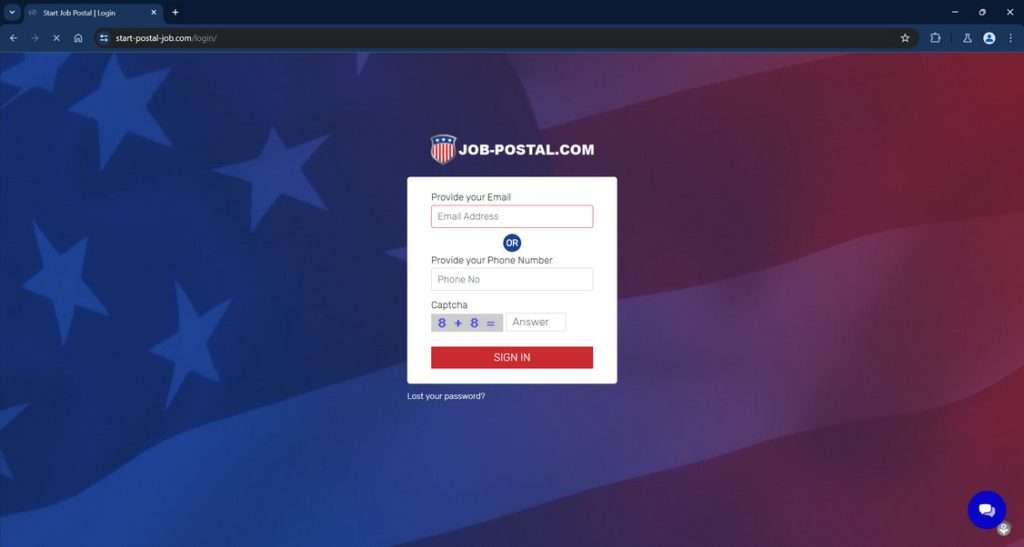
Overview of the Start-postal-job.com Scam
Start-postal-job.com pretends to help people find and apply for jobs with the USPS. However, this website has no official affiliation with the USPS. The site charges an upfront fee of $89 to supposedly assist applicants in getting hired.
In reality, start-postal-job.com provides no real services to improve someone’s chances of USPS employment. They simply pocket the fees paid by unsuspecting victims.
This scam takes advantage of people who may be struggling financially and desperately need a good job. USPS positions are highly desirable, with good pay and federal government benefits. The scam artists behind start-postal-job.com target those eager to get their foot in the door with the USPS.
Warning Signs of the Start-postal-job.com Scam:
- Claims to be affiliated with USPS when it is not.
- Charges a fee to help applicants get hired.
- Vague about services provided and hiring process.
- No verifiable company information or location.
- Uses fake reviews and testimonials.
- Refuses refunds on their “service fees”.
Avoid being fooled by only using the official USPS site at usps.com/careers for job searches and applications.
How the Start-postal-job Scam Works
The start-postal-job.com scam is quite elaborative in how it deceives job seekers and profits from their needs. Here is an in-depth look at how this employment scam operates:
Step 1: Fake Job Listings
The scam begins by populating start-postal-job.com with USPS job postings copied directly from the official USPS careers site. Site visitors browsing the job listings are unable to tell these are not legitimate postings made by start-postal-job.com itself.
Step 2: Phony Application Process
When someone tries to apply for a job on start-postal-job.com, they are redirected to a site registration form. This sign-up requires an email address, personal details, and importantly – a credit card number.
Visitors are led to believe this application process will improve their chances of getting hired. But in reality, it only exists to collect payment.
Step 3: Upfront Fee Charged
After submitting the registration form, applicants are charged an upfront $89 fee. This charge may be labeled as an “application processing fee”, “job preparation service”, or other misleading terms.
The scammers behind start-postal-job.com pretend this fee is for services that will boost someone’s chances of getting hired by the USPS. This is completely false.
Step 4: Fake Application Confirmation
Once payment goes through, the applicant receives an email confirming their “application” was received. This helps maintain the illusion that start-postal-job.com has submitted an application on the victim’s behalf.
Of course, no job application was actually filed. The USPS never receives these applications, only start-postal-job.com receives the money.
Step 5: No Services Provided
Despite claiming otherwise, start-postal-job.com does absolutely nothing to actually assist applicants in getting hired by the USPS.
No coaching, profile help, application assistance or hiring boost is provided. The entire website is a front to collect fees from job seekers.
Step 6: No Refunds Allowed
When victims inevitably do not get hired by the USPS, and realize it was a scam, start-postal-job.com will refuse any refund request.
Their site claims the $89 is non-refundable no matter the outcome. This ensures they keep all ill-gotten funds.
Avoid this by never paying upfront fees for help getting hired. Legitimate job prep services only charge after you are hired.
What to Do if You are a Victim of the Start-postal-job.com Scam
If you already paid the start-postal-job.com fee, but have not gotten a USPS job, here are important steps to take:
1. Contact your bank or credit card company.
Immediately notify your bank or credit card provider that you were fraudulently charged by start-postal-job.com. Request a chargeback or refund of the $89 or more paid to them. Provide details showing it was an illegitimate transaction.
2. Report start-postal-job.com to the FTC.
File a scam report about them with the Federal Trade Commission at ReportFraud.ftc.gov. The FTC investigates employment scams like start-postal-job.com. Reporting them helps protect others from being targeted.
3. Check credit reports.
Since you provided personal information to start-postal-job.com, check your credit reports. Ensure no accounts were opened fraudulently in your name. Visit www.annualcreditreport.com.
4. Warn others online.
Post reviews about the scam on sites like Yelp, BBB, Google, etc. Spreading awareness helps prevent other job seekers from falling victim too. Share your experience on social media as well.
5. Apply directly with the USPS.
Don’t let this scam discourage you. Go directly to usps.com/careers and apply for any jobs legitimately posted by the United States Postal Service. Avoid any other sites claiming to help get hired.
Frequently Asked Questions About the Start-postal-job.com Scam
1. What is Start-postal-job.com?
Start-postal-job.com is a fraudulent website that pretends to help people apply for United States Postal Service (USPS) jobs in exchange for an upfront $89 fee. However, it has no affiliation with the USPS and provides no real services to improve someone’s chances of getting hired. It simply pockets the fees paid by victims.
2. How can I tell Start-postal-job.com is a scam?
Start-postal-job.com displays several clear warning signs of a scam:
- Claims to be affiliated with the USPS when it is not.
- Charges fees to help you get hired.
- Vague about actual services provided.
- No verifiable company info or location.
- Uses fake reviews and testimonials.
3. Does Start-postal-job.com really help people get USPS jobs?
No, Start-postal-job.com does not help anyone get hired by the USPS in any way. It is a fake front used to collect fees from job seekers. No coaching, profile help, or application assistance is actually provided.
4. What happens when I try to apply on Start-postal-job.com?
When you try to apply, you are redirected to a registration form asking for your email, personal details, and credit card number. After submitting it, you are charged the $89 fee under the guise it is for “application processing” or “job preparation services”. In reality, no application is submitted and no services provided.
5. What should I do if Start-postal-job.com charged my credit card?
If you paid their fee but have not gotten a USPS job, immediately contact your bank or credit card issuer to dispute the charge as fraudulent. Also file a report about the scam with the FTC to help warn others. Check your credit reports for any fraud too.
6. Can I get a refund from Start-postal-job.com?
No, their website states the $89 fee is non-refundable no matter the outcome. This ensures they keep all ill-gotten funds paid by victims. Legitimate job services only charge after you are hired, not before.
7. Is there a way to get USPS jobs without paying anything?
Yes, simply apply directly on the official USPS careers site usps.com/careers. It is 100% free to search job listings and submit applications yourself. Never pay a third party site claiming they can help you get hired.
8. How can I report this scam to help others avoid it?
You should report Start-postal-job.com to the Federal Trade Commission at ReportFraud.ftc.gov. Also post warnings on review sites, social media, and forums frequented by job seekers. Spreading awareness helps prevent additional victims.
9. What precautions can I take to avoid similar employment scams?
Only use the official company site to apply when seeking jobs. Be wary of third parties claiming they can improve your chances for a fee. Research the company first and look for scam warnings. And never pay upfront for application assistance – legitimate services only charge after you are hired.
The Bottom Line on Start-postal-job.com
Start-postal-job.com falsely claims to help applicants get hired by the USPS in order to collect fees from job seekers. They provide no real services to improve employment chances. Reputable job prep companies only charge for their services after you are hired.
Applying directly via the official USPS site at usps.com/careers is the only way to legitimately seek postal service employment. Report any scams to the FTC to protect other vulnerable job seekers from being exploited. Share your experiences too so everyone is aware of these deceptive employment sites.
This article is for informational purposes only and should not be relied upon for financial or business decisions. We identify potential scams using research, user experiences, and expert analysis. However, all claims should be independently verified. Mistakes may occur, and legitimate products could be flagged. We strive for accuracy but make no warranties regarding the completeness or reliability of the information.

If you are the owner of the website or product in question and wish to offer clarifications regarding your business or website, please reach out to us via our Contact form.








