

Lululemon’s wildly popular athletic apparel has cultivated an enthusiastic following ready to shell out premium prices for leggings, tops, and more. So when an opportunity pops up promising $750 in Lululemon gift cards for product reviews, eager fans take notice. But the enticing SweatHaul.com website is a fraudulent affiliate marketing scheme, not a rewards program. This comprehensive guide will uncover how this scam really works so you can avoid manipulation.
Understanding the Deceptive SweatHaul Scam
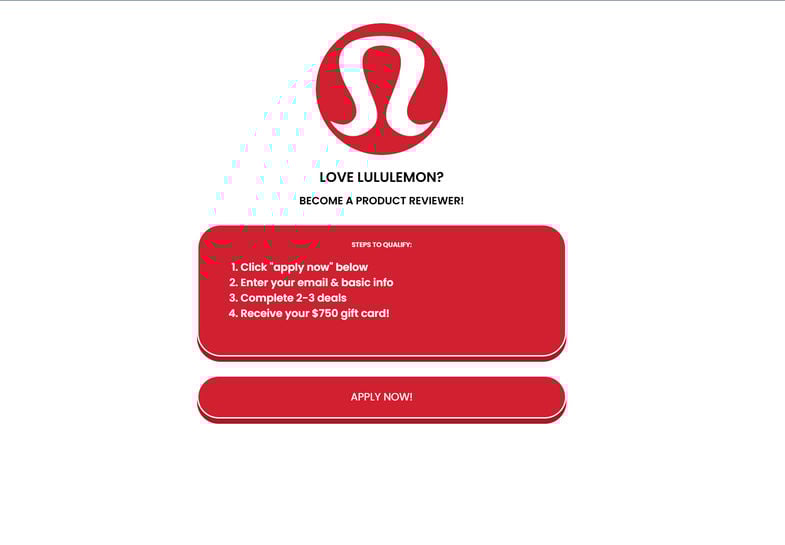
At first glance, SweatHaul.com appears to offer an amazing chance to score free Lululemon gear. The site prominently displays the brand’s logo and promises visitors can become a product tester to earn a massive $750 digital gift card.
To get started, you simply click “Apply Now,” quickly enter some basic personal details like your email, and complete a couple of “deals.” These deals involve taking surveys, signing up for free trials, downloading apps, or watching videos.
In exchange, SweatHaul claims they’ll send a $750 Lululemon gift code for online or in-store use. But despite appearances, this website has absolutely zero affiliation with Lululemon.
In reality, SweatHaul.com is an elaborate affiliate marketing scheme disguised as a rewards program. By enticing Lululemon fans with free gear, scammers generate illicit commissions and harvest data from completed “deals.” Meanwhile, victims are left empty-handed.
When exposed, this ruse serves as a reminder to be wary of unbelievable brand offers requiring upfront activity. Let’s break down exactly how SweatHaul operates so you can stay vigilant.
How the SweatHaul Lululemon Scam Works
Now that you understand the general premise, let’s walk through how this deceptive SweatHaul.com scam unfolds:
1. You Encounter the SweatHaul.com Website
The scam begins when a social media ad, email, search result, or text link leads potential victims to the SweatHaul.com website.
The site appears at first glance to be an official Lululemon domain. It uses the brand’s assets without permission to feign legitimacy. However, SweatHaul.com has zero actual ties to Lululemon.
Upon arriving, users see promises of a $750 Lululemon digital gift card in exchange for becoming a product tester. Given Lululemon’s premium prices, this seems like an amazing deal.
2. You Click “Apply Now”
Enticed by free Lululemon gear, users click the prominent “Apply Now” button to get started.
3. You’re Redirected to Complete Additional “Deals”
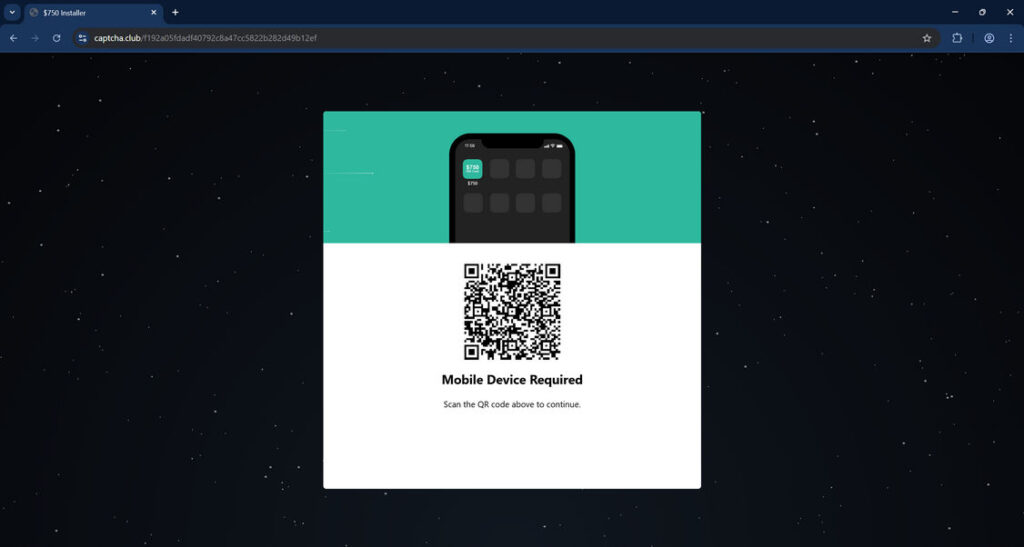
Users are then redirected via affiliate links to third-party websites like Captha.club to complete extra “deals.”
These deals typically include signing up for subscriptions, taking surveys, downloading apps, or watching videos. Each completes earns affiliate commissions for scammers while users still haven’t received any reward.
4. You Provide More Personal and Financial Information
Completing the required deals necessitates handing over more personal and financial information.
Signing up for subscription offers often requires inputting credit card information. Downloaded apps request access to contacts, messages, and more data. Surveys collect location, demographic, and interest data.
This sensitive information enables financial fraud and expands scammers’ ability to profile and target victims.
5. No Gift Card Arrives After Completing Deals
After investing time and information completing “deals,” users await their promised $750 Lululemon gift code.
But unsurprisingly, no reward ever materializes. SweatHaul.com is not associated with Lululemon and never intended to actually send gift cards. The entire premise is a ruse to manipulate shoppers into generating affiliate commissions.
6. Scammers Vanish or Try Again
Having successfully swindled commissions and data, the SweatHaul scammers disappear. The website may be abandoned now that they’ve gotten what they want.
In some cases, victims report receiving more texts or emails weeks later with the same fake Lululemon gift card offers. Persistent scammers may reuse stolen contact lists to replicate their scam.
Without caution, these online scams can escalate to take advantage of thousands more unsuspecting victims.
What to Do If You Are a SweatHaul.com Victim
If you suspect you’ve fallen prey to the SweatHaul.com ruse, take these steps immediately to protect yourself:
- Report It – File a scam complaint with the FTC at ReportFraud.ftc.gov and notify Lululemon about the brand misuse.
- Monitor Accounts – Check bank statements and credit reports closely for any signs of personal information misuse. Enable text/email alerts.
- Change Passwords – If you reused SweatHaul passwords anywhere else, change them now. Use a password manager to ensure unique and complex credentials.
- Warn Contacts – Let friends, family, and social media connections know about this scam website so they can avoid it too. Preventing further victims will undermine these schemes.
- Learn From It – Use this as motivation to be more discerning and cautious moving forward. Never provide payment or personal information to unfamiliar third-party websites.
Remaining vigilant and questioning suspicious offers helps disrupt these criminal enterprises thriving on consumer data and trust.
Is Your Device Infected? Run a Free Malware Scan
Slow performance, constant pop-ups, or strange behavior? These are classic signs of a malware infection. The fastest way to find out is to scan your device with Malwarebytes Free — one of the most trusted malware removal tools available.
The free version detects and removes the most common threats, including:
- Adware — the cause of those annoying pop-ups
- Browser hijackers — unwanted redirects and changed homepages
- Trojans and spyware — hidden programs stealing your data
- Potentially unwanted programs (PUPs) — software you never asked for
👉 Select your device below — Windows, Mac, or Android — then follow the simple steps to download Malwarebytes, scan your system, and remove any threats it finds. The scan usually takes 5 to 20 minutes.
Run a Malware Scan with Malwarebytes for Windows
Malwarebytes is one of the most popular and trusted anti-malware tools for Windows — and it’s completely free for removing infections. It catches threats that many antivirus programs miss, including adware, browser hijackers, and trojans. Follow the steps below to scan and clean your PC in just a few minutes.
Download Malwarebytes
Click the button below to download the latest version of Malwarebytes for Windows from the official source. The free version is all you need — it will scan your computer and remove adware, browser hijackers, and other malicious software at no cost.
Download MalwarebytesOfficial installer for Windows 11 and 10. Your download starts right away.Want real-time protection? See Malwarebytes Premium Malwarebytes Free for WindowsScans and removes malware at no cost
-
Install Malwarebytes
When the download finishes, open your Downloads folder and double-click the MBSetup file. If Windows shows a User Account Control pop-up, click “Yes” to allow the installation.

Follow the On-Screen Prompts to Install Malwarebytes
The setup wizard will walk you through a few quick screens:
-
Choose where you’re installing the program — “Personal Computer” or “Work Computer” — then click Next.

-
Malwarebytes will now install on your device. This usually takes under a minute.

-
When installation is complete, the “Welcome to Malwarebytes” screen will open automatically.

-
On the final screen, click Open Malwarebytes to launch the program.

-
Enable “Scan for Rootkits”
Before scanning, turn on rootkit detection so Malwarebytes can find even the most hidden threats. Click the Settings gear icon on the left side of the screen.

In the settings menu, find “Scan for rootkits” and click the toggle so it turns blue.

Done? Click “Dashboard” in the left pane to return to the main screen.
Start the Scan
Click the blue Scan button. Malwarebytes will automatically update its virus database and start checking your computer for malware.

-
Wait for the Scan to Finish
The scan checks your entire system for browser hijackers and other malicious programs, so it can take 5 to 20 minutes depending on your computer. Feel free to do something else — just check back occasionally to see the progress.

-
Quarantine the Detected Threats
When the scan is done, you’ll see a list of everything Malwarebytes found — malware, adware, and potentially unwanted programs. Click the “Quarantine” button to remove all of them at once.

Malwarebytes will now remove the malicious files and registry entries and move them safely into quarantine.

-
Restart Your Computer
Some threats can only be fully removed after a reboot. If Malwarebytes asks you to restart, click Yes. Once you’re logged back in, Malwarebytes has finished removing the threats it found.

That’s it — your Windows PC is now clean of trojans, adware, and other malware, and should be back to running smoothly.
If you are still having problems with your computer after completing these instructions, then please follow one of the steps:
- Run a computer scan with ESET Online Scanner
- Ask for help in our Windows Malware Removal Help & Support forum.
Run a Malware Scan with Malwarebytes for Mac
Malwarebytes for Mac is a free on-demand scanner that removes the malware other security software tends to miss — adware, browser hijackers, and unwanted programs included. Cleaning an infected Mac with Malwarebytes has always been completely free, and it’s our go-to recommendation. Follow the steps below to scan and clean your Mac in just a few minutes.
-
Download Malwarebytes for Mac
Click the button below to download the latest version of Malwarebytes for Mac.
Download MalwarebytesOfficial installer for macOS. Your download starts right away.Want real-time protection? See Malwarebytes PremiumMalwarebytes Free for MacScans and removes malware at no cost -
Open the Malwarebytes setup file
When the download finishes, open your Downloads folder and double-click the setup file to begin the installation.

-
Follow the On-Screen Prompts to Install Malwarebytes
The Malwarebytes for Mac Installer will guide you through a few quick screens. Click “Continue” and keep following the prompts until the installation completes.



When the installation is complete, Malwarebytes opens to the Welcome to Malwarebytes screen. Click “Get started“.
-
Select “Personal Computer” or “Work Computer”
Malwarebytes will ask what type of computer you’re installing it on. Click either Personal Computer or Work Computer, whichever applies.

-
Start the Scan
Click the “Scan” button. Malwarebytes will automatically update its detection database and begin checking your Mac for malware.

-
Wait for the Scan to Finish
Malwarebytes will scan your Mac for adware, browser hijackers, and other malicious programs. This can take a few minutes, so feel free to do something else — just check back occasionally to see the progress.

-
Quarantine the Detected Threats
When the scan is done, you’ll see a list of everything Malwarebytes found. Click the “Quarantine” button to remove all the threats at once.

-
Restart Your Mac
Malwarebytes will now remove all the malicious files it found. Some threats can only be fully removed after a reboot — if Malwarebytes asks you to restart, allow it. Once you’re logged back in, your Mac is clean.

That’s it — your Mac is now free of adware, rogue browser extensions, and other potentially harmful software.
If you are still experiencing problems while trying to remove a malicious program from your computer, please ask for help in our Mac Malware Removal Help & Support forum.
Run a Malware Scan with Malwarebytes for Android
Malwarebytes for Android automatically detects and removes dangerous threats like malware and ransomware so you don’t have to worry about your most-used device being compromised. Aggressive detection of adware and potentially unwanted programs keeps your Android phone or tablet running smooth.
-
Download Malwarebytes for Android.
You can download Malwarebytes for Android by clicking the link below.
Get Malwarebytes for AndroidOpens Google Play in a new tab.Want real-time protection? See Malwarebytes Premium for AndroidMalwarebytes for AndroidScans your phone and removes malware at no cost -
Install Malwarebytes for Android on your phone.
In the Google Play Store, tap “Install” to install Malwarebytes for Android on your device.

When the installation process has finished, tap “Open” to begin using Malwarebytes for Android. You can also open Malwarebytes by tapping on its icon in your phone menu or home screen.

-
Follow the on-screen prompts to complete the setup process
When Malwarebytes will open, you will see the Malwarebytes Setup Wizard which will guide you through a series of permissions and other setup options.
This is the first of two screens that explain the difference between the Premium and Free versions. Swipe this screen to continue.
Tap on “Got it” to proceed to the next step.
Malwarebytes for Android will now ask for a set of permissions that are required to scan your device and protect it from malware. Tap on “Give permission” to continue.
Tap on “Allow” to permit Malwarebytes to access the files on your phone.
-
Update database and run a scan with Malwarebytes for Android
You will now be prompted to update the Malwarebytes database and run a full system scan.

Click on “Update database” to update the Malwarebytes for Android definitions to the latest version, then click on “Run full scan” to perform a system scan.

-
Wait for the Malwarebytes scan to complete.
Malwarebytes will now start scanning your phone for adware and other malicious apps. This process can take a few minutes, so we suggest you do something else and periodically check on the status of the scan to see when it is finished.

-
Click on “Remove Selected”.
When the scan has been completed, you will be presented with a screen showing the malware infections that Malwarebytes for Android has detected. To remove the malicious apps that Malwarebytes has found, tap on the “Remove Selected” button.

-
Restart your phone.
Malwarebytes for Android will now remove all the malicious apps that it has found. To complete the malware removal process, Malwarebytes may ask you to restart your device.
That’s it — your Android phone is now clean — no more malicious apps, adware, or browser redirects.
If you are still having problems with your phone after completing these instructions, then please follow one of the steps:
- Restore your phone to factory settings by going to Settings > General management > Reset > Factory data reset.
- Ask for help in our Mobile Malware Removal Help & Support forum.
Stay Protected: Block Ads and Malicious Sites
Now that your device is clean, keep it that way. Most infections start with a malicious ad or a fake download button — so blocking them at the source is your best defense.
We recommend AdGuard, which blocks malicious ads, phishing pages, and dangerous redirects before they can reach you.
👉 Download AdGuard and browse safely
Frequently Asked Questions About the SweatHaul.com Scam
1. What is SweatHaul.com?
SweatHaul.com is a fraudulent website that claims to offer $750 Lululemon gift cards in exchange for completing surveys and “deals.” It uses Lululemon’s brand without permission to appear legitimate. In reality, there is no reward – it is an affiliate marketing scam.
2. How does the SweatHaul.com scam work?
The site entices visitors by promising a $750 Lululemon gift card for becoming a “product tester.” Users must click “Apply Now,” take a survey, then complete additional “deals” via affiliate links. These deals earn commissions for scammers while users get nothing.
3. What happens when you click “Apply Now” on SweatHaul.com?
Clicking “Apply Now” starts a brief survey collecting your email and info. Then you are redirected via affiliate links to secondary scam websites to complete survey “deals” requiring personal data and sign ups.
4. What “deals” does SweatHaul.com want you to complete?
Typical deals include:
– Online surveys
– Subscription sign-ups
– App downloads
– Purchases
Each deal earns affiliate money while building profiles on victims.
5. What personal information do they obtain?
SweatHaul collects:
– Full names
– Email addresses
– Phone numbers
– Home addresses
– Credit card details
– Passwords
This enables identity theft and future targeting.
6. What happens after completing the deals?
After handing over all personal information and completing “deals,” users never receive the promised $750 Lululemon gift card. SweatHaul is not associated with Lululemon.
7. Why do they claim Lululemon gift cards specifically?
Scammers leverage Lululemon’s popularity – a $750 gift card offer is highly enticing to fans. Dangling the brand makes the scam more irresistible.
8. How can I identify the SweatHaul.com scam?
Warning signs include:
– Unbelievable gift card offers
– Requests for personal information
– Redirects to questionable third-party sites
– Unauthorized use of brand names
– Vague “deals” language
9. What should I do if I find SweatHaul.com?
Avoid entering any information or clicking buttons. Report the site to Lululemon and warn others it is fraudulent. Enable ad blockers as well. Check bank statements for any unauthorized charges.
10. How can I avoid this scam type in the future?
Be wary of unsolicited brand offers requiring information or payments. Verify legitimacy through official brand channels and look for valid contact info. Avoid clicking affiliate links with free rewards. Use unique passwords everywhere and monitor accounts closely.
The Bottom Line on the SweatHaul Scam
In summary, SweatHaul.com is an elaborate affiliate marketing scheme disguised as an official Lululemon rewards program. By falsely promising $750 gift cards for completing deals, scammers can generate illicit commissions and steal user data when no reward is ever provided.
When exposed, this scam demonstrates why we must think critically about online brand offers and exercise caution when asked for information or payments. If an opportunity seems too good to be true, approach with skepticism rather than blindly clicking.
By revealing how these scams operate, consumers can recognize warning signs and avoid enabling these deceptive practices. Being an empowered user who questions unbelievable deals is the best defense against those looking to profit on deception. Don’t let visions of free leggings cause you to sweat over scam websites.

Reviews & discussion
0 commentsShare a firsthand experience, or ask a question.
Community reviews
sweathaul.com
Moderated reader experiences, not an editorial verdict.
Start the conversation
Have a question or something useful to share? Add the first comment.