


Theydayssay.live is a dangerous scam website that tricks unsuspecting victims into signing up for unwanted subscriptions. This comprehensive guide will provide an in-depth overview of how the Theydayssay.live scam works, help victims understand what to do if they have fallen prey, and offer key takeaways to avoid this and similar subscription traps.
Overview of the Theydayssay.live Scam
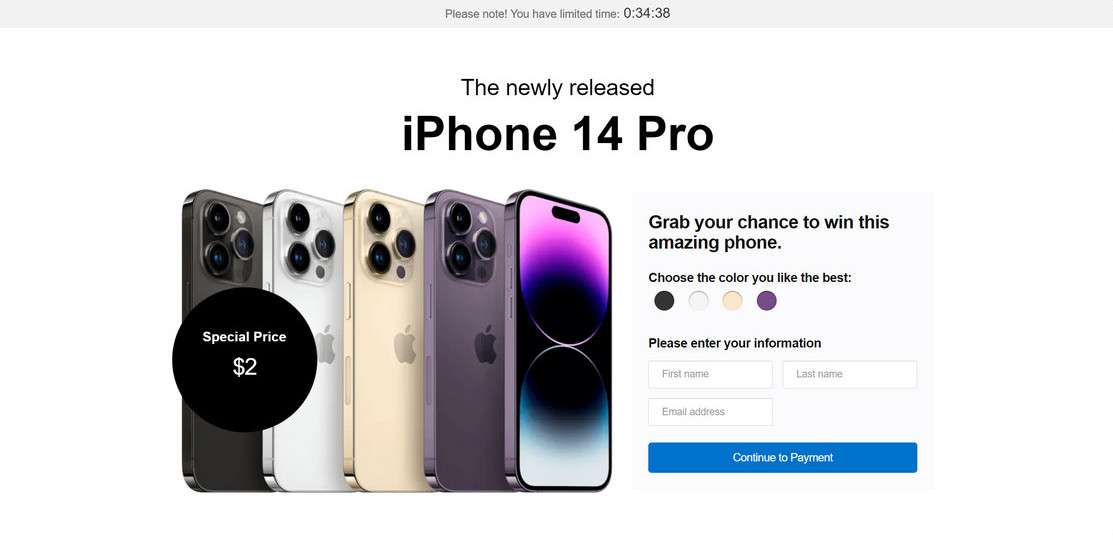
Theydayssay.live utilizes deceptive techniques and known brand names like Amazon, The Home Depot, and Walmart to fool visitors into taking an online survey. After completing the survey, victims are told they have won a valuable prize like an iPhone. However, in order to claim the prize, they must first pay a small $9.90 shipping fee.
This is where the scam truly begins. After entering payment information, victims are automatically signed up for expensive monthly subscriptions without consent. Additionally, the promised prize never arrives. Sadly, many honest, hard-working people fall victim to this scam while browsing the internet.
How Victims Are Lured to the Site
Theydayssay.live relies on unethical lead generation tactics to drive traffic to their scam website. The most common methods include:
- Malvertising – Malicious popup, banner, and video ads placed on shady websites. These ads may promote free gift cards, prize giveaways, or virus warnings to entice clicks. Once clicked, users are redirected to Theydayssay.live.
- Social Media Ads – Scammers often buy cheap social media advertising to target vulnerable demographics with clickbait offers. Messages may claim viewers have won a free iPhone or must take an important survey.
- Spam Emails – Deceptive emails are sent en masse to purchase email lists. Subject lines are catchy and content warns recipients they must take quick action to claim prizes or avoid account suspensions. Links lead to Theydayssay.live.
While navigating the web, staying vigilant against scams is crucial. If an offer appears too good to be true, it likely is.
An Inside Look at the Scam Website
Once lured onto the official Theydayssay.live website, users are met with convincing graphics and messaging to build trust and excitement around prize winnings and survey participation. Here is a glimpse at what visitors experience:
- Branding Elements – The site uses fonts, colors, templates commonly seen on legitimate ecommerce stores to appear credible. Logos like Amazon and official security badges are displayed despite being unaffiliated.
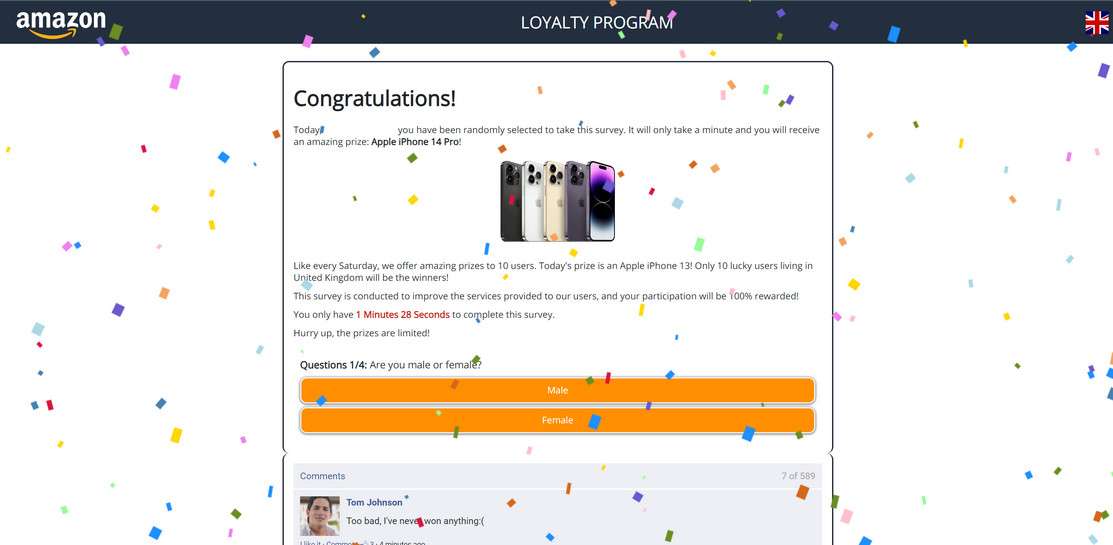
- Survey Questions – A series of short questions with buttons are presented covering basic demographic info. Submitting answers triggers prize notifications.
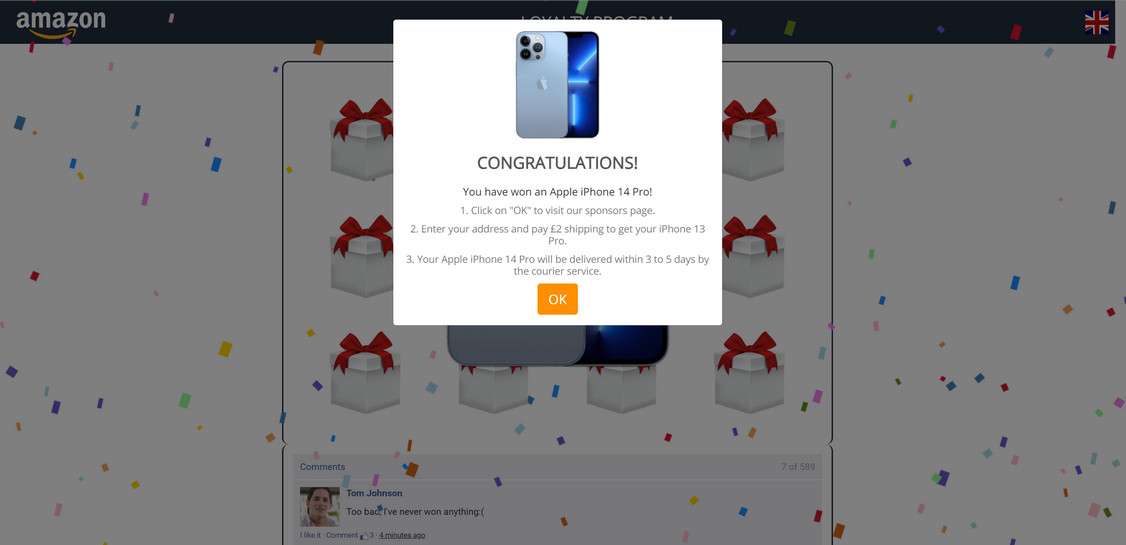
- Prize Selection Game – Users must choose from boxes as if playing an online game to secure prizes. Pre-set winnings are shown regardless of box picked, often iPhones, gift cards, or smart home devices.
- Shipping Payment Page – On this final page, personal and payment details are collected under the guise users must cover a small $9.90 shipping fee to receive winnings. In reality, account and billing information is stolen for recurring monthly subscriptions.
With an understanding of tactics used on the website itself, it becomes clearer how otherwise wary internet users can be smoothly manipulated into participating in sweepstakes offers and surveys.
What Happens After Entering Payment Information
Once credit card information is collected on Theydayssay.live for the supposed shipping payment, victims soon realize they have been scammed in multiple ways:
- No Prize Delivery – The promised free gifts like iPhones, smartwatches, or gift cards are never shipped out. Delivery timeframes provided were false all along.
- Unauthorized Subscriptions – Within 1-2 weeks, victims see monthly charges from unfamiliar third-party companies appear on credit card statements. Monthly fees typically ranging from $89-$299 are billed recurrently for mystery subscription services never signed up for.
- Payment Details Resold – Credit card numbers, passwords, addresses, and other sensitive information entered on the site are sold on dark web marketplaces. This exposes victims to future financial fraud or identity theft.
Essentially, the Theydayssay.live website acts as a fraudulent front to collect sensitive user data and sign unknowing visitors up for recurring monthly billing scams. The promised prizes and survey participation are completely fake – solely manipulation techniques to lower defenses before stealing financial information.
How the Theydayssay.live Scam Works Step-By-Step
Now that you understand the devious intentions driving Theydayssay.live, let’s break down exactly how this scam ensnares good-faith website visitors into unwilling subscription plans:
Step 1: Entice Victim Clicks with Misleading Offers
As outlined in the overview section, Theydayssay.live relies heavily on lead generation tricks to drive target traffic to their scam portal. Most visitors reach the site after clicking social media ads, contextual banners, email links, or popups promoting free gift cards, prize giveaways, or urgent warnings while browsing dubious websites.
For example, a Facebook ad may read:
“iPhone 15 Pro Giveaway! We’re giving away 100 FREE iPhone 15 Pros. Click here to take a short survey and see if you’ve won!”
These type of attention-grabbing messages convince website visitors to click without considering potential risks.
Step 2: Build Trust and Excitement Around Survey Participation
After clicking misleading offers, visitors land directly on Theydayssay.live. The website branding and content focus intensely on building credibility around the advertised survey and prize giveaways.
Visitors see exciting confirmation messages emphasizing they’ve been specially selected to participate in an exclusive customer satisfaction survey. Completing the quick 3-4 question survey allegedly enters them into iPhone, AirPods, or gift card prize drawings.
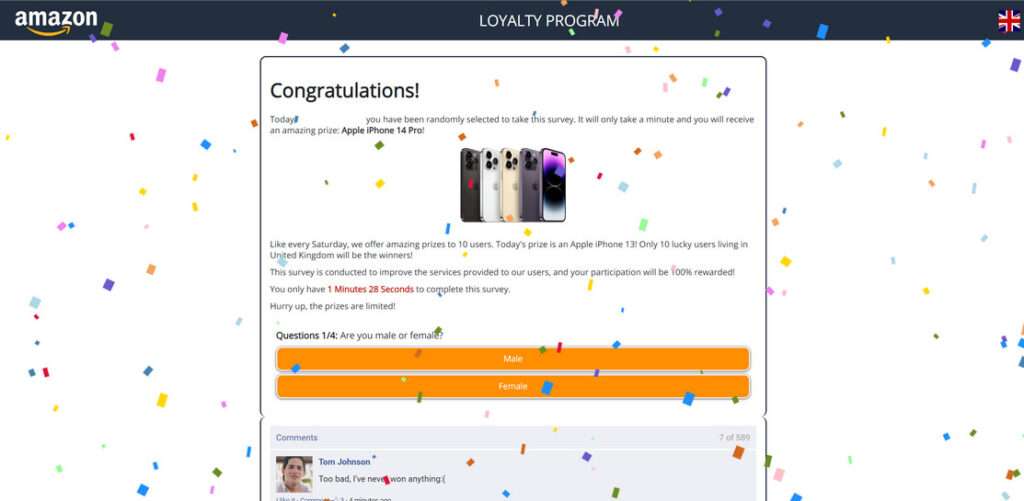
To manufacture trust, fake reviewer quotes, security badges, a US business address, and established brand logos are displayed prominently. Everything down to site aesthetics make the scam more convincing.
Step 3: Collect Personal Information Through Survey Questions
Now that visitors are enthused to take the survey for prize eligibility, the questioning begins.
A series of 3-4 multiple choice questions request fairly innocent personal details like age, gender, shopping habits, and brand preferences. Users’ guard is down believing survey responses may improve Amazon, Walmart or other major retailer experiences.
Little do they know, this information is only gathered to build detailed user profiles for targeting and selling data. Still, the minimal questions seem harmless enough to proceed for the promised generous prizes.
Step 4: Show Visitors They’ve “Won” Valuable Prizes
Seconds after completing the short survey, exciting prize claim notifications appear on-screen. Despite random guessing, visitors are told they were specially selected as winners for iPhones, AirPods, Walmart gift cards, or other hot ticket items.
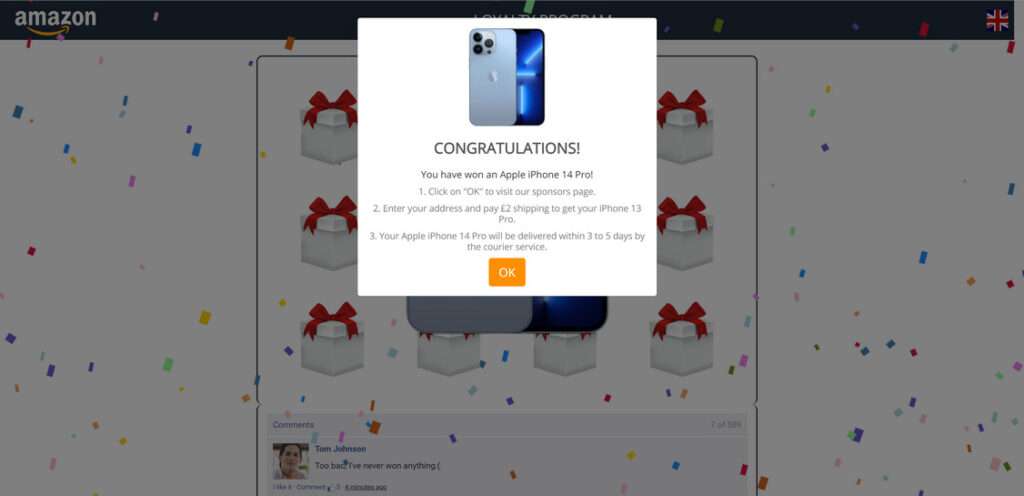
To build suspense, a simulated online game similar to a claw machine runs prompting visitors to pick a box hoping their prize lies inside. A countdown clock pressures visitors to select boxes quickly before time expires.
Ultimately, the victim’s “lucky” box choice reveals they have won either an iPhone, AirPods Pro, or a $500 grocery gift card. The only catch left is paying a mere $9.90 shipping fee and the incredible prizes will arrive within 3-5 days. Even savvy shoppers would have a hard time walking away from deals too good to be true.
Step 5: Collect Credit Card Information for “Shipping Charges”
Having come this far showing viewers personalized prize claim notifications, Theydayssay.live now asks visitors to validate eligibility by covering a small $9.90 shipping charge.
A reasonable shipping fee is what finally motivates visitors blinded by dollar signs to input sensitive payment information including:
- Full Name
- Physical Address
- Phone Number
- Credit Card Number
- CVV Security Code
Website language clearly confirms only shipping costs will be applied to visitor accounts. No recurring charges or confusing fine print in sight. Visitors gleefully input details, pay, and await arrival of promised iPhone and other hot electronic prizes.
Step 6: Sign Up Victims for Recurring Monthly Subscriptions
Within 1-2 weeks the cold reality sets in. Not only do the promised free prizes never arrive, but unfamiliar recurring $49, $89, or $99 charges from random third-party companies emerge on credit card statements.
These charges relate to monthly subscription plans scammers illicitly signed victims up for after stealing financial data. Monthly plans may be for pdf convertors, antivirus software, movie clubs, job listing sites, or other services never requested.
Sadly, contact information entered on the website cannot be traced as scammers utilize dummy domains and offshore hosting. Any credit card charge disputes also mysteriously fail. At this point, victims have no choice but to painstakingly cancel each fraudulent monthly subscription and monitor financial statements moving forward.
In the end, Theydayssay.live obtains all the sensitive personal and payment information they need to profit from underground selling of data, forced subscription plans, or potential financial theft.
What to do if You Have Fallen Victim to Theydayssay.live
Discovering you’ve been manipulated into entering personal information and hard-earned money into Theydayssay.live under false pretenses is understandably enraging. While some financial or data privacy damage may be irreversible, here are smart action steps victims should immediately take in response:
Cancel Any Active Subscriptions or Services
The first priority is identifying all monthly subscription charges, services, software, or physical products signed up for without authorization as result of Theydayssay.live credit card data theft.
Check bank and credit card statements carefully highlighting any unfamiliar recurring fees from the past 1-3 months. Common charges range from $89-$299 per month for unsolicited services.
Once all fraudulent businesses are identified, immediately call each company demanding cancellation of services and refund of charges. Be persistent explaining payments were made without consent. Dispute all charges with credit card providers as well for the best chance of remuneration.
Call Banks to Monitor Accounts for Future Fraud
Unfortunately, once personal information is sold on the dark web to Theydayssay.live or similar scammers there is no way to undo potential future harm. Financial account or identity theft may emerge down the road beyond the initial subscription scam charges.
As a precaution, call all banks and credit card companies used on the malicious website to flag accounts as high risk for fraud. Request increased security through methods like PIN code transactions, lowered cash withdrawal limits, online purchase verification procedures and have fraud monitoring enabled if available.
Ask financial institutions to issue new card numbers altogether to further protect accounts that may have payment data compromised unknowingly. Though extreme, total card replacement gives peace of mind against recurring financial breach.
Run Anti-Virus Scans to Remove Spyware or Keyloggers
Visiting technically-savvy scam websites like Theydayssay.live poses threats beyond immediate billing fraud or privacy invasion. Victims may be exposed to dangerous malware like spyware, keystroke loggers, or trojan bot downloads designed to capture passwords, financial data, or control devices covertly over months.
Run full system anti-virus scans to check for and remove these sophisticated hacking threats that historically bypass standard Windows or MacOS protections. Safeguard online identities by changing account passwords as added precaution too.
Monitor Credit Reports and Set Fraud Alerts
With bad actors potentially having access to full names, addresses, social security digits and more, victims should take measures to protect credit histories as well by setting up protective fraud alerts.
Order full credit reports looking for signs of emerging identity theft. Place 90-day fraud victim alerts warning lenders of compromised information to prevent scammers from opening unauthorized lines of credit. Options also exist for credit freezes stopping all access without approval and extended 7-year fraud alerts. Though extreme, such alerts provide security after falling prey to privacy threatening scams.
Report Scam Website and Charges to Federal Trade Commission
While frustratingly difficult to achieve direct restitution from elusive scam websites like Theydayssay.live, reporting these malicious sites and associated credit card fraud to the Federal Trade Commission (FTC) can build critical cases to some day shut operations down fully.
The more victims able speak up on shady business practices, file complaints noting financial damages and privacy violations, then stronger consumer protection rulings can be enacted. Add your voice by contacting the FTC fraud division online or by phone.
Is Your Device Infected? Run a Free Malware Scan
Slow performance, constant pop-ups, or strange behavior? These are classic signs of a malware infection. A quick way to check is to scan your device with Malwarebytes Free, one of the most trusted malware removal tools available. If you only visited a scam page and didn’t download or install anything, this scan is optional.
The free version detects and removes the most common threats, including:
- Adware — the cause of those annoying pop-ups
- Browser hijackers — unwanted redirects and changed homepages
- Trojans and spyware — hidden programs stealing your data
- Potentially unwanted programs (PUPs) — software you never asked for
👉 Select your device below — Windows, Mac, or Android — then follow the simple steps to download Malwarebytes, scan your system, and remove any threats it finds. The scan usually takes 5 to 20 minutes.
Run a Malware Scan with Malwarebytes for Windows
Malwarebytes is one of the most popular and trusted anti-malware tools for Windows — and it’s completely free for removing infections. It catches threats that many antivirus programs miss, including adware, browser hijackers, and trojans. Follow the steps below to scan your PC and remove what Malwarebytes finds.
Download Malwarebytes
Click the button below to download the latest version of Malwarebytes for Windows from the official source. The free version is all you need — it will scan your computer and remove adware, browser hijackers, and other malicious software at no cost.
Download MalwarebytesOfficial installer for Windows 11 and 10. Your download starts right away.Want real-time protection? See Malwarebytes Premium Malwarebytes Free for WindowsScans and removes malware at no cost
-
Install Malwarebytes
When the download finishes, open your Downloads folder and double-click the MBSetup file. If Windows shows a User Account Control pop-up, click “Yes” to allow the installation.

Follow the On-Screen Prompts to Install Malwarebytes
The setup wizard will walk you through a few quick screens:
-
Choose where you’re installing the program — “Personal Computer” or “Work Computer” — then click Next.

-
Malwarebytes will now install on your device. This usually takes under a minute.

-
When installation is complete, the “Welcome to Malwarebytes” screen will open automatically.

-
On the final screen, click Open Malwarebytes to launch the program.

-
Optional: Check for rootkits with a Custom Scan
You don’t need to change any settings for a normal scan. The standard Threat Scan in the next step is enough for most problems, so you can go straight to it.
If you also want to check for rootkits, use a Custom Scan. In current versions of Malwarebytes, rootkit scanning is only available there:
- On the Scanner tile, click the three-dot menu and select Advanced Scan.
- Choose Custom Scan. In its options, check Scan for rootkits.
- Select your system drive (usually C:\) as the location to scan, then start the scan. It takes longer than a Threat Scan.
- When it finishes, review and quarantine the results as described in the steps below.
Rootkit scanning isn’t available on Windows devices with ARM processors.
Start the Scan
Click the blue Scan button. Malwarebytes will automatically update its virus database and start checking your computer for malware.

-
Wait for the Scan to Finish
The scan checks your entire system for browser hijackers and other malicious programs, so it can take 5 to 20 minutes depending on your computer. Feel free to do something else — just check back occasionally to see the progress.

-
Quarantine the Detected Threats
When the scan is done, you’ll see a list of everything Malwarebytes found — malware, adware, and potentially unwanted programs. Click the “Quarantine” button to remove all of them at once.

Malwarebytes will now remove the malicious files and registry entries and move them safely into quarantine.

-
Restart Your Computer
Some threats can only be fully removed after a reboot. If Malwarebytes asks you to restart, click Yes. Once you’re logged back in, Malwarebytes has finished removing the threats it found.

When the scan is done, check whether the problems you noticed have stopped. If they continue, see the options below.
If you are still having problems with your computer after completing these instructions, then please follow one of the steps:
- Run a computer scan with ESET Online Scanner
- Ask for help in our Windows Malware Removal Help & Support forum.
Run a Malware Scan with Malwarebytes for Mac
Malwarebytes for Mac is a free on-demand scanner that removes the malware other security software tends to miss — adware, browser hijackers, and unwanted programs included. Cleaning an infected Mac with Malwarebytes has always been completely free, and it’s our go-to recommendation. Follow the steps below to scan your Mac and remove what Malwarebytes finds.
-
Download Malwarebytes for Mac
Click the button below to download the latest version of Malwarebytes for Mac.
Download MalwarebytesOfficial installer for macOS. Your download starts right away.Want real-time protection? See Malwarebytes PremiumMalwarebytes Free for MacScans and removes malware at no cost -
Open the Malwarebytes setup file
When the download finishes, open your Downloads folder and double-click the setup file to begin the installation.

-
Follow the On-Screen Prompts to Install Malwarebytes
The Malwarebytes for Mac Installer will guide you through a few quick screens. Click “Continue” and keep following the prompts until the installation completes.



When the installation is complete, Malwarebytes opens to the Welcome to Malwarebytes screen. Click “Get started“.
Malwarebytes needs Full Disk Access to check your whole Mac. When it asks, open System Settings > Privacy & Security > Full Disk Access, turn on Malwarebytes (it may be listed as Malwarebytes Protection), and confirm with your password or Touch ID. Then return to Malwarebytes. On macOS Monterey and earlier, this setting is in System Preferences > Security & Privacy > Privacy.
-
Select “Personal Computer” or “Work Computer”
Malwarebytes will ask what type of computer you’re installing it on. Click either Personal Computer or Work Computer, whichever applies.

-
Start the Scan
Click the “Scan” button. Malwarebytes will automatically update its detection database and begin checking your Mac for malware.

-
Wait for the Scan to Finish
Malwarebytes will scan your Mac for adware, browser hijackers, and other malicious programs. This can take a few minutes, so feel free to do something else — just check back occasionally to see the progress.

-
Quarantine the Detected Threats
When the scan is done, you’ll see a list of everything Malwarebytes found. Click the “Quarantine” button to remove all the threats at once.

-
Restart Your Mac
Malwarebytes will now remove all the malicious files it found. Some threats can only be fully removed after a reboot — if Malwarebytes asks you to restart, allow it. Once you’re logged back in, check whether the problems you noticed have stopped. If they come back, save the scan report and ask for help in our forum.

If the problems you noticed continue after the scan, see the options below.
If you are still experiencing problems while trying to remove a malicious program from your computer, please ask for help in our Mac Malware Removal Help & Support forum.
Run a Malware Scan with Malwarebytes for Android
Malwarebytes for Android scans your phone or tablet for malware, adware, and potentially unwanted apps. The free version scans only when you start a scan. Real-time protection, which checks apps automatically, is part of the paid Premium version.
-
Download Malwarebytes for Android.
You can download Malwarebytes for Android by clicking the link below.
Get Malwarebytes for AndroidOpens Google Play in a new tab.Want real-time protection? See Malwarebytes Premium for AndroidMalwarebytes for AndroidScans your phone and removes malware at no cost -
Install Malwarebytes for Android on your phone.
In the Google Play Store, tap “Install” to install Malwarebytes for Android on your device.

When the installation process has finished, tap “Open” to begin using Malwarebytes for Android. You can also open Malwarebytes by tapping on its icon in your phone menu or home screen.

-
Follow the on-screen prompts to complete the setup process
When Malwarebytes opens, it walks you through a short setup. Tap Get started and follow the prompts. If you see an offer for a trial or a paid plan, read it before you accept. You can skip it and keep using the free scanner.
Malwarebytes will ask for permission to access the files on your phone so it can scan them. Tap Allow, or turn on the permission in the Android screen that opens, then return to Malwarebytes.
-
Run a scan with Malwarebytes for Android
On the main screen, tap Scan now. In some versions, you open the menu, tap Scanner, and then tap Run a scan.
-
Wait for the Malwarebytes scan to complete.
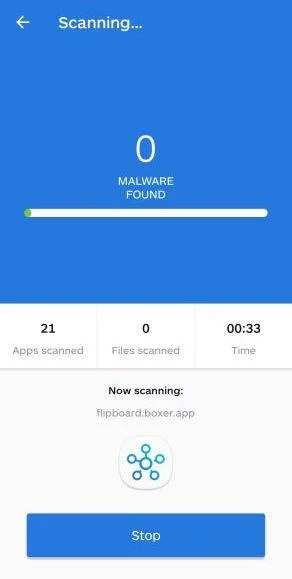
Malwarebytes will now start scanning your phone for adware and other malicious apps. This process can take a few minutes, so we suggest you do something else and periodically check on the status of the scan to see when it is finished.
-
Remove the detected apps.
When the scan has been completed, you will see a list of the threats that Malwarebytes for Android has detected. Next to each detected item, tap the menu icon (three dots), then choose to uninstall the app or delete the file. Android then asks you to confirm. Tap OK or Uninstall to remove the app.
-
Restart your phone.
When the detected apps are removed, restart your phone if Malwarebytes asks you to. Then check whether the problems you noticed have stopped.
If the problems you noticed continue after the scan, see the options below.
If you are still having problems with your phone after completing these instructions, then please follow one of the steps:
- Ask for help in our Mobile Malware Removal Help & Support forum.
- Only as a last resort, reset your phone to factory settings. Read the warning below first.
- Back up your photos, videos, files, and messages, for example to your Google account or a computer.
- Make sure you know your Google account email and password. The phone asks for them after the reset. If you changed the password recently, Google recommends waiting 24 hours before you reset.
- On a Samsung phone, also make sure you know your Samsung account password.
- If you use an authenticator app for two-step verification, move your accounts to another device or save your backup codes first.
Stay Protected: Block Ads and Malicious Sites
No scan can prove a device is completely clean, so it helps to block threats before they reach you. Most infections start with a malicious ad or a fake download button — so blocking them at the source is your best defense.
We recommend AdGuard, which blocks malicious ads, phishing pages, and dangerous redirects before they can reach you.
👉 Download AdGuard and browse safely
The Bottom Line: Avoiding Theydayssay.live and Subscription Scams
In the end, Theydayssay.live operates with pure malicious intent to mislead internet users into entering valuable financial and personal data under false pretenses. By enticing visitors to take branded surveys with prize offers then strong-arming credit card information for alleged shipping charges, this scam business steals identities, forces unwanted subscription plans, resells sensitive data and may install dangerous system malware given website access.
Moving forward, extreme caution is advised when encountering similar money-too-good-to-be promotions across squirrelly websites, social channels, inboxes or online ads. Look for these red flags signaling likely subscription scams:
- Branding From Well-Known Retail/Tech Companies
- Easy Online Game Simulations Where You Always “Win” Valuable Prizes
- Requests for Personal Info Through Benign Surveys
- Claims of Needing Credit Cards Strictly for Shipping, Handling or Processing Costs
- Spelling Errors, Grammar Mistakes or Legal Wording Oversights
No legitimate corporation would solicit consumers randomly through third-party channels with hot ticket item giveaways in exchange for taking a few fun survey questions. That business model simply does not exist. Anytime financial details are explicitly required upfront to claim promised prizes or free gifts, scam alarms should sound.
Be vigilant, trust intuition, and refrain from inputting details onto shady websites regardless of messaging urgency or seeming security assurances. Financial harm may happen split-seconds after personal data changes hands with unscrupulous scammers masquerading as familiar brands. Simply put, if the offer appears too good to be possibly true – it always will be fraudulent.

Reviews & discussion
0 commentsShare a firsthand experience, or ask a question.
Community reviews
theydayssay.live
Moderated reader experiences, not an editorial verdict.
Start the conversation
Have a question or something useful to share? Add the first comment.