

Ecommerce scams impersonating real shipping tracking services are on the rise. One prolific example is Track718.com – a fraudulent website deceiving online shoppers into believing purchased goods are shipped when in reality they never arrive. This article will uncover how this “tracking” scam works and provide tips to avoid falling victim.
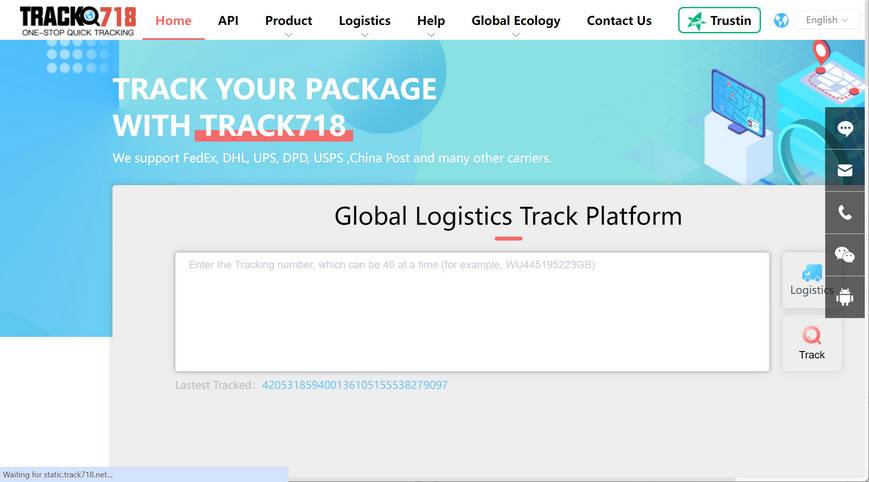
What is Track718.com?
Track718.com portrays itself as a package tracking and delivery confirmation service for orders placed through various ecommerce websites.
The site provides package tracking IDs to online shoppers who have purchased goods through third-party seller sites. Customers can then supposedly track the progress of their order in transit using the provided tracker from Track718.com.
However, Track718.com is not associated with any actual shipping companies. It is essentially a fake tracking service that provides bogus tracking information to deceive customers.
When shoppers visit Track718.com and enter their tracking number, the site will continually show the status of their order as “delivered” even when no package has actually arrived.
This false claim of successful delivery allows partner ecommerce scam websites to keep customers’ payments while avoiding responsibility for non-shipment of the ordered goods. Track718.com enables this scam by providing fake “proof” of delivery to dissatisfied shoppers.
In summary, Track718.com is a fraudulent tracking service that works with affiliate scam websites to trick customers and prevent refunds for undelivered orders through fabricated tracking updates. Shoppers should be wary of sites utilizing Track718.com or other dubious shipping trackers.
How the Track718.com Scam Operates?
Track718.com promotes itself as a package tracking and delivery service for items bought through partner ecommerce websites. Customers receive tracking numbers from Track718.com to monitor orders in transit.
However, when victims check their Track718.com tracking link, it invariably shows the status as “delivered” even when no order arrives. This leaves customers confused, frustrated, and out money or products.
In reality, Track718.com has no relation to any legitimate delivery companies. The site is a front merely posing as a tracker to help affiliated scam websites steal funds. When customers report missing orders, Track718.com claims no liability – pointing to its bogus tracking showing successful delivery.
This elaborate hustle allows partner ecommerce scam sites to keep ill-gotten payments while avoiding responsibility by leveraging the fake tracker. Customers are left powerless as Track718.com’s “proof” shows orders delivered.
Spotting Red Flags of the Track678 Scam
While sophisticated, key signs can help identify and avoid being deceived by Track718.com:
- Generic domain name – Legitimate carriers use domains related to their business name.
- Lack of contact details – No customer service phone numbers or addresses.
- Reports of non-delivery – Online reviews detailing orders never arriving despite tracking.
- Missing logos and branding – Real shipping companies prominently display logos.
- Identical tracking interfaces – All carriers have unique tracking portals. Identical interfaces across domains are suspicious.
- Affiliation claims – Scam sites often falsely claim to be “powered by” or “in partnership with” real shipping companies.
- Poor writing and errors – Amateur errors signal scam sites.
Being skeptical of any new online tracking platform that differs from a carrier’s known official website can help avoid these scams. Only use verified tracking tools directly from shipping companies’ official websites and be wary of too-good-to-be-true deals.
What to Do if You Are a Victim of Track718.com
If you suspect you have been deceived by Track718.com, take these steps:
- Immediately stop using the fraudulent tracking website.
- Check with the shipping carrier to confirm if your order was actually shipped.
- Document evidence showing the items were never delivered.
- Report the incident to the FTC and consumer complaint agencies.
- Dispute payments if possible and notify relevant financial institutions.
- Be aware that personal data provided may be compromised and misused. Enable credit monitoring and update account passwords.
- Leave online reviews warning others about the scam website.
- Learn from the incident to increase awareness of delivery tracking scams.
Spreading awareness of schemes like Track718.com can help prevent more from falling victim and potentially get these malicious websites shut down. But those defrauded must act swiftly to limit financial damages. This scam provides a reminder to only use trusted shipping company websites for tracking deliveries.
Conclusion
Websites like Track718.com reveal a disturbing trend of ecommerce scams impersonating legitimate shipping tracking services. Caution is required to identify fraudulent sites based on red flags like lack of real carrier branding, reports of missing orders, and pressure for upfront payments. Avoiding these sham platforms and only using trusted carrier tracking portals can steer clear of this theft and deception targeting online shoppers.

Reviews & discussion
0 commentsShare a firsthand experience, or ask a question.
Community reviews
track718.com
Moderated reader experiences, not an editorial verdict.
Start the conversation
Have a question or something useful to share? Add the first comment.