

A text message claims you have an unpaid traffic violation and must act immediately to avoid fines, court action, license suspension, or other penalties.
It may include a fake case number, a QR code, a payment link, a hearing date, or an official-looking notice that appears to come from a court, DMV, toll agency, or traffic division.
Do not rush. These messages are part of a widespread phishing scam designed to steal your money, credit card details, and personal information.
Scam Overview
The Traffic Violation Notice text scam is a smishing scam, which means phishing through SMS or mobile messages. Scammers send fake traffic ticket notices that look like they came from a court, DMV, highway patrol, municipal traffic division, or toll authority.
The message usually claims you owe money for something like:
- A traffic violation
- A speeding ticket
- A parking citation
- A toll violation
- A missed court hearing
- An unpaid traffic fine
- A vehicle registration issue
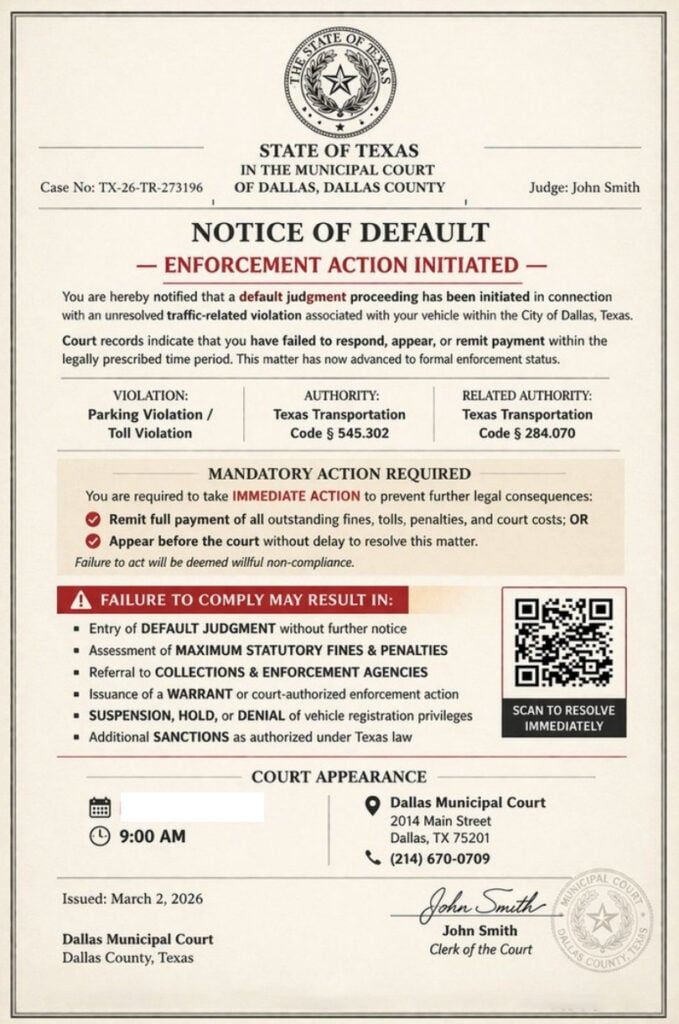
The notice may look simple, like a short text with a link. But many recent versions are more advanced. They include image attachments that resemble formal court documents, complete with seals, judge names, fake case numbers, hearing dates, and QR codes.
The FTC has warned about fake traffic violation texts that include QR codes, official-looking images, fake case numbers, fake hearing dates, and threats of default judgments, fines, or enforcement action. The FTC says these scams are designed to steal personal information, credit card numbers, money, and may even expose victims to malware risks.
What the scam usually looks like
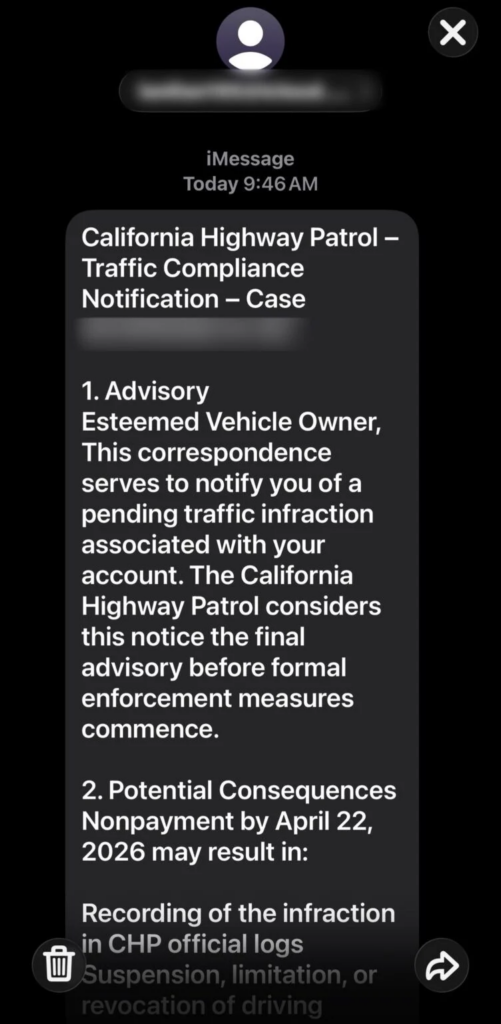
A Traffic Violation Notice scam text may say something like:
“Final Notice: Our records show an unpaid traffic violation associated with your vehicle. Immediate payment is required to avoid additional penalties, court enforcement, or license suspension.”
Other versions may say:
- “Traffic Violation Notice”
- “Notice of Default”
- “Court Enforcement Action”
- “Immediate Action Required”
- “Failure to pay may result in penalties”
- “Scan QR code to resolve your citation”
- “Pay now to avoid court appearance”
Some versions appear to come from a real court or agency. Others use generic terms like “Traffic Division,” “Court Notice,” “Department of Vehicles,” or “Traffic Compliance Office.”
That vague language is often a red flag.
Why this scam works
This scam is effective because it uses fear, familiarity, and urgency.
Traffic tickets are common. Most drivers know that unpaid tickets can sometimes lead to late fees, registration problems, or court issues. Scammers use that familiarity to make the fake message feel possible.
The message does not need to prove anything. It only needs to make you think:
- “Did I miss a ticket?”
- “Was this from a camera or toll road?”
- “Could this affect my license?”
- “Is it easier to just pay?”
Once the message creates doubt, it gives you a fast solution: click the link, scan the QR code, or pay the small amount due.
That is the trap.
The QR code is not safe
Many of these scam notices include a QR code. It may be labeled as:
- “Scan to pay”
- “Scan to resolve”
- “Official secure portal”
- “Settle your unpaid balance”
- “Access your court notice”
A QR code can feel more official than a suspicious link, but it works the same way. It opens a website.
If the QR code came from an unexpected traffic notice, it may lead to a fake payment site controlled by scammers.
The fake payment website
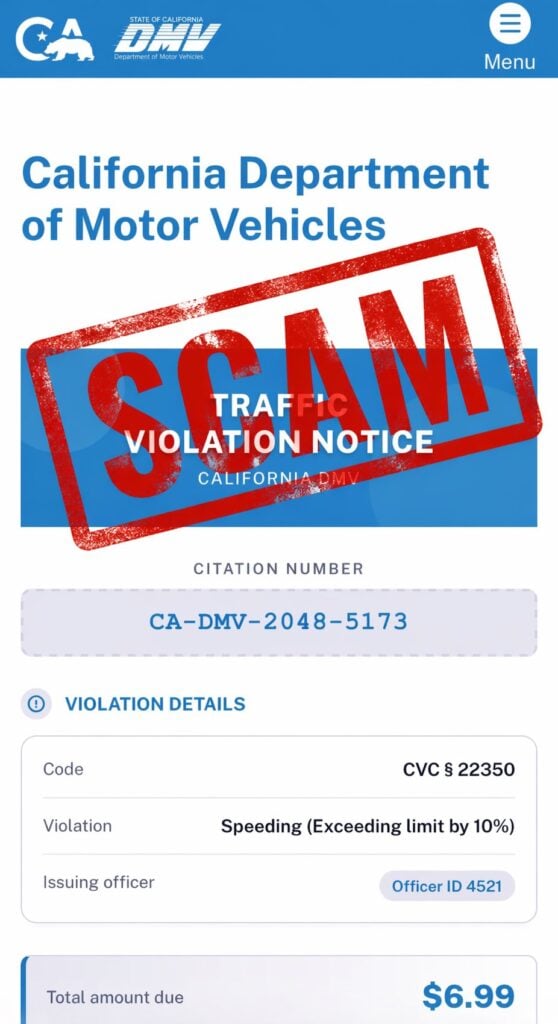
After clicking the link or scanning the QR code, victims are usually sent to a fake website. That site may look like:
- A court payment portal
- A DMV-style citation page
- A toll agency website
- A city parking ticket portal
- A traffic division case lookup system
The fake site may display:
- A citation number
- A case number
- A violation code
- A judge or clerk name
- A hearing date
- A small balance due
- A “Pay Now” or “Continue” button
The design may look polished. That does not make it legitimate.
Why the amount is often small
A common trick in Traffic Violation Notice scam texts is the small fee.
The fake payment page may show an amount like:
- $6.99
- $9.99
- $14.95
- $19.99
That number is chosen carefully.
A large fine makes people suspicious. A small fee feels easier to pay than to investigate.
But the payment amount is not the real prize. The real goal is to steal:
- Credit card number
- Expiration date
- CVV
- Billing ZIP code
- Full name
- Address
- Phone number
- Vehicle or license plate details
Once scammers have that information, they can attempt unauthorized charges, sell the data, or target you again with more convincing scams.
The fake legal threats
Traffic Violation Notice scam texts often include threatening language, such as:
- License suspension
- Vehicle registration hold
- Default judgment
- Court enforcement
- Collections referral
- Additional fines
- Credit damage
- Possible prosecution
These threats are designed to push you into acting fast.
Why official-looking details do not prove anything
Scammers frequently include details that look official, such as:
- State seals
- Court names
- Legal codes
- Fake judge names
- Fake officer IDs
- Fake case numbers
- Fake hearing dates
- Government-style formatting
These details are there to manipulate trust.
A fake notice may include a real court address or a real law code. That still does not make the payment demand real.
A legitimate traffic issue should be verifiable through official court, DMV, toll agency, or city citation systems you access yourself. A scam tries to keep you inside its own link or QR code flow.
How The Traffic Violation Notice Text Scam Works
Step 1: The scam text arrives
The scam begins with an unexpected message.
It may arrive as:
- A plain SMS
- An iMessage
- A multimedia message with an image
- A document-style attachment
- A message with a QR code
- A short text with a payment link
The message usually claims you have a traffic violation that requires immediate action.
It may reference a city, county, court, DMV, highway patrol, toll agency, or “traffic division.”
Step 2: The message makes the issue feel official
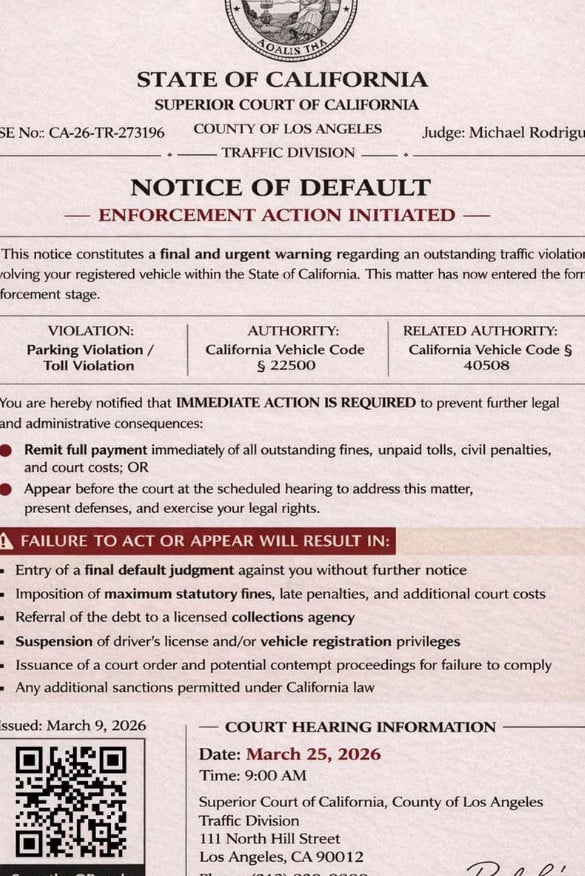
Scammers add details to create authority.
The notice may include:
- A court heading
- A state name
- A fake case number
- A violation number
- A judge’s name
- A hearing date
- A legal code
- A deadline
The goal is to make the recipient think, “This looks real enough that I should handle it now.”
That is how the scam gets past your first layer of skepticism.
Step 3: The text creates urgency
The message then shifts into pressure.
It may say:
- This is your final notice
- Enforcement action has started
- Payment is required immediately
- A court hearing has been scheduled
- Failure to respond will increase penalties
- Your license or registration may be affected
Urgency is the scam’s engine.
If you feel rushed, you are less likely to verify the claim through official channels.
Step 4: The link or QR code offers the “solution”
After creating fear, the scam gives you a simple way out:
- Click here
- Scan the QR code
- Pay now
- Resolve immediately
- Settle your balance
This turns panic into action.
The link or QR code sends you to a fake website designed to look official.
Step 5: The fake site collects personal details
Before payment, the fake site may ask you to verify:
- Name
- Address
- ZIP code
- Phone number
- License plate
- Vehicle details
- Driver information
This makes the process feel legitimate.
It also gives scammers data they can reuse later.
Even if you stop before entering card details, the information you already typed may still be captured.
Step 6: The payment form steals card data
The fake payment page then asks for:
- Card number
- Expiration date
- CVV
- Billing ZIP code
- Billing address
Once submitted, your card should be treated as compromised.
The site may show a fake confirmation page. It may also claim the payment failed and ask you to try again, sometimes with another card.
Both outcomes help the scammer.
Step 7: Fraud may happen later
Some victims see unauthorized charges quickly.
Others do not see suspicious activity for days or weeks.
Scammers may:
- Run small test charges
- Attempt larger transactions later
- Sell the card details
- Use your personal information in other scams
- Send more fake traffic, DMV, or court texts
That delay is why it is important to act quickly if you entered any information.
Red Flags of Traffic Violation Notice Scam Texts
The message arrives unexpectedly
If you did not recently receive a paper ticket, official mail notice, or verified account alert, be suspicious.
It includes a QR code
A QR code in an unexpected traffic or court notice is a major warning sign.
It asks for immediate payment
Scammers rely on urgency. Real agencies usually provide clear, verifiable processes.
It threatens severe consequences quickly
License suspension, default judgment, collections, and prosecution threats are often used to scare people into paying.
The payment amount is unusually small
A tiny fee can be bait to steal your card details.
The website is not one you typed yourself
Never trust a payment page just because it opened from a text. Go to the official site independently.
The notice uses generic names or recycled case numbers
Fake notices often use placeholder-style judge names, generic court labels, or reused case-number patterns.
It asks for too much personal information
A scam site may ask for more details than a normal citation payment would need.
What To Do If You Receive a Traffic Violation Notice Text
Do not click the link
Do not open the link to “check.” That is how the scam starts.
Do not scan the QR code
A QR code from an unsolicited traffic notice should be treated as unsafe.
Do not reply
Replying can confirm your number is active and may lead to more scam messages.
Do not pay
Do not enter card details through any link or QR code from the message.
Verify independently
If you are worried the violation might be real:
- Go directly to the official court website
- Use the official traffic case lookup tool
- Check your city parking citation portal
- Log into your toll account through the official app or site
- Contact the court or agency using a number you find yourself
Report the message
You can:
- Mark it as spam or junk
- Block the sender
- Forward it to 7726 (SPAM) if your carrier supports it
- Report it through official consumer fraud channels
What To Do If You Already Paid or Entered Information
1. Call your card issuer immediately
If you entered card details, call the number on the back of your card.
Tell them:
- You entered your card details on a fraudulent traffic violation site
- The site came from a scam text
- You want the card blocked and replaced
- You want recent transactions reviewed
Do this even if you do not see fraud yet.
2. Review your transactions
Look for:
- Small test charges
- Unknown online purchases
- Subscription charges
- Repeated declined attempts
- Charges from unfamiliar merchants
Dispute anything suspicious immediately.
3. Turn on transaction alerts
Enable alerts for:
- Every purchase
- Online transactions
- Charges over $1
- International transactions, if available
4. Change passwords if needed
If the fake site asked you to create an account or log in, change that password immediately.
Also change it anywhere else you reused it.
5. Monitor for identity misuse
If you entered personal information, watch for:
- More scam texts
- Fake bank alerts
- Password reset emails
- Strange account activity
- New phishing messages using your name or vehicle details
6. Save evidence
Take screenshots of:
- The original text
- The sender number
- The link or QR code
- The fake website
- The fake case number
- Any payment confirmation or error page
7. Watch for follow-up scams
Scammers may contact you again pretending to be:
- A court clerk
- A refund department
- A bank fraud team
- A DMV agent
- A collections office
Do not trust follow-up messages just because they mention the same fake case.
The Bottom Line
The Traffic Violation Notice text scam is a fake legal or DMV-style message designed to make you panic, click, and pay.
It may include a QR code, fake case number, court-style document, legal threats, or a small payment amount. Those details are part of the deception.
If you receive one of these texts, do not panic. Verify any real traffic ticket only through official court, DMV, toll, or city citation websites you access yourself.
FAQ
What is the Traffic Violation Notice text scam?
It is a phishing scam where criminals send fake traffic ticket or citation notices by text. The message may claim you owe money for a traffic violation, toll, parking ticket, or court fine and push you to pay through a link or QR code.
Is a Traffic Violation Notice sent by text real?
A surprise text demanding fast payment is a major red flag. Some agencies may send reminders, but real traffic matters should always be verified through official court, DMV, toll, or city citation websites you access yourself.
Why does the message look official?
Scammers use fake case numbers, seals, legal wording, judge names, hearing dates, and QR codes to make the notice look like a real government or court document.
What happens if I scan the QR code or click the link?
You may be taken to a fake payment website that asks for your personal information, vehicle details, and credit card data.
Why is the payment amount often small?
Small amounts lower suspicion. The fake fee is bait. The real goal is to steal your card number, CVV, billing address, and personal information.
What information are scammers trying to steal?
Usually:
- Full name
- Address and ZIP code
- Phone number and email
- Vehicle or license plate details
- Credit card number
- Expiration date and CVV
I clicked the link but did not enter anything. Am I safe?
Your risk is much lower if you did not submit information. Close the page, do not return, and watch for follow-up scam texts.
I entered my card details. What should I do now?
Call your card issuer immediately, report the card as compromised, freeze or replace it, review transactions, dispute anything unfamiliar, and turn on real-time transaction alerts.
Can a real court demand payment through a QR code in a text?
A random QR code payment demand in a traffic or court text is suspicious. Always pay only through official portals you reach independently.
How do I verify if I really owe a traffic ticket?
Do not use the link, QR code, or phone number in the message. Go directly to the official court, DMV, toll agency, or city citation website by typing the address yourself.
How do I report the scam?
Mark the message as spam, block the sender, forward it to 7726 (SPAM) if your carrier supports it, and keep screenshots of the text, QR code, and fake site.








