

A text message claims you have an unpaid parking violation and must pay immediately to avoid late fees, registration problems, or court action.
It may look like it came from a DMV, parking authority, toll agency, court, or traffic division. It may include a link, QR code, fake case number, or a small balance due.
Do not rush. These messages are often phishing scams designed to steal your credit card details and personal information.
Scam Overview
Parking violation scam texts are fake payment notices sent by scammers pretending to represent a city parking office, DMV, court, toll authority, or traffic enforcement agency. The message claims you owe money for an unpaid parking ticket, traffic citation, toll, or vehicle-related violation.
The scam usually follows a simple pattern:
- You receive an unexpected text.
- It claims you have an unpaid parking violation.
- It warns of penalties if you do not pay quickly.
- It includes a payment link or QR code.
- The link leads to a fake website.
- The fake site asks for personal details and card information.
The Federal Trade Commission has warned about traffic violation text scams that use official-looking notices, QR codes, fake case numbers, fake hearing dates, and threats of court action to pressure people into paying or sharing information. The FTC says these scams may steal money, personal information, credit card numbers, or expose victims to malware risks.
These scams are especially convincing because parking tickets are common. Many people have received one before. If a text says you owe a small balance, it can feel believable enough to make you pause.
That pause is what scammers exploit.
Why Parking Violation Text Scams Work
They use a familiar problem
Parking tickets are annoying, common, and easy to forget. Scammers know this.
A message saying “unpaid parking violation” can make someone think:
- “Did I forget a ticket?”
- “Was there a camera citation?”
- “Did I miss a city notice?”
- “Is this from a rental car?”
- “Could this affect my registration?”
The scam does not need to prove anything. It only needs to create enough doubt for you to click.
They create urgency
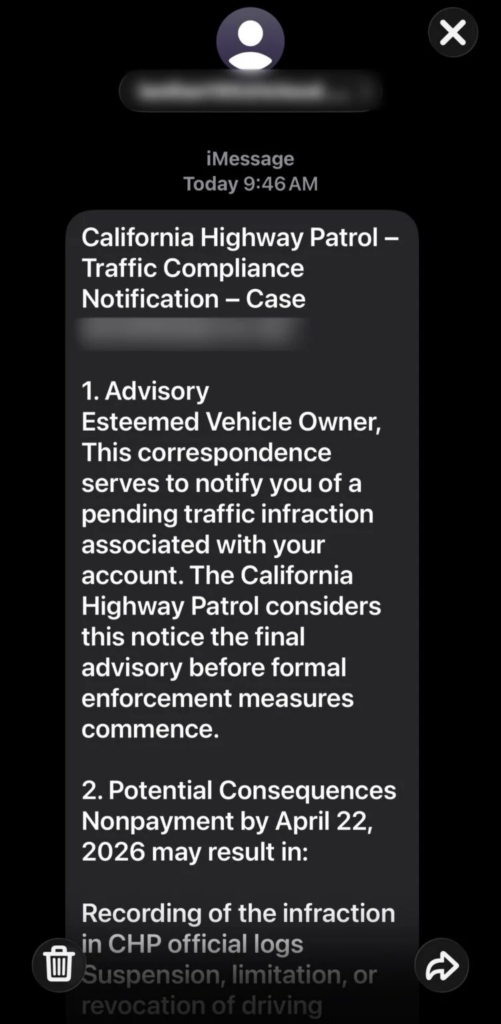
The message often warns that if you do not pay immediately, you may face:
- Late fees
- Registration holds
- Collections
- License suspension
- Court action
- Additional penalties
The FTC has warned that overdue traffic ticket scam texts may threaten registration suspension, license suspension, driving privilege loss, prosecution, credit damage, or added fees to make people act quickly.
This urgency is deliberate. Scammers want you to react before you verify.
They use official-looking language
Scam texts may include phrases like:
- Final Notice
- Traffic Violation Notice
- Parking Citation
- Court Enforcement Action
- Unresolved Vehicle Violation
- Immediate Payment Required
- Pending Citation Action Required
Some messages even include legal codes, fake officer IDs, fake case numbers, or court-style formatting.
That does not make them real.
Scammers use legal language because it creates authority.
They ask for a small amount
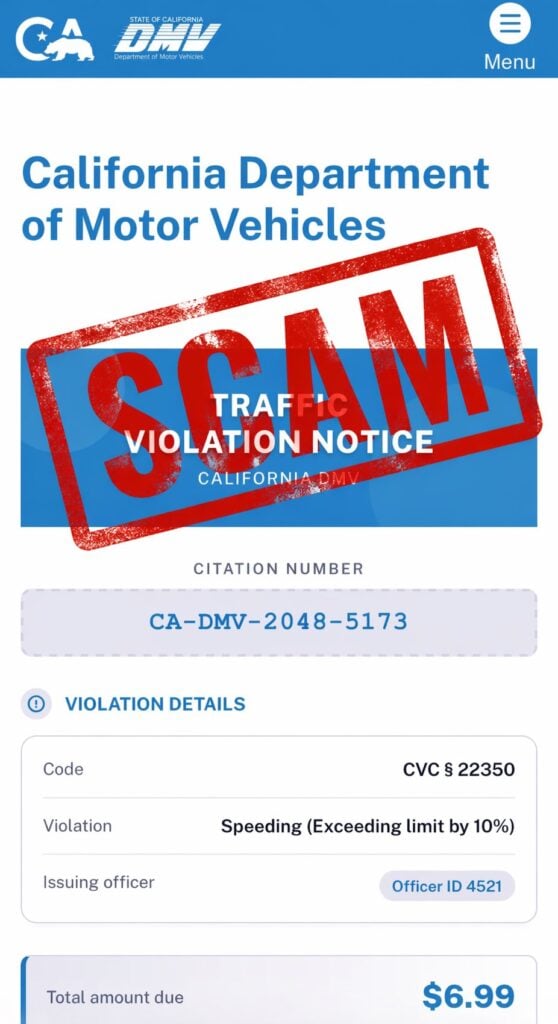
Many fake payment pages show a low amount, such as:
- $6.99
- $9.99
- $14.95
- $19.99
A small balance feels easier to pay than to investigate. That is the trap.
The goal is not just the fake parking fee. The real goal is to capture your:
- Card number
- Expiration date
- CVV
- Billing ZIP code
- Full name
- Address
- Phone number
Once scammers have that data, they can use it for unauthorized charges, sell it, or target you again.
What Parking Violation Scam Texts May Look Like
The wording changes often, but many messages follow a pattern like this:
“Final Notice: Our records show an unpaid parking violation associated with your vehicle. Pay immediately to avoid late fees, registration hold, and additional penalties.”
Another version may say:
“Unresolved parking citation. Immediate action required. Failure to pay may result in collections or court action. Pay now: [link]”
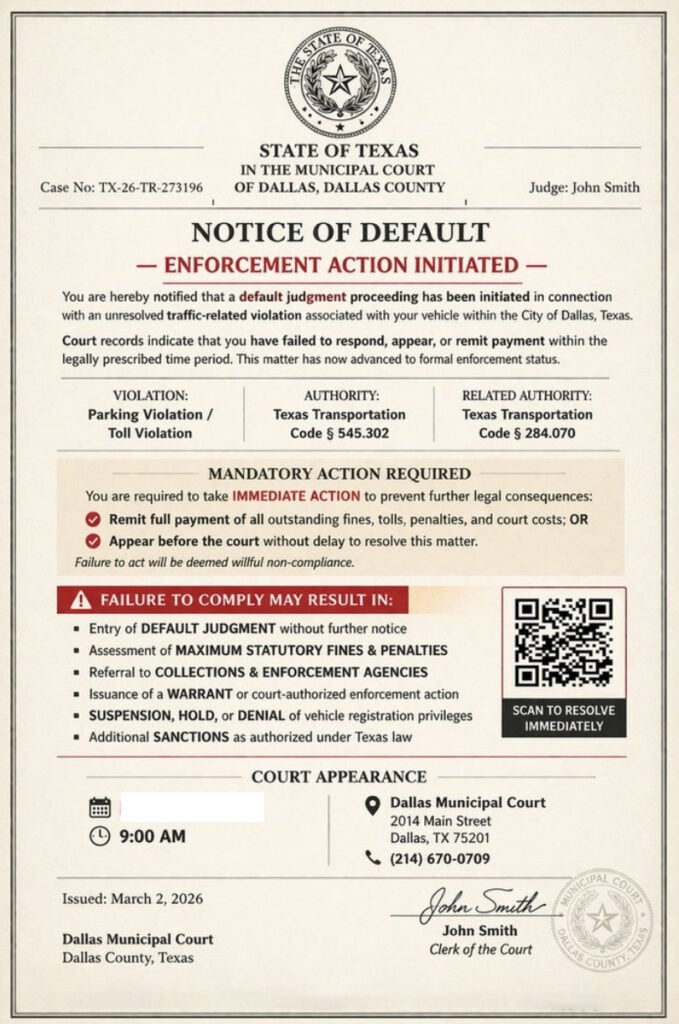
Some versions include QR codes instead of visible links. The FTC has warned that fake traffic violation texts may include QR codes that recipients are told to scan to pay or avoid court.
Other versions look like court documents or DMV portals and may show:
- A state seal
- A citation number
- A violation code
- A judge or clerk name
- A hearing date
- A QR code
- A payment deadline
- A “total amount due”
The more official it looks, the more cautious you should be.
The Fake Payment Website
After clicking the link or scanning the QR code, victims are usually taken to a fake website.
The site may imitate:
- A city parking payment portal
- A DMV website
- A toll agency page
- A court citation portal
- A traffic division payment system
It may show a realistic layout with fields like:
- Citation Number
- Violation Details
- Total Amount Due
- Payment Deadline
- License Plate
- Vehicle Information
- Billing Details
The California DMV warns that scammers send fake texts and links pretending to be from the DMV and says it will never ask for personal or financial information by text.
The Iowa DOT has also warned about fraudulent texts and calls claiming unpaid traffic or parking violations, tolls, or registration fees, with scammers impersonating DOT or DMV-style agencies.
Why QR Codes Are Dangerous in These Scams
A QR code may look safer than a strange link, but it works the same way. It opens a website.
Scammers use QR codes because:
- They hide the destination URL.
- They look modern and official.
- People are used to scanning QR codes for payments.
- They reduce hesitation.
Once scanned, the QR code may lead to a fake payment page that asks for personal and credit card information.
Security researchers and consumer warnings have noted that traffic violation QR scams may lead users to fake DMV-style pages designed to harvest names, addresses, phone numbers, and credit card data.
A simple rule: never scan a QR code from an unexpected parking, DMV, toll, or court text.
Red Flags of Parking Violation Scam Texts
The message arrives unexpectedly
If you did not recently receive an official mailed notice, paper ticket, or verified account alert, be suspicious.
It demands immediate payment
Scammers use deadlines to pressure you.
It includes a link or QR code
A payment link in a random text is one of the strongest warning signs.
The amount is suspiciously small
A tiny fee can be bait to steal card details.
The sender is not official
Random phone numbers, strange domains, and unusual sender names are major red flags.
The message threatens serious consequences too quickly
Real agencies usually provide clear, verifiable processes. Scammers use panic.
The site asks for too much information
A fake site may ask for your full identity and card details before showing any real evidence of a citation.
How the Parking Violation Scam Works
Step 1: The scam text arrives
You receive a message claiming you owe money for a parking violation or related vehicle issue.
The message may be vague or may include a fake citation number.
Step 2: It creates fear
The text warns that failure to pay may lead to late fees, collections, license issues, or registration problems.
Step 3: It offers a fast solution
The message tells you to click a link or scan a QR code to pay.
Step 4: The fake website appears
The page may look like a real government or parking payment portal.
Step 5: You are asked for personal information
The site may ask for your name, address, phone number, email, plate number, or vehicle details.
Step 6: You are asked to pay
The fake payment form collects your card number, expiration date, CVV, and billing address.
Step 7: The scammers use or sell your data
Fraud may happen immediately or days later. Some victims first see small test charges before larger unauthorized transactions.
What To Do If You Receive a Parking Violation Scam Text
Do not click the link
Do not open the link just to check. Use official websites instead.
Do not scan the QR code
A QR code from an unexpected parking notice is unsafe.
Do not reply
Replying can confirm your number is active.
Do not pay
Do not enter card details through a link or QR code from a text.
Verify independently
If you think the ticket might be real:
- Go directly to the official city parking website.
- Use the official court or citation portal.
- Check your account through a verified app or official website.
- Call the agency using a number from its official site.
- Do not use contact information from the text.
The FTC advises people who receive suspicious traffic or toll texts to verify using a website or phone number they know is real, not the information in the message.
What To Do If You Already Paid or Entered Information
1. Call your card issuer immediately
If you entered payment details, call the number on the back of your card.
Tell them:
- You entered card details on a fraudulent parking violation site.
- The site came from a scam text.
- You need the card blocked and replaced.
- You want recent transactions reviewed.
2. Review your transactions
Look for:
- Small test charges
- Unknown purchases
- New subscriptions
- Repeated declined attempts
- Charges from unfamiliar merchants
Dispute anything you do not recognize.
3. Turn on transaction alerts
Enable alerts for:
- Every purchase
- Online payments
- Transactions over $1
- International charges, if available
4. Change passwords if needed
If the fake site asked you to create an account or log in, change that password immediately.
Also change it anywhere else you reused it.
5. Watch for follow-up scams
Scammers may contact you again pretending to be:
- A city parking office
- A court clerk
- A DMV agent
- A refund department
- A bank fraud investigator
Do not trust follow-up messages just because they reference the same fake violation.
6. Save evidence
Take screenshots of:
- The original text
- The sender number
- The link or QR code
- The fake website
- Any payment confirmation
- Any unauthorized charges
7. Report the scam
You can:
- Mark the text as junk or spam
- Block the sender
- Forward the message to 7726 (SPAM) if supported by your carrier
- Report the scam to the FTC at ReportFraud.gov
The FTC recommends reporting scam texts through your phone’s junk-reporting feature or forwarding them to 7726, then deleting them.
The Bottom Line
Parking violation scam texts are designed to look routine and official, but their purpose is theft.
They may claim you owe a small parking fine, threaten late fees, and push you to a fake payment link or QR code. The small amount is bait. The real goal is your credit card details and personal information.
If you receive one of these messages, do not click, do not scan, do not reply, and do not pay.
Verify any real parking citation only through official city, court, DMV, or parking authority websites you access yourself.
FAQ
What is a parking violation scam text?
It is a phishing scam where criminals send fake text messages claiming you owe money for an unpaid parking ticket. The message usually includes a link or QR code that leads to a fake payment website.
Are parking violation texts real?
Some cities may send reminders, but an unexpected text demanding immediate payment through a random link or QR code is a major red flag. Always verify through the official city, court, DMV, or parking authority website.
Why do scammers use parking tickets as bait?
Parking tickets are common, and many people worry they may have forgotten one. Scammers use that doubt to push victims into paying quickly.
What happens if I click the link?
You may land on a fake payment portal designed to look official. It may ask for your name, address, vehicle details, and credit card information.
Why is the payment amount usually small?
Small amounts make people less suspicious. The fake fee is bait. The real goal is to steal your card details and personal information.
What information are scammers trying to steal?
Usually:
- Full name
- Address and ZIP code
- Phone number and email
- License plate or vehicle details
- Credit card number
- Expiration date and CVV
I clicked the link but did not enter anything. Am I safe?
Your risk is much lower if you did not submit information. Close the page, do not return, and watch for follow-up scam texts.
I entered my card details. What should I do now?
Call your card issuer immediately, report the card as compromised, freeze or replace it, review recent transactions, dispute anything unfamiliar, and turn on transaction alerts.
Can a real parking authority demand payment by QR code in a text?
A surprise QR code payment demand is suspicious. Only pay through official websites or apps you access yourself.
How do I verify if I really have a parking ticket?
Do not use the link or phone number in the text. Go directly to the official city parking portal, court website, or DMV site and search there.
How do I report the scam?
Mark the message as spam, block the sender, forward it to 7726 (SPAM) if your carrier supports it, and keep screenshots of the text and fake site.








