

A text message claims you have an unpaid traffic violation, toll violation, or court fine connected to a St. Louis County court in Oklahoma. It may include a fake court notice, a case number, a judge’s name, and a QR code demanding payment.
It looks official at first glance.
But the details do not add up. This is a scam designed to scare people into scanning a QR code, visiting a fake payment site, and giving away credit card or personal information.
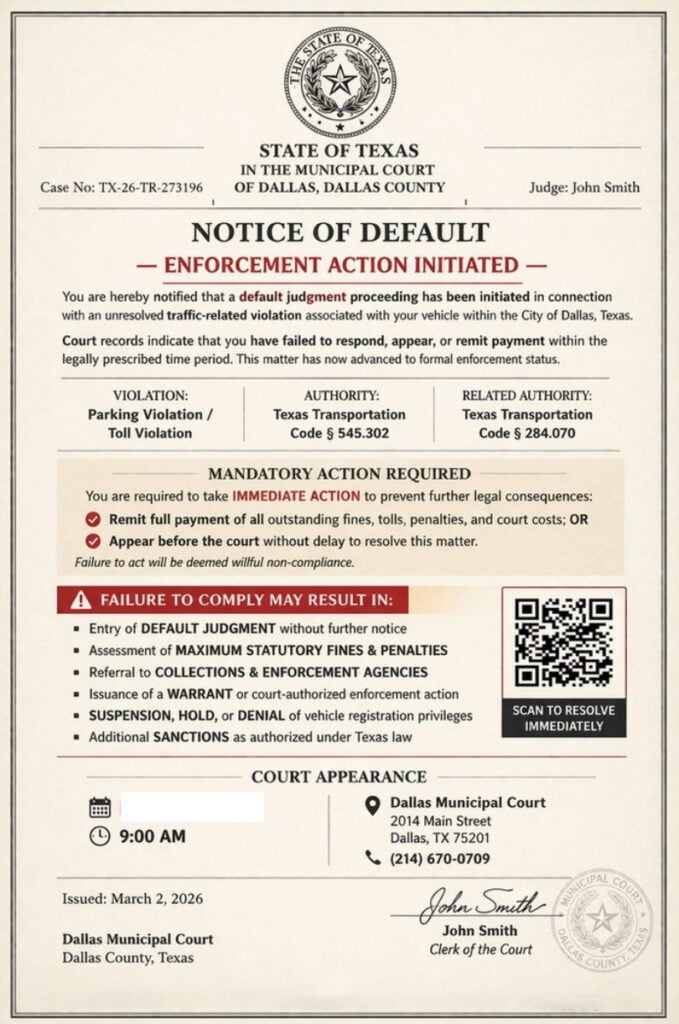
Scam Overview
The St. Louis County Oklahoma Court scam texts are part of a wider fake traffic ticket and court notice campaign spreading across multiple states. Scammers send text messages, emails, or image-based “final notices” that claim the recipient owes money for unpaid tolls, parking violations, speeding violations, or court fines.
The scam often uses a confusing mix of real and fake locations. Some versions reference Oklahoma, while also claiming to come from a Municipal Court of St. Louis County. That is a major red flag because there is no “Municipal St. Louis County” in Oklahoma, and St. Louis County is in Missouri, not Oklahoma. Oklahoma City Police publicly called out this mismatch as one of the obvious signs that the message is phishing.
The same scam pattern has also affected St. Louis County, Missouri. Local reporting says people received texts claiming to be from the St. Louis County Court Traffic Division, telling them they had outstanding traffic violations that could be paid by scanning a QR code. Officials said courts do not communicate by text or phone asking for payment, and residents should not scan the code.
This is what makes the scam confusing. It borrows names from real places, then combines them incorrectly.
A fake notice may say something like:
- State of Oklahoma
- Municipal Court of St. Louis County
- Traffic Division
- Final Notice
- Court Enforcement Action
- Unpaid tolls, parking violations, or speeding violations
- Scan the QR code to settle your unpaid balance
The document may look polished, but the legal geography is wrong.
Why This Scam Looks Convincing
It uses official-looking court language
The notice may include phrases like:
- “Final Notice”
- “Court Enforcement Action”
- “Immediate Action Required”
- “Failure to Act or Appear Will Result In”
- “Default Judgment”
- “Driver’s License Suspension”
- “Vehicle Registration Suspension”
This language is meant to create panic. Scammers want you to feel like the matter has already escalated and that payment is the only safe option.
It includes a QR code
The QR code is the trap.
The notice may tell you to scan the QR code to:
- Pay the balance
- Avoid a court appearance
- Prevent license suspension
- Stop enforcement action
- Settle the violation
But QR codes are just hidden links. If the QR code came from an unexpected court or traffic text, it can send you to a fake website controlled by scammers.
In St. Louis County, police said some recipients received a text with a photo of a flyer from the supposed “Traffic Division” of the Circuit Court of St. Louis County. The flyer directed people to pay by QR code or appear at a court hearing, and 20 to 30 people reportedly showed up at the courthouse because of the scam.
It mixes states and courts that do not match
One of the biggest giveaways is the mismatch between Oklahoma and St. Louis County.
A scam notice may claim to be from Oklahoma while listing a St. Louis County court. That does not make sense.
Similar mismatched notices have appeared elsewhere too. Linn County, Iowa warned residents about fraudulent texts claiming to be a final notice from the State of Iowa about unpaid tolls, parking violations, and speed violations, while also claiming to be from the municipal court of St. Louis County in Missouri.
This is a template scam. Scammers reuse the same fake notice and change state names without checking whether the details make sense.
How the St. Louis County Oklahoma Court Scam Works
Step 1: You receive a text with a fake court notice
The scam usually starts with a text message from an unknown number.
It may include an image that looks like a court document. The notice may include:
- A state seal
- A court name
- A case number
- A judge name
- A traffic division heading
- A QR code
- A court hearing date
- Threats of fines or license suspension
The goal is to make you believe the message is connected to a real legal matter.
Step 2: The message claims you owe money
The fake notice may say you owe money for:
- Failure to pay electronic tolls
- Toll evasion
- Parking violations
- Speeding violations
- Court fines
- Administrative fees
These are common enough that many people worry they may have missed something.
Step 3: It creates urgency
The notice may say:
- All prior notices have expired
- Immediate action is required
- Enforcement will proceed without delay
- Failure to pay may result in court action
- Your license or registration may be suspended
Oklahoma-area law enforcement has reported similar fake “final notices” from county courts, with unpaid tolls, traffic violations, or court fines demanding immediate payment through a link or QR code. Officials said legitimate courts do not make payment requests like this and advised people to verify citations with the local court clerk.
Step 4: The QR code sends you to a fake payment site
If you scan the QR code, you may land on a website that looks like a court, DMV, or traffic citation portal.
It may ask for:
- Full name
- Address
- Phone number
- Vehicle information
- License plate number
- Credit card number
- Expiration date
- CVV
- Billing ZIP code
This is the real goal of the scam.
The payment amount may look small, but the scammer wants your card data and personal details.
Step 5: Your information may be used later
After you enter your details, scammers may:
- Make unauthorized charges
- Run small test transactions
- Sell your card data
- Send more fake court or DMV texts
- Use your information in identity-related scams
The damage may not appear immediately. That is why you should treat any card entered on a fake court payment page as compromised.
Red Flags in These Scam Texts
The location does not make sense
If the notice says Oklahoma but references St. Louis County, that is a serious warning sign.
The message arrives by text
A surprise legal notice demanding payment by text is suspicious.
The notice uses a QR code
Courts do not typically demand payment through QR codes sent in random text messages.
The language is overly aggressive
Phrases like “final notice,” “default judgment,” and “immediate enforcement” are meant to scare you.
The violations are vague or stacked together
Fake notices often list several violations at once, such as toll evasion, parking, and speeding. Real citations are usually tied to a specific incident.
The payment path is controlled by the message
A real court issue should be independently verifiable through official court systems, not only through a QR code in a text.
What To Do If You Receive One
Do not scan the QR code
Do not scan it out of curiosity. A QR code can send you to a phishing site.
Do not click links
If the text includes a link, do not open it.
Do not reply
Replying can confirm that your number is active.
Do not pay
Do not enter card details through a link or QR code from the message.
Verify independently
If you are worried there may be a real issue:
- Look up the court yourself
- Use official court websites
- Call the local court clerk using a verified number
- Do not use contact information from the message
Officials in Oklahoma-area reports advised residents to verify any citation directly with the local court clerk rather than paying through suspicious links or QR codes
What To Do If You Already Paid or Entered Information
1. Call your card issuer immediately
If you entered card details, call the number on the back of your card.
Tell them:
- You entered payment details on a fraudulent court payment site
- The site came from a scam text
- You need the card blocked and replaced
- You want recent transactions reviewed
2. Review recent transactions
Look for:
- Small test charges
- Unknown online purchases
- New subscription charges
- Repeated declined attempts
- Charges from unfamiliar merchants
Dispute anything you do not recognize.
3. Turn on transaction alerts
Enable alerts for:
- Every purchase
- Online payments
- Transactions over $1
4. Save evidence
Take screenshots of:
- The text message
- The sender number
- The fake notice
- The QR code
- The fake website
- Any payment confirmation
5. Report the scam
You can:
- Mark the message as spam or junk
- Block the sender
- Forward it to 7726 (SPAM) if your carrier supports it
- Report it to local law enforcement if you sent money
St. Louis County officials said anyone who sent money through the QR code should contact local law enforcement.
The Bottom Line
The St. Louis County Oklahoma Court scam texts are fake legal notices designed to scare people into paying fake traffic, toll, or court fines.
The biggest red flag is the mismatch: the notice may claim to be from Oklahoma while referencing St. Louis County, which does not fit. Other versions use St. Louis County, Missouri court language and QR codes to trick recipients into paying.
If you receive one of these texts, do not scan, do not click, do not reply, and do not pay.
Verify any real court or traffic matter only through official court channels you access yourself.








