

In the fast-paced world of cryptocurrency, new opportunities arise every day alongside new scams trying to take advantage of unwitting investors. One such scam that has emerged involves fake websites mimicking the official Trump Meme ($TRUMP) website gettrumpmemes.com. These fraudulent sites lure victims by promising free $TRUMP tokens through a fake “airdrop.” However, their real intent is to steal cryptocurrency funds when users connect their wallets.
This article will provide an in-depth examination of how the FAKE $TRUMP airdrop scam works, including a comprehensive list of known fake sites, steps for avoiding being scammed, and advice if you have already fallen victim.
Scam Overview
The $TRUMP airdrop scam exploits the hype surrounding the recent launch of $TRUMP, a crypto token representing support for the 47 U.S. President Donald Trump. The legitimate $TRUMP token can be purchased through the official website gettrumpmemes.com, which redirects users to moonshot.money for transactions.
However, various fake sites have emerged that closely resemble the real gettrumpmemes.com website. These scam sites offer visitors an airdrop – a free distribution of cryptocurrency to numerous wallet addresses – claiming users can receive free $TRUMP coins this way.
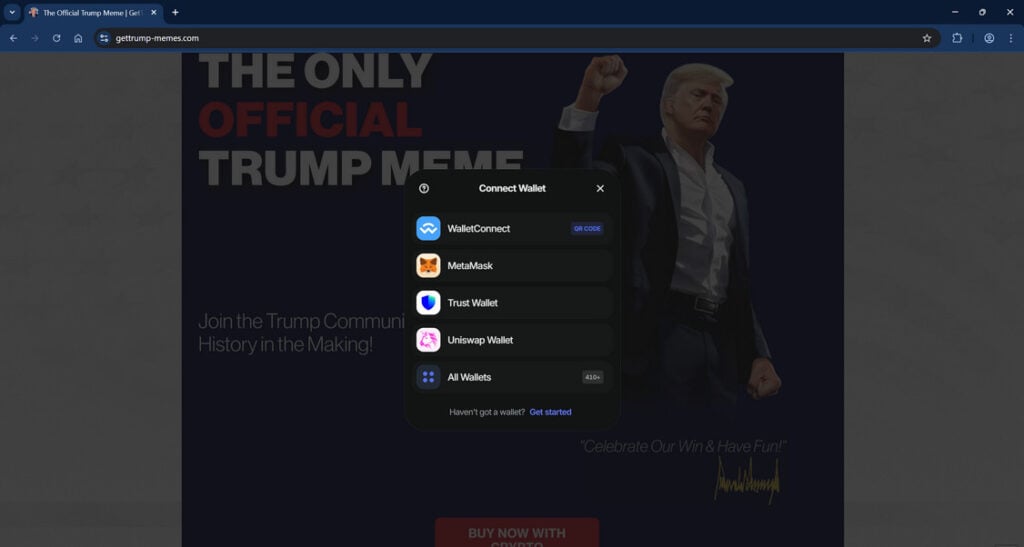
In reality, the scammers behind these fake airdrop offers are trying to steal funds from victims’ connected crypto wallets. The scam sites instruct users to connect their wallet in order to claim the free $TRUMP tokens. But instead of receiving anything, this allows the scammers to activate cryptocurrency theft malware and drain the wallet contents.
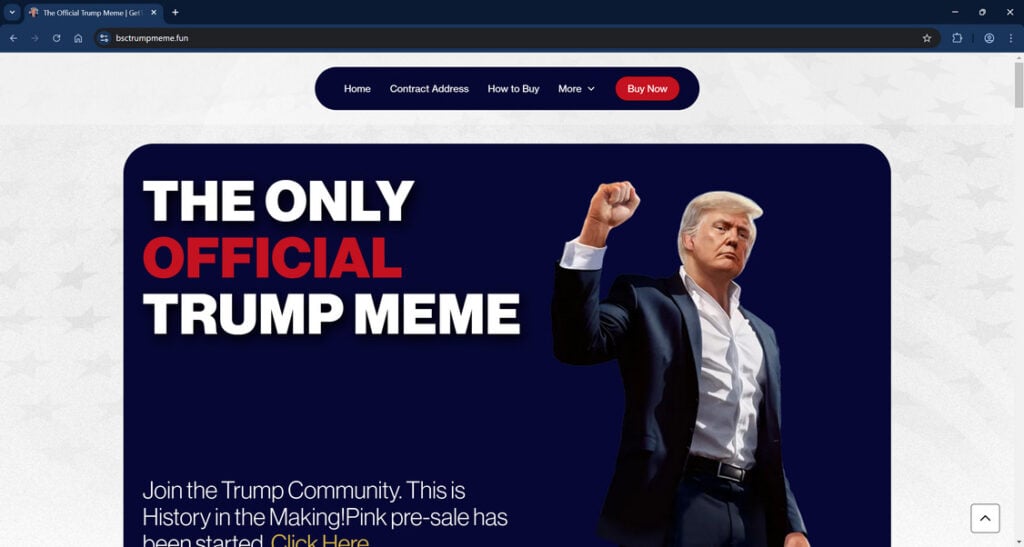
So far, we have identified over 100 fraudulent websites impersonating the legitimate gettrumpmemes.com to perpetrate this theft scheme. Most are near-identical copies of the real site in terms of visual design and domain name.
The $TRUMP airdrop scam highlights the risks of “FOMO investing,” where hype and fear of missing out cause investors to let their guard down. Scammers exploit this by offering free or discounted cryptocurrency to quickly attract victims before stealing their funds. Avoiding this scam requires vigilance, skepticism of “too good to be true” offers, and taking steps to verify legitimacy.
How the Scam Works
The $TRUMP airdrop scam is relatively simple from a technical standpoint, but highly effective at duping unwary victims into draining their own cryptocurrency wallets. Here is an outline of how the scam operates step-by-step:
Step 1: Scammers Create Fake Websites
The first step for scammers is to register one or more domain names that closely resemble the real gettrumpmemes.com website. Examples include gettrumpmemes.org, get-trumpmemes.com, gettrumpairdrop.web.app, and trumpmeme.info.
Some fake sites look identical to gettrumpmemes.com at first glance, with the same branding, images, and text. Others have small differences or a generic template. This is intended to trick users into thinking they are on the legitimate site.
Step 2: Fake Sites Promise a $TRUMP Airdrop
The scam pages prominently promote the opportunity to receive free $TRUMP tokens through an airdrop. They emphasize the hype around $TRUMP’s launch and claim users can get “free money” by participating.
Various tactics are used to make the offer seem more legitimate, like fake user comments, urgency (“limited time”), pressure (“only 137 spots left!”), and false authority (“verified by CoinMarketCap”).
Step 3: Users Instructed to Connect Wallet
After building up the airdrop offer, the fake sites instruct users to connect their cryptocurrency wallet to claim it. This is usually done by providing a wallet address or scanning a QR code, similar to authenticating a DeFi transaction.
The sites reassure users that connecting the wallet is safe and required only to “prove you are human” or “send the free $TRUMP.” In reality, this gives scammers wallet access.
Step 4: Scammers Drain the Wallet
Once wallets are connected, the scammers immediately activate draining software to transfer all cryptocurrency funds from the wallet to an account they control. This theft can take seconds or minutes to complete after wallet access is granted.
From the user’s perspective, their wallet balance starts rapidly declining without explanation. The scam sites provide no further response after the wallet is connected and drained. Users are often left confused about what happened.
Step 5: Scammers Disappear and Repeat
After draining funds from one or more wallets, the scammers abandon the fake site and register a new domain to repeat the process. The fraudulent sites tend to get taken down quickly once publicly exposed.
Stolen cryptocurrency gets converted to untraceable coins and cycled through tumblers to obscure the trail. Scammers repeat the airdrop scam with new sites and new victims.
What to Do If You Connected Your Wallet
If you have fallen victim to the $TRUMP airdrop scam, the most urgent priority is trying to stop the draining process to preserve any crypto funds not yet stolen. Time is critical, so remain calm and take these steps:
- Disconnect the wallet – If the scam site is still open, immediately disconnect your wallet to revoke access. This may temporarily pause the draining.
- Contact wallet support – If the wallet has a customer support team, contact them and explain you connected to a scam site. They may be able to freeze the account.
- Move funds to a new wallet – Create a brand new crypto wallet and transfer your remaining coins there. This disconnects the scam wallet.
- Change wallet passwords – Update your wallet password and any relevant account passwords as a precaution.
- Monitor transactions – Keep checking your wallet and crypto account transactions to see if the draining has stopped or reversed any amounts.
- Notify cryptocurrency exchanges – Contact any exchanges you use to inform them of the situation in case the scammers try moving funds there.
- Consult blockchain security firms – Companies like Coinfirm, Chainalysis, and TRM Labs can sometimes trace stolen crypto even after its converted.
- Report the scam – File reports about the theft with the FTC, FBI, SEC, and IC3 to aid law enforcement. Provide website names, wallet addresses, and transaction hashes.
- Learn from the experience – Reflect on missteps that led to connecting your wallet so it does not happen again. Never connect wallets to unfamiliar sites offering “free money.”
Warning: Fake Websites Impersonating GetTrumpMemes.com
It has come to our attention that scammers have created numerous fake websites designed to impersonate the official gettrumpmemes.com website. These fraudulent sites include:
- airdrop-gettrumpmemes[.]com
- bsctrumpmeme[.]fun
- claim-gettrumpmemes[.]com
- claiming-trump[.]com
- claimtrump[.]pages[.]dev
- claim-trumpmemes[.]xyz
- demo222-eh4[.]pages[.]dev
- evmtrumpmemes[.]com
- gameslux[.]store
- getcommunitytrumpmemes[.]com
- getrumpmemes[.]cc
- getrumpmemes[.]org
- getstrumpmemes[.]lol
- gettrampmeme[.]com
- gettrampmeme[.]org
- gettrampmemes[.]com
- gettrummpmemes[.]com
- gettrumpairdrop[.]web[.]app
- gettrumpbutthole[.]com
- gettrumpememes[.]com
- get-trumpmeme[.]com
- get-trump-meme[.]com
- get-trumpmeme[.]info
- get-trumpmeme[.]net
- get-trumpmeme[.]org
- gettrumpmeme[.]pages[.]dev
- gettrumpmeme[.]web[.]app
- get-trumpmeme[.]world
- gettrumpmemes[.]click[.]jittercore[.]art
- gettrump-memes[.]com
- get-trumpmemes[.]com
- gettrumpmemes[.]dev
- gettrumpmemes[.]ink
- gettrumpmemes[.]me
- gettrumpmemes[.]run
- gettrumpmemes[.]shop
- gettrumpmemes[.]site
- gettrumpmemesnow[.]com
- gettrumpmemeth[.]com
- gettrumpmemms[.]com
- gettrumpmems[.]com
- gettrupmems[.]com
- gtetrumpmemes[.]com
- macatrumpmeme[.]pages[.]dev
- memetrump[.]org
- swaggy[.]pages[.]dev
- trumpclaim[.]org
- trumpfair[.]com
- trumpmeme[.]info
- trumptokenofficial[.]com
- website-87e9feb8[.]quaaludes[.]io
- worldofdypians[.]ch
These websites are NOT affiliated with gettrumpmemes.com in any way. The official $TRUMP meme coin can only be purchased through gettrumpmemes.com, which redirects to moonshot.money, or via exchanges like Binance and Bybit where it is listed.
Gettrumpmemes.com will NEVER ask users to connect their wallet or participate in an “airdrop.” There are currently NO legitimate $TRUMP airdrops available. Only purchase $TRUMP through reputable sources.
Frequently Asked Questions about the Fake $TRUMP Airdrop Scam
1. What is the fake $TRUMP airdrop scam?
The $TRUMP airdrop scam involves fraudulent websites that impersonate the real gettrumpmemes.com and promise free $TRUMP tokens through a fake airdrop. This is a ploy to steal funds when users connect their crypto wallets.
2. How does the fake $TRUMP airdrop scam work?
Scammers create lookalike sites, promote a $TRUMP airdrop offer, instruct users to connect wallets to “claim” it, then use malware tools to drain funds from connected wallets quickly.
3. How can I identify fake $TRUMP airdrop websites?
Fake sites have deceptive URLs intended to mimic gettrumpmemes.com. Look for subtle differences. Verify legitimacy against an authoritative site list before connecting any wallet.
4. Why do the fake sites want me to connect my wallet?
This grants the scammers access to initiate transfers out of your wallet. Real airdrops would never require handing over wallet access.
5. What happens after connecting my wallet to a fake site?
The scammers drain your wallet rapidly using theft software. You’ll see unapproved transfers out until your balance hits zero. Act fast to disconnect.
6. How can I avoid the fake $TRUMP airdrop scam?
Never connect your wallet to unfamiliar sites or offers requiring it. Independently verify legitimacy through official channels before participating.
7. What should I do if I connected to a fake site already?
Disconnect immediately, move funds to a brand new wallet, contact wallet support, monitor for unauthorized transfers, and report it.
8. Can I recover stolen funds if I fell for this scam?
Very difficult, but possible in some cases by tracing transactions. Prevention is critical – only connect wallets to trusted platforms and offers.
9. Where can I safely obtain legitimate $TRUMP meme coins?
Only through the official gettrumpmemes.com site, which redirects to https://moonshot.money, or major exchanges like Binance where $TRUMP is listed.
10. How can I stay safe from crypto scams in general?
Never connect wallets randomly, avoid “too good to be true” offers, verify legitimacy, use strong unique passwords, enable two-factor authentication, and keep aware of latest scam methods.
The Bottom Line
The $TRUMP airdrop scam serves as a cautionary tale about the prevalence of cryptocurrency fraud, especially surrounding hype-driven asset launches. While scam methods grow more sophisticated, the fundamentals remain unchanged – verifying legitimacy and controlling wallet access are key to avoiding theft.
With blockchain’s transparency, there is hope that law enforcement can eventually identify the specific scammers behind these fake $TRUMP sites and hold them accountable. But for now, cryptocurrency users must remain vigilant about protecting their funds and denying wallet access to suspicious services.
The $TRUMP meme coin will likely continue attracting imitators and fraudsters trying to profit on its popularity. However, the longevity of blockchain depends on users learning to spot and avoid these scams. By understanding how the $TRUMP airdrop scam operates, we can work together to protect investor funds and shut down these fraudsters for good.

Join the discussion
0 commentsShare your experience or ask a question about this article.
Discussion
Start the conversation
Have a question or something useful to share? Add the first comment.