

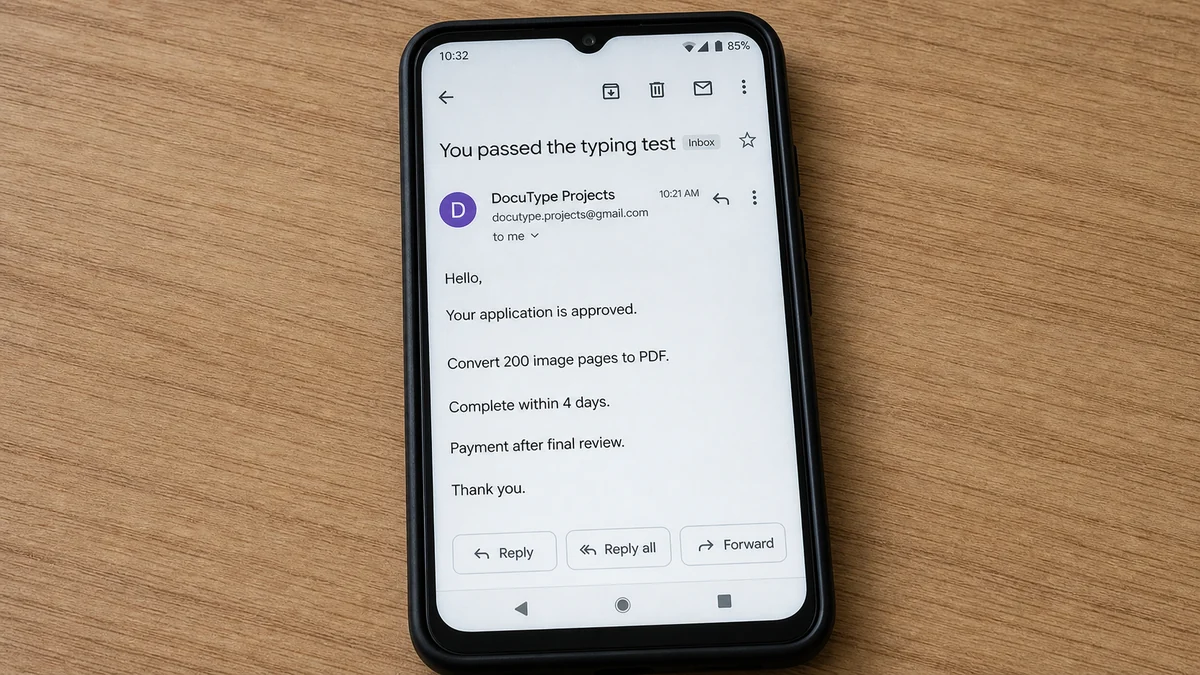
A remote worker passes a short typing test, fills out an application, and is accepted almost immediately. The first assignment is simple enough to understand and large enough to feel like serious freelance work.
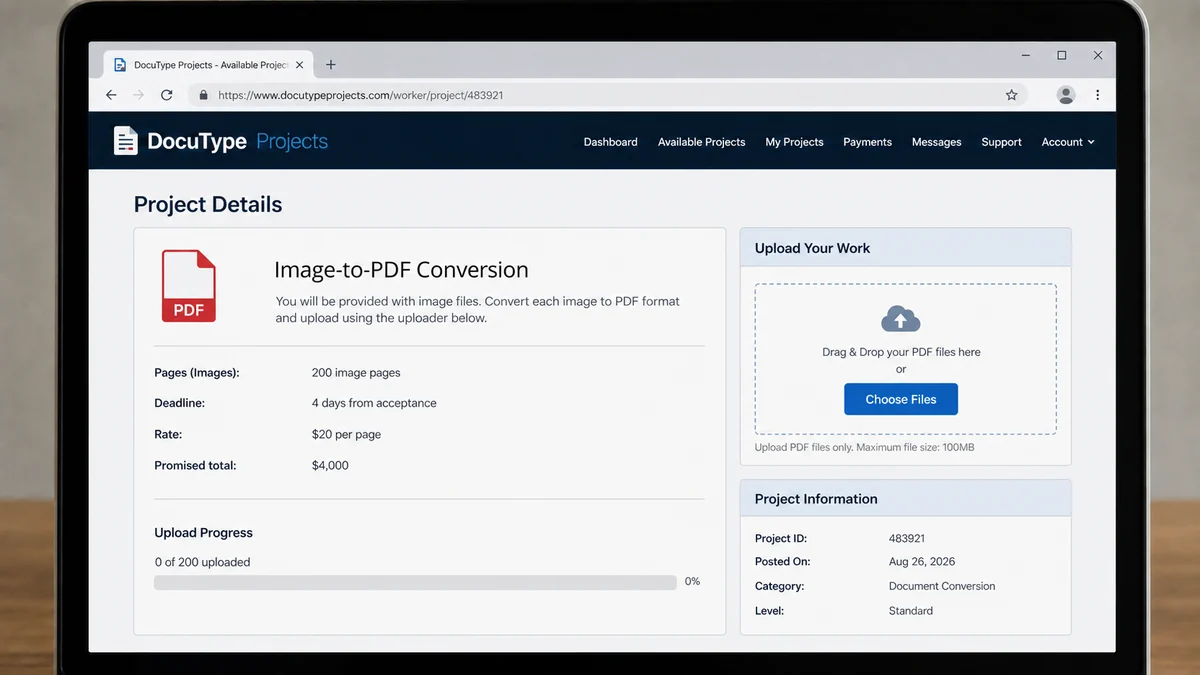
The Typing Job offers 200 image pages, four days, and a promised $4,000, creating one question the recruiter hopes the worker postpones: why would anyone pay that rate for a highly routine task software can complete in minutes?
Overview
The advertised rate is disconnected from the value of the task
A recent typing-job report describes an offer to convert text shown in 200 images into PDF format within four days. The recruiter promised about $20 for each image, creating a total of roughly $4,000.
Optical character recognition can extract printed text quickly, and ordinary document tools can save or combine pages as PDF files. Human review may have value for difficult handwriting or accuracy, but the reported rate is still far above what the vague task explains.
High pay for easy work is not generosity in this pattern. It is the emotional anchor that makes a worker invest four days before asking how payment will actually be delivered.
The worker was accepted before a verifiable employer appeared
The poster said they found the opportunity on a platform, completed a test, were told to email and fill in an application, and then received the 200-image assignment. No verified company, manager, contract, or normal payroll process was established in the report.
A test and application can make a fake job feel earned. Their presence does not prove that a budget, client, or accounts-payable department exists.
The worker blocked the contact before the reported story reached a payment demand. That is important: we can identify the job as highly suspicious without inventing an exact fee the recruiter never got to request.
The likely endgame appears only after the work is finished
Retyping scams commonly wait until the victim submits the assignment. The fake employer then claims that payment is blocked by a registration fee, tax, currency conversion, account upgrade, release charge, or minimum balance.
Other variations use a fake check, collect identity documents, install malware through project files, or simply steal the work. Which path this specific recruiter intended was not confirmed in the public report.
Before accepting any image-to-PDF job, ask:
- What legal company is hiring?
- Where is the company registered?
- Who is the named hiring manager?
- Why is the rate so high for routine conversion?
- Is there a written contract and payment schedule?
- Will a small paid milestone be completed first?
- Does payment require any fee from the worker?
- Are project files hosted on a trusted platform?
- Do the files contain macros, installers, or archives?
- Does the recruiter use a corporate email domain?
- Can the company confirm the job independently?
- What happens if the work is rejected?
A legitimate client can answer these before receiving hundreds of pages. A scammer benefits when all important payment details remain until the end.
The Four-Day Assignment Is a Psychological Investment
The scammer does not need the converted PDF to be useful. The labor itself changes the victim’s decision-making.
After hours of repetitive work, abandoning a promised $4,000 feels harder than refusing a suspicious job on day one. The worker may think that a small release fee is worth paying to avoid wasting the completed assignment.
This is the sunk-cost effect. Past time cannot be recovered, but it still pushes people to risk new money in an attempt to justify it.
A four-day deadline increases the pressure. The worker focuses on production, sleeps less, postpones verification, and may stop discussing the job with people who would question it.
The recruiter can encourage this by sending progress reminders, praising accuracy, or saying a client is waiting. These messages simulate management without demonstrating that the client exists.
At submission, the fake employer has maximum leverage. The victim has delivered work, expects a large payment, and wants the relationship to be real.
A demand for $50 or $200 can feel small beside $4,000. That comparison is deliberate. The promised payment has no value until it is received through a legitimate, irreversible process.
The safest policy is set before work begins: the worker never pays the employer, payroll processor, bank agent, or tax officer to receive wages.
Write that rule beside the project deadline. It is easier to follow a decision made calmly than to improvise after four exhausting days and an urgent payment message.
How the $4,000 Typing Job Scam Works
Step 1: A platform post advertises simple remote work
The listing uses phrases such as data entry, image conversion, retyping, document formatting, or PDF project. No specialist qualification is needed, so almost anyone can imagine being accepted.
The employer may claim an overseas client, publishing deadline, legal archive, or confidential manuscript to explain the volume.
Step 2: A test creates the feeling of selection
The applicant retypes a sample or formats a page. Quick approval makes the person feel that skill, not luck, earned the opportunity.
A fake test costs the recruiter little and makes later doubts feel like self-sabotage.
Step 3: The conversation leaves the original platform
The recruiter moves to email, Telegram, WhatsApp, or another channel. Platform warnings, dispute tools, and account history are left behind.
The application may collect a full name, phone number, address, identity document, bank details, or signature.
Step 4: An oversized project promises an oversized payment
The worker receives hundreds of images and a tight deadline. The rate is stated clearly, while tax, invoicing, acceptance criteria, and dispute terms remain vague.
The assignment can be copied public text, meaningless scans, or material distributed to many victims at once.
Step 5: The worker submits before receiving a paid milestone
No small stage is paid first. The entire balance remains a promise controlled by the recruiter.
If the worker asks for partial payment, the scammer may cite company policy or claim that only complete projects can enter payroll.
Step 6: A new obstacle blocks the $4,000
Common stories include a payment portal activation fee, employee registration, international transfer charge, tax certificate, account upgrade, or refundable security deposit.
Another version sends a fake check or fake payment email and asks the worker to return an overpayment.
Step 7: Each payment creates another requirement
If the victim pays once, the portal may show a larger balance but invent a second fee. The amount rises because the victim is now chasing both wages and money already sent.
The chain ends only when the victim stops. The displayed earnings were never available.
What the Public Report Proves and What It Does Not
The report proves that a worker was offered about $20 per image for 200 images, had a four-day deadline, completed a test and application, and became concerned before proceeding.
It also shows a mismatch between the simplicity of the described task and a $4,000 total. That mismatch is a strong job-scam signal.
The report does not identify a confirmed company, show a completed payment attempt, or document the exact fee that would have followed. We should not claim that this particular recruiter requested tax, software, or release money when the worker blocked them first.
Instead, those are evidence-based descriptions of common next stages in retyping and remote-job scams. The distinction matters because accurate warnings are more useful than dramatic guesses.
It is possible for real clients to hire transcription, data-entry, accessibility, or document-remediation work. Legitimate jobs can also use tests. The decision turns on the employer, economics, contract, files, and payment process together.
A real client should be able to explain why human conversion is required, what accuracy standard applies, who owns the source material, and why the rate fits the project.
Blocking the recruiter before losing money was the correct move. A victim does not need to wait for the final demand to “prove” a pattern that already fails basic verification.
Readers should use the same threshold. When a job’s value proposition makes no business sense and the employer cannot be verified, do not donate labor to see what happens next.
How to Verify a Remote Data-Entry Client
Find the company’s legal name, registration, physical address, website age, telephone number, and staff directory. Search independently rather than using links supplied in the message.
Contact the company through its official website and ask whether the named recruiter and project are real. A copied logo or offer letter is not confirmation.
Inspect the email domain. Lookalike domains, free webmail, misspellings, and recently registered websites need explanation.
Request a contract that names both parties, deliverables, file count, rate, acceptance criteria, payment date, currency, tax treatment, revision limits, and dispute process.
Ask for a small paid milestone. Convert five pages, submit them, and require payment before accepting the remaining 195. A scammer wants the large sunk cost and often resists this structure.
Verify that the source material can legally be shared. A real client should know the copyright owner and confidentiality requirements.
Open files cautiously. Scan archives and documents before viewing, disable macros, and avoid installers or “special PDF software” supplied by the recruiter.
Use a trusted freelance platform with escrow or a known invoicing method when possible. Keep communication and delivery inside its dispute system.
Never send identity documents until the employer is verified and has a legitimate need. Redact unnecessary numbers and use a secure channel.
Finally, calculate the economics. If ordinary software performs the task almost instantly, ask why a business would pay thousands to an unknown worker recruited online.
Files, Identity, and Malware Risks
A typing assignment can carry more than a payment scam. Project archives may contain executable files disguised as images, malicious shortcuts, or documents that request macros.
A recruiter may say a custom font pack, converter, time tracker, or secure viewer is required. Unknown software can steal passwords, browser sessions, cryptocurrency wallets, and documents.
File names and icons are not reliable. Configure the system to show extensions and scan downloads before opening them.
Use a separate standard user account for untrusted work, keep the operating system updated, and do not disable security tools because the recruiter calls them incompatible.
Identity theft is another path. An “employee form” may ask for passport, national identity card, tax number, bank statement, or selfie before the company is verified.
Information collected for fake payroll can be used to open accounts, impersonate the victim, or make later bank calls more convincing.
A real employer may need tax and payment details after hiring, but the timing and secure process matter. A form sent from free webmail to an unverified applicant is not safe onboarding.
If credentials or identity files were sent, recovery should cover more than the promised payment. Change passwords, monitor accounts, and use the official identity-theft process for the victim’s country.
Keep the work files separate from personal photographs, tax records, and saved browser downloads. A broad upload request can cause a tired worker to send the wrong document along with the assignment.
Review cloud-sharing permissions after delivery. Revoke links that allow the recruiter to browse an entire folder, and check whether an unfamiliar account was invited as an editor rather than a viewer.
If remote-access software was installed for “quality control,” disconnect the device from the internet before removing it, then inspect financial and email sessions from a different trusted device.
What Not to Pay to Receive Freelance Earnings
Do not pay an employee registration fee. A company can deduct legitimate agreed business charges from its own budget, not demand gift cards or transfers from a new worker.
Do not pay to upgrade a bank account or payment wallet chosen by the employer. A balance visible only inside an unknown portal may be fictional.
Do not pay taxes to a recruiter. Tax obligations are handled through official government processes, not personal accounts supplied in a chat.
Do not pay an international conversion or anti-money-laundering certificate fee. Those stories misuse financial language to make an advance payment sound mandatory.
Do not buy software from the employer’s designated vendor using a check they sent. That is a fake-check variation.
Do not return an accidental overpayment. Contact the payment provider independently and let it correct a genuine error through the original rail.
Do not deposit cryptocurrency to “activate” withdrawal. Honest jobs pay workers; they do not require capital to release wages.
Do not let a countdown or threatened account closure change these rules. A real obligation can be verified outside the recruiter’s system.
Company, Address, and Fulfillment Checks
Verify the legal employer
Find the registered company, official domain, address, directors, and independent contact details. Confirm the recruiter through that channel.
If no legal employer can be named, there is no accountable party promising $4,000.
Check the project owner and source files
Ask who owns the images, why they need manual conversion, and how the output will be used. A legitimate client should understand its own material.
Scan every file and reject unknown software requirements.
Audit the contract and payment process
Require written deliverables, acceptance rules, rate, due date, payment rail, and dispute terms. Use a small paid milestone before the full project.
Any fee required to receive earnings ends the relationship.
Prove that completed work can be paid
A screenshot of a payroll dashboard is not fulfillment. A successfully paid milestone through a known processor is much stronger evidence.
Do not submit 200 pages while every payment fact remains controlled by an anonymous recruiter.
What to Do if You Have Fallen Victim to This Scam
- Stop work and payment. Do not complete more pages or pay a fee to release the promised earnings.
- Preserve the project. Save the listing, platform profile, test, application, emails, messages, files, deadlines, and payment promises.
- Report the account to the original platform. Include evidence that the conversation moved away and the rate or process was deceptive.
- Contact the payment provider. If money was sent, report it immediately and ask about a stop, recall, or fraud review.
- Tell your bank about any fake check. Do not wait for it to be returned and do not spend visible funds.
- Secure identity information. If documents or tax numbers were shared, follow IdentityTheft.gov or the equivalent official service in your country.
- Change exposed passwords. Start with email and financial accounts, and enable strong multifactor authentication.
- Remove unknown software. Disconnect remote-access tools and revoke suspicious browser extensions or account sessions.
- File an official report. Use ReportFraud.ftc.gov or the relevant national fraud-reporting service.
- Run Malwarebytes. Perform a full scan if any assignment file, archive, converter, font pack, or app was opened.
- Use AdGuard as a supporting layer. It can reduce malicious adverts and tracking but cannot verify a job or unlock wages.
- Ignore recovery scammers. Do not pay a hacker, agent, or lawyer found in an unsolicited message.
Frequently Asked Questions
Is $20 per image a normal rate for image-to-PDF work?
Rates vary, but $4,000 for 200 routine image pages is economically implausible without specialized complexity that the reported recruiter did not explain.
Does passing a typing test prove the job is real?
No. A simple test can be used to create commitment. Verify the company, contract, project owner, and payment process independently.
What fee will the scammer ask for?
The specific report ended before a fee appeared, so its exact endgame is unknown. Common variants use release, registration, tax, conversion, or account-upgrade stories.
Can the assignment files contain malware?
Yes. Archives, fake images, macro-enabled documents, custom converters, and remote-access tools can be dangerous. Scan files and reject unknown installers.
What if I finished the work but have not been paid?
Do not pay to unlock wages. Preserve the contract and delivery proof, use the platform’s dispute process, and report an unverifiable employer.
Can a legitimate remote job use email and PDF files?
Yes. Those tools are neutral. The warning comes from the implausible rate, unverified employer, vague contract, unsafe files, and pay-to-get-paid demand.
Bottom Line
The $4,000 typing job is powerful because the worker feels hired before the employer is proven and feels owed before payment exists. Two hundred pages and a four-day deadline create the commitment the scammer can exploit later.
Verify the company, demand a contract, scan the files, and require a small paid milestone. Most importantly, never send money to receive earnings. A job that turns the worker into the payer is not employment.








