


A file looks like a document, but opening it leaves you wondering what actually ran. The familiar icon is no longer enough reassurance.
If that happened on your Windows computer, focus first on containing the exposure. Identifying a campaign matters less immediately than protecting the accounts you use.
Overview
UAT-12643 describes a documented Windows malware campaign
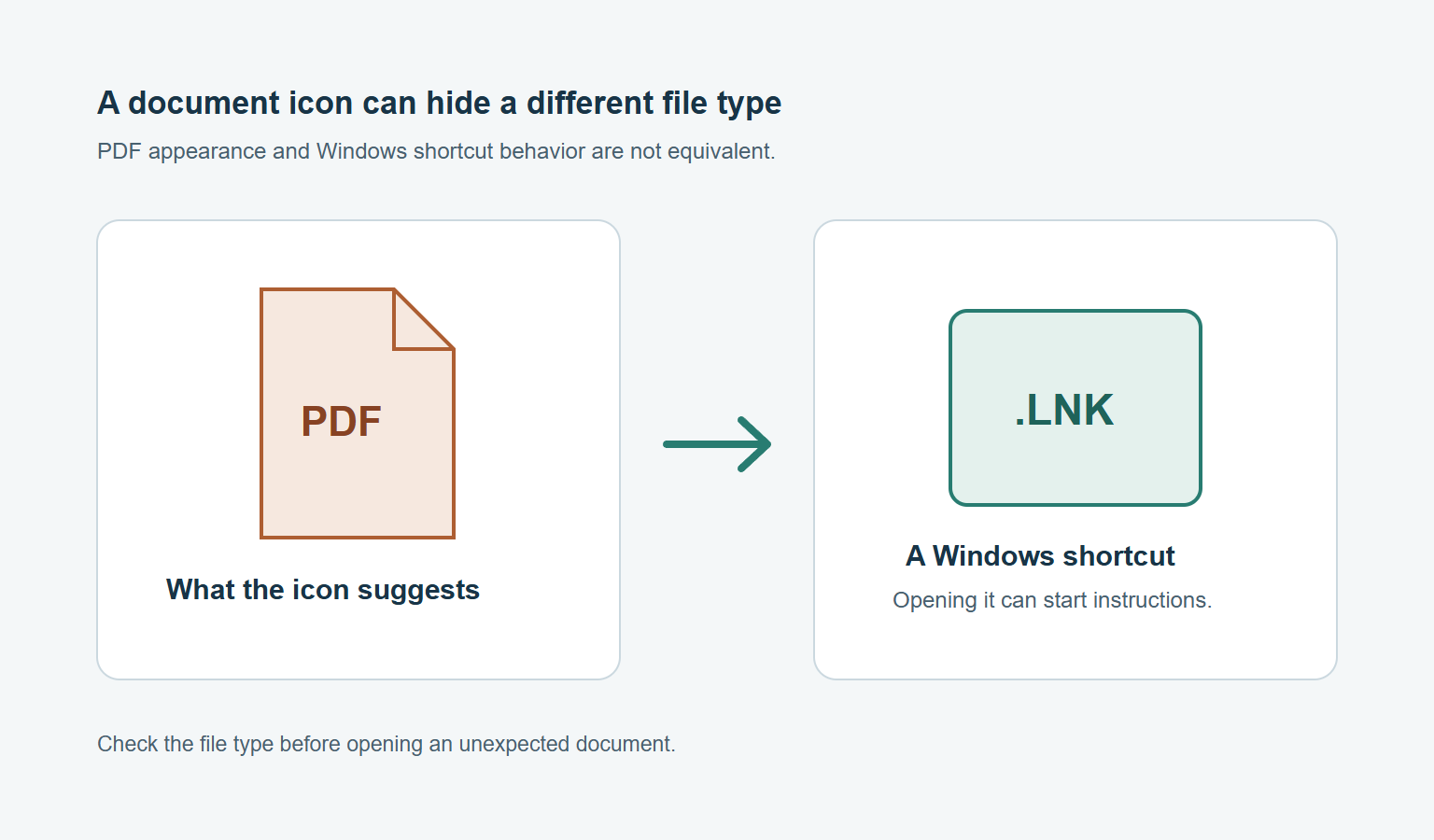
Cisco Talos associates UAT-12643 with Good Game information theft, Overlord remote access, and a cryptocurrency clipboard hijacker. Analyzed Windows shortcuts can imitate PDF files.
Talos did not observe how the initial files reached victims. Its suggested North Korea alignment carries low confidence, rather than confirmed attribution.
Your response depends on whether anything executed
- Only downloaded a suspicious file: leave it unopened and retain its source information.
- Opened a suspicious shortcut or installer: isolate the computer and investigate possible execution.
- Received a malware detection: preserve its exact name, location, and remediation result.
- Used sensitive accounts afterward: protect those accounts from a different, trusted device.
An unexpected file is not, by itself, a diagnosis. Equally, seeing a document open does not establish that nothing else happened beforehand.
Device cleanup cannot repair an exposed secret
The practical route below separates scanning, persistent-infection escalation, and account recovery. Use the branch matching your situation rather than deleting unfamiliar files indiscriminately.
How to Remove Suspected UAT-12643 Malware From Windows
Step 1: Disconnect the computer and preserve useful details
Unplug its Ethernet cable and disconnect Wi-Fi through the network controls. Do not continue banking, trading, entering passwords, or opening wallet software on that computer.
Use another trusted device for urgent account protection. You do not need to finish a lengthy scan before reporting an unauthorized withdrawal or securing email.
Write down when the file arrived, where you obtained it, and whether you opened it. Record any Windows warning or antivirus detection exactly.
Keep the filename, download address, and relevant message privately. Do not forward a suspected executable to friends or upload it to a public help discussion.
If you only downloaded the file without opening it, keep it closed. A scan can inspect it without testing whether its shortcut or installer works.
Do not try to stop unfamiliar processes by guessing from their names. Talos describes an Overlord mechanism that can crash Windows when its process is terminated.
A crash, frozen application, or disabled system tool is not unique to this campaign. Report the symptom without deciding that every matching computer is infected.
Step 2: Obtain the verified Windows scanner
Obtain Malwarebytes through the existing Windows download route below, not an advertisement. The installer and optional protection links serve different purposes.
If the affected machine cannot safely download software, obtain the installer on a trusted computer. Transfer only that installer using an otherwise empty removable drive.
Do not copy unknown programs from the affected machine onto the trusted one. Keep any evidence transfer separate from the installation file.
Download the Windows installerRead about the free scannerOptional Malwarebytes Premium protection
The free scanner and optional Premium links use the site’s affiliate routes. Purchasing prevention is separate from investigating this incident and does not recover stolen funds.
Malwarebytes needs internet access for installation and current updates. On a suspected active infection, ask a trusted technician about updating safely before reconnecting the affected computer.
If installation or updates fail, preserve the error instead of disabling Windows security. Keep the machine isolated and use the help route in Step 6.
Step 3: Install Malwarebytes and open the application
Open the Downloads folder and locate the MBSetup installer you deliberately obtained. Double-click that file, rather than reopening the original suspicious download.

If Windows requests permission, check that the prompt belongs to the intended Malwarebytes installation before allowing it. Stop if the publisher or file seems wrong.
In the setup wizard, choose Install. Select Personal for your own computer, then continue with Next and the installation prompts.
Skip optional product offers you do not want. When installation finishes, choose Open Malwarebytes rather than purchasing a subscription solely to follow this guide.
The tutorial images show an earlier Windows interface, including Premium trial labels. They illustrate installation, result handling, and restart prompts, not a requirement to purchase.
Current wording can differ between releases. If the application offers no clear free path, consult its official support instead of selecting an unexpected paid checkout.
Step 4: Configure an available scan and let it finish
Malwarebytes’ current feature table lists Custom Scan as free. Do not assume every scan type shown in an older tutorial remains free.
For the documented Windows Custom Scan route, find the Scanner tile. Open its three-dot menu, select Advanced Scan, then choose Custom Scan.
On Configure Custom Scan, expand the file finder and select the folders or drives to examine. Include your Windows system drive and the suspicious download’s location.
Review the available detection settings before starting. The vendor’s Custom Scan instructions recommend treating potentially unwanted programs and modifications as detections.
Select Start Custom Scan and allow it to complete. Scanning a large drive can take considerably longer than checking a small download folder.
If your installed version provides a normal Threat Scan without a payment prompt, that is another available scan. Its scope differs from a configured drive scan.
For an additional rootkit check, the supported Custom Scan option requires the entire system drive. Do not weaken Windows security to expose an unavailable setting.
A rootkit scan is not proof that this particular infection has been found. Choose options deliberately rather than enabling every feature because its name sounds stronger.
Keep the computer available for scanning, and avoid launching other downloaded programs while it runs. If scanning stops repeatedly, save the error and seek assistance.
Step 5: Quarantine detections and retain the scan report
Review the results when scanning finishes. Select the detected threats for quarantine, then choose Quarantine if the application has not already isolated them automatically.
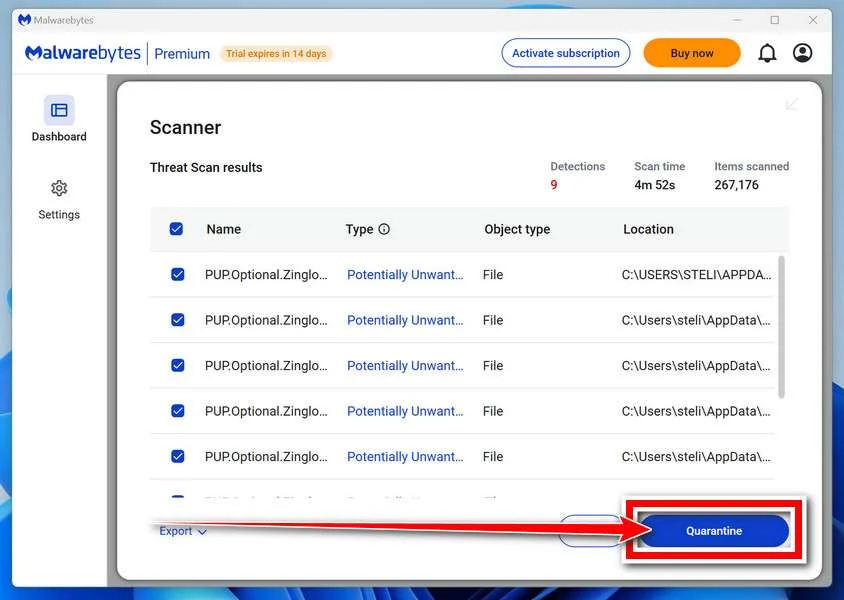
Save or export the report, including the scan time and affected paths. Those details help distinguish a successful quarantine from an unresolved or repeatedly returning item.
Keep suspicious items quarantined while you investigate them. Do not restore or exclude a detection simply because its filename resembles an ordinary updater.
Quarantine isolates detected material; it is not an inventory of everything an intruder might have done. A clean result cannot prove that account information stayed private.
If the scanner requests a restart, save unrelated work and follow the prompt. On a managed device, obtain your security team’s approval first.
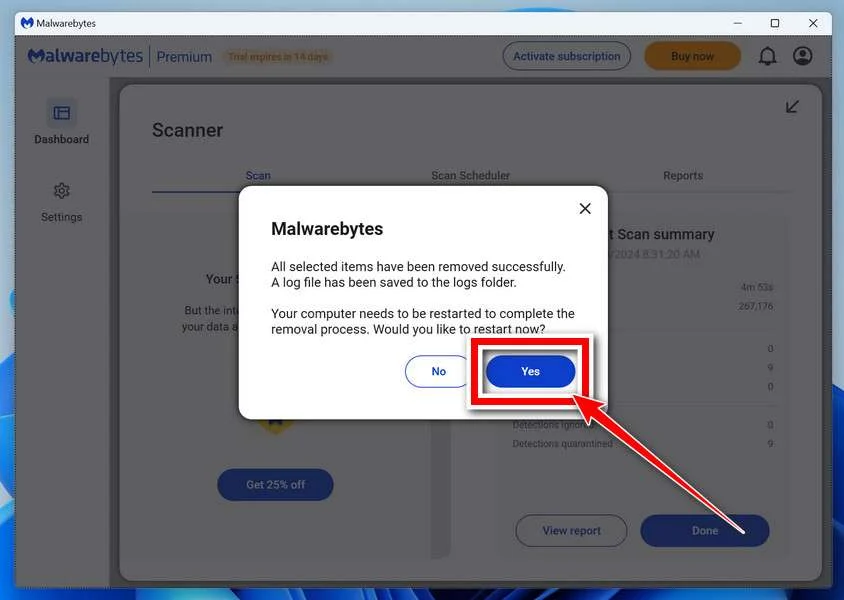
After signing back in, reopen Malwarebytes and inspect the report. Run another available scan to check whether the same findings return.
If a restart triggers a crash or detections persist, stop repeating the same cleanup attempt. Preserve what happened and move to assisted investigation.
Step 6: Escalate persistence and rebuild safely when necessary
Ordinary scanning is a useful first response, but confirmed remote access needs a stronger trust decision. Ask whether the machine should be rebuilt before sensitive reuse.
Talos reports Overlord persistence involving Windows recovery configuration. Do not treat Reset this PC as a guaranteed cure for this analyzed variant.
Do not manually delete recovery folders or edit reset configuration from an online checklist. Those changes can damage recovery options without establishing that every implant is gone.
Microsoft’s recovery guidance identifies installation media as an option when malware infection persists. Plan a clean installation with trusted assistance when compromise cannot be resolved confidently.
Before rebuilding, preserve needed personal documents and your recovery information. A clean installation can remove files, applications, and settings from the selected drive.
Have the technician verify the intended disk, backup, encryption recovery key, and trusted installation media before changing partitions. Do not improvise destructive steps on another drive.
Keep copies of essential documents separate from installers, scripts, browser profiles, and startup material. Scan retained files before restoring them to a rebuilt system.
For unresolved consumer infections, use the MalwareTips Windows removal-help forum. Describe the symptoms and scan results, then follow the assigned helper’s instructions.
Review logs for passwords, wallet material, recovery codes, and private documents before posting. A public discussion does not need the secrets you are trying to protect.
What to Do About Stolen Accounts and Financial Access
Use a trusted device for this work, not the computer still under investigation. A new password entered into a compromised environment can create another exposure.
-
Secure your primary email account first. Change its password, inspect recent activity, and verify the recovery email, telephone number, and authentication methods.
Check forwarding rules and connected applications for changes you did not authorize. Email often provides the route for resetting your other accounts.
-
End sessions as well as changing passwords. Use each provider’s session or device controls to sign out unfamiliar access and remove unwanted connected applications.
Google’s compromised-account instructions cover device review, security settings, and unauthorized activity. Follow the official recovery process if you cannot sign in.
Microsoft provides Sign out everywhere, but warns that it may take up to 24 hours and excludes Xbox consoles. Check each provider’s published session-revocation limits.
-
Replace exposed credentials in a deliberate order. Prioritize banking, exchanges, password managers, work access, and any other account using the same password.
If you stored recovery codes or application credentials on that computer, review them with the issuing provider. Revoke exposed tokens or keys rather than renaming their files.
-
Contact financial providers about suspicious activity promptly. Use their official applications or contact information you already trust, and identify the particular transfer or account change.
Keep transaction references and correspondence privately. Do not send a supposed recovery agent an advance payment or verification code to unlock money.
-
Handle exposed wallet recovery material as a separate emergency. A changed wallet-app password does not replace an exposed private key or recovery phrase.
Follow your wallet provider’s process for creating a genuinely separate wallet on a trusted device. Do not import the compromised phrase into a supposedly new safe account.
MetaMask’s compromise guidance explains moving remaining assets and abandoning accounts derived from compromised recovery material. It also warns against adding gas funds when a sweeper is suspected.
For complicated holdings or active theft, seek help through the provider’s verified support route. Never reveal the recovery phrase to somebody offering assistance.
-
Review gaming and messaging accounts used on the computer. Inspect recent logins, purchases, linked payment methods, and messages you did not send.
Report account takeover through each platform’s official support. Warn affected contacts through another channel if your account sent them suspicious files.
Keep a simple record of each account, the action taken, and any remaining support request. That is more useful than repeatedly changing one password.
If identity information was exposed, use the relevant official reporting service for your country. For United States identity theft, IdentityTheft.gov offers a recovery process.
Why the File Disguise and Blockchain Detail Matter
Good Game can display a financial-themed decoy while stealing data. Overlord can obtain updated control-server locations from encrypted Solana transaction memos.
Blocking one familiar address therefore is not equivalent to removing the installed malware. Solana itself is not proof that a wallet or computer is compromised.
The clipboard component can replace copied cryptocurrency addresses. Verify a payment destination on a trusted device before authorizing a transfer, especially following suspected infection.
Do not inspect the campaign’s servers, download samples, or run commands from a technical report as a home diagnosis. Leave those investigations to qualified responders.
Choose the Next Action for Your Exposure
I saved the file but never opened it
Keep the file closed, preserve its source details, and scan it without executing it. Do not assume downloading alone proves this campaign infected your machine.
I opened it and still need the computer
Disconnect it and use another trusted device for sensitive tasks. Follow the removal procedure or your organization’s incident-response instructions before returning to normal use.
The scan is clear but my account shows activity
Continue the provider’s account-recovery process and revoke unwanted access. A scanner result does not resolve an account takeover or replace a compromised wallet key.
Frequently Asked Questions
Does a PDF icon prove the file is safe?
No, the appearance alone does not establish the file’s behavior. This campaign includes Windows shortcuts disguised as documents.
Is deleting the original shortcut enough after opening it?
No, removing the original download does not establish that an executed payload or its persistence is gone. Isolate the computer, scan it, and escalate unresolved findings.
What if a copied cryptocurrency address changes?
Stop the transfer and verify the destination on a trusted device. Clipboard replacement needs investigation, but that symptom alone does not identify this malware campaign.
Must I purchase Malwarebytes to follow this guide?
The current feature table lists Custom Scan as free. Optional paid prevention is separate, and a paid purchase cannot restore stolen account access.
Does quarantining a file secure all my accounts?
No, address account sessions, passwords, and exposed recovery material separately. Use a trusted device while the affected Windows installation is being investigated.
Should I reset Windows if detections return?
Seek assisted investigation rather than repeatedly resetting the computer. This report describes recovery-related persistence, so a planned trusted-media rebuild may be more appropriate.
The Bottom Line
Do not reopen a suspicious document-looking shortcut to see what happens. Isolate a potentially affected Windows computer, follow the illustrated cleanup procedure, and escalate unresolved persistence.
Secure exposed accounts from a trusted device immediately. Scanning, session revocation, and replacing compromised wallet material solve different problems, and none should be mistaken for the others.

Join the discussion
0 commentsShare your experience or ask a question about this article.
Your progress
Did these steps help?
Let us know how the guide worked for you.
Describe what you see and the step you reached. Keep passwords and other private information out.
Discussion
Start the conversation
Have a question or something useful to share? Add the first comment.