


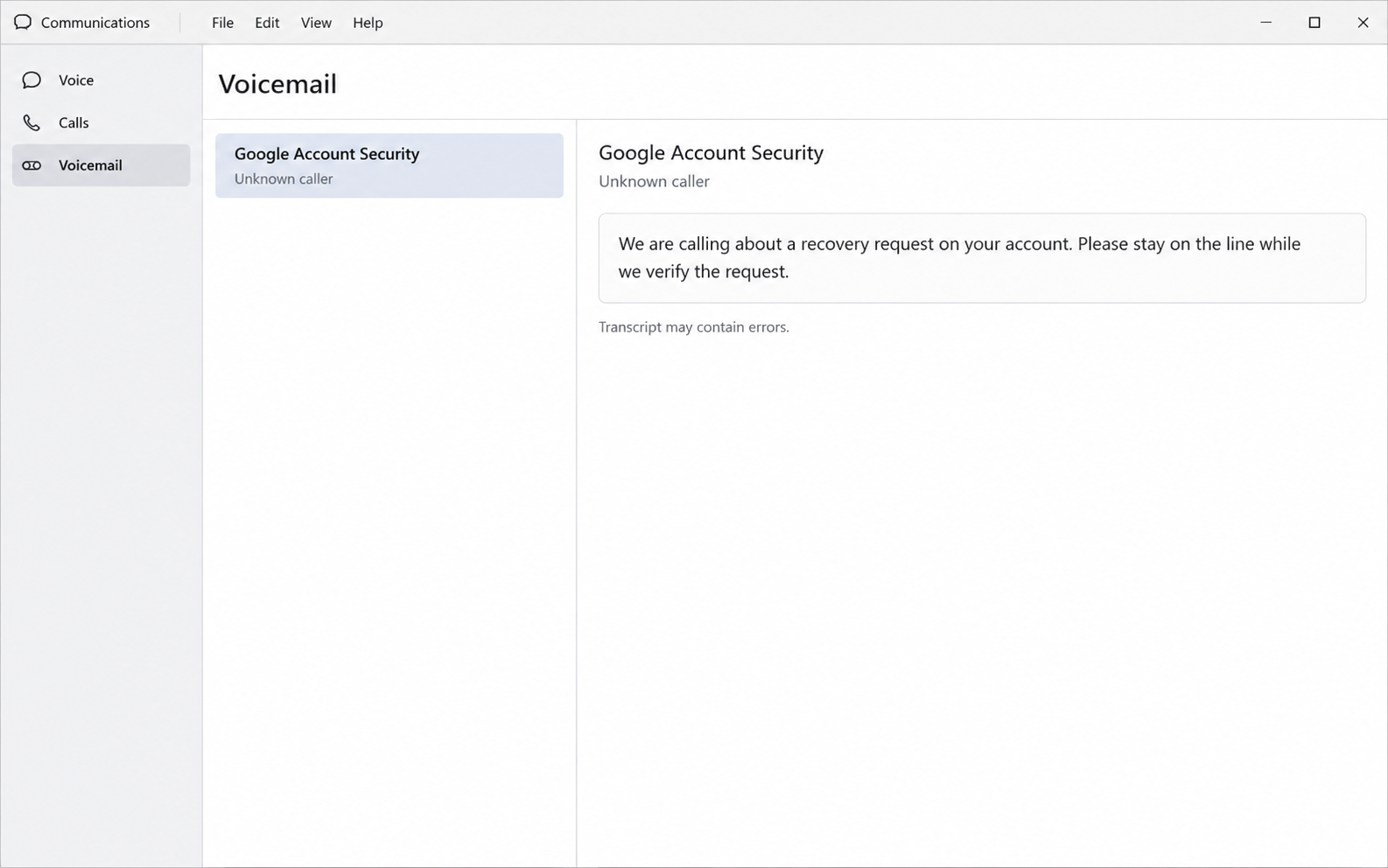
A caller says there is a problem with your Google account. They sound prepared, mention a security request, and seem to know exactly what should happen next.
Then a message arrives while you are still talking. Before treating that timing as reassurance, take a closer look at what the caller wants you to do.
Overview
The call turns an account worry into a conversation
The Google account security call scam starts with someone claiming to represent Google, account recovery, or a security investigation team.
They describe an attempted login, changed recovery information, or another urgent account problem. The details vary, but the caller wants to supervise your response.
This is not the same as an automated verification call you requested yourself. It is an unsolicited person claiming authority over your account.
The crucial question is not whether the caller sounds technical. It is whether you are being asked to hand over something that permits account access.
A genuine message can accompany a dishonest explanation
Some reported attacks combine the conversation with real Google notifications or support-case emails. That is why checking only the sender’s logo can fail.
A real notification confirms that a particular system event happened. It does not establish that the person on the telephone works for Google.
An outsider can initiate certain account-related requests without already controlling your inbox. The resulting message can become a prop in a much larger deception.
The caller may describe a sign-in code as a cancellation code. Those descriptions are opposites, and accepting the wrong explanation can expose your account.
- An unexpected security call deserves independent verification first.
- A case number does not authenticate its caller.
- A code may authorize access rather than cancel it.
- A familiar caller name can be spoofed easily.
- Your own account settings provide a safer starting point.
The response depends on what you actually shared
Answering the telephone is not equivalent to surrendering your account. Sharing a password, reading out a code, or approving a prompt creates a different situation.
Keep those events separate when deciding what to do next. You can take a suspicious call seriously without assuming that every device is infected.
If you have already approved something, act promptly through your own account. There is no need to finish the caller’s supposed verification first.
How the Google Account Security Call Scam Works
Step 1: The caller introduces a security emergency
The conversation usually begins with a question that sounds protective. Did you request a recovery change, or are you trying to sign in from somewhere unfamiliar?
Answering no feels like the beginning of fixing the problem. In reality, it gives the caller a reason to continue as the person handling your case.
They may use an employee name, a department title, or an internal-sounding reference. Those details make the interaction feel organized without establishing genuine authority.
Someone who knows your email address has not necessarily accessed your account. That address may have appeared in an old breach, public profile, or contact list.
Do not provide extra identifying information simply because the caller already knows one detail. A partially informed stranger remains a stranger.
Step 2: A notification makes the story feel credible
An email or account alert may appear during the conversation. The caller points to its timing as evidence that they control a legitimate support process.
There are two separate things to examine here. One is the message itself, and the other is the interpretation being supplied over the telephone.
A genuine message can say that someone attempted an action. It cannot, by itself, tell you who is speaking or whether their instructions are safe.
An invented support case is especially persuasive when the message comes through a familiar system. Readers can mistake a reference number for an identity check.
Instead, stop the conversation and inspect your account independently. Do not let the caller choose the page, translate every warning, and decide what you should approve.
Step 3: Verification becomes a request for account access
The dangerous turn comes when the caller asks for a password, verification code, backup code, or approval on a device you control.
They may say the request will reject an intruder, secure the account, or prove that you are its owner. Read what the actual prompt says instead.
A sign-in approval grants a sign-in. A recovery code can help complete recovery. Neither becomes harmless because someone labels it an anti-fraud procedure.
Some requests involve changing recovery settings rather than sharing an existing secret. Adding an address or number supplied by a stranger can also give away control.
Do not create a new passkey or security method at the caller’s direction. Security features protect you only when their setup remains under your control.
Step 4: Staying on the line keeps you from checking
The caller may discourage hanging up because the investigation is supposedly active. A moment of independent checking would interrupt the story they are controlling.
They might insist that a warning is expected or that another employee will confirm the procedure. A second voice is not independent verification.
This pressure can be quiet rather than aggressive. A patient person who explains every screen may feel more trustworthy than someone making obvious threats.
Nevertheless, the boundary stays the same. You do not need an unsolicited caller’s permission to stop, check your settings, or ask someone you already trust.
You also do not owe a stranger a demonstration. There is no benefit in deliberately supplying a fake code or trying to catch them in conversation.
Step 5: Account control can reach beyond Gmail
If access succeeds, an intruder may inspect messages, recovery options, connected services, or stored documents. The exact consequences depend on the permissions and access obtained.
Email is particularly sensitive because other services use it for password resets. Protecting the inbox can therefore become part of protecting shopping, social, and financial accounts.
An intruder might also create forwarding rules or connect an unfamiliar application. Changing the password is important, but reviewing persistent access matters too.
This is a possible consequence of account takeover, not proof that every suspicious caller completed it. Check the account record rather than assuming the worst outcome.
Why Caller ID and Real Emails Are Not Enough
Displayed names are easy to mistake for verification
A phone screen may display a recognizable business name. Caller ID can be falsified, and a matching label does not establish the origin of the call.
Searching the displayed number can create another trap if the results merely repeat that label. You still have not confirmed the person currently speaking.
Do not call back using a number supplied during the conversation. Open the service through a saved bookmark or an address you know independently.
For ordinary Google account recovery, start with Google’s account-help process. Paying a stranger to bypass that process is not an established recovery route.
Authentication answers a narrower question
An authenticated email can be genuinely transmitted by the system named in its headers. That is useful information, but it answers only a message-origin question.
It does not certify every claim made by a separate caller. This distinction is why polished messages can appear inside otherwise dishonest interactions.
Likewise, an alert about an unfamiliar attempt deserves attention without making the caller your adviser. You can investigate the event after ending the call.
Google’s phishing guidance recommends checking suspicious security messages through your account’s own recent activity rather than following the message’s sign-in route.
A real support relationship starts differently
You might legitimately request help for a paid service or communicate with an administrator at work. That context differs from an unexpected account-security cold call.
Check whether you actually opened a case, which product it concerns, and whether the response appears inside the support channel you initiated.
If you use a managed work account, contact your internal administrator through an established directory. Do not substitute a number provided by the unexpected caller.
The warning here concerns impersonation and secret-sharing requests. It is not a claim that every phone interaction involving every Google business service is fraudulent.
What to Do If You Responded to the Call
-
End the conversation and write down what happened.
Note the time, claimed department, requested actions, and whether you shared a code, password, recovery detail, or approval. These distinctions help you prioritize effectively.
Keep related messages without forwarding active links to friends. If you warn somebody, describe the approach instead of circulating the caller’s contact instructions.
-
Open your Google account through a route you already trust.
Check recent security events and signed-in devices. Read unfamiliar activity carefully, then use the account’s own controls to report actions that were not yours.
A location estimate can be imperfect, so consider device details and timing together. Do not dismiss an unfamiliar session merely because its city looks nearby.
-
Replace exposed credentials and remove unfamiliar access.
If you disclosed your password or approved access, change the password from a trusted device. Review sessions, recovery addresses, phone numbers, passkeys, and connected applications.
Remove entries you do not recognize. Also replace the exposed password anywhere else you reused it, beginning with accounts that could cause financial or identity harm.
-
Inspect Gmail settings for changes that could persist.
Check forwarding, filters, delegation, and sent messages. An unfamiliar forwarding rule can expose later mail even after the original conversation has ended.
Google’s compromised-account guidance identifies several account and product settings worth reviewing when somebody else may have gained access.
-
Use the official recovery process if you are locked out.
Begin with the official Google account recovery process. Follow its questions from a familiar device and location when possible, rather than paying a supposed recovery specialist.
Nobody who messages you privately can guarantee restoration. Save any genuine recovery notices and avoid creating more confusion through repeated instructions from different strangers.
-
Address any separate financial or workplace exposure.
Contact your bank through its established app or published number if payment information was shared or misused. Tell workplace IT if a managed account was involved.
If messages were sent from your account, warn affected contacts through another trusted channel. Explain that unusual requests should be ignored until access is secure.
-
Strengthen authentication after you regain control.
Review Google’s passkey guidance and choose protection you can maintain securely. Keep recovery information current and store backup options somewhere appropriate.
If you installed software during a separate instruction, stop using it and seek exposure-specific cleanup help. Account phishing alone does not establish a malware infection.
Small Habits That Break This Particular Trap
Give yourself a standing rule that security calls end before account changes begin. You can then inspect the issue without balancing a warning against somebody’s voice.
Read the purpose of every prompt. A request to approve a login should be treated as a login request, even when the caller supplies another explanation.
Avoid sharing screenshots that contain codes, recovery links, or personal information. An apparently helpful person may obtain the same secret visually instead of verbally.
For family members, explain the real-email detail in advance. Telling somebody only to watch for spelling mistakes leaves them unprepared for a genuine notification used deceptively.
You do not need to memorize an attacker’s script. Recognizing the handoff from an unsolicited conversation to a security action is more useful.
If a caller becomes impatient when you propose checking independently, take that reaction as another reason to stop. Genuine account safety does not depend on continued conversation.
Frequently Asked Questions
Can a real Google email arrive during a scam call?
Yes, an attacker may cause a genuine notification or support-related message to arrive. The message’s origin does not establish the identity of a separate caller.
Check what event the message describes through your account. Do not treat its appearance as permission to share codes or approve an unfamiliar action.
Does answering the call let someone access Gmail?
Answering alone does not demonstrate account takeover. The more important questions concern shared secrets, approved prompts, changed recovery information, or software you were persuaded to install.
Review activity if concerned, but match your response to those actual events. There is no reason to assume an infection from a conversation alone.
Should I read out a code to cancel a login?
Do not give an unsolicited caller an authentication code. A code sent for signing in or account recovery can help complete that action instead of canceling it.
Open the account independently and follow its own instructions. The caller should not be interpreting or controlling your security decisions.
Is a matching support case number enough proof?
No, a number can identify a request without identifying the person discussing it. Some attacks exploit exactly that gap between a genuine system message and false authority.
Use a support channel you initiated or your account’s security area. Do not continue merely because the caller can repeat a reference.
Do I need to scan my computer after this call?
Not merely because you answered or received an email. Scanning cannot revoke an approved login or remove an attacker’s recovery address from your Google account.
If you installed a program or granted device access, treat that as a separate exposure requiring suitable cleanup. Secure the online account as well.
Can someone recover my account for a payment?
Do not pay people promising guaranteed Google account recovery. Their claimed insider access can become another attempt to collect money, identity documents, or verification information.
Use the official recovery process and keep any employer-managed account issue with your organization’s administrator. Recovery may require patience, but another stranger is not a shortcut.
The Bottom Line
Do not follow an unsolicited Google security caller’s instructions or share authentication information. A real email, convincing case number, and calm voice do not make that person trustworthy.
If you already approved access or disclosed credentials, secure your account through Google’s own settings and recovery process. Review persistent access before assuming the problem is finished.

Join the discussion
0 commentsShare your experience or ask a question about this article.
Community experiences
Did this happen to you?
Your experience could help someone recognize the same scam. Submit a private report for our team to review.
I experienced this tooReports are reviewed before publication. Sharing publicly is always your choice.
Discussion
Start the conversation
Have a question or something useful to share? Add the first comment.