


A payment receipt is usually welcome news when you’re waiting for a customer to settle an invoice. Opening the paperwork can feel like finishing the job.
This QuickBooks BillPay message fits that moment neatly. Before treating its receipt as another accounting record, check what the notice actually establishes.
Overview
A completed payment that still needs your attention
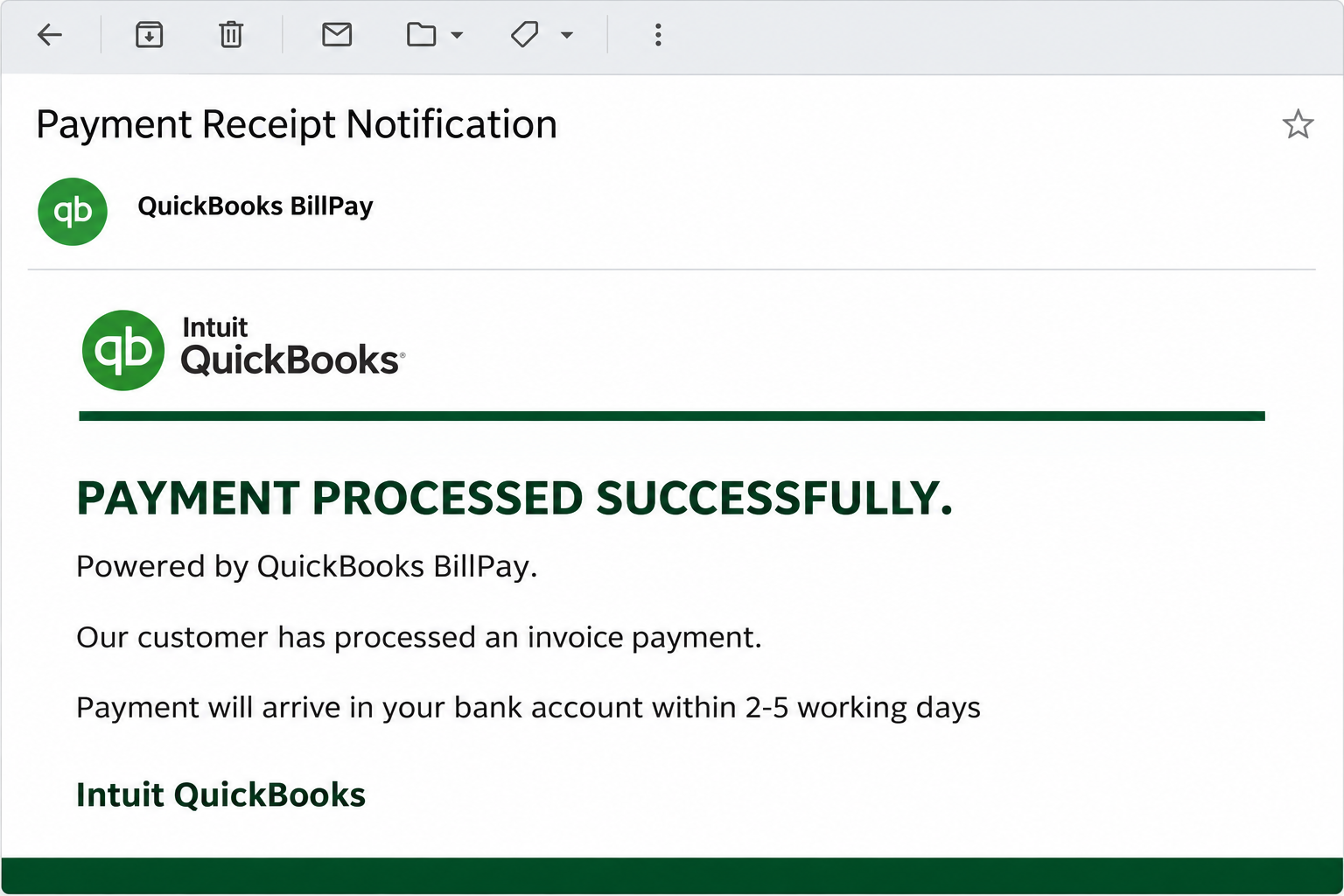
The Intuit QuickBooks Payment Processed Successfully email claims that a customer has paid an invoice through QuickBooks BillPay. A receipt is supposedly available through its viewing link.
The recorded notice includes a transaction reference and says the payment will reach the bank account within two to five working days. Those details make the announcement sound operational.
The attraction is not a prize or unexpected refund. It is a piece of business paperwork that someone responsible for receivables might reasonably want to file.
The receipt route asks for a password instead
The documented destination, maasaraswatichimes[.]com, presents a supposed secure portal. Its purpose is to collect the password entered by the visitor, not deliver a verified payment record.
The domain is written in non-clickable form here. A page’s use of payment language doesn’t establish that Intuit, a customer, or your business authorized that destination.
This is credential phishing using QuickBooks branding. It does not establish that a real customer paid, that funds are pending, or that your bank is processing a deposit.
The payment must have an independent record
QuickBooks is legitimate accounting software, and genuine businesses use its payment services. That background is why the brand is useful to an impersonator.
- Match the alleged payment with a real invoice in your own accounting records before treating it as collected revenue.
- Check the payment status from the product you normally use, rather than from the notice’s receipt button.
- Ask a known customer contact about an unexplained payment without sending the suspicious link back for them to open.
- Keep the payment question separate from account recovery if someone already entered credentials on the linked page.
The safest response preserves normal bookkeeping while refusing the unverified login request. You can investigate a genuine receivable without using the sender’s portal.
Why a Receipt Can Be More Convincing Than a Warning
Many phishing messages demand immediate action to prevent something bad. This one starts with an apparently positive event and gives you a small follow-up task.
That pleasant opening changes what readers expect. A bookkeeping employee may focus on filing the document rather than questioning an outside request for an account password.
The bank-arrival estimate also makes a missing deposit feel explainable. Instead of questioning the announcement, a recipient might assume the transfer is simply taking the stated time.
The email cannot establish that timing for a real payment. It supplies a story about settlement, not independent evidence that a transaction exists.
Transaction references are useful only when independently matched
The original message lists a specific transaction identifier, B24P93eZ2201G. A precise-looking reference can create confidence without being connected to any genuine invoice.
Search your own records for the customer, amount, invoice, and payment status. A reference repeated only by the suspicious email and its linked page is circular evidence.
If the customer is unclear, don’t ask the unverified sender for banking information. Check the existing commercial relationship first and use a contact method already on file.
This matters before you mark an invoice paid, release goods, or adjust a customer’s balance. An emailed claim should not become a financial decision merely through repetition.
How the QuickBooks Payment Processed Successfully Email Scam Works
Step 1: The notice enters the receivables workflow
The message announces an invoice payment and borrows the BillPay name to make the communication look automated. It gives the recipient a reason to regard the email as routine.
This can reach people who handle billing without requiring inside knowledge about a particular customer. Businesses publish accounting contacts, and many employees routinely receive external payment-related messages.
Receiving the email at a relevant address therefore doesn’t prove the sender knows your accounts. A broad distribution can produce convincing coincidences with real outstanding invoices.
Start by asking which existing transaction the notice could describe. If that connection cannot be established independently, don’t let the unfamiliar receipt route supply the missing context.
Step 2: A receipt becomes the next ordinary task
The email directs you to view or download the payment copy. That language makes the next interaction sound like document handling rather than authentication.
It also suggests the important event has already happened. A recipient may assume the payment is settled enough to justify opening whatever record the message offers.
The distinction between a claimed payment and a verified payment is lost at this point. That is why the bookkeeping check should happen before the external page.
You can leave the receipt unopened while checking your account. A genuine customer’s payment does not become invalid because you avoided an unexpected email link.
Step 3: The viewing link leaves the expected provider
The recorded route sends the visitor to a different domain displaying a secure-portal explanation. The word secure describes the page’s claim, not a verified relationship with Intuit.
Intuit’s own guidance identifies its official website domain patterns and recommends checking questionable messages by signing in independently. That is a more reliable starting point than copied branding.
Don’t treat every complicated business link as automatically fraudulent. Instead, establish the actual service and whether the known sender authorized the sharing or payment route.
Here, the counterfeit portal and password collection are the problem. A recognized company name in the email doesn’t transfer trust to the destination.
Step 4: A document task turns into password disclosure
The portal asks for a password to continue. Entering a mailbox credential there would expose the secret to someone outside the account’s legitimate authentication process.
It is important to identify which password you used. A business email password and an Intuit account password can protect different accounts, even when the username looks identical.
If you tried multiple credentials, each needs attention. Don’t assume the first password remained safe because the page continued asking or displayed an error.
The documented case does not establish a particular installed program or malicious attachment. Its observed route is a fake payment page seeking credentials.
Step 5: Account access can interfere with real payments
A compromised mailbox could expose customer conversations and payment instructions. An intruder might use that context to make a later request more convincing.
For example, a fraudulent instruction could appear inside a familiar conversation about an actual invoice. That possibility explains why account recovery and payment verification should be coordinated.
It does not mean the original notice moved money or changed an invoice. Check actual records and messages before telling customers that a particular transaction was affected.
If account activity reveals an unauthorized payment instruction, notify the relevant business contact through another channel. Involve the bank promptly when money has been sent to the wrong destination.
Verify the Payment Without Trusting the Receipt
Open your usual accounting product
Use the existing QuickBooks app or an established bookmark. Check the relevant invoice and payment information inside the business account you already recognize.
If another employee manages that account, ask them to confirm the record. Don’t request their password or forward the suspect login route as a shortcut.
Account permissions may limit what you can see, particularly in shared finance workflows. Missing access should lead to an internal question, not permission to enter credentials on another site.
The official Intuit phishing guidance explains how to check communications and report brand impersonation. Keep that process separate from confirming whether your customer paid.
Reconcile the business facts
Match the customer identity, invoice number, expected amount, and payment method. Use information already recorded before the email arrived where possible.
If a bank credit has not appeared, consult the actual payment status and your normal settlement expectations. The estimate in an unverified email should not determine your reconciliation.
For goods awaiting release, follow the company’s established payment-confirmation policy. Don’t dispatch solely because the sender’s receipt says the funds are on their way.
Likewise, don’t send an overpayment refund or redirect a balance based on this announcement. A new request involving money needs confirmation through the real customer and payment records.
Preserve the distinction between records and notifications
A notification points you toward a claimed event. The accounting record and payment provider’s status help establish whether the event actually occurred.
Even a professional-looking notification can contain an invented reference. Conversely, a genuine customer may send an imperfect email, so style alone should not decide the financial outcome.
Make the decision on independently matched information. That approach protects the business without making every customer payment a lengthy security investigation.
What to Do if You Have Fallen Victim to This Scam
-
Pause the receipt task and record your actions. Save the email, the visible reference, and approximately when anyone opened its destination or submitted information.
Don’t delete the company’s real invoice or customer record. The fraudulent notice is a separate item that may be needed for the incident report.
-
Secure the account whose password was entered. Navigate directly to that provider and replace the exposed secret with a new, unique password.
If access is unavailable, begin official recovery immediately. Tell your administrator if the credential belongs to a managed mailbox rather than a personal account.
-
Check sessions and persistent access with the account provider. Review unfamiliar devices, authorized applications, mailbox delegates, forwarding, and rules appropriate to the service involved.
Resetting an Intuit password won’t automatically secure a separately exposed email account. List every attempted credential so recovery doesn’t miss one of them.
-
Protect other services using the same password. Replace reused credentials, prioritizing payment-related systems and any account that can reset another login.
Add supported multifactor authentication or a passkey through the real provider. Don’t approve a new prompt merely because another message says it completes receipt verification.
-
Recheck financial records before changing invoice status. Ask the authorized bookkeeper to confirm whether a payment exists independently of the email.
If someone already marked the invoice paid, correct that entry through normal accounting procedures. Keep an explanation so another employee doesn’t later reintroduce the false confirmation.
-
Investigate suspicious messages sent from the affected account. Focus on customer payment conversations and any unfamiliar instruction about bank details, refunds, or invoice balances.
Notify actual business contacts if a fraudulent instruction reached them. Use known contact information and explain the specific instruction they should disregard.
-
Contact the bank immediately if a payment was misdirected. Give the payment method, date, amount, destination, and supporting communication, and ask about available recall or fraud procedures.
Do not promise customers that recovery is guaranteed. Preserve case numbers and coordinate the next communication with the business owner or incident-response team.
-
Report the imitation to Intuit and your mail provider. Intuit’s official instructions identify security@intuit.com for suspicious messages using its brand.
Submit the suspicious email without adding passwords or unnecessary customer information. Report any separate downloaded or executed file as an additional technical issue, not an assumed part of this case.
A Useful Payment-Handling Rule for Small Teams
Decide who can confirm a payment and which records count before a confusing notice arrives. A simple internal rule reduces pressure on whoever happens to read the inbox.
For example, separate receipt filing from approval to release goods. The person collecting paperwork should not have to infer settlement from an unsolicited email alone.
Keep customer contact details in a known system. A reply address inserted into a new payment notice shouldn’t replace the established phone number for verification.
When a customer genuinely changes a payment arrangement, document the confirmation independently. This helps both fraud prevention and ordinary bookkeeping when people revisit the transaction later.
These checks do not require accusing a customer of wrongdoing. They keep an outside notification from becoming the sole authority for a financial decision.
Frequently Asked Questions
Is Payment Processed Successfully a real QuickBooks receipt?
The documented email is an impersonation leading to a password-collecting portal. Confirm any actual invoice payment inside your existing accounting account and payment records.
Does the transaction identifier prove that money is coming?
An identifier matters only when it matches an authentic transaction. Its appearance in the email does not establish a bank transfer or a valid customer payment.
Why does the notice say settlement takes several working days?
That estimate makes the alleged payment sound routine and explains away an absent deposit. Check real payment status instead of using the email’s timing as evidence.
Which password should I change after using the portal?
Protect whichever account the submitted password actually belongs to, plus other accounts sharing that secret. If you tried several passwords, include every affected account.
Should I mark an outstanding invoice paid?
Not on the strength of this message alone. Match the payment through your authorized accounting process before changing the balance or releasing goods.
Is this necessarily a malware infection?
The recorded route collects credentials rather than identifying a particular malware payload. A separate download or executed file needs its own assessment alongside account protection.
The Bottom Line
Do not open the QuickBooks Payment Processed Successfully email’s receipt portal or enter a password there. Its payment announcement does not establish that a customer actually paid.
Verify the receivable in your normal records. If credentials were disclosed, secure those accounts and examine payment conversations before another employee or customer acts on the impersonation.

Join the discussion
0 commentsShare your experience or ask a question about this article.
Community experiences
Did this happen to you?
Your experience could help someone recognize the same scam. Submit a private report for our team to review.
I experienced this tooReports are reviewed before publication. Sharing publicly is always your choice.
Discussion
Start the conversation
Have a question or something useful to share? Add the first comment.