


A shared spreadsheet can look like the next small task in a busy finance inbox. The filename suggests useful information, and the notification seems familiar.
This OneDrive message offers a payment schedule rather than an explanation in the email itself. Before opening it, check how that invitation is supposed to work.
Overview
A payment schedule presented as a shared file
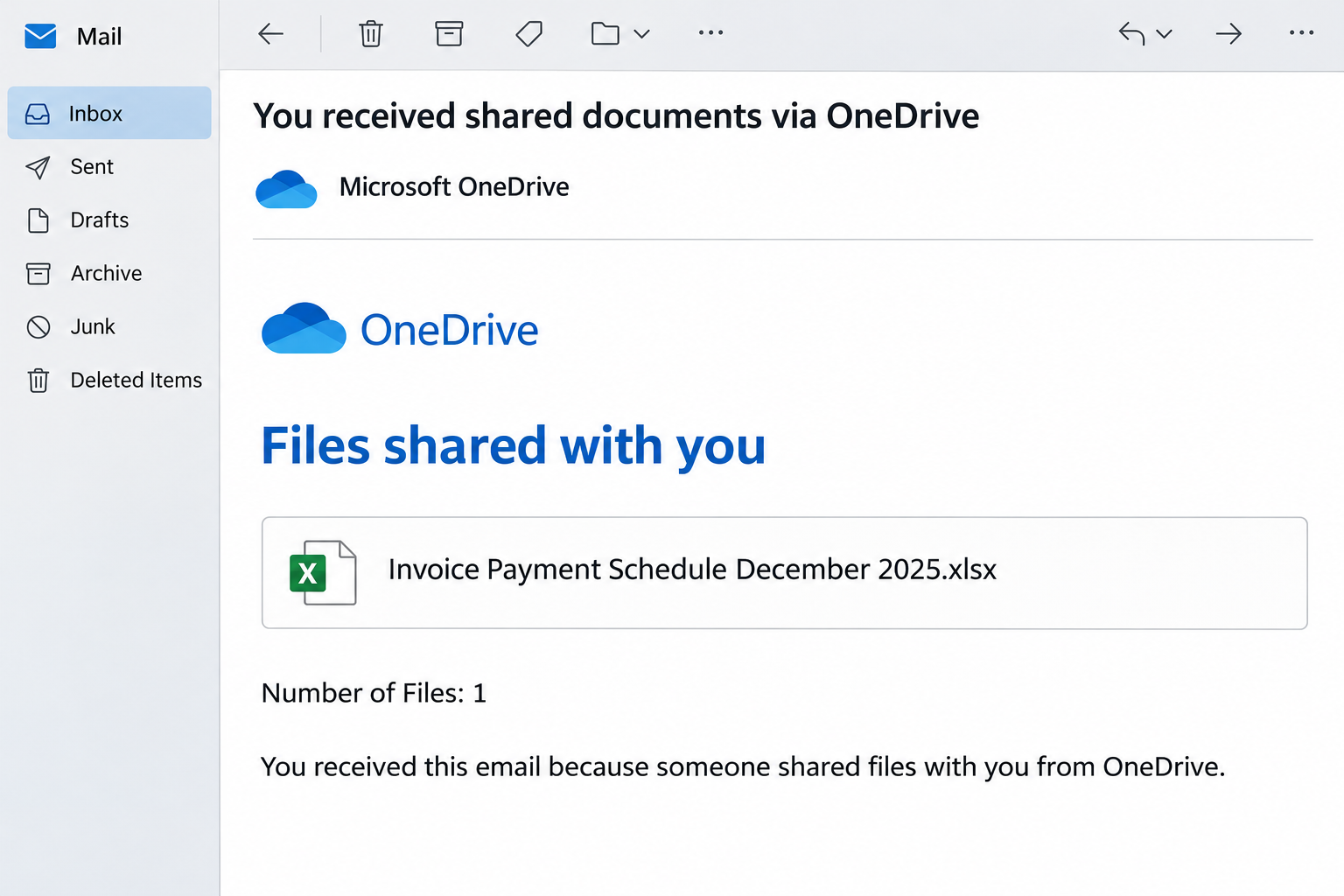
The Microsoft OneDrive Files Shared With You email claims that an invoice-payment spreadsheet is available. The original example names a December 2025 payment schedule with an Excel extension.
The notice is designed to resemble document-sharing communication, with a file label and an invitation to view it. It doesn’t establish an actual transaction or legitimate sender relationship.
Other recorded versions use invoice PDFs and a purported signed contract. Those variations keep the familiar shared-document task while changing the paperwork readers expect to see.
The page wants an email login, not document feedback
The documented route presents counterfeit email-provider sign-in forms. Its appearance can vary with the recipient’s address, including imitations of Gmail and Yahoo Mail.
The central deception is credential collection under the cover of document access. Microsoft, OneDrive, and the imitated mailbox providers are not the operators of these counterfeit forms.
An Excel or PDF label in an email also does not prove a real attachment exists. A document-shaped link can simply send the recipient to another website.
Legitimate sharing still needs an authorized route
Real OneDrive users can share files externally, and recipients’ authentication experiences can differ. A request to establish access isn’t automatically fraudulent because the recipient uses another mail provider.
- Confirm the supposed sender actually intended to share the file and can identify its business purpose.
- Establish who controls the authentication page before supplying a password or approving access.
- Treat a familiar filename as context to verify, not proof that the sender knows your accounts.
- Separate an invitation to review paperwork from any instruction to approve payments or change banking details.
For this phishing notification, don’t use the viewing route. Arrange verified access with the real sender, and secure any account whose password was disclosed.
The Difference Between a File Invitation and a Payment Record
A payment schedule concerns expected or planned transactions. Even a genuine spreadsheet would not necessarily establish that funds were already received or that an invoice should be marked paid.
That makes the document label important. A reader may be tempted to infer financial facts before opening anything, simply because the invitation sounds like part of an accounting workflow.
First identify the person who supposedly shared it and the transaction it relates to. The relationship should exist independently of the notification’s logo and file description.
If there is no known sender or relevant project, the invitation has not supplied enough context to justify an external login. Ask the business question before the authentication question.
A document icon isn’t a downloaded document
Email design can make a link resemble an attachment, complete with a file extension or size. That presentation doesn’t tell you what the browser will actually receive.
In this case, the documented behavior is a move to counterfeit sign-in pages. It isn’t evidence that the named spreadsheet was opened, contained macros, or installed a particular program.
Keep that distinction when reporting an incident. Clicking a document label, downloading a file, opening that file, and enabling something inside it are different actions.
An accurate description helps support respond to the actual exposure. You don’t need to guess that every document-related phishing attempt is also an executed malware infection.
How the OneDrive Files Shared With You Email Scam Works
Step 1: The notification borrows an everyday collaboration task
The email says that documents have been shared and supplies a file-oriented action. This makes opening the link look like participation in an existing work process.
Finance staff and small-business owners regularly receive spreadsheets and supporting PDFs from outside organizations. A sharing notice can therefore arrive without the immediate surprise of a prize announcement.
The original payment-schedule label gives the task a plausible purpose. Later invoice and contract variants show how the same general approach can suit different conversations.
You should still be able to identify the relationship outside the email. A file invitation isn’t a substitute for knowing who sent it and why you need it.
Step 2: Specific file details encourage curiosity
A named document feels more concrete than a vague request to log in. Readers may want to know whether it concerns an unpaid invoice, a customer balance, or an agreement.
The specificity can be manufactured without access to your business. A sender can choose an accounting filename and distribute it to many inboxes where it might seem relevant.
Even an old month can draw attention if you handle outstanding balances or historical records. Its presence is a detail to reconcile, not automatic evidence for or against authenticity.
Ask the known contact to identify the document in their own words. Don’t give the questionable notice credit for information that only the notice itself supplies.
Step 3: The viewing route introduces a counterfeit identity check
The invitation’s viewing control takes the recipient into the phishing route. Instead of verified file access, the visitor encounters an imitated mailbox sign-in experience.
The recorded forms can imitate different providers according to the recipient’s address. That adaptation makes the next screen feel familiar without demonstrating a legitimate authentication relationship.
For example, seeing Gmail styling after receiving mail at a Gmail address isn’t surprising by itself. The decisive issue is whether the page is genuinely authorized to authenticate that account.
Don’t supply a password to test the design. If the route is uncertain, return to the verified sender or organizational support and establish access independently.
Step 4: The attempted login transfers the secret
The counterfeit form is designed to capture entered credentials. It can achieve that purpose without showing a real spreadsheet, accepting the password, or opening your mailbox afterward.
A second prompt may feel like an ordinary correction. Continuing with more passwords instead gives the operator additional secrets to try against real services.
Stop after recognizing the problem, and identify every credential submitted. If several accounts use that password, the exposure is not limited to the service imitated on screen.
There is no need to assume the document was genuine beneath the form. The promise of a file can be sufficient to keep the recipient engaged.
Step 5: Stolen access can lend credibility to the next request
An accessed mailbox can reveal real trading relationships and recent conversations. That information could support another message that sounds less generic than the original invitation.
A fraudulent bank-detail change or follow-up document request might then appear within a familiar context. These are possible consequences to investigate, not confirmed outcomes for every recipient.
If correspondence shows unauthorized instructions, contact the real parties through a separate channel. Don’t rely on the affected mailbox alone while its control is uncertain.
For organizations, the investigation should include relevant sharing and application access as well as email. The right checks depend on what the person actually approved or disclosed.
What Genuine OneDrive Sharing Can Look Like
Different permissions produce different experiences
Microsoft’s OneDrive sharing documentation describes sharing with specific people and links with different audiences. Not every legitimate invitation uses the same access method.
That matters because an unfamiliar screen alone cannot identify the entire scheme. Some real files require authentication, while others are accessible through permissions that do not require a sign-in.
The safe habit is to verify the sender, intended recipient, and authorized authentication route together. Avoid universal claims that a real document could never require another step.
A sharing code and a mailbox password are different secrets
Some legitimate external-sharing workflows use an access-verification code. That does not authorize a random website to ask for the password protecting your entire email account.
Read the message that supplies a code and establish which action it belongs to. Don’t forward a code to someone merely claiming to help you view the spreadsheet.
If a page requests access to your account or data, consider that request separately from opening a file. The sender’s document-sharing story doesn’t explain every permission an application might request.
The real sender can help establish the route
Contact the person using a number or conversation already associated with your business relationship. Ask whether they shared the file and which approved system should provide it.
If their mailbox may also be compromised, a reply in the same thread is not enough. Use a second channel before trusting new links or changed payment instructions.
Your organization may require a particular document portal or reporting process. Follow that policy rather than improvising another external route because the invitation looks urgent.
What to Do if You Have Fallen Victim to This Scam
-
Stop attempting to open the shared file through the message. Preserve the invitation and note the filename, sender display name, and time of any interaction.
Leave the suspicious route unopened while collecting those details. If your workplace provides a phishing-reporting control, use it to preserve the original message for security staff.
-
Identify what was actually disclosed or approved. Distinguish an email address, password, verification code, application permission, download, and executed file rather than reporting them as the same action.
If you only received the invitation, report and remove it. A document name appearing in your inbox does not mean the file or an attacker entered your computer.
-
Protect every account whose credential was submitted. Open the real provider directly and change the password, using its official recovery process if access has been lost.
Don’t assume the imitated brand identifies the affected account. What matters is which real account uses the password you actually typed.
-
Review sessions, recovery information, and mailbox persistence. Inspect unfamiliar devices, forwarding, rules, delegates, and connected applications where the provider makes them available.
Ask an administrator to handle managed-account controls. If you approved application access, name that action explicitly so the team can assess and revoke unauthorized permissions.
-
Check business correspondence related to payments and documents. Look for messages you didn’t send, unexpected replies, changed recipient details, or newly introduced banking instructions.
Confirm suspicious requests with the real business contact separately. A genuine shared-file service doesn’t make the contents of every message or document trustworthy.
-
Tell affected colleagues or customers what to disregard. Identify the particular invitation or instruction instead of forwarding the live phishing link for others to examine.
If funds were sent because of an unauthorized instruction, contact the financial provider immediately. Give the transaction details and ask which recovery steps are available.
-
Use account-specific recovery help rather than a generic unlocking offer. For Gmail exposure, Google’s compromised-account guidance explains the legitimate recovery and security checks.
Use the corresponding official provider for another mailbox. Anyone requesting a fee, password, or code to recover the document should be verified independently before receiving anything.
-
Handle any separate software exposure as an additional incident. The documented invitation collects credentials; its spreadsheet and PDF labels do not identify a particular installed malware family.
If a file was actually run, notify technical support and avoid using that device for sensitive recovery until it has been assessed. Retain the filename without reopening it.
Keep Payment Approvals Outside Document Invitations
Shared files can carry useful information, but they shouldn’t silently change how the business approves payments. A new attachment or link is not a new financial authorization policy.
If a document proposes different bank details, confirm the change with a known contact through a separate method. The document’s presence inside a familiar cloud service isn’t enough.
Similarly, don’t mark an invoice settled simply because a spreadsheet lists it as paid. Check the actual accounting and payment records according to your organization’s process.
When several people handle receivables, leave a clear note about a rejected fraudulent notice. That prevents another colleague from reopening the same task as unexplained unfinished paperwork.
Keep legitimate collaboration moving through a verified channel. The goal is to reject the counterfeit route, not to stop accepting real documents from customers and partners.
Frequently Asked Questions
Is Files Shared With You always a fraudulent subject?
No, genuine file-sharing services send notifications too. This documented campaign is fraudulent because its viewing route uses counterfeit authentication pages to collect email credentials.
Does the Excel filename prove a spreadsheet was attached?
A filename displayed in an email may only label a link. Report what actually downloaded or opened rather than assuming the depicted document existed.
Why did the OneDrive invitation show a Gmail or Yahoo screen?
The recorded phishing forms can adapt to the recipient’s mail provider. Familiar branding does not establish that the page is the provider’s authorized authentication service.
Can real OneDrive sharing require identity verification?
Yes, the legitimate access process depends on sharing settings and account arrangements. Verify the source and destination rather than treating every additional check as fraudulent.
What if I entered my email password but never saw the file?
Treat that password as exposed and protect the real account immediately. A missing document or error screen doesn’t show whether the counterfeit form retained your submission.
Is Microsoft responsible for the fake payment schedule?
The campaign misuses Microsoft and OneDrive branding. The service’s legitimacy does not authenticate the sender, the promised document, or the counterfeit login route.
The Bottom Line
Do not use this OneDrive Files Shared With You invitation to enter mailbox credentials. A payment-schedule label is not proof of an authorized file or a legitimate sign-in page.
Confirm document access with the real sender separately. If you supplied a password or granted access, secure the affected account and check related correspondence before resuming financial work.

Join the discussion
0 commentsShare your experience or ask a question about this article.
Community experiences
Did this happen to you?
Your experience could help someone recognize the same scam. Submit a private report for our team to review.
I experienced this tooReports are reviewed before publication. Sharing publicly is always your choice.
Discussion
Start the conversation
Have a question or something useful to share? Add the first comment.