


A page asks you to complete a familiar security check, then the instructions move beyond the browser. Soon a download looks more like ordinary application software.
That shift matters in the ResiLoader case. If you followed an unexpected verification procedure, the next step is understanding what actually reached your computer.
Overview
A fake verification page starts the documented chain
Malwarebytes documented a delivery chain using fake Google and Cloudflare verification pages, a repackaged Franz application, ResiLoader, and the StealC information stealer.
The initial encounter is not a verified fake Franz storefront. Franz appears as a later trojanized component, so blaming its legitimate distribution would misdescribe the evidence.
The payload is more important than the visible application
A recognizable application can conceal harmful changes in an altered package. Closing its window or uninstalling the visible program does not establish that later payloads are gone.
The reported chain includes persistence and interference with security processes. A returning detection or disabled protection deserves more than repeated attempts to remove one familiar application.
Respond according to what you actually did
- Seeing the page alone does not establish infection.
- Running its instructions requires a more serious response.
- Device cleanup and stolen-account recovery remain separate tasks.
- Managed computers need the organization’s incident-response process first.
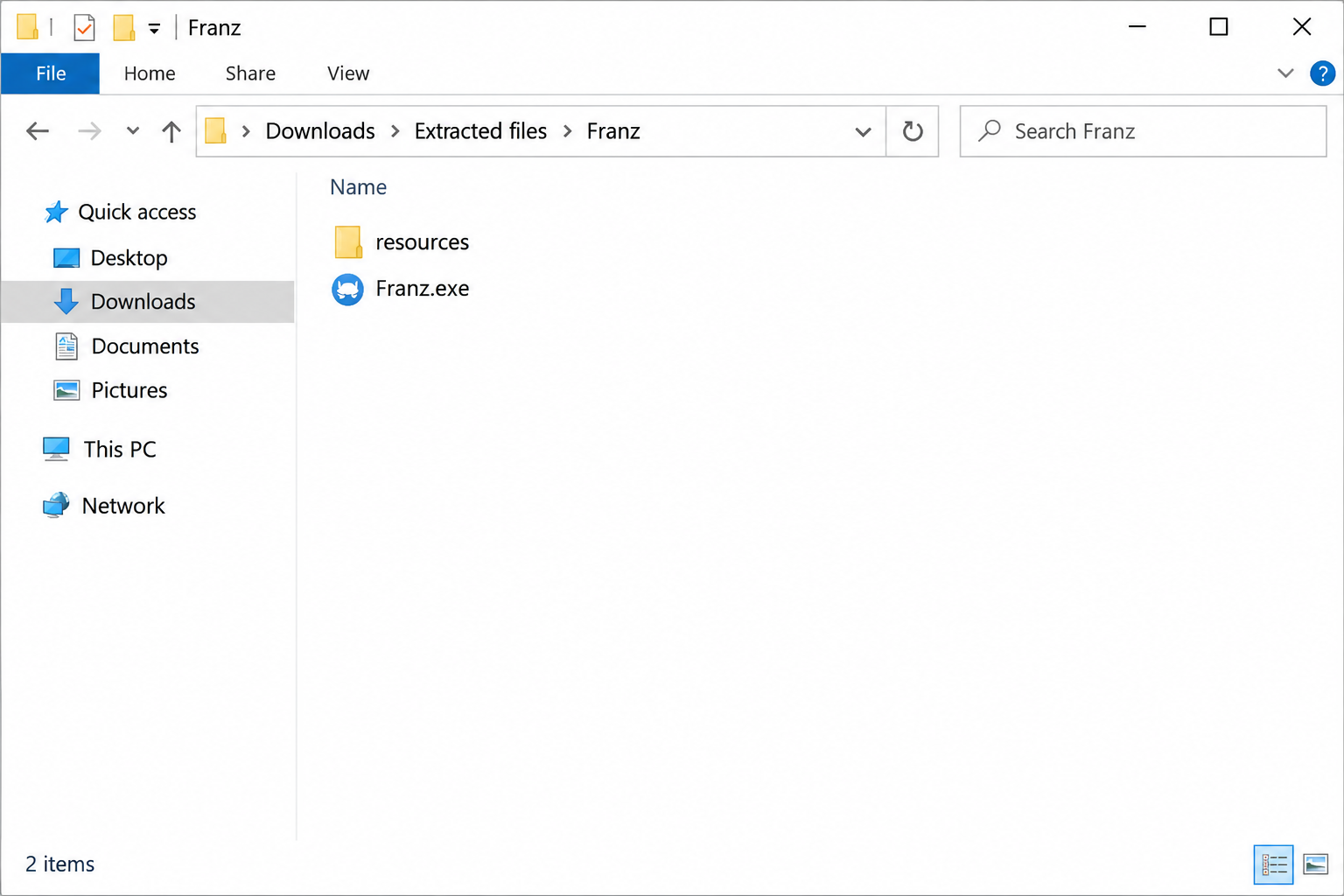
The folder image illustrates a repackaged-application concept, not a captured malware sample. A filename or familiar application icon cannot diagnose the contents of your own download.
What to Do If You Followed the Verification Instructions
-
Stop interacting with the verification page. Do not paste another command, approve a replacement download, or accept a supposed repair from the same source.
If you only viewed the page and did not run anything, close it. Investigate actual downloads and alerts without assuming the entire infection chain executed.
-
Isolate a computer where instructions were executed. Disconnect network access and stop using that machine for passwords, banking, cryptocurrency, or other sensitive work.
Tell your employer’s security team about a managed device. Preserve the approximate time, page address, download name, and actions already performed without reopening the suspect material.
-
Protect exposed accounts from another trustworthy device. Change relevant passwords and explicitly revoke unauthorized sessions, application grants, and access tokens where the provider supports those controls.
Prioritize email because it can receive recovery messages for other services. Do not wait for local cleanup before beginning urgent account containment elsewhere.
-
Use a complete cleanup process rather than deleting Franz alone. Follow the illustrated Windows procedure below, or an organization’s approved containment and rebuilding plan.
If protection has been disabled or cleanup repeatedly fails, keep the machine isolated. Ask a qualified specialist to assess whether a clean installation is necessary.
-
Handle financial and identity consequences directly. Contact the actual bank, payment provider, or account service about unauthorized activity and preserve relevant transaction records.
A compromised wallet secret needs specialist attention to remaining assets and replacement credentials. Never send a seed phrase to somebody claiming they can recover stolen funds.
Remove the ResiLoader Chain From a Personal Windows Computer
If this is a managed work computer, contact your security team before making changes. They may need logs and other evidence before cleanup or restarting.
The reported chain can interfere with security processes. If legitimate protection cannot run, preserve its error and seek specialist help instead of repeatedly launching suspect applications.
Step 1: Isolate the computer before using sensitive accounts
Disconnect Wi-Fi and unplug the network cable. Use a different, trusted device for urgent account protection rather than signing in again on the suspect computer.
Record existing detection names, file paths, and alert times. Do not reopen the suspicious download to identify it or upload personal files into a public discussion.
An offline scanner already installed may be useful initially. If installation or updates require reconnection, keep that connection brief and avoid using sensitive accounts.
Step 2: Obtain the legitimate Windows installer
The site’s direct installer and free-download page provide separate legitimate routes. Choose one route below rather than downloading software advertised by an unexpected warning.
Download Malwarebytes for Windows Using the Direct Installer
Get the Free Malwarebytes Scanner From Its Download Page
Free on-demand scanning and quarantine do not require a paid protection subscription. Premium prevention is optional, rather than a condition for following this removal procedure.
See Optional Malwarebytes Premium Protection for Windows
MalwareTips may receive commissions through the linked affiliate pages. Those commercial links do not make a detection certain or change which items require examination.
Open your Downloads folder and locate the MBSetup installer from the legitimate route. The tutorial image identifies that installer, not the suspect file being investigated.

Step 3: Complete setup without accepting unwanted extras
Open the downloaded MBSetup file and check the expected publisher before approving Windows’ permission prompt. Follow the installer to install Malwarebytes on your personal computer.
Current setup screens may offer a browser product, trial, or subscription. Skip optional offers you do not want, then open Malwarebytes when installation finishes.
Allow available updates before starting the scan. If setup fails, retain the error and seek help instead of disabling protection or trying an unofficial installer.
Step 4: Run a free Custom Scan
On the Scanner tile, open the three-dot menu and choose Advanced Scan. Select Custom Scan in the pop-up window, rather than the dashboard’s Scan button.
On Configure Custom Scan, expand the file finder and select the Windows system drive, usually C:\. Include other drives or folders that held suspicious files.
Set detections of PUPs and PUMs to be treated as malware, then click Start Custom Scan. Let the scan finish before reviewing its results.
Use Custom Scan for this free procedure. If the dashboard instead offers a paid Threat Scan, return to the three-dot menu rather than purchasing protection.
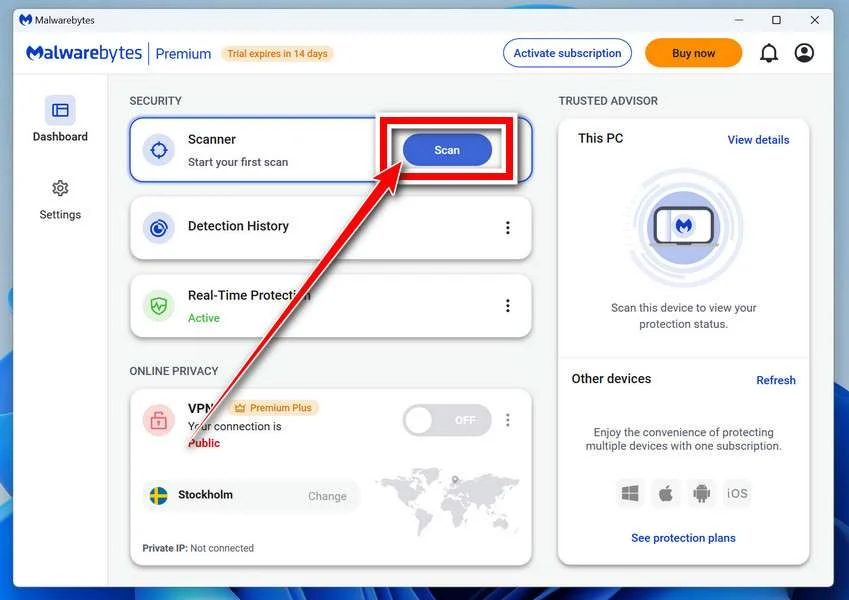
The older tutorial image identifies the Scanner card, not the Custom Scan settings. Use the menu instructions above rather than the highlighted Scan button.
Step 5: Examine results and quarantine detected threats
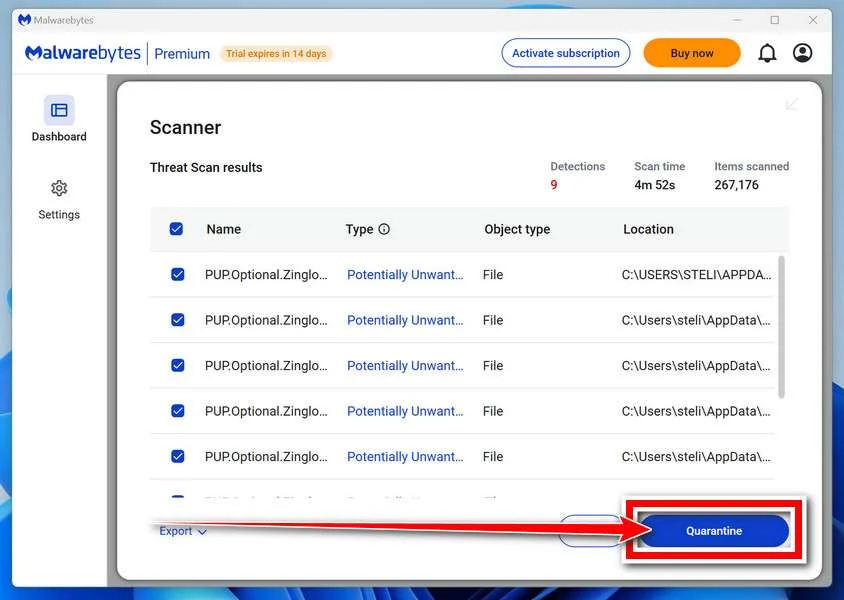
Review detection names and file locations after completion. Keep confirmed malicious items selected and choose Quarantine to isolate them, then retain the scan report.
If an item is uncertain, ask for qualified help before excluding or restoring it. Do not release a quarantined file just because an application stops working.
Step 6: Complete a requested restart and review again
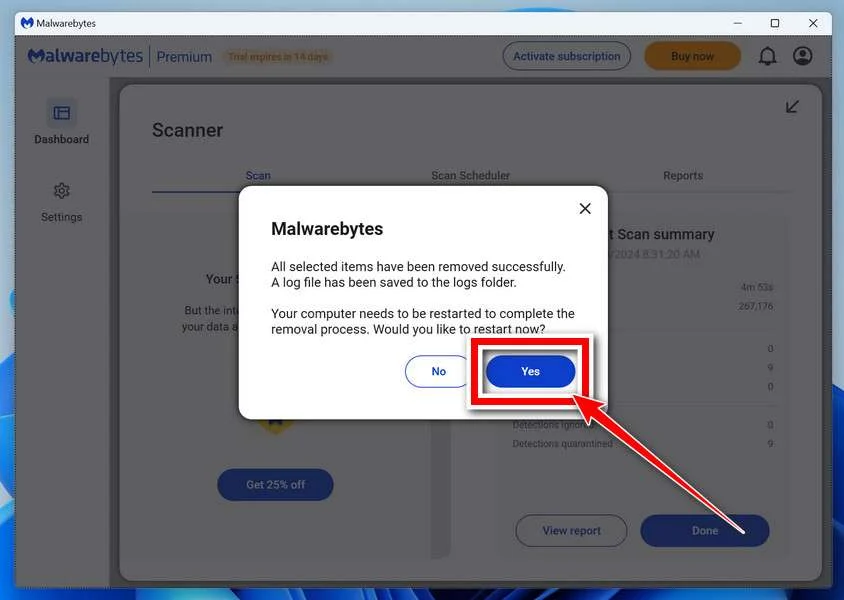
If Malwarebytes requests a restart, save your open work and accept it. Reopen the application afterward and check whether any removal actions remain outstanding.
Run another updated scan and compare the results with your saved report. Returning detections need investigation even if the original warning has stopped appearing.
No clean scan can guarantee that all attacker activity has been found. Continue the case-specific account and configuration checks explained elsewhere in this guide.
Step 7: Escalate recurring or blocked cleanup
Keep a persistently affected computer isolated if detections return or security tools cannot operate. Repeatedly deleting unfamiliar files is not a reliable substitute for investigation.
Use the MalwareTips malware removal assistance forum for guided help. Share relevant detection reports without passwords, tokens, private documents, or full personal identifiers.
A qualified specialist may recommend a planned clean Windows installation after serious compromise. Back up essential documents safely and understand the data-loss implications before proceeding.
Restoring a trusted operating system addresses local software. Previously exposed credentials, copied files, fraudulent transactions, and compromised online accounts still require their own response.
How the ResiLoader Infection Chain Works
Step 1: Verification branding makes the request look routine
The lure imitates security checks associated with familiar services. Its purpose is to make an unexpected instruction feel like a necessary obstacle to viewing a page.
A CAPTCHA does not legitimately need you to execute an unfamiliar downloaded script. Stop when a website tries to move verification into your operating system.
Step 2: An altered application becomes the next stage
The researchers traced a ZIP containing a trojanized copy of Franz. Altered application code acts as part of the delivery process rather than proving Franz itself is malicious.
A working window can distract from what else a package starts. Familiar branding and ordinary application files are not evidence that the entire bundle is trustworthy.
Step 3: ResiLoader helps establish further execution
The analysis describes additional loading techniques, persistence, and attempts to terminate security processes. Those behaviors help explain why removing a visible application may be insufficient.
Do not copy reported file paths into a mass-deletion command. Legitimate files can share names with abused components, and a damaged security configuration needs careful examination.
Step 4: StealC creates a separate information-theft problem
The chain culminates in the StealC information stealer. Once sensitive material has been copied, removing its local source does not retrieve that material from the recipient.
This is why the response covers sessions and credentials alongside scanning. A computer appearing stable afterward does not establish that exposed accounts remain under your exclusive control.
Why Familiar Applications Can Be Used as Cover
Attackers do not always need to invent an application from scratch. Altering or bundling legitimate software can give a malicious package recognizable files and a convincing appearance.
Franz is a legitimate messaging application, but this chain used a modified copy. Treat that package and the developer’s genuine distribution as separate sources.
If you already use genuine Franz, do not remove it solely because its name appears here. Investigate the unexpected download and any actual security findings.
Likewise, an application appearing in Installed apps does not explain every component executed earlier. A loader can hand off to other software before that visible program closes.
Keep the original download quarantined or otherwise isolated under qualified guidance. Reopening it to compare icons or verify that it still launches adds unnecessary exposure.
What to Check When Security Software Stops Working
First distinguish an ordinary update or subscription notice from a disabled protection component. Record the exact message instead of assuming every warning has the same cause.
On a personal Windows computer, inspect Windows Security’s actual status and any installed security application’s alerts. On a managed machine, ask the administrator to interpret its controls.
Do not follow the suspicious page’s instructions to disable protection temporarily. A promise that installation will succeed after turning security off is not a trustworthy explanation.
If legitimate protection remains unavailable, contact qualified support from another device. Provide detection reports and recent events without granting remote access to an unsolicited caller.
A planned reinstall may be preferable when trust cannot be restored. Understand which documents to preserve and how to avoid bringing suspect executables into the new installation.
Use a trusted recovery source and the device manufacturer’s instructions. Do not download a supposed clean Windows image through the same advertising or verification route.
After Cleanup, Review the Accounts the Computer Could Access
Start with email and password recovery
Review recent account events, signed-in devices, recovery addresses, and verification methods. Remove unauthorized changes and choose unique replacement passwords from the trusted device.
Google users can follow its compromised-account recovery instructions. Check mailbox filters and forwarding as well as the sign-in settings.
If the same password was reused elsewhere, those other accounts need their own replacements. A password manager can help maintain unique credentials after the environment is trusted.
Revoke access that does not use the normal password
Review API keys, connected applications, active sessions, and other service-specific credentials that were accessible on the computer. Their revocation controls differ between providers.
Do not paste new secrets into a still-suspect browser or application. Otherwise, cleanup and credential replacement can become an unhelpful cycle of re-exposure.
Preserve evidence of unauthorized transactions
Contact financial providers using a known app, official website, or card contact route. Describe the unauthorized transaction clearly rather than waiting for a scanner to resolve it.
Save receipts, provider case numbers, and relevant messages. Avoid recovery agents demanding an advance fee or claiming a guaranteed reversal of cryptocurrency transfers.
Avoid Repeating the Original Verification Trap
Obtain updates through an application’s established controls or its genuine developer. Avoid a download selected by an unrelated website that interrupted normal browsing.
AdGuard may reduce some malicious-advertising exposure, but it cannot make an executed command safe or reverse data theft. Treat blocking tools as supplementary prevention.
Teach household members what crosses the boundary: a web page asking for operating-system execution. Recognizing that request is more durable than memorizing every rotating domain.
For organizations, report the original route without circulating live payloads in chat. Security staff can preserve and distribute safe indicators through the appropriate internal process.
Frequently Asked Questions
Is the legitimate Franz application itself the threat?
The documented chain uses a trojanized package. That does not establish that genuine Franz or its official distribution was compromised, and its name alone proves nothing.
Did I become infected just by seeing the verification page?
Viewing the lure is different from executing its instructions. Establish what actually ran and what security tools reported before assuming this chain reached your computer.
Can uninstalling the visible application finish removal?
Do not rely on that action alone after execution. The chain contains additional components, so use complete remediation and investigate returning symptoms or security failures.
Should I delete every file with a reported component name?
A filename alone cannot distinguish malicious and legitimate copies. Preserve useful evidence and use qualified analysis rather than broad manual deletion.
Does a clean scan restore stolen login information?
Scanning addresses local findings within its coverage. Change exposed credentials, revoke unwanted access, and investigate account activity independently of the scanner’s final result.
What if my employer owns the affected computer?
Notify the organization’s security team and follow its instructions. Scanning, restarting, or deleting files before that contact could alter evidence needed for the incident.
The Bottom Line
Do not execute a website’s supposed verification instructions. In the ResiLoader case, familiar application files helped deliver malware rather than authenticate the requested action.
If those instructions already ran, isolate the computer and begin account protection elsewhere. Complete remediation before trusting the device, and handle exposed credentials and financial consequences separately.

Join the discussion
0 commentsShare your experience or ask a question about this article.
Community experiences
Did this happen to you?
Your experience could help someone recognize the same scam. Submit a private report for our team to review.
I experienced this tooReports are reviewed before publication. Sharing publicly is always your choice.
Discussion
Start the conversation
Have a question or something useful to share? Add the first comment.