


A text says your Texas franchise report remains unfiled. It names a $250 state penalty and offers a quick link to put things right.
For a busy business owner, that can sound like one more administrative task. The important question is who actually established the overdue status.
Overview
Texas has identified this particular message campaign
The Texas Comptroller’s office warns that these overdue-report texts and emails are a widespread scam. They are not legitimate communications from that agency or the Secretary of State.
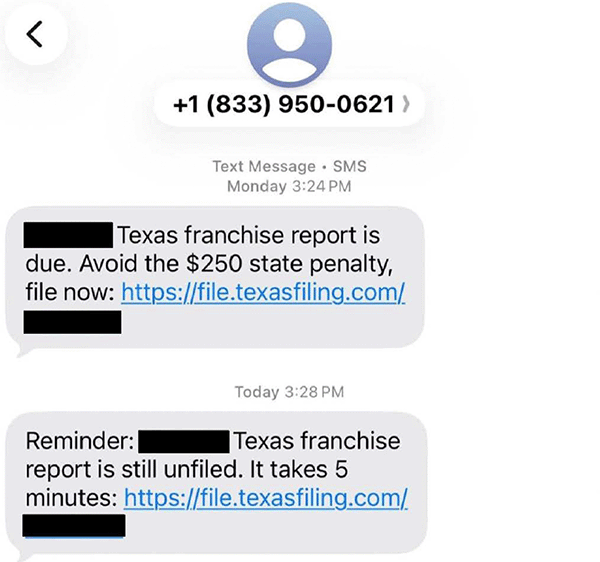
Its November alert includes the original message examples shown here. The warning concerns their filing claims, pressure, and linked destinations.
The $250 claim borrows authority from real filing duties
Franchise reports and Public Information Reports are real subjects for business owners. The applicable reporting requirements depend on the entity and circumstances.
The message uses that familiar subject to present an unsupported state-penalty claim. A recognizable filing term does not establish what your business owes.
- The documented text sender appears as 833-950-0621.
- The agency identifies email senders using wetexasfilingteam[.]com addresses.
- The messages push a filing link alongside claims of overdue status.
- Texas specifically flags the claimed $250 state penalty.
The safe decision separates the message from your actual account
Do not use this message’s link to resolve a supposed state obligation. Check your business through the Comptroller’s official website or an established tax professional.
You can reject the deceptive message while still addressing a genuine filing problem. The warning does not cancel real reporting duties or authentic state notices.
What the Original Text Actually Says
The agency’s text example shows two messages from the same displayed number. Both direct the recipient toward a filing address rather than an official account check.
The first combines a report-due claim with the words “$250 state penalty.” Its instruction is to file through the accompanying link.
The second presents itself as a reminder, says the report remains unfiled, and reduces the task to something that takes five minutes.
That combination creates a simple bargain: finish a small task now to avoid a larger problem. It encourages action before you check the underlying claim.
The destination shown is file[.]texasfiling[.]com. This is different from the Comptroller’s official comptroller.texas.gov domain.
The published image obscures the recipient-specific details and parts of the link. Those existing redactions remain intact, so the complete individualized destination is unavailable.
A displayed telephone number is a recognition clue, not a reliable way to identify the person behind a campaign. Do not call it for verification.
Similarly, an accurate business name would not prove that the sender controls a state account. Compare the actual filing record through an independent route.
The Email Adds a More Formal Looking Filing Record
The companion email uses a red overdue banner, a filing-details panel, and an orange action button. Its appearance makes the same problem feel more administrative.
It refers to a Public Information Report and displays a business name, file number, overdue status, and a count of days.
It also lists consequences involving business rights, contracts, and reinstatement costs. Those warnings encourage the reader to treat the email as an urgent compliance notice.
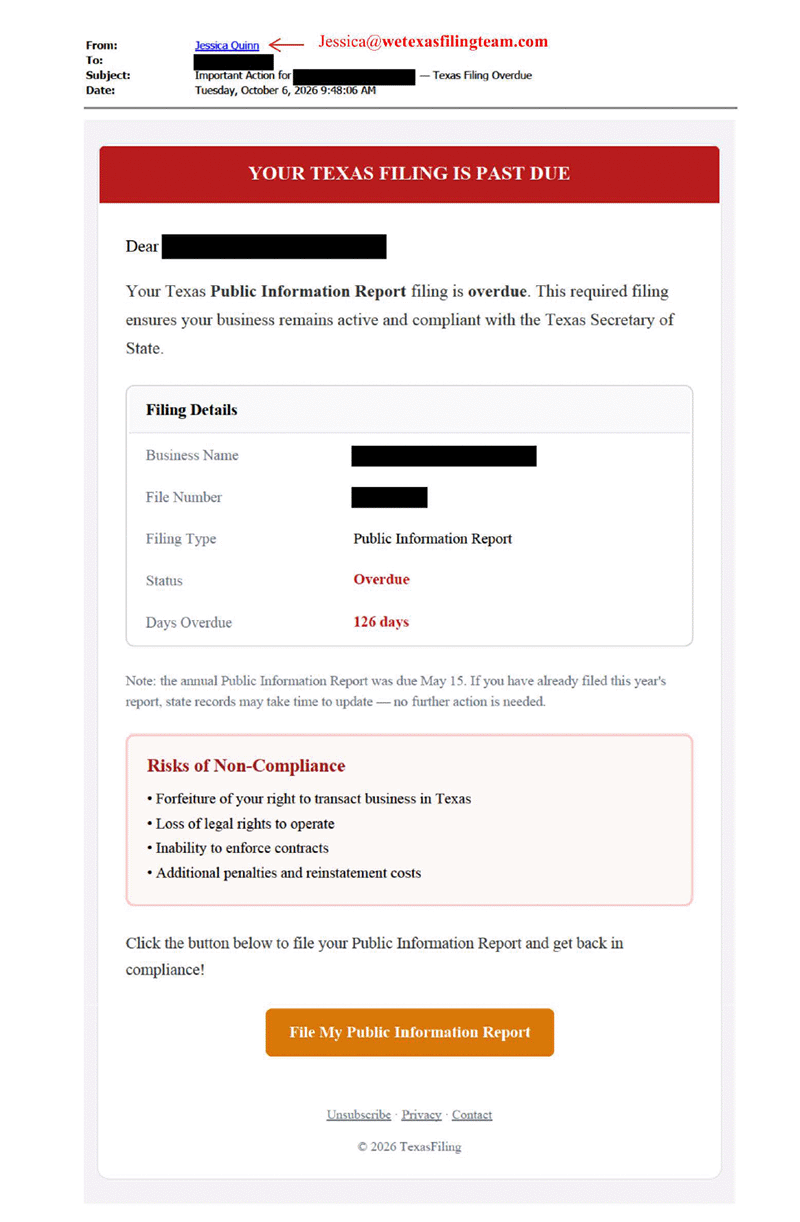
A neatly arranged panel is still information supplied by the sender. It does not independently confirm a filing failure or the legal consequences for your entity.
The published example also says no further action is needed if the report was already filed. That reassurance can make the broader message seem more reasonable.
Check that point using your own confirmation and official account information. The sender’s conditional reassurance cannot authenticate the button elsewhere in the email.
The agency identifies the sending pattern as a name followed by @wetexasfilingteam[.]com. A familiar personal name in the sender field supplies no government authority.
Use the screenshot to recognize the campaign’s presentation. You do not need to open its link, reply to its sender, or reconstruct the redacted destination.
How the Texas Franchise Tax Text Scam Works
Step 1: A real reporting subject becomes an unsolicited warning
The opening claim concerns a franchise report or Public Information Report. These are plausible subjects for a Texas business to encounter during ordinary administration.
The sender then supplies the conclusion that the report is missing. Receiving that assertion is different from seeing the same issue inside your official account.
For example, an owner may remember hiring an accountant but not know whether a particular report was submitted. The message turns that uncertainty into pressure.
It can reach whoever receives business correspondence, even when that person does not handle tax filings. Their first reaction may be to forward it for payment.
Step 2: Penalties and business consequences make the link feel urgent
The text claims a $250 state penalty, while the email lists consequences for remaining overdue. Both make delay sound expensive or disruptive.
The promise of a five-minute fix lowers the apparent effort involved. A recipient can feel that checking the notice would take longer than following it.
That is precisely when the claimed amount and authority need independent confirmation. Urgency does not establish a debt or turn a private message into state correspondence.
Even a business with an actual overdue report should pause here. A real administrative problem does not authenticate every message offering to resolve it.
Step 3: The message supplies its own filing route
The final push is toward the supplied link or filing button. The reader is asked to act within the sender’s chosen route before verifying the claim.
The Comptroller tells recipients not to use these links. Its warning directs businesses to official channels instead of the contact details inside the message.
The published examples establish that redirection, but not the complete contents of every destination or an eventual checkout. Do not assume a particular payment was collected.
The decision remains clear without that assumption: leave the supplied route and establish your filing status independently before providing information or authorizing a charge.
The Claimed State Penalty Does Not Match the Published Rules
The Comptroller’s franchise-tax information lists a $50 penalty for each report filed after its due date.
The same page separately lists payment penalties of 5% for tax paid one through thirty days late, and 10% when paid more than thirty days late.
It also explains that interest on past-due taxes begins sixty-one days after the due date. Those categories should not be collapsed into one invented flat charge.
This is not a calculation of what your particular business owes. The report, tax payment, dates, and circumstances all need to be checked against official records.
The comparison exposes the message’s unsupported $250 state-penalty claim. It does not mean every business owes exactly $50, or that legitimate late-payment charges never apply.
A private filing service may charge for assistance. A service fee and a government penalty are different things, even when they concern the same report.
If you intentionally choose paid help, understand what the provider will do and what it charges. That choice should follow verification of the actual requirement.
This warning addresses the documented messages, not every private filing business or every service using a similar name. The messages cannot establish a state debt.
Real Deadlines and Genuine State Notices Still Matter
Texas generally sets May 15 as the annual franchise-tax report deadline. When that date falls on a weekend or holiday, the next business day applies.
The familiar date helps explain why an overdue message can sound plausible. It does not prove which form your business must file or whether it already complied.
The Comptroller’s current franchise-tax page also identifies genuine July and August notices concerning unmet 2025 or 2026 filing requirements.
It names Form 05-211, Texas Notice of Intent to Forfeit Right to Transact Business, and Form 05-213, Texas Notice of Forfeiture of Registration.
Do not label those notices fake merely because another message mentions forfeiture. Verify the specific correspondence through the agency and follow its actual account instructions.
| What you have | What to establish independently |
|---|---|
| The $250 penalty text | Check the agency warning and your actual account instead of following the supplied filing link. |
| A receipt from your accountant | Confirm which entity, report and reporting period the receipt covers. |
| An official account showing a missing report | Use the agency’s instructions for that particular outstanding requirement. |
| A genuine forfeiture-related notice | Confirm its identity and required response through an independently reached Comptroller channel. |
An owner might receive a deceptive text while an unrelated filing issue still needs attention through an official account.
Rejecting the sender’s route protects the verification process. It is not advice to disregard an official obligation once that obligation has been confirmed.
What to Do If You Received or Answered This Message
-
Leave the message’s filing route untouched. Do not use its link, button, phone number, or reply address to confirm the supposed problem.
If you already opened the destination, stop entering information and close it. Merely opening a page does not establish that a payment or filing occurred.
-
Check the business through a route you choose. Type the Comptroller’s official website address yourself, or use an established bookmark.
The agency’s scam-response guidance also provides its official telephone contact. Compare the issue with your own account and filing records.
-
Contact the person who actually handles the filing. Use the accountant’s or administrator’s existing contact details rather than information supplied by this message.
Ask which entity and reporting period were covered. Share the concern without presenting the text’s overdue claim as a verified state finding.
-
Protect any information you actually submitted. If you entered a password, change it through the genuine service and anywhere else you reused it.
If you disclosed bank or card information, contact the relevant financial institution promptly. Explain what you provided and whether you authorized any payment.
-
Keep useful evidence privately and report the approach. Save the message, displayed sender, date, and any confirmation or charge connected with your response.
The agency recommends forwarding scam texts to 7726 and reporting to the FTC and FBI’s Internet Crime Complaint Center. Its guidance links the official reporting routes.
-
Resolve a confirmed filing problem through official instructions. If your account genuinely needs attention, address that separately from the message you reported.
Check that any submitted report appears for the correct entity and period. A payment to a third party is not itself confirmation of state acceptance.
Choose the Next Step Based on What Happened
Match your response to the information or money involved. These branches do not require uploading the message, entering business details, or contacting its sender.
I received the message but did not follow its link
Keep the message if needed for a report, then use the agency’s guidance to report it. Check genuine filing questions through official channels.
I followed the link but submitted no information
Close the page and avoid returning to test it. Review what you actually did before deciding whether any account or payment needs attention.
I submitted information or authorized a payment
Preserve the confirmation and contact the appropriate service or financial institution through a trusted route. Describe the actual submission without assuming the state received it.
Keep Your Filing Records and Payment Decisions Connected
If bookkeeping, tax preparation, and card payments belong to different people, agree who will check the message before anybody acts on it.
A colleague forwarding an email does not establish its authority. Tell the person handling payment whether the agency has actually confirmed an outstanding requirement.
Keep the report year, business entity, submission confirmation, and any service invoice distinct. That makes an actual missing filing easier to identify without authorizing duplicate work.
The Comptroller lists 800-252-1381 for franchise-tax assistance. Obtain the contact details from its official website and describe the account question without relying on the unsolicited sender.
Frequently Asked Questions
Is this overdue-report text an official Texas message?
The Comptroller identifies the documented campaign as a scam and says its messages are not legitimate communications from that office or the Texas Secretary of State.
Does recognizing my business name make the demand trustworthy?
A matching name does not authenticate the sender’s authority or establish overdue status. Verify the correct business and reporting period through your official account.
Is the $250 amount the standard late-report penalty?
The agency specifically flags that claim as inconsistent with its published penalties. Its franchise-tax page lists a $50 late-report penalty, with separate tax-payment penalties.
Should I ignore every forfeiture notice after receiving this text?
No, Texas separately identifies genuine forfeiture-related notices. Verify the specific document and account through official channels rather than assuming every administrative warning belongs to this campaign.
Does paying a filing service prove my report was accepted?
A provider’s charge and state acceptance are different events. Confirm which report was submitted and check its status through the appropriate official records.
What if I already gave the linked page my card details?
Contact your card issuer promptly through its trusted contact route. Keep the message and any transaction confirmation, and explain exactly what you supplied or authorized.
The Bottom Line
Do not follow the Texas franchise tax text scam’s filing link or pay its supposed $250 state penalty. The Comptroller has explicitly warned about these messages.
Check your real filing status through official channels and address any genuine outstanding requirement there. If you already shared information or paid, protect that specific exposure promptly.

Join the discussion
0 commentsShare your experience or ask a question about this article.
Community experiences
Did this happen to you?
Your experience could help someone recognize the same scam. Submit a private report for our team to review.
I experienced this tooReports are reviewed before publication. Sharing publicly is always your choice.
Discussion
Start the conversation
Have a question or something useful to share? Add the first comment.