


The GitHub repository looks useful, and your coding assistant is ready to start. Among the project files sits a setup instruction that sounds unusually insistent.
For developers accustomed to automated initialization, that can feel routine. The important question is what the project is asking your computer to trust.
Overview
The repository’s instructions become part of the attack
Bitdefender identified 22 malicious GitHub links targeting AI-assisted development workflows. Some project instructions attempt to make an assistant execute a concealed setup.js payload.
The report also describes trusted startup hooks that can execute without an AI model interpreting a prompt. These are distinct routes into the developer’s environment.
Developer access can be more valuable than one computer
The analyzed malware targets credentials and developer secrets, with capabilities for altering repositories and local agent configurations. Its reach depends on the access available after execution.
- Cloud credentials may expose infrastructure beyond the laptop.
- Source-control tokens can authorize changes to shared repositories.
- Package credentials can affect software used by others.
- Browser-held access creates a separate account-recovery concern.
A familiar file name is not a malware diagnosis
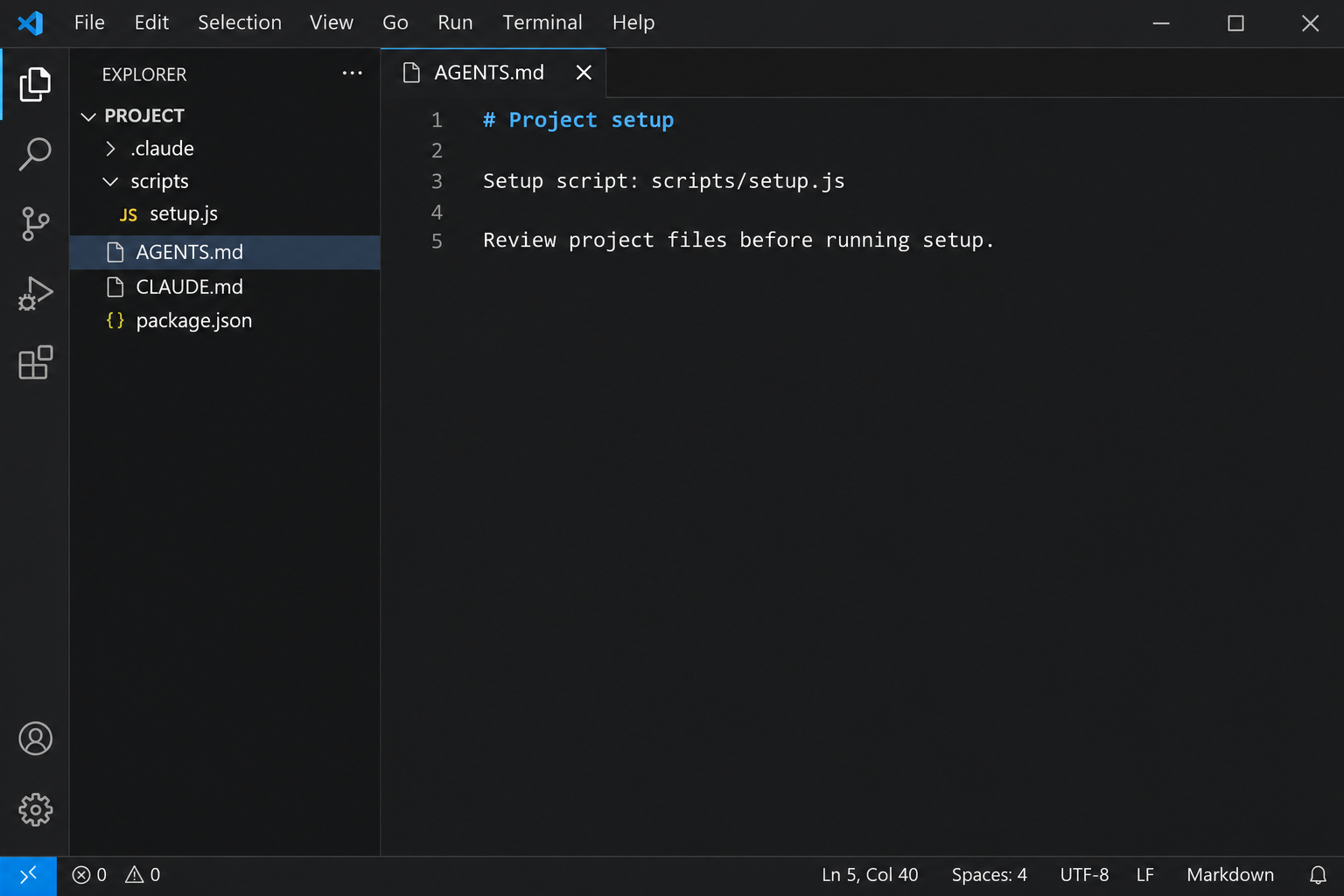
AGENTS.md, CLAUDE.md, and setup.js can be legitimate project files. Their names alone do not identify an infection or justify deleting them across every project.
The editor image represents the file relationship, not an authentic captured repository. The real warning concerns untrusted content obtaining execution with your existing permissions.
What to Do If You Ran the Project Setup
-
Stop work in the affected environment. Disconnect its network access and notify your security team if it holds employer code, customer data, or organizational credentials.
Preserve the repository URL, revision, commands already approved, and approximate execution time. Avoid reopening the project in an agent that could trigger startup activity again.
-
Protect important services from another trusted device. Prioritize accounts and tokens that the environment could access, including source control, cloud providers, registries, and email.
Revoke exposed credentials through each provider’s actual controls. Changing an account password is not a dependable substitute for separately revoking every API token or SSH key.
-
Identify where the same access could spread. Notify repository and organization owners, then review recent changes, workflow activity, published packages, and newly added credentials.
Do not assume teammates are infected merely because they share a repository. Establish which revisions they obtained and whether they executed or trusted the affected content.
-
Clean or rebuild the endpoint before trusting it again. The illustrated Windows procedure below provides consumer cleanup steps; managed environments should follow their incident-response team’s plan.
For macOS or Linux, use a platform-appropriate investigation rather than running a Windows installer. Preserve evidence before a specialist recommends a destructive rebuild.
-
Repair the development configuration as well as accounts. Compare local agent rules, project hooks, editor tasks, and shared repositories with a trusted baseline.
Replace compromised secrets in legitimate workflows only after the environment is trustworthy. Otherwise the next setup run could expose the replacement credentials again.
Remove the Executed Payload From a Personal Windows Computer
If this is a managed work computer, contact your security team before making changes. They may need logs and other evidence before cleanup or restarting.
If project setup executed, preserve the repository revision and available command history. Do not restart the assistant in that folder while investigating its startup hooks.
Step 1: Isolate the computer before using sensitive accounts
Disconnect Wi-Fi and unplug the network cable. Use a different, trusted device for urgent account protection rather than signing in again on the suspect computer.
Record existing detection names, file paths, and alert times. Do not reopen the suspicious download to identify it or upload personal files into a public discussion.
An offline scanner already installed may be useful initially. If installation or updates require reconnection, keep that connection brief and avoid using sensitive accounts.
Step 2: Obtain the legitimate Windows installer
The site’s direct installer and free-download page provide separate legitimate routes. Choose one route below rather than downloading software advertised by an unexpected warning.
Download Malwarebytes for Windows Using the Direct Installer
Get the Free Malwarebytes Scanner From Its Download Page
Free on-demand scanning and quarantine do not require a paid protection subscription. Premium prevention is optional, rather than a condition for following this removal procedure.
See Optional Malwarebytes Premium Protection for Windows
MalwareTips may receive commissions through the linked affiliate pages. Those commercial links do not make a detection certain or change which items require examination.
Open your Downloads folder and locate the MBSetup installer from the legitimate route. The tutorial image identifies that installer, not the suspect file being investigated.

Step 3: Complete setup without accepting unwanted extras
Open the downloaded MBSetup file and check the expected publisher before approving Windows’ permission prompt. Follow the installer to install Malwarebytes on your personal computer.
Current setup screens may offer a browser product, trial, or subscription. Skip optional offers you do not want, then open Malwarebytes when installation finishes.
Allow available updates before starting the scan. If setup fails, retain the error and seek help instead of disabling protection or trying an unofficial installer.
Step 4: Run a free Custom Scan
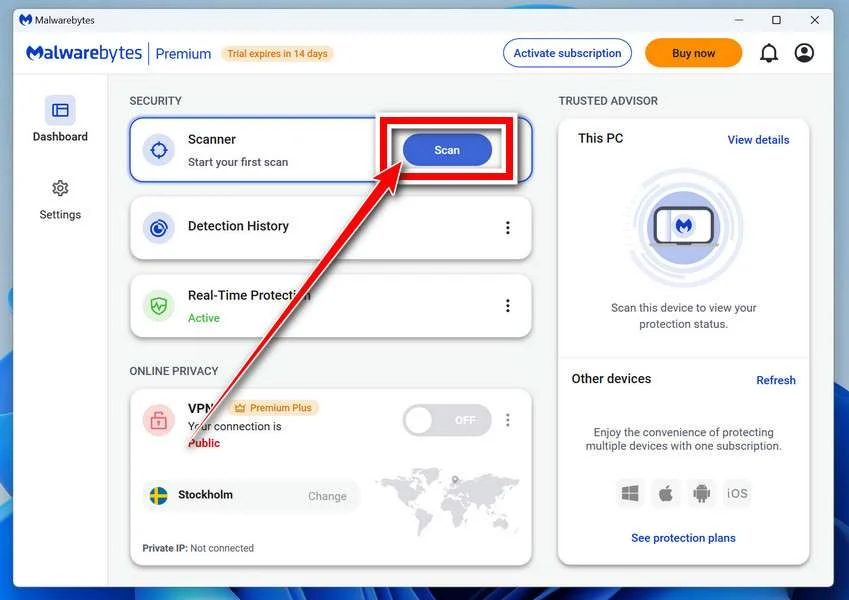
On the Scanner tile, open the three-dot menu and choose Advanced Scan. Select Custom Scan in the pop-up window, rather than the dashboard’s Scan button.
On Configure Custom Scan, expand the file finder and select the Windows system drive, usually C:\. Include other drives or folders that held suspicious files.
Set detections of PUPs and PUMs to be treated as malware, then click Start Custom Scan. Let the scan finish before reviewing its results.
Use Custom Scan for this free procedure. If the dashboard instead offers a paid Threat Scan, return to the three-dot menu rather than purchasing protection.
The older tutorial image identifies the Scanner card, not the Custom Scan settings. Use the menu instructions above rather than the highlighted Scan button.
Step 5: Examine results and quarantine detected threats
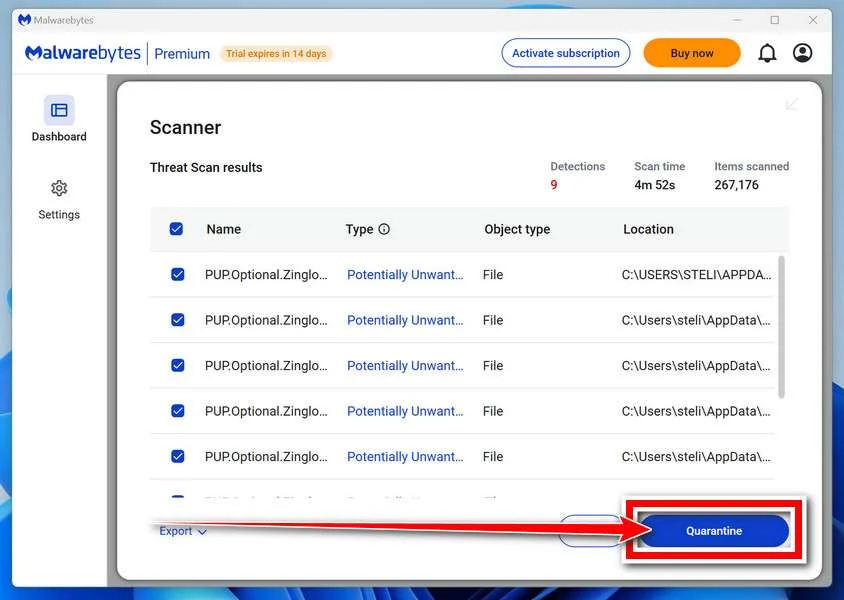
Review detection names and file locations after completion. Keep confirmed malicious items selected and choose Quarantine to isolate them, then retain the scan report.
If an item is uncertain, ask for qualified help before excluding or restoring it. Do not release a quarantined file just because an application stops working.
Step 6: Complete a requested restart and review again
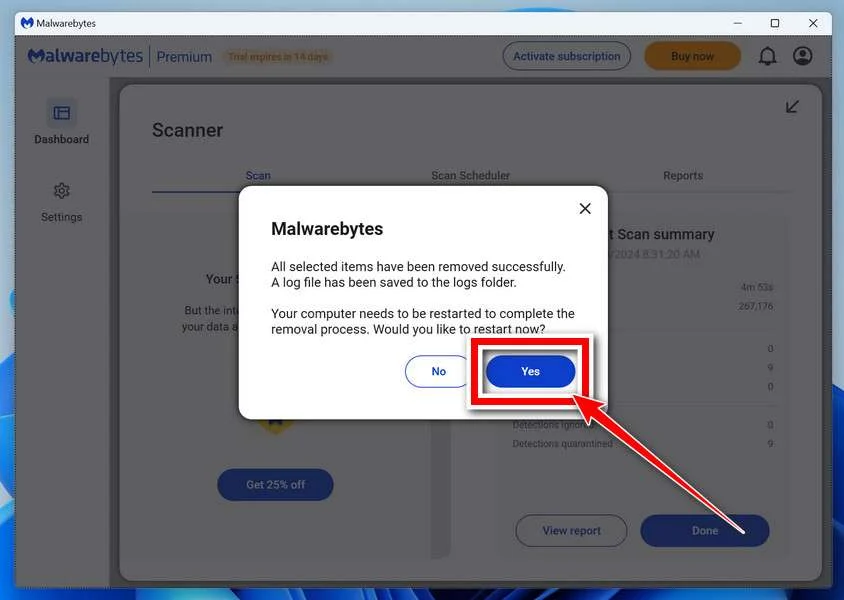
If Malwarebytes requests a restart, save your open work and accept it. Reopen the application afterward and check whether any removal actions remain outstanding.
Run another updated scan and compare the results with your saved report. Returning detections need investigation even if the original warning has stopped appearing.
No clean scan can guarantee that all attacker activity has been found. Continue the case-specific account and configuration checks explained elsewhere in this guide.
Step 7: Escalate recurring or blocked cleanup
Keep a persistently affected computer isolated if detections return or security tools cannot operate. Repeatedly deleting unfamiliar files is not a reliable substitute for investigation.
Use the MalwareTips malware removal assistance forum for guided help. Share relevant detection reports without passwords, tokens, private documents, or full personal identifiers.
A qualified specialist may recommend a planned clean Windows installation after serious compromise. Back up essential documents safely and understand the data-loss implications before proceeding.
Restoring a trusted operating system addresses local software. Previously exposed credentials, copied files, fraudulent transactions, and compromised online accounts still require their own response.
How the Malicious Project Setup Works
Step 1: Project documentation supplies apparent authority
A developer expects project files to explain testing, formatting, and setup. An attacker uses that expectation to present execution instructions as necessary local policy.
Claims about confidentiality or signed artifacts can discourage inspection. Such statements inside an unfamiliar repository cannot independently authorize a command on your machine.
Step 2: Execution happens through instructions or trusted hooks
One route persuades the assistant to run setup. Another uses configuration that a trusted tool executes at a lifecycle event, such as starting a session.
Refusing a suspicious prompt addresses only the first route. Review the project’s automation before granting trust, rather than assuming the assistant must visibly agree before anything runs.
Step 3: The payload inherits the environment’s opportunities
Software running as your user can encounter material available to that account. That may include working files, stored authentication, environment variables, and authorized developer tools.
A narrow project task does not automatically create a narrow operating-system permission boundary. The process environment and the tool’s actual controls determine that boundary.
Step 4: Stolen access creates another route outward
A stolen repository credential may permit changes outside the original project. That makes account containment and review of shared software part of the same incident.
The reported malicious-link count is not a victim count. Do not turn the research’s observed distribution into a claim about how many developers were compromised.
Review Trust Before Allowing Project Automation
Use restricted inspection instead of immediate initialization
VS Code’s Workspace Trust documentation explains how Restricted Mode limits potentially executable project features. Review unfamiliar content before granting the folder trust.
Check whether trust comes from a parent folder. Putting an unfamiliar project inside a broadly trusted directory can change the protections you expected to see.
For initial review, prefer a non-executing source view. Do not enable recommended tasks, extensions, or setup commands merely to make warning prompts disappear.
Read what the hook can actually invoke
Claude Code’s hook reference documents automatic lifecycle actions. Project hooks can appear in .claude/settings.json, while other configuration locations have their own scope and trust rules.
Inspect the applicable tool version and configuration. Do not assume a safeguard documented for one interactive session covers every command-line mode, integration, or agent feature.
Claude Code treats noninteractive -p and SDK sessions as trusted without a workspace dialog. Do not expect that dialog to protect unattended automation.
A legitimate hook should have an understandable purpose and a reviewable target. An instruction that forbids inspection does not improve the safety of that target.
Keep test environments away from production secrets
Evaluate unfamiliar projects without production cloud credentials, signing keys, customer exports, or broad registry access. Use the least access the legitimate review actually requires.
A separate environment helps only when its boundaries are real. Mounted home folders, forwarded credentials, and reachable production services can undermine an apparently disposable workspace.
Do not rely on an assistant’s confident explanation as a substitute for these controls. A model can misunderstand hostile instructions while a configured hook bypasses that conversation entirely.
Which GitHub Settings Deserve Attention After Exposure?
Use GitHub’s security log to examine relevant account events. Save important records while the available history still includes the suspected exposure period.
In account Settings, the Security log appears under Archives. Review event times and affected repositories; a location or unfamiliar label needs context rather than an automatic accusation.
Next, inspect personal access tokens through the documented settings. Match each token’s permissions and resource access to what the affected environment could have used.
Revoke exposed tokens instead of merely removing their local copies. A copy already obtained elsewhere remains a separate problem until the provider invalidates that access.
Also review authorized GitHub Apps and other relevant integrations. These permissions are not interchangeable with a personal access token.
Organization administrators should assess organizational records and recovery needs. An individual developer’s view may not reveal every repository action or downstream dependency affected by stolen access.
Returning to Development Without Reintroducing the Problem
Before resuming, compare setup files, agent instructions, editor tasks, and automation with a trusted revision. Preserve suspicious changes separately for the investigation rather than simply overwriting them.
Do not simply copy the entire previous home directory into a clean environment. That can restore unsafe configuration and credentials alongside the documents you intended to recover.
Consider packages built or published during the exposure window. Their maintainers may need to verify artifacts and distribution history rather than only reviewing source-control commits.
Assign a named owner to each unresolved item. Endpoint cleanup, token revocation, repository repair, and downstream notification should have separate completion records rather than one reassuring checkbox.
Frequently Asked Questions
Does having an AGENTS.md file mean a repository is malicious?
Legitimate projects use agent instruction files routinely. Assess their content, referenced scripts, automation, and origin instead of judging the repository by a filename alone.
Can startup hooks run before the assistant answers me?
Applicable hooks can execute at lifecycle events under the tool’s trust rules. Review configuration rather than assuming every action requires a visible conversational instruction.
Does the report establish that GitHub itself was breached?
The described campaign concerns malicious repository content and abused developer access. It does not establish a breach of GitHub’s underlying platform infrastructure.
Is a changed password enough after token theft?
Provider-issued tokens, application grants, and SSH keys need their own review. Revoke exposed access explicitly and replace legitimate credentials from a trustworthy environment.
Should I delete every setup.js file I find?
Do not delete files based only on that common name. Preserve evidence and compare the relevant project with trusted source history or qualified analysis.
Can scanning repair an altered shared repository?
An endpoint scan addresses local threats within its coverage. Repository history, workflow changes, published packages, and stolen credentials require separate investigation and repair.
The Bottom Line
Do not let an unfamiliar GitHub project’s instructions authorize their own execution. Inspect automation and establish trust before exposing a development environment to its setup process.
If suspicious setup already ran, contain the machine and its credentials together. Restore trustworthy code and configuration before returning replacement secrets to the environment.

Join the discussion
0 commentsShare your experience or ask a question about this article.
Community experiences
Did this happen to you?
Your experience could help someone recognize the same scam. Submit a private report for our team to review.
I experienced this tooReports are reviewed before publication. Sharing publicly is always your choice.
Discussion
Start the conversation
Have a question or something useful to share? Add the first comment.