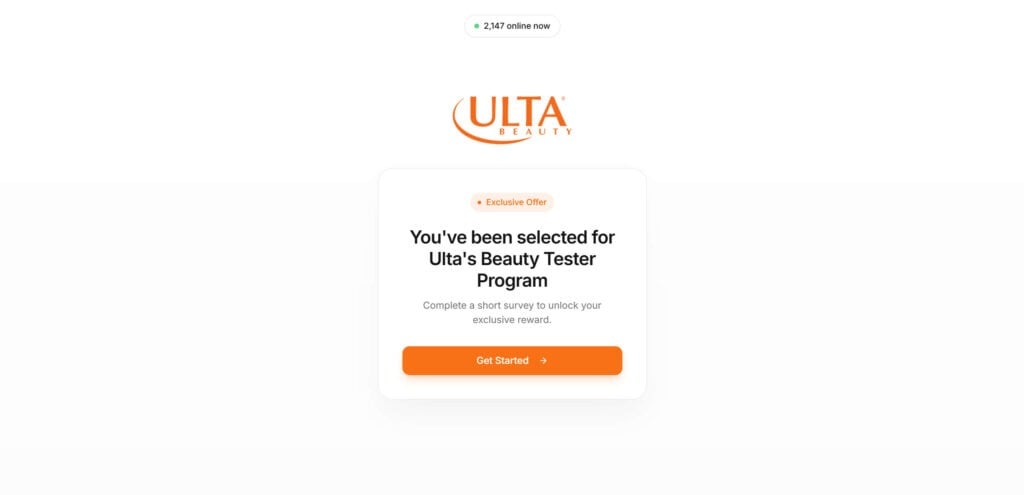
A clean Ulta logo. A bright button that says “Get Started.” A message telling you you’ve been “selected” for Ulta’s Beauty Tester Program, like it’s a private invite most people never see.
And then it gets interesting.
Because the page looks harmless, even exciting. A few quick questions. A reward choice. A “congratulations” screen that feels like you’re one click away from something big.
But if you’ve seen this offer on more than one website, or you landed there from an ad that felt slightly off, your gut is picking up on something real.
There’s a reason this “program” keeps showing up under different domains, with the same promise, the same steps, and the same ending.
Scam Overview
The so called “Ulta Beauty Tester Program” offer is part of a common reward funnel scam that’s been repackaged for years under dozens of brand names.
The branding changes, the domain changes, and the product changes. But the playbook stays the same.
You’ll see it presented as:
“You’ve been selected for Ulta’s Beauty Tester Program”
“Exclusive offer” or “Limited spots”
A short survey that “unlocks” a reward
A large gift card amount such as $750
A final “claim your reward” button that routes you elsewhere
On the surface, it looks like an Ulta promotion. In reality, it is typically a lead generation and affiliate marketing funnel that uses brand impersonation to increase clicks and completions.
Why the Ulta branding is used
Ulta is a high trust retail brand. People already associate it with:
loyalty points and rewards
coupons and seasonal sales
beauty boxes, free samples, and product launches
influencer campaigns
Scammers and shady affiliate operators know that familiarity lowers skepticism.
A promise like “Beauty Tester Program” also sounds plausible because legitimate tester programs do exist in the world. Real brands sometimes offer samples to reviewers through controlled, invite-only platforms or marketing partners.
The scam relies on that mental shortcut: “This sounds like something a beauty retailer would do.”
What the pages typically look like
Most versions of this scam use an intentionally minimal design:
a centered Ulta logo
a clean white background
a card-style box with a headline and a CTA button
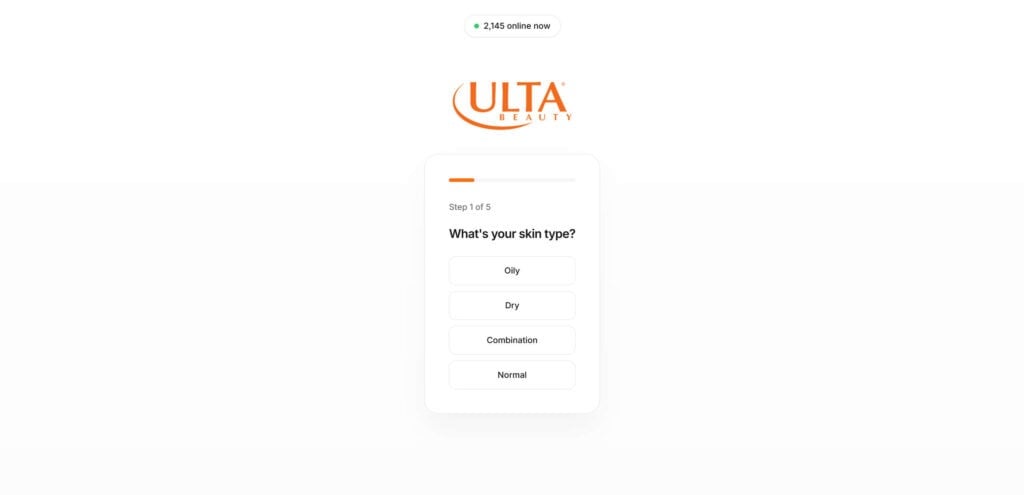
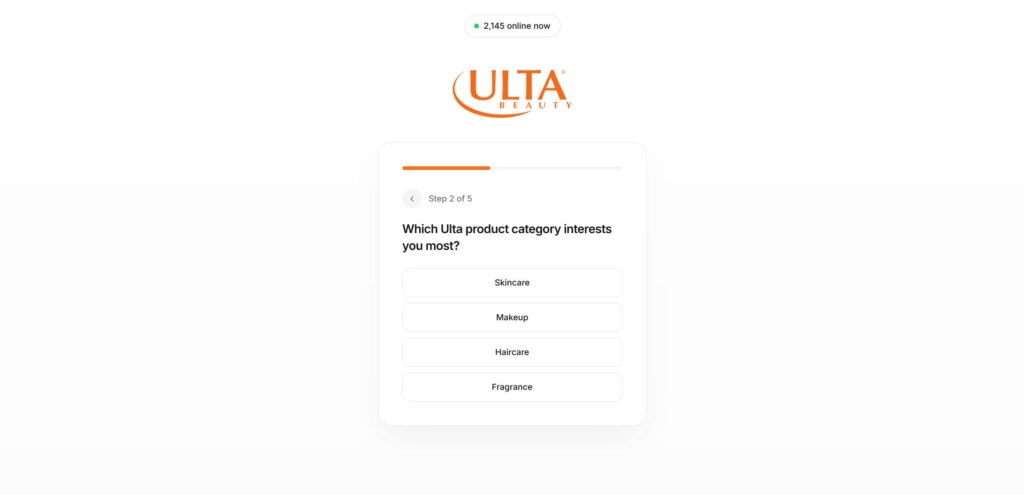
a short multi-step quiz (often “Step 1 of 5”)
easy questions like skin type, favorite categories, routine frequency
a reward screen offering options like a $750 gift card, free product bundle, VIP membership
The quiz is not the actual scam. The quiz is the warm-up.
It’s there to create momentum. Every click makes the user feel more invested. Every “Step 3 of 5” creates a sense of progress and inevitability.
By the time a user reaches the end, the brain is already thinking in terms of finishing, not evaluating.
Why you might see it on multiple websites
One of the biggest red flags is how often this exact “program” appears under different domains. That’s not an accident.
This scam model is designed to be duplicated quickly. Operators can:
clone the same template
swap out a logo and headline
launch a new domain
push traffic via ads, popups, or redirects
rotate domains when one gets reported
So you might see nearly identical Ulta “tester” pages across multiple sites, sometimes with small differences like:
a different button color
a slightly different headline
a different “reward” amount
different tracking links in the background
If it were a real Ulta campaign, it would typically live on official Ulta web properties or clearly identified official partners. It would not keep popping up under unrelated domains with no transparent corporate information.
The real purpose: an affiliate offer funnel
Most versions of this scam route users into a “complete offers to unlock reward” system.
That can include:
signing up for trial subscriptions
downloading apps and opening them
entering email, phone number, address
completing “deals” that require payment information
registering for promotions that trigger recurring billing
The operator gets paid when users complete these offers.
This is often done through CPA (cost per action) affiliate networks, where advertisers pay affiliates for:
a sign-up
a lead submission
an app install
a trial start
a purchase
The scammy part is not that affiliate marketing exists. Affiliate marketing is legitimate in many contexts.
The scammy part is the deception.
The user is led to believe they are completing steps for Ulta, and that a large gift card reward is guaranteed at the end. But the funnel is usually structured so that:
the reward is not actually issued
the user cannot satisfy the fine print requirements
the “reward” is limited, delayed, or unavailable
the user gets stuck in an endless loop of offers
the user gives away data or money along the way
Common manipulation tactics used
These pages are engineered to feel safe and urgent at the same time.
You’ll often see:
“Exclusive Offer” labels
“You’ve been selected”
fake online counters such as “2,147 online now”
progress bars like Step 1 of 5
congratulatory language before any real verification happens
reward options designed to feel personalized
The psychological push is subtle, but effective.
A user is not asked, “Do you want to be scammed?” They’re nudged into thinking:
“I’m already halfway through.”
Then:
“I might as well finish.”
Then:
“It’s only one more step.”
That’s how these funnels pull people from curiosity into compliance.
What can happen to victims
Not everyone loses money immediately, which makes this scam even trickier. Many victims walk away thinking:
“Well, I didn’t get the gift card, but nothing bad happened.”
But the harm often shows up later, including:
recurring charges from trials you forgot to cancel
spam calls and texts from lead lists
increased phishing emails targeting your inbox
compromised accounts if you reused passwords
identity risk if you submitted detailed personal information
And even when the damage is “just” spam, it can still be relentless. Some people end up changing phone numbers because the volume becomes unmanageable.
The bottom line of the overview
This is not a real Ulta Beauty Tester Program.
It’s a rotating network of look-alike reward pages built to funnel users into offer completions and data collection, while using Ulta branding as the hook.
How The Scam Works
Below is the typical step-by-step flow, including why each step exists and what it’s trying to accomplish.
Step 1: You get pulled in through an ad, redirect, or “exclusive offer” link
Most people don’t type these domains directly.
They arrive through:
social media ads
sponsored posts
popups from streaming or download sites
redirect chains from “claim reward” buttons
sketchy coupon pages
comment links or “limited offer” banners
The link usually promises something high value for low effort, such as:
a $750 gift card
a tester bundle
a VIP membership
“free products”
Step 2: A clean landing page builds instant trust
The landing page is intentionally simple.
It usually includes:
Ulta logo
“Exclusive Offer”
“You’ve been selected”
“Complete a short survey”
a single prominent button such as “Get Started”
No clutter. No obvious warnings. No complex menus.
This design choice matters. Scams that look too busy trigger suspicion. Scams that look “modern and minimal” feel professional.
Step 3: The quiz creates momentum and micro-commitments
The quiz questions are easy and low risk:
What’s your skin type?
How often do you follow a routine?
Which category do you prefer?
What’s your go-to brand?
Which reward would you like?
None of these questions “verify” anything.
They’re there to get clicks.
Each answer is a micro-commitment. Each click increases the chance you’ll keep going.
This is the same technique used in many conversion funnels: reduce friction, build forward motion, delay any hard asks until the user is invested.
Step 4: The “reward selection” primes you emotionally
When the page asks what reward you want, it feels like a choice.
But in most versions, the choice is cosmetic. The system is not truly customizing anything.
It’s doing something more important: anchoring you to the value.
When someone selects “$750 gift card,” that number becomes real in their mind. It stops being an abstract possibility and starts feeling like something they are about to receive.
That’s when users become much more willing to:
enter personal information
submit their email and phone
continue through additional steps without reading carefully
Step 5: “Congratulations” appears before anything is actually earned
This is one of the most telling moments.
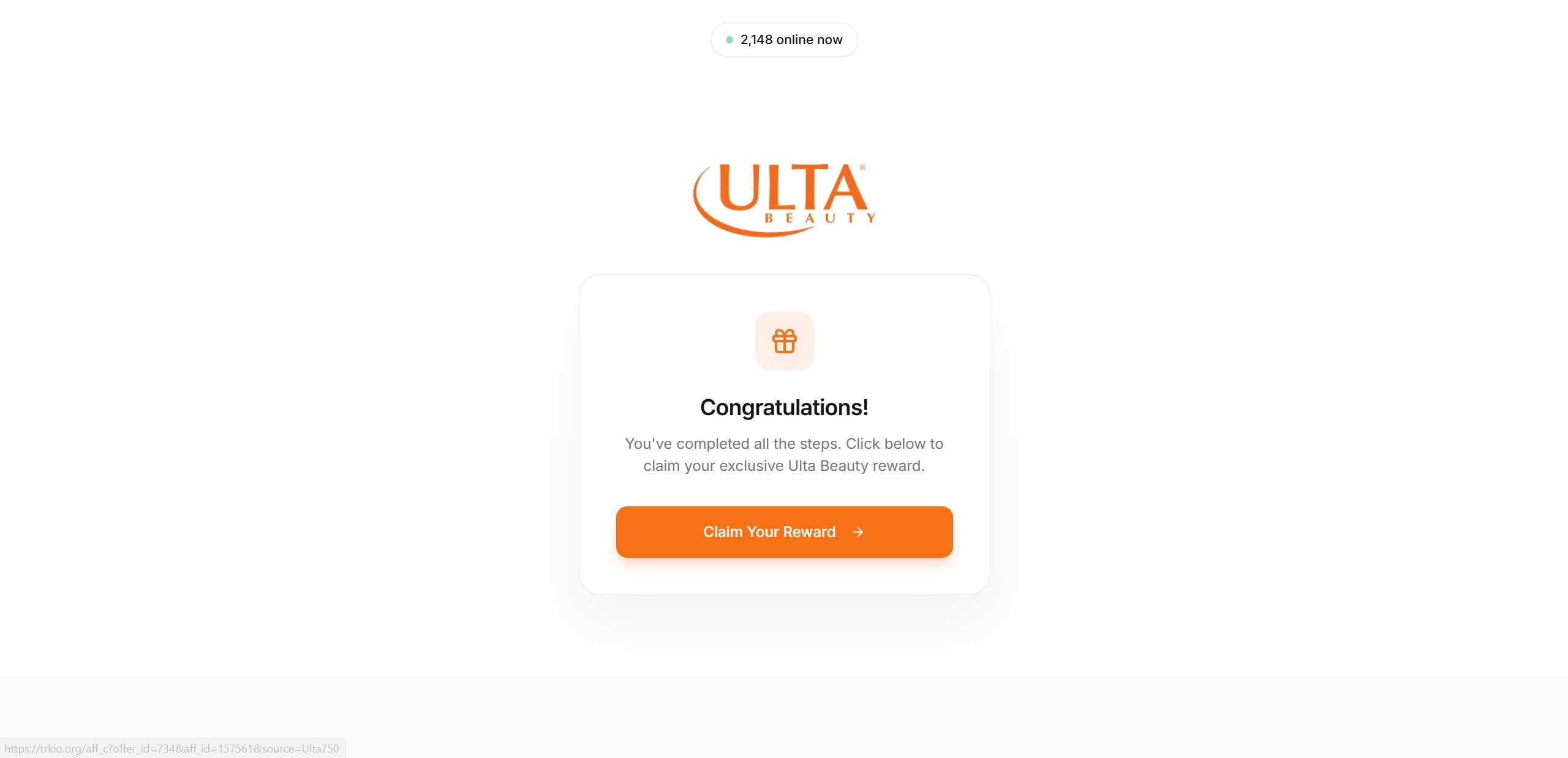
You’ll often see a “Congratulations” or “You’ve completed all the steps” screen, with a “Claim Your Reward” button.
But you haven’t completed anything meaningful yet.
That’s the trick.
The “congratulations” screen is a psychological payoff. It gives you a dopamine hit that makes you feel like success is one click away.
Step 6: The click routes you to tracking links and offer walls
When you click “Claim Your Reward,” you’re often pushed through:
affiliate tracking links
redirect URLs
shortener-style or cloud-hosted URLs
multiple domains in a chain
This is how attribution works in affiliate campaigns.
The goal is to ensure the operator gets credit and payment when you complete an action on an advertiser’s offer page.
You might not see the tracking happening. You just see a new page load.
Step 7: You’re told to “complete offers” or “verify” to unlock the reward
Now the funnel reveals its real requirement.
You’re instructed to do things like:
complete 3 deals
complete 5 recommended deals
sign up for partner offers
download apps and keep them installed
complete trials and “stay subscribed” for a period
provide a valid email and personal details
This is where many people get trapped.
They think they are at the end, but the end keeps moving.
Step 8: The fine print protects the operator, not you
These sites often hide critical details in:
small text at the bottom
expandable FAQ sections
terms that are hard to find
vague language like “may qualify” or “while supplies last”
Common fine print patterns include:
rewards are not guaranteed
reward availability varies
offers must be completed exactly as listed
only certain offers count
verification can take days or weeks
incomplete offers are disqualified
duplicate entries are disqualified
Even when the site pretends to have a “support” email, the response is often slow, generic, or nonexistent.
Step 9: The user either gives up, or keeps spending time and money chasing the reward
Most users never receive the promised gift card.
Instead, they end up with:
a flooded inbox
a phone number in marketing databases
trial subscriptions they didn’t want
time wasted completing pointless steps
A smaller group will also end up with unauthorized charges if they entered payment details on an offer that later renews.
Step 10: The domain disappears or changes, and the scam restarts elsewhere
Once a domain collects enough reports or loses performance, the campaign can move.
That’s why you see the same scam under multiple websites.
It’s not one page.
It’s a system.
How to Spot the Ulta “Beauty Tester Program” Scam Ads on Social Media
The ad looks like a “selection notice,” not a real promotion
Scam ads usually open with language that implies you were chosen, even though you never applied. Common lines include:
“You’ve been selected”
“Exclusive offer for you”
“Limited invite”
“Only today”
“Only a few spots left”
Legitimate brand campaigns rarely rely on random selection claims inside an ad, especially without directing you to an official brand page.
The reward is unrealistically high for a tiny action
If an ad promises a $500 to $750 gift card for a short quiz, that’s your biggest clue. Brands don’t routinely hand out large-value gift cards for a 2-minute survey because it would be immediately abused and financially unsustainable.
The visuals are designed to feel “official,” but they are generic
Look for these patterns:
a clean white background with a centered logo and a single “Get Started” button
big “gift” icons, progress bars (“Step 1 of 5”), or “Congratulations” screens
fake counters like “2,147 online now”
fake urgency timers or “limited time” badges
These are common funnel templates. They are meant to mimic real onboarding flows.
Comments and engagement often look unnatural
Scam ads often have:
comments turned off
repetitive “I got mine” style replies from brand-new profiles
replies that push you to “click the link” or “check bio”
spammy comment sections filled with short, generic reactions
Real promotions usually have normal questions, mixed opinions, and consistent official replies.
The link destination is hidden or masked
Before you click:
press and hold the link (mobile) or hover (desktop) to preview the URL
watch for shortened links, redirect chains, or random domains
A real Ulta campaign would not need to route you through multiple unrelated domains.
The ad doesn’t come from an official brand account
Check the profile behind the ad:
Is it Ulta’s verified account or a random page with an Ulta-like name?
Does it have a real post history and consistent branding?
Does the username look off (extra characters, misspellings, odd spacing)?
Impersonator accounts are a common entry point.
“Verification required” is a major red flag
If the ad suggests you must “verify you’re human” to claim a reward, it’s often a lead funnel. On social platforms, “verification” language is frequently used to justify pushing you into offers, app installs, or data collection steps.
How to Spot the Scam Websites That Power These Ads
The domain name is not an official brand domain
This is the fastest check. If the page is on a domain like:
RewardsUlta.com
Ulthauls.com
UltaReview.store
anything hosted on unusual subdomains or unrelated sites
Treat it as suspicious by default. A real Ulta promotion should be hosted on a clearly official domain or a well-known, verifiable partner platform.
The website uses a “step” or “quiz” gate to unlock a reward
That quiz is typically just a funnel step, not an eligibility process.
It pushes you to complete “deals” or “recommended offers”
If the site mentions:
“Complete 3–5 deals”
“Recommended offers required”
“Install apps to qualify”
“Sign up for trials”
That’s the monetization layer. It’s not a legitimate rewards system. It’s an affiliate offer wall dressed up as a brand promotion.
The fine print quietly distances the site from the brand
Scroll to the bottom. Many of these pages include language like:
“Not affiliated with [brand]”
“This site is operated by a third party”
“Rewards are provided by partners”
“Terms apply”
Even if they use the brand logo prominently, the disclaimer tells you what it really is.
The site collects more info than a normal promotion needs
Be cautious if it asks for:
phone number and full address early
date of birth
“verification” card details
extra permissions via app installs
A basic giveaway should not require sensitive personal data to “unlock” it.
It uses trust signals that are easy to fake
Common fake credibility elements:
“Verified platform” badges
inflated counters (“100K rewards claimed”)
generic testimonials (“Jennifer K.” “Mark T.”)
star ratings that don’t link to real reviews
popups saying “Ryan just claimed $100” or “Someone in your city just joined”
These are designed to reduce doubt and increase conversions.
The checkout or claim process never ends
A classic sign is the moving finish line:
you complete one step, then it asks for more
the reward is always “processing”
you’re told you must complete higher-value offers
support is nonexistent or only reachable through a form
Legitimate promotions have a clear endpoint and clear, verifiable support.
Redirects happen immediately after clicking “Claim”
If clicking the main button jumps you to:
a different domain
a tracking URL with lots of parameters
an “offer” page unrelated to Ulta
That’s a strong indicator you’re in an affiliate redirect chain.
What To Do If You Have Fallen Victim to This Scam
If you clicked through and entered information, you’re not alone. The most important thing is to take calm, practical steps, starting with the biggest risks first.
Check your bank and card statements for trial charges Look for small charges from unfamiliar merchants, especially in the last 1 to 14 days. Many trials start with a low “verification” charge, then renew at a higher monthly price. If you see anything suspicious, call the number on the back of your card and ask about disputing the charge and blocking future billing.
Cancel any trials or subscriptions you may have started If you remember signing up for anything during the process, log in and cancel immediately. If you cannot find the account, search your email for keywords like “welcome,” “trial,” “subscription,” “billing,” “receipt,” or the merchant name from your statement.
Change passwords if you reused one anywhere If you entered a password on any page during this process, change it right away. Also change it anywhere else you used the same password. Reused passwords are one of the easiest ways for scammers to escalate from a “reward scam” into account takeovers.
Turn on 2-factor authentication for key accounts Start with your email account, then banking and shopping accounts. Email is the big one. If someone gets into your email, they can reset passwords almost everywhere.
Expect more spam, and protect your inbox If you submitted your email, you may see a spike in marketing and phishing emails. Use your email’s tools to:
mark messages as spam
unsubscribe only from legitimate senders you recognize
avoid clicking “confirm” links from unknown brands
block repeat offenders
Watch for phone spam and text scams If you entered your phone number, you may start getting:
robocalls
“reward” texts
fake delivery alerts
fake account verification codes
Do not reply. Do not click links. Block and report spam texts through your phone’s built-in tools.
If you provided address or personal details, monitor your identity footprint If you shared your full name, address, date of birth, or other sensitive information, consider monitoring your credit report and watching for unfamiliar accounts or inquiries. Even if nothing happens immediately, the risk can build over time if your data is resold.
Report the ad or page that led you there Reporting helps reduce how many people get hit next.
Report the ad on the platform you saw it on (TikTok, Instagram, Facebook, YouTube, etc.)
If it came from a popup, report the site that triggered it
If it was sent by someone, let them know their account may be compromised
Clean up your browser Some of these funnels are tied to aggressive ad networks.
clear your browser cookies and site data
remove unknown browser extensions
run a reputable security scan if your device started behaving oddly
avoid “allow notifications” prompts on random websites
Give yourself one rule going forward No legit brand gives out $750 rewards through random quizzes on unrelated domains.
If a page claims you were “selected,” but you never signed up, treat it as a scam until proven otherwise.
Is Your Device Infected? Scan for Malware
If your computer or phone is slow, showing unwanted pop-ups, or acting strangely, malware could be the cause. Running a scan with Malwarebytes Anti-Malware Free is one of the most reliable ways to detect and remove harmful software. The free version can identify and clean common infections such as adware, browser hijackers, trojans, and other unwanted programs.
Malwarebytes works on Windows, Mac, and Android devices. Choose your operating system below and follow the steps to scan your device and remove any malware that might be slowing it down.
Malwarebytes for WindowsMalwarebytes for MacMalwarebytes for Android
Run a Malware Scan with Malwarebytes for Windows
Malwarebytes stands out as one of the leading and widely-used anti-malware solutions for Windows, and for good reason. It effectively eradicates various types of malware that other programs often overlook, all at no cost to you. When it comes to disinfecting an infected device, Malwarebytes has consistently been a free and indispensable tool in the battle against malware. We highly recommend it for maintaining a clean and secure system.
Download Malwarebytes
Download the latest version of Malwarebytes for Windows using the official link below. Malwarebytes will scan your computer and remove adware, browser hijackers, and other malicious software for free.
(The above link will open a new page from where you can download Malwarebytes)
Install Malwarebytes
After the download is complete, locate the MBSetup file, typically found in your Downloads folder. Double-click on the MBSetup file to begin the installation of Malwarebytes on your computer. If a User Account Control pop-up appears, click “Yes” to continue the Malwarebytes installation.
Follow the On-Screen Prompts to Install Malwarebytes
When the Malwarebytes installation begins, the setup wizard will guide you through the process.
You’ll first be prompted to choose the type of computer you’re installing the program on—select either “Personal Computer” or “Work Computer” as appropriate, then click on Next.
Malwarebytes will now begin the installation process on your device.
When the Malwarebytes installation is complete, the program will automatically open to the “Welcome to Malwarebytes” screen.
On the final screen, simply click on the Open Malwarebytes option to start the program.
Enable “Rootkit scanning”.
Malwarebytes Anti-Malware will now start, and you will see the main screen as shown below. To maximize Malwarebytes’ ability to detect malware and unwanted programs, we need to enable rootkit scanning. Click on the “Settings” gear icon located on the left of the screen to access the general settings section.
In the settings menu, enable the “Scan for rootkits” option by clicking the toggle switch until it turns blue.
Now that you have enabled rootkit scanning, click on the “Dashboard” button in the left pane to get back to the main screen.
Perform a Scan with Malwarebytes.
To start a scan, click the Scan button. Malwarebytes will automatically update its antivirus database and begin scanning your computer for malicious programs.
Wait for the Malwarebytes scan to complete.
Malwarebytes will now scan your computer for browser hijackers and other malicious programs. This process can take a few minutes, so we suggest you do something else and periodically check the status of the scan to see when it is finished.
Quarantine detected malware
Once the Malwarebytes scan is complete, it will display a list of detected malware, adware, and potentially unwanted programs. To effectively remove these threats, click the “Quarantine” button.
Malwarebytes will now delete all of the files and registry keys and add them to the program’s quarantine.
Restart your computer.
When removing files, Malwarebytes may require a reboot to fully eliminate some threats. If you see a message indicating that a reboot is needed, please allow it. Once your computer has restarted and you are logged back in, you can continue with the remaining steps.
Once the scan completes, remove all detected threats. Your Windows computer should now be clean and running smoothly again, free of trojans, adware, and other malware.
If your current antivirus allowed this malicious program on your computer, you may want to consider purchasing Malwarebytes Premium to protect against these types of threats in the future. If you are still having problems with your computer after completing these instructions, then please follow one of the steps:
Malwarebytes for Mac is an on-demand scanner that can destroy many types of malware that other software tends to miss without costing you absolutely anything. When it comes to cleaning up an infected device, Malwarebytes has always been free, and we recommend it as an essential tool in the fight against malware.
Download Malwarebytes for Mac.
You can download Malwarebytes for Mac by clicking the link below.
When Malwarebytes has finished downloading, double-click on the setup file to install Malwarebytes on your computer. In most cases, downloaded files are saved to the Downloads folder.
Follow the on-screen prompts to install Malwarebytes.
When the Malwarebytes installation begins, you will see the Malwarebytes for Mac Installer which will guide you through the installation process. Click “Continue“, then keep following the prompts to continue with the installation process.
When your Malwarebytes installation completes, the program opens to the Welcome to Malwarebytes screen. Click the “Get started” button.
Select “Personal Computer” or “Work Computer”.
The Malwarebytes Welcome screen will first ask you what type of computer are you installing this program, click either Personal Computer or Work Computer.
Click on “Scan”.
To scan your computer with Malwarebytes, click on the “Scan” button. Malwarebytes for Mac will automatically update the antivirus database and start scanning your computer for malware.
Wait for the Malwarebytes scan to complete.
Malwarebytes will scan your computer for adware, browser hijackers, and other malicious programs. This process can take a few minutes, so we suggest you do something else and periodically check on the status of the scan to see when it is finished.
Click on “Quarantine”.
When the scan has been completed, you will be presented with a screen showing the malware infections that Malwarebytes has detected. To remove the malware that Malwarebytes has found, click on the “Quarantine” button.
Restart computer.
Malwarebytes will now remove all the malicious files that it has found. To complete the malware removal process, Malwarebytes may ask you to restart your computer.
After scanning, delete any detected threats. Your Mac should now be free from adware, unwanted extensions, and other potentially harmful software.
If your current antivirus allowed a malicious program on your computer, you might want to consider purchasing the full-featured version of Malwarebytes Anti-Malware to protect against these types of threats in the future. If you are still experiencing problems while trying to remove a malicious program from your computer, please ask for help in our Mac Malware Removal Help & Support forum.
Run a Malware Scan with Malwarebytes for Android
Malwarebytes for Android automatically detects and removes dangerous threats like malware and ransomware so you don’t have to worry about your most-used device being compromised. Aggressive detection of adware and potentially unwanted programs keeps your Android phone or tablet running smooth.
Download Malwarebytes for Android.
You can download Malwarebytes for Android by clicking the link below.
In the Google Play Store, tap “Install” to install Malwarebytes for Android on your device.
When the installation process has finished, tap “Open” to begin using Malwarebytes for Android. You can also open Malwarebytes by tapping on its icon in your phone menu or home screen.
Follow the on-screen prompts to complete the setup process
When Malwarebytes will open, you will see the Malwarebytes Setup Wizard which will guide you through a series of permissions and other setup options. This is the first of two screens that explain the difference between the Premium and Free versions. Swipe this screen to continue. Tap on “Got it” to proceed to the next step. Malwarebytes for Android will now ask for a set of permissions that are required to scan your device and protect it from malware. Tap on “Give permission” to continue. Tap on “Allow” to permit Malwarebytes to access the files on your phone.
Update database and run a scan with Malwarebytes for Android
You will now be prompted to update the Malwarebytes database and run a full system scan.
Click on “Update database” to update the Malwarebytes for Android definitions to the latest version, then click on “Run full scan” to perform a system scan.
Wait for the Malwarebytes scan to complete.
Malwarebytes will now start scanning your phone for adware and other malicious apps. This process can take a few minutes, so we suggest you do something else and periodically check on the status of the scan to see when it is finished.
Click on “Remove Selected”.
When the scan has been completed, you will be presented with a screen showing the malware infections that Malwarebytes for Android has detected. To remove the malicious apps that Malwarebytes has found, tap on the “Remove Selected” button.
Restart your phone.
Malwarebytes for Android will now remove all the malicious apps that it has found. To complete the malware removal process, Malwarebytes may ask you to restart your device.
When the scan is finished, remove all detected threats. Your Android phone should now be free of malicious apps, adware, and unwanted browser redirects.
If your current antivirus allowed a malicious app on your phone, you may want to consider purchasing the full-featured version of Malwarebytes to protect against these types of threats in the future. If you are still having problems with your phone after completing these instructions, then please follow one of the steps:
Restore your phone to factory settings by going to Settings > General management > Reset > Factory data reset.
After cleaning your device, it’s important to protect it from future infections and annoying pop-ups. We recommend installing an ad blocker such as AdGuard. AdGuard blocks malicious ads, prevents phishing attempts, and stops dangerous redirects, helping you stay safe while browsing online.
The Bottom Line
The Ulta Beauty Tester Program scam is built to look simple, safe, and exciting.
But the real goal is not to reward you. It’s to push you into an offer funnel where your clicks, sign-ups, and personal information create profit for someone else.
If you already interacted with it, focus on the practical steps: check for charges, cancel trials, secure your accounts, and tighten your privacy settings.
And if you see the same “Ulta tester” promise on a different website tomorrow, you’ll know exactly why it keeps coming back.
Frequently Asked Questions
Is the “Ulta Beauty Tester Program” real?
In most cases, no. The pages using phrases like “You’ve been selected for Ulta’s Beauty Tester Program” are typically not run by Ulta. They are commonly used as bait to push visitors into a reward or “complete offers” funnel, often hosted on unrelated domains that have no verifiable connection to Ulta.
Is RewardsUlta.com a legitimate Ulta website?
No. Ulta’s official web presence is hosted on its own official domains and verified channels. A standalone domain like RewardsUlta.com is a major red flag, especially when it asks you to complete steps to “unlock” a high-value reward like a $750 gift card.
Why does the scam appear on multiple websites?
Because it’s a template-based funnel that can be cloned quickly. Operators rotate domains to avoid reports, maintain ad approvals, and keep traffic flowing. You might see nearly identical pages with different URLs, the same quiz steps, and the same “Claim Your Reward” button that redirects elsewhere.
What is the goal of the Ulta tester program scam?
The main goal is to generate profit through:
affiliate commissions when you sign up for partner offers, trials, or apps
lead harvesting (collecting email, phone number, sometimes address)
redirect monetization through tracking links and offer walls
The “gift card” or “beauty tester” reward is usually the hook, not the outcome.
How can I tell if an Ulta tester page is fake?
Common red flags include:
the offer is hosted on a non-Ulta domain
you’re told you were “selected” even though you never opted in
a short quiz is used to “unlock” a reward
large rewards like $500 or $750 are promised for minimal effort
the final button routes you through multiple redirects
“complete 3–5 deals” or “partner offers required” language appears
fine print is vague, hidden, or hard to find
Why do they ask questions like skin type and favorite categories?
Those questions are usually there to create momentum, not to verify eligibility. The quiz format makes the process feel official and personalized, and it increases the chance you’ll continue clicking until you reach the offer or data collection stage.
What happens after I click “Claim Your Reward”?
Typically, you get redirected through tracking links to an “offer wall” or partner pages. These may ask you to:
enter personal details
install apps
start subscription trials
complete surveys that collect more data
provide payment information for “verification” or trial enrollment
That’s where the real monetization occurs.
Will I actually receive the $750 Ulta gift card?
In most cases, people do not receive the promised reward. These funnels often rely on fine print, strict completion rules, limited availability claims, or moving goalposts that make it difficult to qualify. The reward is frequently presented as “possible” rather than guaranteed, even if the page makes it feel guaranteed.
What are “deals” or “recommended offers” on these pages?
“Deals” typically mean third-party offers that pay the site operator when you complete them. Examples can include:
subscription trials that convert into paid memberships
product samples tied to shipping fees or recurring billing
app installs that require account creation
sweepstakes-style registrations
surveys that capture marketing consent
Even if an offer looks harmless, it can lead to ongoing charges or heavy spam.
Can this scam charge my card?
The Ulta-themed page itself may not charge you, but the partner offers you’re routed to can. The biggest risk is trial offers that auto-renew. If you entered card details at any step, check your statements carefully for small “test” charges and recurring billing.
I entered my email and phone number. What should I expect?
Most victims see an increase in:
spam emails and aggressive marketing
robocalls and spam texts
phishing attempts that mimic delivery companies, banks, or retailers
Your contact information may be sold to multiple marketing lists, which can compound over time.
I entered personal information. Should I worry about identity theft?
It depends on what you submitted. Email and phone number usually lead to spam and phishing. If you provided your full name, address, date of birth, or other sensitive details, the risk increases. Monitor your accounts and be cautious of any unexpected verification codes, password reset emails, or new account notifications.
What should I do immediately if I started any offers or trials?
Take these steps right away:
search your inbox for “welcome,” “trial,” “subscription,” “receipt,” and “billing”
cancel any trials you can identify
check bank and card statements for unfamiliar merchants
contact your card issuer if you see suspicious charges
change passwords if you reused any login credentials
How do I cancel a trial if I don’t remember what I signed up for?
Start with your bank or card statement. The merchant name on the charge often reveals the service. Then:
search that merchant name in your email
look for a “Manage Subscription” or “Cancel” link in the receipt
if you can’t find it, contact the merchant directly
if support is unresponsive, ask your card issuer to block recurring charges
Are these pages the same as legit Ulta promotions or rewards?
No. Legitimate Ulta promotions typically:
live on official Ulta channels or clearly identified partners
have transparent terms and a verifiable support process
do not require you to complete unrelated third-party offers to “unlock” a gift card
do not rely on random “you’ve been selected” claims on unfamiliar domains
Does Ulta actually have product testing programs?
Brands sometimes run sampling or testing campaigns, but legitimate programs are usually invitation-based through recognized platforms, official brand communications, or established communities. If the “tester” program is hosted on a random domain and immediately pushes you to offers, treat it as suspicious.
Why do these scams use fake urgency like “exclusive offer” or “selected”?
It’s a conversion tactic. Urgency and exclusivity reduce hesitation and encourage quick clicks. The goal is to keep you moving forward before you stop to verify the site, read fine print, or question why a $750 reward is being offered for a simple quiz.
How can I protect myself from similar Ulta gift card or beauty tester scams?
Use a simple safety checklist:
only trust offers hosted on official brand domains
be wary of high-value rewards for minimal effort
avoid entering personal data on unfamiliar websites
never enter card details to “verify” a free reward
don’t click gift card links from popups, redirects, or random social ads
use unique passwords and enable 2-factor authentication on email
Where should I report an Ulta tester scam page?
You can report it to:
the ad platform where you saw it (TikTok, Facebook, Instagram, YouTube)
your browser’s phishing or unsafe site reporting option
consumer protection and fraud reporting agencies in your country
the impersonated brand’s customer support, so they can track misuse
Thomas is an expert at uncovering scams and providing in-depth reporting on cyber threats and online fraud. As an editor, he is dedicated to keeping readers informed on the latest developments in cybersecurity and tech.