


You’re waiting for a package when a text says UPS couldn’t finish the delivery. You expect a tracking link. What you get is a PDF.
The UPS text and its PDF look ordinary enough. Before you open the file, there’s a better way to find out what’s happening with your package.
Overview
The delivery instructions arrive as an attachment
The UPS PDF text scam starts with a familiar problem: a delivery that supposedly couldn’t be completed. The unexpected part is where the message sends you for answers.
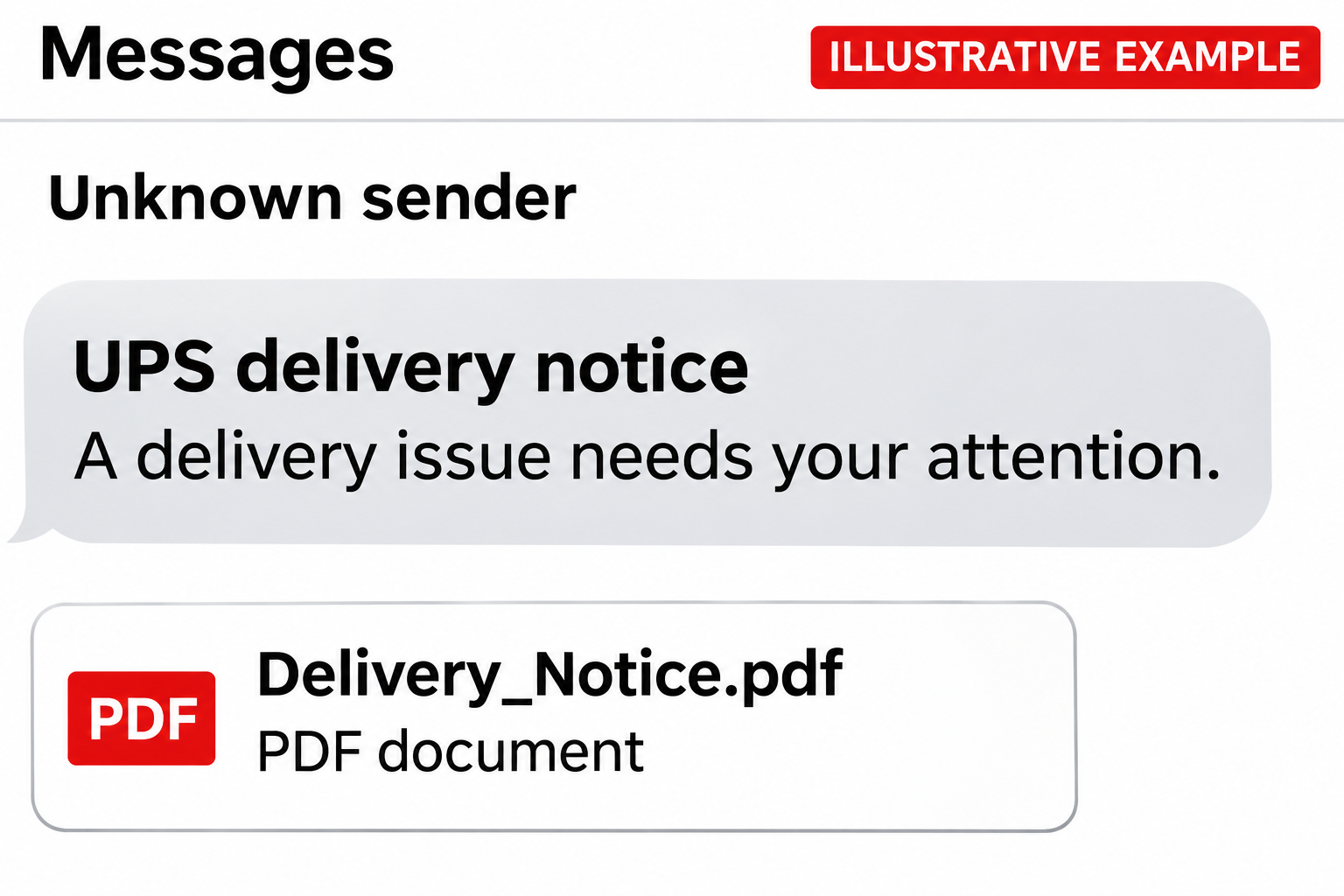
Instead of putting all the instructions in the text, the sender includes a PDF. The attachment might be the first thing you see in the conversation.
One example showed the UPS shield and a warning that the package could be sent back. The PDF appeared as a separate attachment beneath the warning.
There was no shipment tracking number in the visible message. The sender expected the recipient to open the attachment before they could check which package it meant.
A separate report in the BBB Scam Tracker describes an attachment presented as the way to resolve a delivery issue before the package was returned.
That recipient didn’t open it. The report describes the pressure in the message, but it doesn’t tell us what would have happened inside that particular document.
UPS is real. The sender still has to prove the delivery is yours.
UPS warns about impersonation texts that use a waiting package to ask for personal information or a payment. Those requests don’t come from UPS.
The carrier has a separate place to check a real shipment. You don’t need the sender to explain the attachment, resend the message, or give you a new link.
Start with the tracking number from the shop or person who sent the package. An order number and a shipment tracking number aren’t always the same thing.
The type of contact matters more than the file icon
An unsolicited PDF can carry the same kind of misleading request as a text with a visible link. The file format doesn’t tell you who sent it.
These details are enough to stop using the message as your source of delivery information:
- The sender says the only way to find out what’s wrong is to open an unexpected document.
- The message gives you a deadline before you’ve had a chance to verify the tracking number.
- The request to change the delivery has no matching update in the order you placed.
- The instructions ask for card details, a password, or a code before showing you a shipment you recognize.
A message arriving on the right day can make all of this easy to overlook. The date matters less than whether the request appears in a shipment you can verify.
How the UPS PDF Text Scam Works
Step 1: The message gives you a problem you already know how to fix
Missed deliveries happen. Drivers can’t get into a building, shops make address mistakes, and packages take longer than expected. The scam starts with a problem that sounds entirely ordinary.
You may have a delivery notification turned on, an order running late, or a package someone else bought for you. Any of those can make an unexpected message feel timely.
The sender doesn’t have to know what you’re waiting for. You supply the missing detail yourself: the order from yesterday, perhaps, or the box due this afternoon.
That coincidence isn’t a reason to assume the seller leaked your information. Check the actual order before treating the text as a message about it.
Step 2: The PDF makes the text feel like paperwork
A document looks like something a shipping office might generate. A filename that sounds like a notice can be more persuasive than a text from a number you don’t recognize.
At this point, the message may not ask for money or a password. It only asks you to look at the file. That smaller request is part of the appeal.
A preview might show enough of the page to look official. That’s a picture of what the sender put in the document, not a check of the sender’s identity.
Don’t open the file to look for a UPS logo. Even if the name and colors are right, they can’t tell you whether UPS sent it.
Step 3: An instruction can move you from the document to a website
If the document includes a button, web address, or QR code, leave it alone. An attachment can send you to a website just like a link in the text.
A mobile browser may give more room to the page title and branding than to the website address. A good-looking page or a padlock isn’t proof it belongs to UPS.
The safe test isn’t whether you can spot every imitation. Ask whether the same delivery action is available when you start from the carrier’s site or the seller’s account.
The examples show the attachment, not its contents. The safest response doesn’t depend on whether the file contains a form, a link, or nothing useful at all.
Step 4: Fixing the delivery becomes a request for something valuable
In fake delivery messages, a supposed address correction can turn into a request for contact details. What started as a quick check may end with a card form.
A small fee can feel reasonable if it’s presented as the price of getting your package today. For the person collecting the information, the card details can matter more.
Other versions may ask you to sign in. If you enter a password reused on other sites, a fake shipping page can create a problem far outside your delivery account.
One-time codes are especially important. Read the message from the service that sent the code. If it refers to an unfamiliar sign-in or purchase, don’t approve or share it.
Step 5: A stalled form can send you back for another try
A page might claim your payment couldn’t be processed or that your address failed validation. That message doesn’t mean the details you typed stayed on your device.
Don’t try another card to see if it works. Don’t keep refreshing the page to get a confirmation. Close it and check what actually happened through your card issuer.
If you get a new message about a refund or a second delivery charge, don’t assume it comes from the carrier. Use the same independent checks again.
These are possible next moves in delivery phishing, not a claim that every UPS attachment follows the same path. Your response should match what you actually did.
How to Check a UPS Delivery Without the PDF
Start with the order you placed
Open the seller’s app or enter the store address yourself. Find the order and look for the carrier, tracking number, and most recent shipment update.
If the order shows a different carrier, don’t assume it transferred to UPS because a text says so. Ask the seller if the shipping details don’t agree.
For a gift or a shipment you didn’t order yourself, ask the person who sent it for the original tracking number. There’s no need to forward the suspicious PDF.
Look for an action in UPS tracking, not in the text
Enter the number from the seller in UPS Tracking. The page should show a status for a real shipment rather than asking you to identify the parcel from scratch.
Read the last scan and its date. An old status that happens to mention a delay isn’t necessarily the same problem described in the message you got today.
If the tracking page offers no way to make a change, ask the shipper or use the contact route on UPS’s website. Some changes depend on the shipment.
A missing tracking update doesn’t make the text more credible. Your package could still be waiting for a scan, and the seller can help you confirm what to expect.
If a driver left a physical UPS Delivery Notice, UPS tracking support says the notice may carry a reference number you can look up independently.
Use that route if it’s available. You don’t need to scan an image from an unexpected text to find out what a driver did at your door.
Check real fees in the same place you checked the shipment
Don’t rely on the rule that every UPS payment request is fake. There are circumstances where a real shipment can have a payment due.
UPS tracking support directs customers to track the shipment first if a package payment is requested. Start there instead of using a button from the attachment.
If there’s a real fee, find out what it’s for and which shipment it belongs to. A vague instruction to pay for a package you can’t identify isn’t enough.
Even a number copied from a real package can’t authorize a charge by itself. The carrier or seller should be able to explain what the payment covers.
What to Do if You Have Fallen Victim to This Scam
-
If you only got the text, leave the file unopened. Use your messaging app’s spam reporting tool if it has one, then delete the text and block the sender.
Check a package you’re expecting from the original order. You don’t have to keep the suspicious conversation open while you do that.
-
If you opened the PDF, close it and check what happened next. A preview by itself doesn’t mean your card details were exposed or software was installed.
Don’t reopen the file to investigate. Check for anything you deliberately downloaded or installed, and bring your phone and apps up to date through their normal update screens.
-
If you followed a link, close the tab. Check whether you entered any information, accepted a notification prompt, or downloaded anything. Those actions call for different fixes.
Remove notification permission for the unfamiliar site if you gave it. A content blocker such as AdGuard may block some known phishing pages, but can’t undo a submission.
-
If you gave card details, call the issuer now. Use the number on the card or the banking app. Say you entered the card on a suspected phishing page.
Ask whether to lock or replace the card and review recent activity together. Report unauthorized charges, even small ones. Don’t wait for a supposed delivery payment to clear.
-
If you shared only your name and address, watch for follow-ups. Those details can help the next message sound like it’s about a real order.
Tell anyone who helps manage your deliveries what happened. They can verify new messages through the seller rather than acting on a text that uses your details.
-
If you entered a password or code, secure that account. Start from its official site or app. Change the password and review recent sessions and recovery information.
Change that password anywhere else you reused it. Start with email if the same password protects your inbox, since it may also control resets for other accounts.
-
If you installed something, use a different device for banking. If suspicious software or remote access is running, disconnect the affected device from the network and get it checked.
On a computer, updated security software such as Malwarebytes can help check a suspicious download. Use an official download source, not a tool offered by the message.
On a work device, contact your IT team before deleting files or resetting it. Tell them the name of the attachment and what you clicked or installed.
-
Save enough information to report the incident. Keep a screenshot of the text, the sender, the time, and any unauthorized transaction. Don’t forward the file to friends or colleagues.
The FTC phishing guide explains how to report a suspicious text, including forwarding it to 7726 in the US and filing a fraud report.
-
Be wary of a second message offering help. A supposed courier, bank employee, or recovery specialist might say a second payment is needed to cancel the first.
Give updates only through the fraud case you opened with your bank or carrier. Never hand over a one-time code to someone who contacts you unexpectedly.
Frequently Asked Questions
Why would a UPS scam text use a PDF instead of a link?
A document looks like routine paperwork. It also gives the sender a place to put instructions you won’t see until you open the attachment.
Can a real UPS delivery be late at the same time I receive the text?
Yes. The timing can be a coincidence. Check the tracking number from your order and use that shipment’s updates to decide whether you need to do anything.
Does opening a PDF mean my phone is infected?
No. A preview alone doesn’t establish that. Close the file, update your device, and take further action if you installed anything, gave permissions, or entered information.
Should I trust the text if it knows my address?
No. An address is not a signature from UPS. Confirm the shipment through the seller and verify any action through the carrier’s official tracking page.
Do I need to replace my card if I never entered it?
Usually not for a preview or click alone. If you typed card details, authorized anything, or see a charge you don’t recognize, contact your issuer promptly.
What if the text says the package will be returned tonight?
Check the order or UPS Tracking first. If a return is really pending, contact the shipper through a known channel rather than letting the deadline choose the website.
The Bottom Line
The UPS PDF text scam makes a delivery request look like paperwork. Don’t open the file or follow its instructions to find out whether a parcel is real.
Get the tracking number from your order or the person who sent the package. Check it through UPS, and handle any genuine delivery issue there.
If you entered a card number or password, deal with that exposure now. You don’t need to wait for the package or the sender’s next message.

Join the discussion
0 commentsShare your experience or ask a question about this article.
Discussion
Start the conversation
Have a question or something useful to share? Add the first comment.