


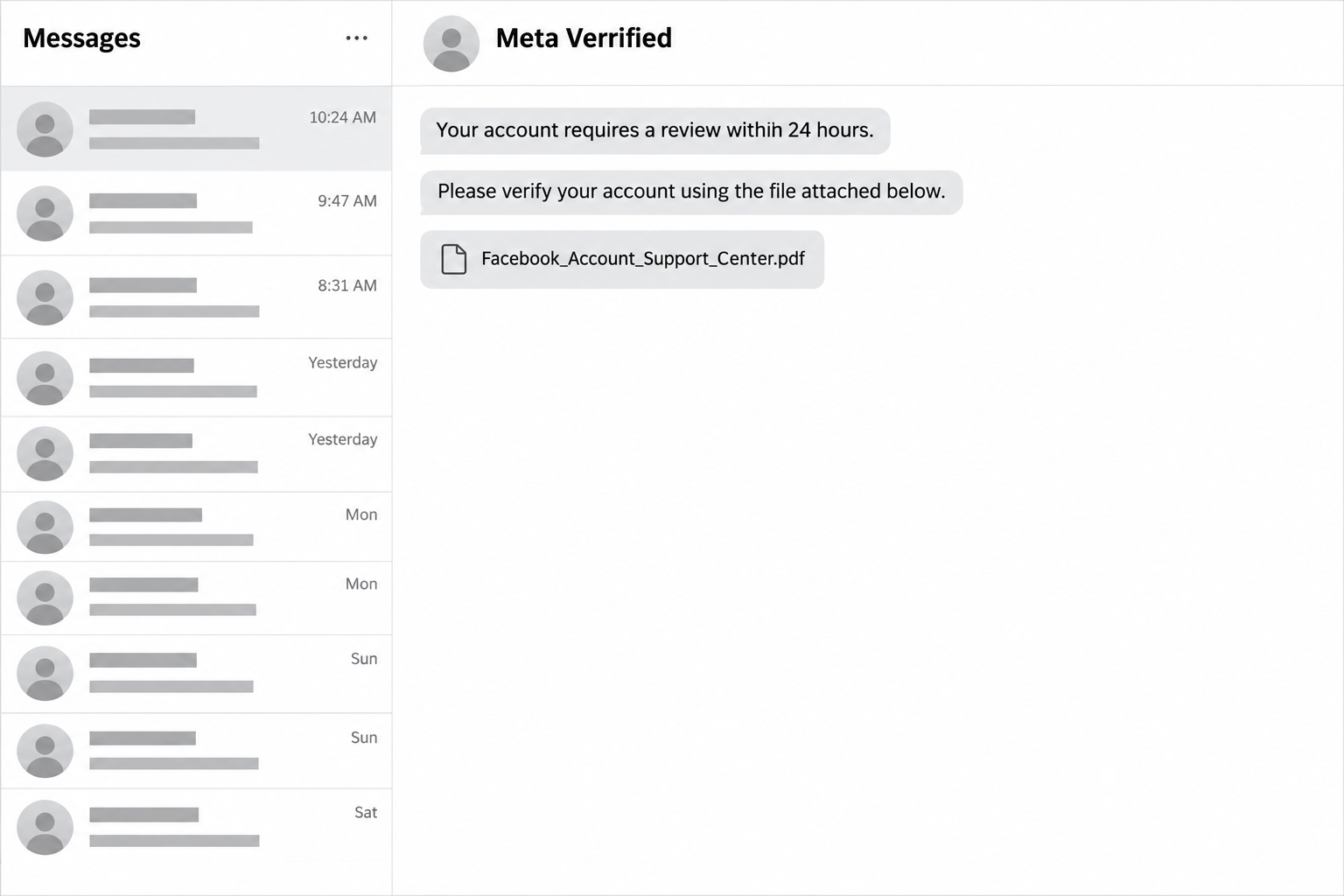
A Messenger notice says unusual activity has put your Facebook account at risk. Beneath the warning sits what looks like a PDF from account support.
The sender gives you 24 hours to respond, making an ordinary chat feel like an urgent account problem. Check these details before opening anything.
Overview
A Messenger account pretends to speak for Meta
The Meta Verrified PDF scam uses a private message to impersonate Facebook support. Its display name can include the misspelling “Verrified,” with an extra letter.
The message alleges harassment, impersonation, copyright violations, or other unusual activity. It then presents an identity check as the way to avoid losing the account.
A familiar company name supplies authority, while the deadline supplies pressure. Neither establishes that the sender can review or disable your Facebook account.
The supposed attachment makes the demand look procedural
Examples include a filename resembling Facebook_Account_Support_Center.pdf. A document-style card can make the next click seem like reading official paperwork rather than following an unsolicited instruction.
However, its appearance does not establish whether the card contains a PDF, opens a website, or does something else. Leave that destination unopened while checking.
- The warning arrives through a chat account claiming to represent Meta.
- The sender alleges a policy problem without providing independently verifiable case details.
- A short deadline discourages checking the account through its genuine settings.
- A supposed support file becomes the route for an identity check.
Your account should be checked through Facebook itself
Do not use the message’s file or link to verify your identity. Open Facebook independently and examine your account’s genuine notices and security settings.
Snopes documented the message pattern and obtained Meta’s confirmation that the company was investigating the reported phishing links.
The lead image reconstructs that approach using fictional message wording. It does not show a victim’s inbox or an examined malicious PDF.
What Is Known About the Fake PDF Notice
Snopes’s investigation identifies the misspelled sender, unusual-activity accusation, 24-hour threat, and file-style invitation to verify an account.
It did not independently establish what happened after clicking the supposed attachment. That limits claims about this particular file’s behavior.
The reliable warning concerns the impersonation and verification demand. There is no basis to tell every recipient that a PDF installed malware or infected a device.
Messenger can carry legitimate files, including PDFs, as Meta’s own feature announcement explains. The file format alone is not the verdict.
What matters is who sent it, what they want you to do, and whether the request can be confirmed outside their conversation.
A person claiming to be support does not gain authority by naming real policies. Fraudsters can copy company language just as easily as a logo.
How the Meta Verrified PDF Scam Works
Step 1: A support-looking sender enters your messages
The approach begins with an account using Meta’s identity. A name suggesting verification makes an unsolicited chat appear connected to the platform operating it.
Seeing the message inside Messenger can reinforce that impression. Yet ordinary accounts can send messages there too, including accounts operated by impostors.
Read the sender as a separate account making a claim. Being inside a genuine application does not turn that claim into an official notice.
Save its exact profile identifier if you intend to report it. The displayed name can be copied, changed, or shared by unrelated accounts.
Step 2: A vague accusation creates a reason to act
The notice refers to unusual activity or policy violations. The allegation sounds serious while remaining broad enough to worry people with very different accounts.
You may start mentally reviewing recent posts, messages, or shared photographs. That search for an explanation can make the accusation feel more plausible than it is.
Instead, check whether Facebook itself identifies an affected post or account issue through a session you opened independently. Do not ask the suspect sender to authenticate itself.
A vague accusation should not make you volunteer additional information about your account. The sender has not established a legitimate reason to collect it.
Step 3: A deadline makes the chat feel compulsory
The threatened 24-hour cutoff changes the apparent choice. Opening the file starts to feel safer than risking access to an account you use every day.
For a business administrator, the fear can involve customer messages, advertising, or a Page. The personal cost makes a hurried response especially tempting.
The countdown remains part of the sender’s unverified claim. It should not decide how you authenticate a request or where you enter credentials.
Pause long enough to open the real service separately. A claim about an account needs to be checked in that account, not inside the claimant’s instructions.
Step 4: The file card becomes the verification route
The message directs you toward the supposed support document. A familiar extension and official-sounding filename make that route look like an administrative requirement.
However, a filename is a label rather than a security check. It cannot establish the sender’s identity, the destination’s ownership, or what information will be requested.
If the route opens a page asking for a password or verification code, stop. Close it and reach Facebook through your usual app or address.
Do not submit invented credentials to investigate the page. You can reject the request without testing the fraudster’s form or downloading a file.
Step 5: Information supplied for an appeal can expose an account
A phishing form can collect credentials while claiming to resolve the original warning. The promised appeal creates an explanation for a request that benefits the attacker.
A password change and a security-code request are separate events to watch for. Read any genuine code message before deciding what action it would authorize.
The exact outcome depends on what you shared or approved. Receiving the chat, opening a page, and submitting login information are different levels of exposure.
Base recovery on those actual actions. Do not assume that every recipient lost an account, or that changing a password resolves every permission already granted.
Check the Account Without Following the Warning
Start a fresh session through your usual route
Close the suspect conversation and open Facebook from your own bookmark, typed address, or installed app. Avoid copying the sender’s link into another browser.
Look for genuine security notifications and account restrictions within that session. If you need an appeal process, begin with the issue shown by Facebook itself.
A missing notice does not explain every possible account problem. It does remove the reason to trust an unsolicited file as your only route to help.
Check access as well as your password
If you entered credentials elsewhere, review the devices and sessions shown in account security. Sign out sessions you do not recognize through the genuine settings.
Examine the recovery email address and phone number for changes you did not make. An attacker-controlled recovery route can undermine a password change.
For connected business assets, check who can manage them. Protecting a personal login and checking Page or advertising permissions address different parts of the problem.
Keep support searches away from the suspect chat
Do not accept a telephone number offered by the sender as the next verification step. That merely gives the same account another way to direct you.
Likewise, avoid replies from strangers promising immediate account restoration for a fee. Their access claims need independent verification, just like the original support claim.
Facebook provides an official compromised-account entrypoint. Use its genuine recovery process when you cannot access the account or find unauthorized changes.
What to Do if You Have Fallen Victim to This Scam
-
Record what happened before taking further instructions. Note whether you received the message, opened its link, entered a password, supplied a code, or installed something.
Preserve the sender’s profile link and the message, including its filename and deadline. You do not need to reopen the suspected destination for that record.
Keep any downloaded file closed while deciding what assistance you need. Its presence alone does not establish what ran on your device.
-
Replace exposed passwords through the genuine service. Start with the account whose password you entered, using an independently opened app or website.
If you reused that password for email or another service, replace it there too. Secure the email account used for recovery before relying on it.
Choose distinct passwords instead of making the same small change everywhere. An attacker who knows the old password should not receive a predictable replacement.
-
Review sessions, recovery details, and extra authentication. Remove unfamiliar sessions and correct recovery contact information through Facebook’s actual security settings.
Enable appropriate two-factor authentication and retain recovery information privately. Never send a backup code or authentication code to the account claiming to investigate your case.
Meta’s account-compromise guidance emphasizes strong replacement passwords, additional authentication, and reviewing sessions. These protect access rather than reverse financial losses.
-
Check business permissions if the account manages a Page. Review administrators, partners, advertising access, and payment activity for changes you did not authorize.
Tell another verified administrator what occurred through a contact route you already trust. Ask them to check the asset independently rather than opening your suspect message.
Keep a record of unfamiliar changes before removing access where possible. If the account belongs to an employer, involve its authorized security or account-management team.
-
Report the impersonating message and block the sender. Use the reporting tools attached to the actual message or profile, and describe the identity-verification demand.
Report any associated account that separately requested information or money. Distinguish what each account did without claiming that you know who controls them.
If an account takeover occurred, warn affected contacts through another trusted channel. Ask them to ignore unexpected requests sent from the compromised account.
-
Contact your payment provider if money was involved. Explain the impersonation and identify the payment, recipient, amount, and transaction date.
Ask what can be stopped, reversed, or disputed, and keep the provider’s reference number. A refund is not guaranteed simply because the message was fraudulent.
The FTC’s recovery advice distinguishes payment methods and information exposure. Use the steps relevant to what you actually supplied.
-
Get appropriate help if you installed software. Tell the person assisting you what was installed and which permissions or remote-access requests you accepted.
Use a separate trusted device for sensitive account recovery if someone still controls the affected one. Work-managed devices should go to the employer’s security team.
Do not interpret the fake deadline as a reason to buy cleanup from the sender. Account support and device investigation should begin outside that conversation.
When a Colleague Forwards the Notice to You
A Page manager may receive the warning through a colleague rather than directly from the impostor. Familiar internal forwarding can make an external claim feel approved.
Ask where the notice originally arrived before treating it as an instruction. Your colleague may simply be seeking help with the same suspicious message.
Keep the original sender separate from the person forwarding it. A trusted coworker can pass along a fraudulent request without realizing what it is.
Choose one verified administrator to check the real account while others pause. That avoids several people opening the file or entering credentials to investigate.
Share a screenshot showing the warning and sender when coordinating internally. Remove authentication codes, recovery codes, and customer information before distributing it further.
Agree on a known contact route for urgent account questions. A message from an unfamiliar profile should not replace the way your team normally confirms instructions.
If unauthorized activity is confirmed, record which assets are affected. A personal profile, Page, advertising account, and payment method need to be identified separately.
Do not delete a Page simply because the chat threatens disablement. First establish its actual status and use the genuine account’s available recovery options.
After regaining access, review the changes with the other administrators. Restoring one person’s login does not establish that every business permission has been checked.
Frequently Asked Questions
Is Meta Verrified an official support identity?
The documented message uses that misspelled identity to impersonate Meta. Its display name does not establish an official support role or authority over your account.
Does a PDF filename mean the file is safe?
A filename does not authenticate the sender or the destination. A document-looking card might represent a file or link, so avoid using it for account verification.
Has this specific attachment been proved to install malware?
The cited investigation did not independently test the click outcome. The confirmed concern is the impersonation and phishing approach, without a verified malware payload for every example.
Can genuine PDFs be sent through Messenger?
Messenger supports file sharing, including PDFs, according to Meta. A legitimate capability does not authenticate an unexpected support notice or the account sending it.
What if I opened the message but entered nothing?
Stop following its instructions and report the sender. Check what you actually opened or downloaded, without assuming that merely reading the chat compromised your account.
Will changing my Facebook password solve everything?
A new password addresses one form of access. You should also review sessions, recovery contacts, and relevant business permissions when the incident exposed those controls.
The Bottom Line
Do not verify your Facebook identity through a Messenger file from Meta Verrified. The urgent warning and supposed support document are part of an impersonation approach.
If you shared login information, secure the genuine account and review its access immediately. Preserve the message, report the sender, and address any payment separately.

Join the discussion
0 commentsShare your experience or ask a question about this article.
Community experiences
Did this happen to you?
Your experience could help someone recognize the same scam. Submit a private report for our team to review.
I experienced this tooReports are reviewed before publication. Sharing publicly is always your choice.
Discussion
Start the conversation
Have a question or something useful to share? Add the first comment.