

The sweltering summer heat can make your home feel like an oven, leaving you desperate for some sweet relief. That’s why portable air coolers like the Vital Breeze AC seem so enticing. With bold claims of cooling any room in minutes, these gadgets promise an oasis from the heat at the press of a button. But is the Vital Breeze AC all it’s cracked up to be or just a bunch of hot air? Let’s dive into the details and separate fact from fiction.
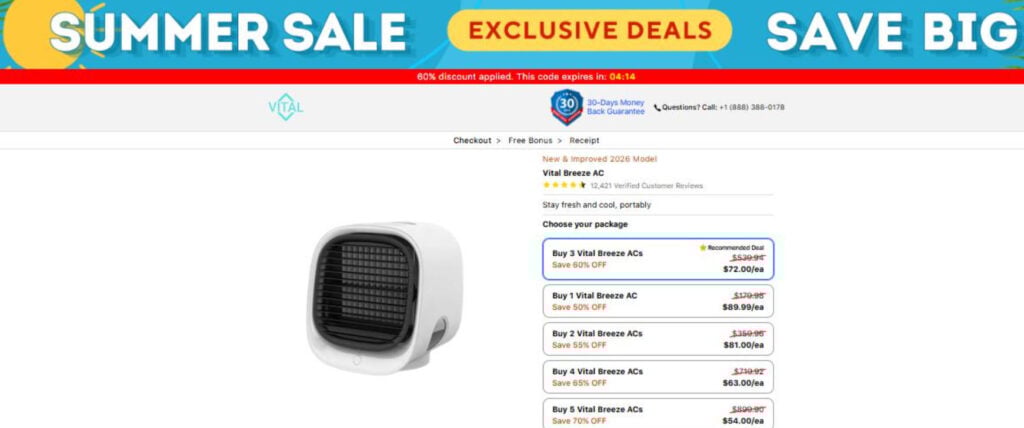
Vital Breeze AC’s Big Claims
One look at the Vital Breeze AC website or advertisements and you’ll see some lofty promises that likely catch your eye:
- Cools rooms up to 40 sq. m in under 3 minutes
- Costs 98.7% less to run than standard A/C
- Uses advanced cooling technology to chill the air
- Customizable cooling with 3 fan speeds
- Portable and compact design
These claims make it sound like the Vital Breeze AC is the answer to all your summer cooling woes. A personal A/C unit that works in a flash and saves you money? It seems too good to be true.
The Cooling Reality: Does Vital Breeze AC Deliver?
The big question is whether or not the Vital Breeze AC can really deliver effective cooling as promised. Looking at reviews online paints a concerning picture. Many customers report the Vital Breeze AC:
- Only provides mild cooling at best
- Is not suitable for very hot days
- Is loud, especially on higher settings
- Breaks easily
Independent cooling experts confirm these portable air coolers often fall short of truly cooling a room compared to an actual air conditioner.
When put to the test in real-world conditions, the Vital Breeze AC seems unable to produce the powerful cooling buyers expect.
Beware the Low Price
Another red flag is the Vital Breeze AC’s relatively low price point. Units start at just $$69.99, with frequent discounts up to 65% off. This seems suspiciously cheap for a device that claims to replace a costly air conditioning system.
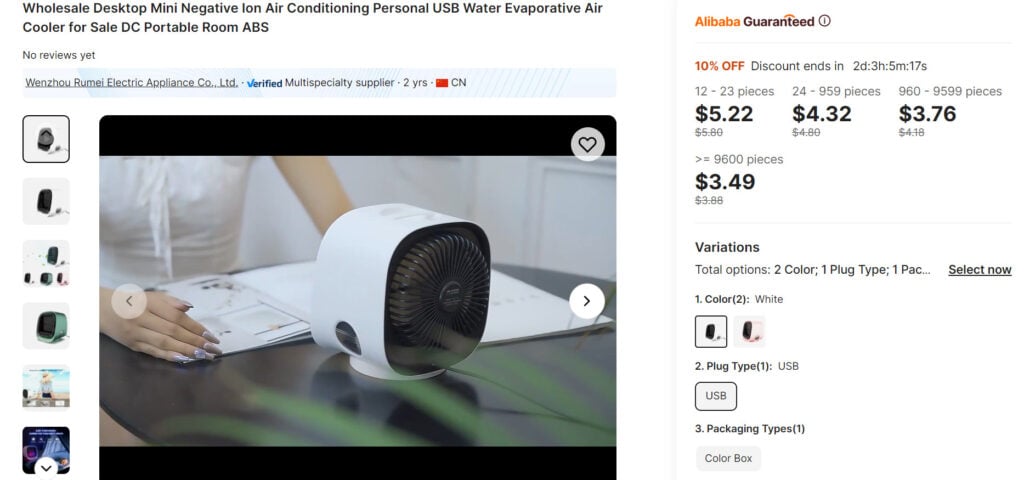
In reality, the Vital Breeze AC is a basic portable cooler similar to units that sell for as little as $5 on sites like Alibaba. The inflated price and near-constant discounts reel customers in, but the product quality does not match the marketing hype.
Customer Service Complaints
Making matters worse are reports of poor customer service should issues arise. According to reviews, getting a refund or replacement unit from Vital Breeze AC can be a nightmare:
- Difficulty getting in contact with support
- Refusal to issue refunds
- Replacement units also defective
This leaves many customers feeling ripped off and stuck with a faulty product. Not ideal for what was supposed to be a solution to hot summer days.
The Verdict: Think Twice Before Buying
The tantalizing claims of fast, cheap cooling make the Vital Breeze AC sound like the ultimate way to beat the heat. But as we’ve seen, the reality does not live up to the hype. Between underwhelming performance, quality concerns, and poor customer service, this cooler comes with some serious red flags.
Before dropping nearly $100 on an Vital Breeze AC unit, carefully consider alternative options. Legitimate portable air conditioners or fans can provide more reliable cooling without the inflated price and misleading claims. With summer heat on the rise, make sure your cooling solution is up to the task before buying. The Vital Breeze AC may look refreshing, but take a closer look before you get burned.
Frequently Asked Questions about Vital Breeze AC
1. What is the Vital Breeze AC?
The Vital Breeze AC is a small personal air cooler marketed as a portable solution to heat relief. It claims to use water to cool air and lower temperatures using specialized “cooling technology.” However, as we’ll explore in this FAQ, there are many reasons to be skeptical of its claims.
2. How does the Vital Breeze AC work?
The Vital Breeze AC is described as using water to provide a cooling effect as air passes through the unit. You fill the water tank, plug it in, and cooler air allegedly comes out the front vent. But real-world testing reveals it cannot truly cool down a room as claimed.
3. Does the Vital Breeze AC really work?
Unfortunately, evidence shows the Vital Breeze AC does not work as advertised. Most customer reviews state it provides only weak, disappointing cooling. It lacks the power to truly impact room temperature on hot days. Independent tests confirm it fails to cool spaces like a real portable AC.
4. Is the Vital Breeze AC a scam?
With its inflated marketing claims, low-quality components, and flood of negative customer experiences, the Vital Breeze AC exhibits many red flags of a scam. It uses exaggeration and psychological tricks to make sales rather than delivering on its claims.
5. Why is the Vital Breeze AC so cheap?
While advertised at nearly $100, the Vital Breeze AC is essentially a $5 plastic fan sold with a huge price markup. The low price coupled with big discounts tricks customers. But its poor performance reveals its true cheap quality.
6. Are there good customer reviews for Vital Breeze AC?
Nearly all independent customer reviews for the Vital Breeze AC are overwhelmingly negative. Most cite its weak cooling, loud noise, frequent breakages, and issues getting refunds. Finding unbiased positive reviews is extremely rare.
7. How is Vital Breeze AC advertising deceitful?
The marketing for Vital Breeze AC uses exaggerated claims, fake reviews, stock photos, and actors pretending to be satisfied customers. This aims to trick potential buyers but hides the truth about its poor quality. Always scrutinize air cooler ads.

Join the discussion
0 commentsShare your experience or ask a question about this article.
Discussion
Start the conversation
Have a question or something useful to share? Add the first comment.