

A friend’s WhatsApp Status says they need help making a payment. You recognize the account, and replying takes you straight into your existing conversation.
That familiarity makes this request different from a message sent by an unknown number. Before paying, check who is actually asking.
Overview
A genuine account can carry a fraudulent request
The WhatsApp Status money scam uses a hijacked account to broadcast a payment request to people who already know its owner.
The name, profile, phone number, and previous conversation can all look familiar. The person posting or answering may nevertheless be a criminal controlling the account.
Swiss police warn that compromised WhatsApp accounts are being used for money requests, including appeals posted through Status.
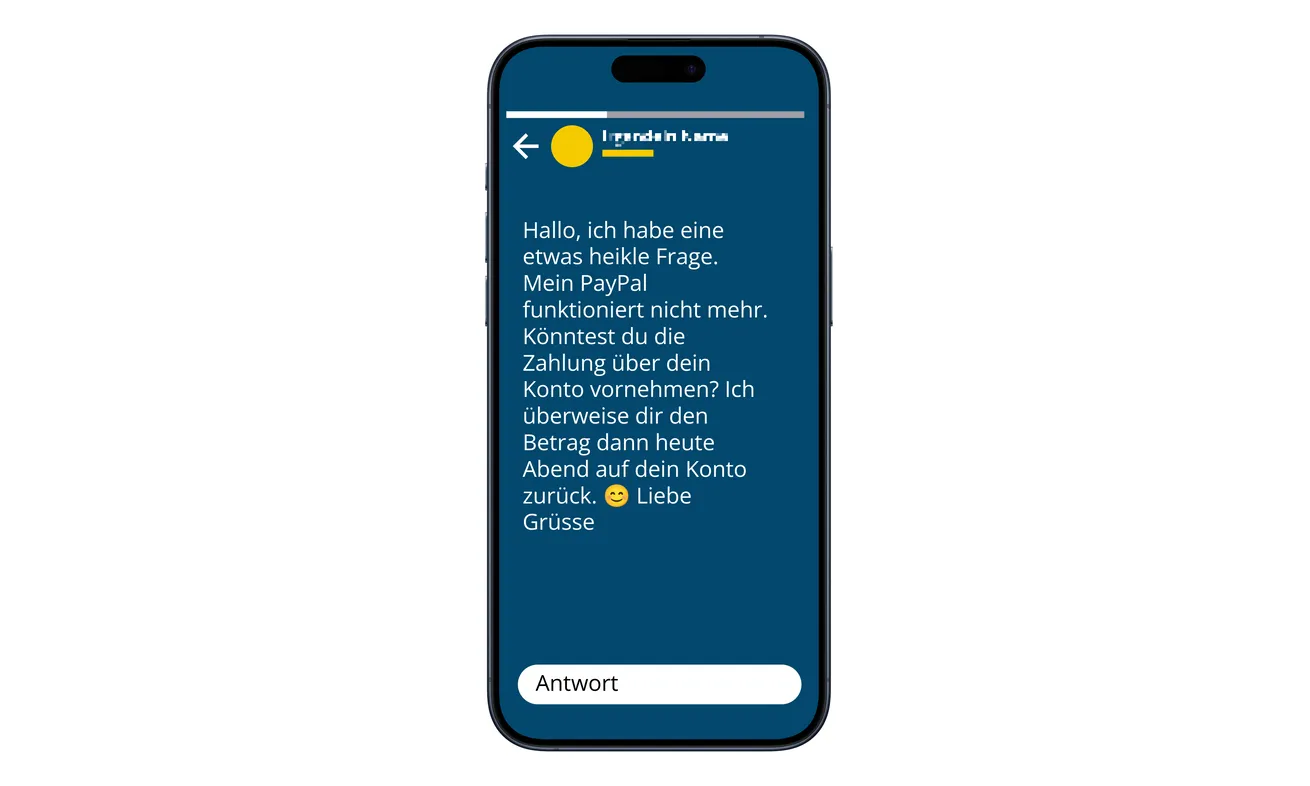
The image above is an illustrative example published by police. It demonstrates the payment-help pretext; it isn’t presented here as a captured victim’s private phone.
The excuse makes paying someone else seem helpful
A post may say a payment account isn’t working and ask contacts to make a payment instead. The supposed friend promises to repay the money.
The request doesn’t have to sound dramatic. A temporary inconvenience can feel more believable than an extraordinary emergency, especially when helping appears easy.
The risk starts when you accept the account’s familiar identity as sufficient evidence. An existing chat confirms the account, not the person currently typing.
Why Status changes the reach of the scam
- One appeal can reach multiple contacts through a familiar account.
- Viewers can respond privately without seeing what others were told.
- A previous conversation may make the new payment request feel established.
- A payment problem provides an excuse for sending money elsewhere.
- Compromised accounts can also spread links that put more accounts at risk.
Singapore Police separately reported at least 128 cases and S$249,000 in losses since September 2026 involving compromised social accounts requesting financial assistance.
Those Singapore figures cover the broader impersonation campaign, not specifically Status posts. They show why a familiar account’s money request deserves an independent check.
This warning concerns hijacked accounts and fraudulent appeals. It doesn’t mean every friend asking for help, fundraiser, or Status update is dishonest.
How the WhatsApp Status Money Scam Works
Step 1: Someone gains control of an existing account
The criminal begins with access to an account other people already trust. That access lets the next request arrive under an established identity.
Swiss police also warn about messages containing links that can lead to further takeovers. The exact entry method can differ between incidents.
Don’t assume every account was stolen through the same trick. Sharing a registration code and authorizing an unfamiliar linked device are separate things to investigate.
What matters to a recipient is the outcome: familiar account details can remain visible while the real owner has lost control or is unaware of misuse.
The account owner may be another victim. Treat them as someone who needs warning and recovery help, rather than accusing them of personally requesting the fraudulent payment.
Step 2: A Status post turns contacts into potential helpers
The account posts an appeal about a payment difficulty. In the police example, the request involves PayPal supposedly not working and repayment later.
Status provides a different opening from an unsolicited private message. You encounter the post while checking updates, then choose to reply because you recognize its author.
You may be the one who starts the conversation after seeing the post. Offering help yourself can make the resulting payment instructions feel less intrusive.
A broadcast also creates several possible conversations from one post. Other viewers’ private replies won’t necessarily be visible to you.
Don’t infer that someone else has verified it because the post has been up for a while. Viewing, replying, and confirming identity are different actions.
Step 3: Your reply reaches the person controlling the account
You answer the Status, and the conversation appears inside the chat you’ve used before. Old messages provide the background for a completely new request.
Scrolling upward can make the identity feel settled. It doesn’t tell you whether the same person is sending today’s messages.
Even a reassuring reply in that thread isn’t an independent check. If the account is compromised, you’re asking its current controller to vouch for themselves.
The same limitation applies to another WhatsApp message from the same account. Moving between Status and chat doesn’t move you outside the disputed identity.
Use a separate channel you already trust, such as a normal voice call to the friend’s established number. Don’t accept a replacement number from the suspicious conversation.
Step 4: The request redirects your money
The supposed friend supplies payment instructions and describes the transfer as a temporary favor. You expect repayment because you believe you know the person asking.
If the recipient name differs, the payment problem can make that difference seem understandable. It still needs direct confirmation from your real friend.
A believable reason doesn’t verify an account number. Before paying, ask the person independently whether they made this exact request and intended this exact recipient.
Don’t send a small test payment as an identity check. It establishes that the destination can receive money, not that your friend controls it.
Likewise, a screenshot showing an alleged repayment isn’t the same as money arriving in your account. Check your own provider through its genuine app.
Step 5: More requests can follow the first reply
A cooperative contact may be asked for another payment, a different recipient, or help resolving another supposed processing problem. Treat each request as a new decision.
You don’t owe further assistance because you already sent money. Stop while you verify the original request outside the compromised conversation.
If a link arrives instead, don’t open it just because you’ve already been chatting. The police warning includes links used to spread account takeovers.
An account-recovery or voting link can expose more than the amount of the proposed favor. Never share a WhatsApp registration code to help someone receive money.
How to Verify a Friend Without Asking the Same Account
Close the payment conversation for a moment. Find an established contact route from your own records, rather than copying new details supplied in the request.
A normal voice call is useful because it takes you outside the WhatsApp conversation. If necessary, contact a mutual friend or speak in person.
Ask a concrete question: did they post this Status and ask you to pay that recipient? A vague question about whether they’re busy won’t resolve the request.
If you cannot reach them, wait. The inability to verify a payment doesn’t become a reason to send it more quickly.
Voice messages and photos inside the suspicious chat still come through the same account. Don’t let additional material replace a separate conversation.
A different writing style can raise concern, but normal spelling isn’t proof of identity. Short payment requests may contain little distinctive language to compare.
You can also tell the real friend what you saw without forwarding private financial details widely. They may need to warn everyone who could view the Status.
What to Do if You Have Fallen Victim to This Scam
-
Contact the payment provider immediately. If you sent money, report an impersonation scam and ask whether the payment can be stopped, recalled, or investigated.
Supply the amount, time, transaction reference, recipient details, and messages. Describe whether it was a bank transfer, payment-service transaction, or another method.
Don’t promise yourself a refund because the fraud is clear. Available remedies depend on the payment and provider; act quickly without waiting for a guaranteed answer.
-
Warn your friend through another channel. Explain that their account posted or sent a payment request. Ask them to check their own account access.
If they’re unreachable, alert a trusted mutual contact without circulating account numbers or private messages unnecessarily. The aim is to interrupt further payments.
Don’t ask the suspicious account to announce that it was hacked. Whoever controls it may use that conversation to reassure you or request another favor.
-
Save the Status and payment conversation. Keep screenshots, timestamps, recipient details, and transaction confirmations. Preserve the original context before blocking or reporting.
If the Status disappears, your payment evidence still matters. Don’t assume disappearance means the money was recovered or that the owner regained control.
When warning others, redact personal identifiers and financial information. Send full evidence only through appropriate bank, platform, or police reporting channels.
-
If your own account was taken over, recover it through WhatsApp. Follow the official compromised-account recovery instructions on a safe device.
Re-register your number using the six-digit code sent to you by SMS or phone call. Never give that code to a supposed helper.
A two-step verification PIN may affect recovery. Follow WhatsApp’s instructions if a PIN you don’t know appears; don’t pay someone claiming they can bypass it.
Changing an unrelated password doesn’t by itself recover WhatsApp access. Use the account’s genuine recovery process rather than instructions sent by the intruder.
-
Review linked devices and secure the recovered account. Remove devices you don’t recognize, then enable the available account-security features, including two-step verification.
WhatsApp’s linked-device guidance explains how to inspect sessions and log out an unfamiliar device. Review the list yourself rather than accepting a screenshot from another person.
If you linked a device after following a message, mention that during recovery. Registration-code exposure and device-linking exposure should both be addressed.
Keep the genuine app updated. Avoid unofficial clients and any recovery tool offered through a message or search advertisement.
-
Warn the people who may have seen the fraudulent post. Once you control the account, explain which payment requests and links weren’t yours.
Use another trusted channel while access remains uncertain. A correction posted by an account you still don’t control may not reach the right people.
Ask anyone who paid to contact their own provider promptly. One person’s report doesn’t automatically protect every viewer who responded to the Status.
-
Report the fraud and refuse paid recovery approaches. Give local police the preserved conversation and payment records. Use official platform reporting controls where appropriate.
For your own compromised account, prioritize WhatsApp’s recovery instructions. Its guidance warns that reporting an account may affect access, so distinguish recovery from reporting another scammer.
Ignore anyone promising guaranteed account restoration or fund recovery for a fee. Don’t provide more codes, remote access, or an advance payment to undo the first loss.
If You Saw the Post but Didn’t Pay
You can still help by warning the real owner. A quick independent call may stop the post from reaching more willing contacts.
Seeing a Status doesn’t by itself mean your phone or account was compromised. Assess what you actually did after viewing it.
If you opened a link but supplied nothing, stop there. If you entered a registration code or linked a device, review your account immediately.
If you shared a reused password on another website reached through the conversation, change it on the genuine service and check other accounts using it.
These are different exposures. A bank report handles money sent; WhatsApp recovery handles account access. A generic phone scan cannot substitute for either.
Be gentle with the account owner. They may be struggling to recover access while their contacts believe the fraudulent messages came from them personally.
Frequently Asked Questions
Can a real friend’s WhatsApp Status contain a scam?
Yes. Swiss police describe money appeals posted through hijacked accounts. Recognizing the phone number and profile doesn’t establish who created the current post.
Verify the payment request through another established channel before sending anything.
Does our old chat history prove I’m speaking to my friend?
No. Old messages can remain visible in the same conversation when account access changes. They show previous contact, not who is answering today.
Don’t ask that same chat to verify itself. Make a separate call or contact the friend another way.
Is PayPal always involved?
No. The police illustration uses a PayPal problem as an excuse, but the core scam is a fraudulent request under a trusted identity.
Apply the same independent check to another payment-service or banking excuse. The brand name alone doesn’t decide whether the request is genuine.
What if the recipient is someone my friend says they owe?
That explanation still comes from the disputed account. Confirm both the request and recipient directly with the real friend through another channel.
Don’t treat a detailed backstory as a substitute for that confirmation.
Will blocking the account recover my money?
No. Blocking can end contact, but it doesn’t reverse a transfer. Contact the provider that handled your payment and preserve the supporting evidence.
Warn the genuine owner separately so they can address the hijacked account.
Should every viewer install an antivirus?
No. Viewing a Status alone doesn’t establish malware infection. Financial exposure, shared codes, linked devices, and any installed software need their own appropriate responses.
Start with what happened, rather than buying a tool before identifying the problem.
The Bottom Line
A familiar WhatsApp Status can put a criminal’s request inside a real friendship. Before paying, reach the friend through a separate channel you already trust.
If money has gone, call the payment provider now. If the account was yours, recover access and warn the contacts who may have answered the post.

Join the discussion
0 commentsShare your experience or ask a question about this article.
Discussion
Start the conversation
Have a question or something useful to share? Add the first comment.