


A renewal notice for $10.99 doesn’t look like a big decision. The risk of a site going offline can make it seem easier to update the card and move on.
If the email says your Wix payment is pending, open your own account first. The right place to start is the subscription you actually pay for.
Overview
The email says an annual renewal failed
The Wix subscription renewal email scam uses a billing notice to claim automatic renewal didn’t work. It asks for updated payment details and warns that the service could be suspended.
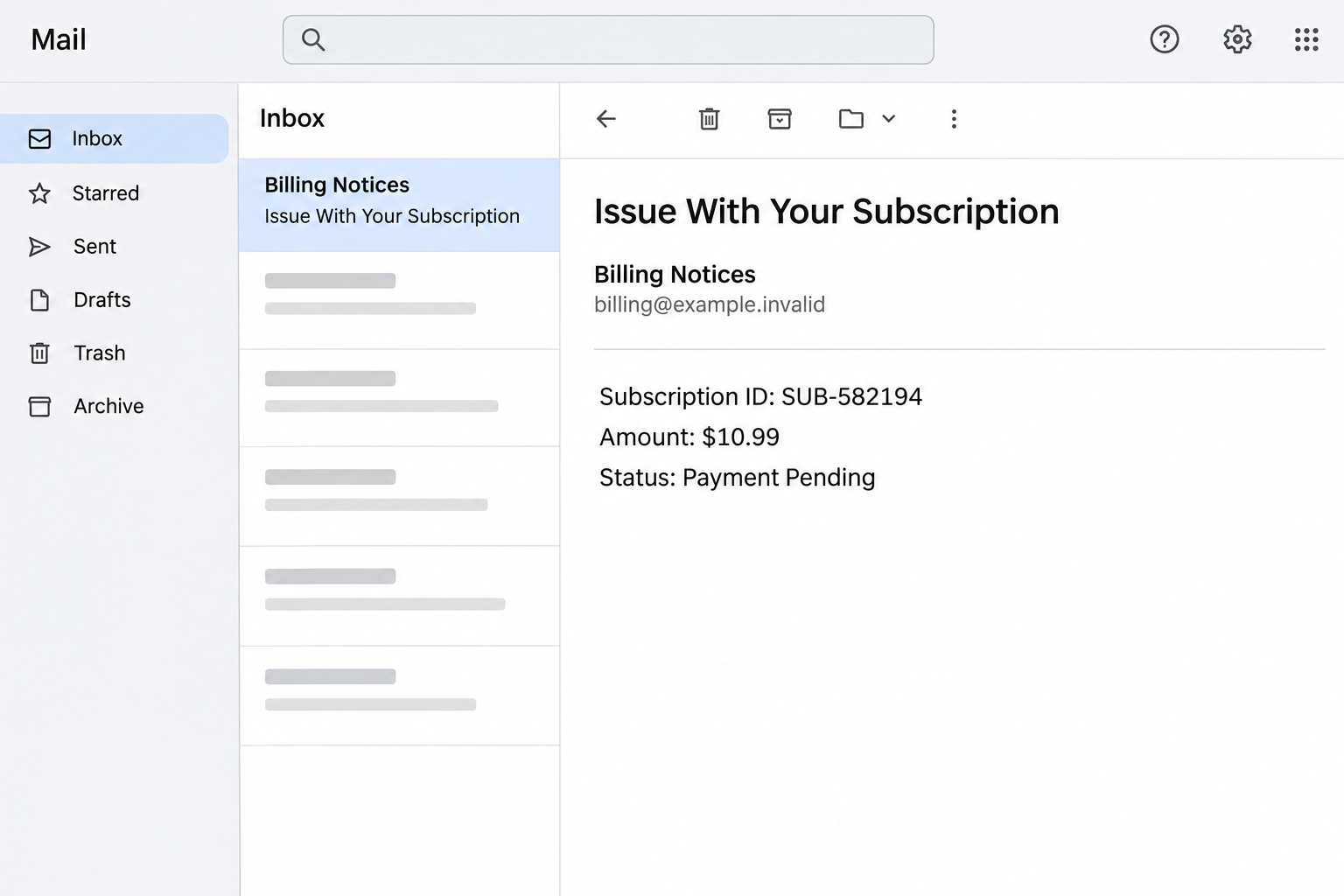
The example lists subscription ID SUB-582194, a $10.99 amount and an annual billing cycle. Its status is “Payment Pending.”
Those details make the email look like an account record. They don’t identify a transaction in your own Wix billing history.
The image above recreates those identifying details. It does not represent an actual Wix invoice or a check of your site’s status.
The warning mixes a real billing problem with an unsafe route
A card can expire or a renewal can genuinely fail. Wix provides a way to check and correct that inside the account.
The reported link was unavailable. There is no verified view of a payment form, sign-in screen, completed charge or installer from that destination.
The documented warning is about the impersonation and its unsolicited request. Don’t assume every recipient was asked for the same information after clicking.
Wix’s renewal payment guidance starts in Premium Subscriptions. Open that through your verified account rather than the email.
Different services under one login can have different renewals
A Wix account may contain more than one site or type of subscription. A site plan and a domain renewal can have different owners, dates or payment arrangements.
That’s a reason to check which service the message concerns. It isn’t a reason to let a generic billing alert decide where you enter card details.
Compare what you can verify independently:
- The account or owner who actually pays for the site or subscription.
- The product name and billing period shown in the real subscription list.
- Any matching invoice, card decline or upcoming renewal in your own records.
- The verified way to update payment if the account shows a real problem.
How the Wix Subscription Renewal Scam Works
Step 1: An ordinary billing issue makes the email feel believable
Website renewals don’t occupy much attention when they work. The notice arrives with a straightforward explanation: a payment that usually happens automatically didn’t go through.
If your bank issued a new card or you recently changed an address, you might recognize part of that story. The sender doesn’t have to know it happened.
Start with your genuine billing records. If you can’t match the notice to a service you use, don’t follow its link to look for one.
If somebody else owns the site or pays for it, ask them directly. An editor or contributor might not be able to verify billing from their own login.
Step 2: The amount and subscription ID turn a claim into something that looks official
A small amount is less likely to send you looking for a second opinion. The subscription ID supplies a reference you can repeat to the sender.
But both pieces of information appeared only as claims. They are not proof that Wix generated the warning or that a $10.99 payment is pending.
Check the actual product and invoice history. An account total might include more than one service, so a number that looks familiar can still be misleading.
If the email matches a figure you recognize but doesn’t match the product, resolve the mismatch with Wix or the owner. Don’t make another payment first.
Step 3: The threat of interruption makes the shortest route seem safest
A website owner may be thinking about appointments, order forms or customers, not checking the destination behind a billing button.
That urgency is understandable. It’s also a good reason to verify whether the relevant service is actually at risk before making changes.
A genuine billing message should be independently checkable. Open the account, look for a failed renewal and use the platform’s own update process if the failure is real.
If your actual website is already down, treat that as a separate problem. A DNS issue, an expired domain or a site issue can look similar to a visitor.
Step 4: The fake update route can expose details you intended only for Wix
The email asks you to update payment details. The destination was reported offline, so it isn’t possible to say which fields were actually shown in that version.
A fraudulent payment alert could lead to a copied sign-in, a card form or another request. Those are possibilities, not steps this sample proves.
If you entered information, write down which fields you filled. A password and a card number call for different help.
Don’t return to the page to identify an unfamiliar field. Your real provider and issuer can use details you remember, plus the actual account activity.
Step 5: A confirmed real renewal wouldn’t make the email any safer
A genuine renewal issue can happen at the same time as a fake message. Fixing the real one doesn’t establish that the email came from Wix.
If you changed a card through Wix directly, keep that confirmation in your own records. If you also entered the old card elsewhere, tell the issuer about that separately.
A blank transaction list doesn’t show what an outside form collected. Likewise, a posted renewal doesn’t mean a leaked password cannot be used later.
Resolve billing inside the verified account and investigate any exposure on its own. Neither task depends on replying to the sender.
How to Check a Real Wix Renewal
Find who actually owns the subscription
Start with the account that received the original purchase receipt. If the website was built by an agency, ask whether the agency or your business owns the subscription.
Being able to edit a site is not the same as being able to pay for it. If you don’t see a subscription, check the owner before interpreting its absence.
A company may use one service for the website plan and another for domain registration or email. Find the party that actually billed you.
If you see a pending renewal for a different site, don’t assume it explains the message. Confirm the identifier and product, not just the price.
Check the billing record before entering a new payment method
Use the platform’s subscription area and billing history. Look for an actual failed payment, the product it affected, and whether the account offers an update.
If the real account shows a working plan, leave the card alone. You can report the false message without changing settings that don’t need attention.
If a renewal did fail, verify the payment method with the account owner or the card issuer. Update it through the genuine product dashboard when needed.
Don’t start a new subscription simply because the old one looks inactive in a browser where you might be signed into the wrong account.
Verify a site outage separately from the alert
Check whether the public site, the account dashboard and the domain are each working. A problem with one of them does not pick out the cause.
If there’s a real outage, tell Wix or your web administrator what you see. An error page, the affected domain and the time are more useful than the fake invoice.
Avoid changing DNS, transferring a domain or buying another plan while you’re still establishing what failed. Those are real account changes, not harmless tests.
Confirm the display and receipt after a genuine fix. If the site still isn’t responding, let the original provider investigate rather than paying the email.
When an agency or team pays, check with the account owner
Ask who is responsible for renewals before sharing a receipt or accepting a request for a new card. The person who edits pages may not oversee payments.
If the website account changed hands, use the current owner’s records. Old billing emails may be useful context, but billing access might have moved during the handoff.
For a team with several sites, compare the domain name and subscription in the same account. A correct business name doesn’t tell you which service is being renewed.
If the owner asks you to help, open a new conversation through your established channel. Don’t carry on inside a forwarded copy of the suspicious message.
Keep a written record of the genuine billing change and what it covers. An extra purchase can be harder to catch when several people administer the same site.
Ask which payment will run again and on what date. The notice’s annual label does not tell you how the platform will handle the real subscription.
Check whether there are separate renewal settings for the domain or another product. Changing a card for a site plan may not update every other service automatically.
Save the official support route before the next billing issue. Then a surprise email won’t look like the only way to get help.
Make sure the backup billing contact also knows which service renews the domain. The right person can verify it without asking another teammate to open the message.
What to Do If You Fell Victim
-
Close the payment update and report the notice.
If you saw the email or page and submitted nothing, don’t go back. Check the real account only if you still need to verify the renewal.
Use Wix’s phishing reporting guidance for reporting options. Do not share a password or card number with an unauthorized person.
Save the subject and timing if helpful. Don’t send information to the original sender to ask which charge it means.
-
If you entered your Wix password, secure the real account.
Change the password through your own verified session or account recovery. If it was reused for email or the domain registrar, replace those copies too.
Review account owner details, team access and unfamiliar activity. If somebody has changed the address or recovery settings, tell official support.
If you approved a new sign-in or disclosed a verification code, report what happened and when. Don’t put the code in the report.
-
If you entered card details, contact the issuer through a verified route.
Say the information was entered after a suspected subscription impersonation. Explain whether you also confirmed a transaction or gave out a code.
Tell the issuer what the statement actually shows, including pending or unfamiliar entries. Ask about locking, replacing or monitoring the card as appropriate.
Don’t assume the advertised $10.99 is the only amount to watch. The email’s quoted number is not a record of what the issuer authorized.
-
If you own the website, check access and billing separately.
Make sure the right people still control the site, registrar and relevant account email. Ask your provider to check unfamiliar changes rather than guessing which settings were affected.
If you separately downloaded or installed something, describe that to your security team. The documented payment notice alone does not establish a device infection.
For a real renewal problem, correct it from Premium Subscriptions or contact the verified provider. Do not use contact information taken from the fake email.
-
Record any confirmed unauthorized activity.
Keep the receipt, issuer reference and a timeline of what you entered. Provide sensitive records only through an established secure channel.
If a site or domain was changed, tell the owner or administrator immediately and use the provider’s account recovery process. Don’t authorize another transfer.
Treat later messages offering to restore your site or refund a payment as separate claims. Contact the institution named in them yourself.
Frequently Asked Questions
Is subscription SUB-582194 a real Wix subscription?
That reference appeared in the documented fake notice. It does not identify a verified subscription belonging to you. Check your own account and receipts.
Does Wix ever ask customers to fix declined renewal payments?
Yes. Wix documents how to do that inside Premium Subscriptions. You can use the official account without following a link in a surprise email.
Is the $10.99 amount proof a renewal failed?
No. It is a figure printed in the lure. Compare the actual product, billing period and subscription status in the account that pays for it.
What if the alert matches a site I really own?
That still doesn’t authenticate the message. Check whether the site plan or domain has a genuine payment problem and use the verified provider to resolve it.
Did the fake link definitely ask for a credit card?
The promoted page was reported offline. If you entered a card number or saw an unauthorized payment, contact the issuer based on that actual exposure.
Do I have to contact the bank if I only opened the email?
No, not for reading alone. Contact the issuer if you disclosed payment information, authorized a request or find account activity you don’t recognize.
The Bottom Line
Don’t update payment through the $10.99 renewal notice. Open the real Wix account, identify which subscription actually exists, and handle a verified failure there.
If you gave away a password or card details, secure the account or contact the issuer first. Keeping the real site online does not require trusting the fake email.

Join the discussion
0 commentsShare your experience or ask a question about this article.
Community experiences
Did this happen to you?
Your experience could help someone recognize the same scam. Submit a private report for our team to review.
I experienced this tooReports are reviewed before publication. Sharing publicly is always your choice.
Discussion
Start the conversation
Have a question or something useful to share? Add the first comment.