


A private video invitation arrives while you’re checking your channel’s messages. Its title sounds important, and the familiar YouTube branding makes it worth a second look.
Maybe it’s about monetization. Maybe it hints at a copyright problem. Before letting that notice interrupt your day, look at what it’s actually asking you to do.
Overview
A real sharing feature can carry a false warning
The YouTube private video email scam abuses a normal platform feature. Someone shares a video, then presents its contents as an official instruction for creators.
YouTube has warned about this phishing method. Its employees don’t deliver official creator instructions through privately shared videos.
The invitation can therefore look more convincing than an ordinary forged email. The dangerous claim belongs to the person sharing the video, not necessarily the notification service.
The destination matters more than the invitation’s appearance
The video may push you toward an outside document, sign-in page, or download. That’s where a routine viewing invitation becomes a request for something valuable.
- A supposed policy update asks you to open a separate document.
- A creator eligibility notice demands account verification through an unfamiliar page.
- A warning threatens lost earnings unless you follow the video’s instructions.
- A linked file is presented as a required appeal or compliance tool.
These are warning patterns, not a claim that every invitation uses every tactic. The information requested determines the immediate risk.
This warning concerns impersonation, not ordinary video sharing
Private invitations from friends, clients, and collaborators can be genuine. The scam is the false claim that a shared video carries YouTube’s authority over your account.
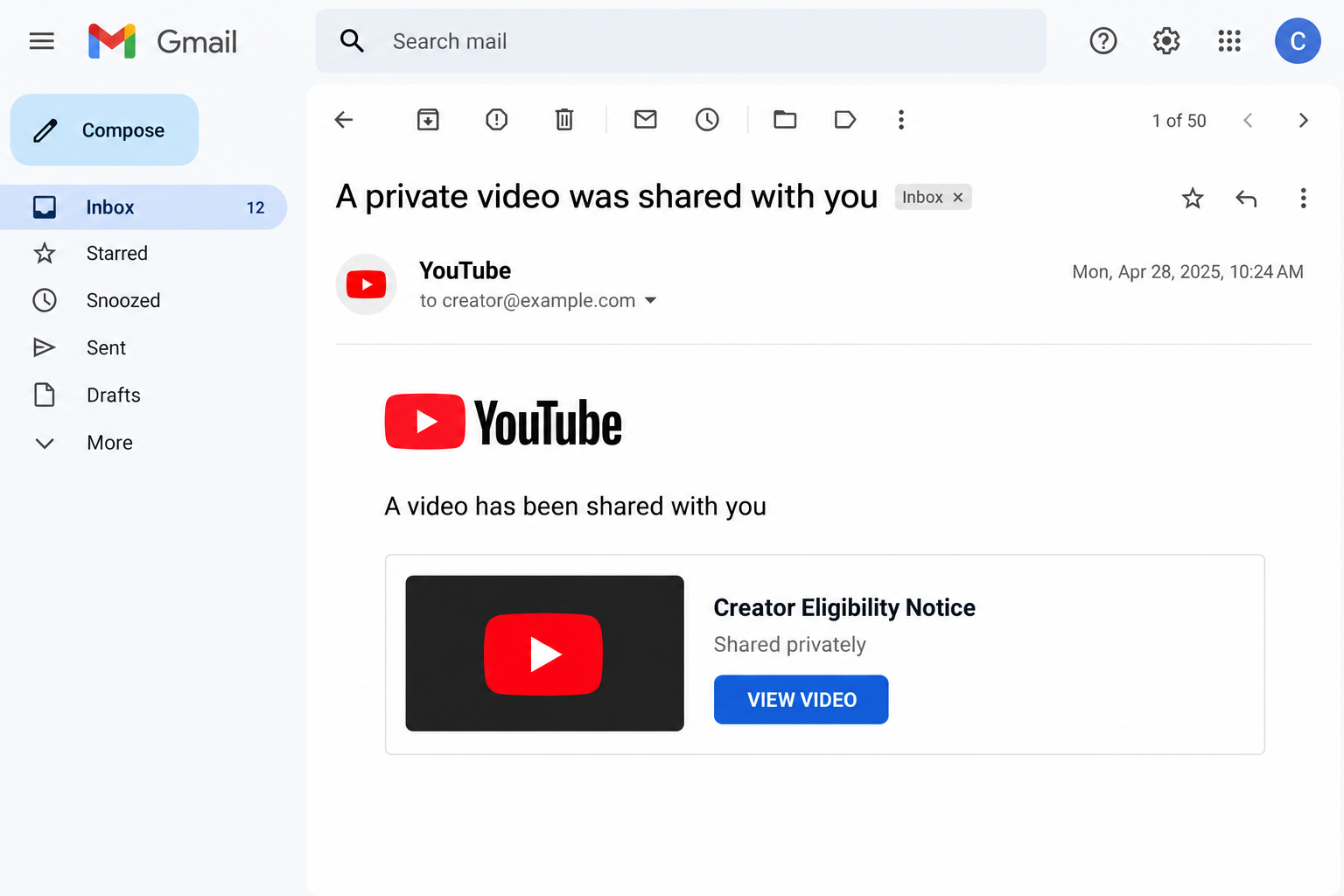
The image above is a fictional interface illustration. It isn’t a recovered email, and it doesn’t identify a particular uploader as the operator of an attack.
A recent reader report described a creator eligibility notice. Without its original message and video, that individual example can’t establish the sender, destination, or payload.
The independently documented sharing-feature abuse is the focus here. Don’t enter account details or install anything to satisfy a policy demand delivered this way.
Why an Official-Looking Email Can Still Mislead You
The service sends the envelope; another user supplies the story
Think of the notification as an envelope. Recognizing the delivery service doesn’t tell you whether the person who placed the message inside has legitimate authority.
YouTube lets uploaders share private videos with selected email addresses. That feature is useful for previews, collaboration, and personal sharing.
It doesn’t turn an uploader into a YouTube employee. Nor does it make a video title, channel name, or description an official account instruction.
Private videos also aren’t ordinary public search results. Failing to find the invitation’s video in a search doesn’t prove it’s authentic or fake.
Likewise, an unlisted video isn’t the same as a private one. Unlisted links can be shared onward, so the labels shouldn’t be treated interchangeably.
Authentication answers a narrower question
Gmail’s mailed-by and signed-by details help identify sending infrastructure. Google explains how email authentication works and where to check those details.
Passing that check isn’t an endorsement of every instruction inside a user-triggered notification. The transport and the uploader’s intentions are separate questions.
That distinction matters if you’re used to screening scams by sender address alone. Keep that habit, but don’t let it replace checking the requested action.
A pasted header summary isn’t enough to authenticate a particular message, either. Investigators need the original message, not just a display name or copied security label.
You don’t have to become an email specialist to stay safe. Open your creator account independently and investigate the alleged issue there.
How the YouTube Private Video Email Scam Works
Step 1: The invitation reaches an inbox the creator already watches
A creator expects to hear from viewers, sponsors, editors, and platform services. An unexpected video invitation fits into that busy stream better than a random prize announcement.
The invitation alone doesn’t establish a breach. Someone knowing your email address isn’t the same as someone controlling your Google account.
Still, the timing can make the message effective. If you’re managing uploads or checking earnings, a creator-related title lands close to something already on your mind.
Step 2: A policy-themed title turns curiosity into urgency
The content is framed as news you can’t afford to miss. Monetization, eligibility, and channel standing are convincing subjects because they affect a creator’s work.
The title can do much of the persuasion before you play anything. A routine invitation begins to feel like an administrative task with consequences.
Pause at that change in tone. A person sharing a video has not acquired the power to suspend your channel or rewrite its eligibility requirements.
Step 3: The shared video borrows the platform’s authority
A familiar logo or official-sounding channel name can make the presentation feel like part of YouTube’s support system. Those visual cues aren’t an appointment letter.
Some documented versions use fabricated announcements. Don’t assume a convincing voice, polished presentation, or recognizable face establishes who authorized the message.
YouTube’s phishing guidance specifically describes private-sharing abuse and unofficial channels that appear authoritative.
The key deception is the same whether the video looks expensive or amateur: an uploader is asking you to treat their instructions as the platform’s rules.
Step 4: The explanation moves you toward a document or outside page
The next request may be tucked into the description or presented as a way to read the complete update.
Once you leave YouTube, you’re dealing with another website, not a protected extension of the platform.
A legitimate video URL doesn’t authenticate an outside destination. Follow the actual address, not the promise attached to a button or document title.
You don’t need to visit the destination to investigate safely. Save the invitation and check official help or your account through a separate route.
If you already opened it, stop before submitting anything. A page calling itself a creator portal still needs a legitimate reason to receive your information.
Step 5: The requested action exposes the account or device
A copied sign-in form can collect a password. Another version may request a security code, a login approval, an app connection, or a file download.
These aren’t interchangeable events. Note what you actually supplied instead of assuming that every click produced the same result.
Don’t provide a second code because the first supposedly failed. Don’t approve a prompt to cancel a sign-in you never initiated.
A file offered as a policy document can create a different problem from credential theft. Don’t open or run it just to discover what it contains.
Step 6: The account issue becomes a reason to keep cooperating
Once you’ve started, an error or another verification request can feel like ordinary troubleshooting. That’s a poor reason to continue through an unverified process.
You can leave without finishing the supposed appeal, confirmation, or eligibility check. An unfinished fraudulent workflow isn’t an official strike against your channel.
Move the conversation back to your own account controls. If you exposed credentials or access, begin recovery rather than waiting for the invitation to provide reassurance.
Check the Alleged Problem Without Following the Video
Look for an actual channel restriction
Open YouTube Studio from your bookmark or by entering its address yourself. Check the channel you actually manage, especially if your account switches between several channels.
YouTube’s copyright-strike guidance explains where strikes appear and how official notifications work. A private video invitation isn’t a substitute for that process.
Don’t ignore a genuine restriction simply because a scam email mentioned copyright. Handle the real issue through Studio and the official instructions associated with it.
Read the request as if the branding were missing
Would you give an unfamiliar uploader your password to watch a video? Would you install their software to learn whether your channel qualifies for a program?
Removing the logo from the question often makes the problem clearer. The request needs to make sense without borrowed branding doing all the work.
A real collaboration can be discussed without handing over account ownership. A claimed platform policy should be verifiable without surrendering a security code.
Don’t mistake a familiar playlist for proof of employment
A channel can point toward genuine educational videos. That doesn’t establish that its owner works for the platform or can issue enforcement notices.
Keep the question specific: who is asking you to act, and where can you verify that authority independently?
You can stop without proving the uploader’s identity. Declining an unsolicited account-access request is a sensible decision even when the full story remains unclear.
What to Do if You Have Fallen Victim to This Scam
-
Stop and write down the exposure. Close the invitation’s route. Record whether you viewed a video, opened a page, entered credentials, approved access, or downloaded something.
Keep the original email and relevant URLs privately. Don’t forward a clickable lure around your team as a demonstration or return to collect extra screenshots.
If you only received or viewed the invitation, that alone doesn’t demonstrate account takeover. Match the response to what happened next.
-
Secure an exposed Google login. From a trusted device, open your Google account independently and follow the compromised-account instructions.
Change a password submitted to an untrusted page. If you used it elsewhere, replace those copies with distinct passwords, starting with other important accounts.
Review recent security events and recovery information. If you can’t sign in, use Google’s recovery process instead of a helper introduced by the suspicious message.
-
Inspect devices and sessions. Google’s device-access page explains how to review signed-in activity and sign out sessions you don’t recognize.
Several sessions can belong to one device. Examine the details rather than treating every extra entry as an attacker.
Conversely, a familiar device description doesn’t excuse activity you didn’t initiate. Follow the account’s security prompts when something doesn’t fit.
-
Review app connections separately. Check Google’s linked-app controls if the lure asked you to connect a service or grant permissions.
Remove access you didn’t intend to grant. Read what each connection can do before deciding whether it belongs.
Disconnecting an app doesn’t erase information already shared with it. Keep that distinction in mind when assessing what business or personal material may need protection.
-
Check the channel’s management access. Review YouTube channel permissions, not just your personal password. Remove unfamiliar access through the official controls.
Ask authorized managers to secure their own accounts, too. A shared channel needs a coordinated response, not several people independently following the same suspicious invitation.
For a managed workplace account, involve the administrator. Explain the information submitted and the approximate time so they can investigate the relevant access.
-
Use official channel recovery if anything changed. For a hijacked channel, YouTube’s official recovery route begins with the Google account that controls it.
Then address changes made without your permission. Check the official instructions before treating the channel itself as secure.
Record unfamiliar uploads, altered descriptions, and changed account associations. Follow official cleanup instructions rather than deleting the channel or negotiating with an alleged attacker.
Keep recovery case numbers and responses together. Don’t pay a stranger who promises a guaranteed shortcut or asks for another login code.
-
Handle downloads as a separate exposure. If a file arrived but wasn’t opened, leave it unopened. If software ran, involve trusted technical support or your organization’s security team.
Use a different trusted device for urgent account recovery while the affected device is assessed. A password change doesn’t diagnose what installed software may have done.
No specific malware family is established for the individual reader report. Receiving this invitation is not, by itself, a reason to buy a scanner or reset everything.
-
Report the content and strengthen future sign-ins. Use YouTube’s reporting instructions for deceptive videos or channels, supplying the relevant context.
After securing the account, review 2-Step Verification and your available sign-in protections. Never approve a prompt simply because another person insists it’s required.
Give your team a short incident summary without passwords, codes, or private recovery details. Agree that future policy demands will be checked independently before anyone responds.
Frequently Asked Questions
Can a private video invitation arrive through a genuine YouTube notification?
Yes. An authentic sharing notification can carry another user’s misleading pitch. Its delivery doesn’t make the uploader an employee or turn the video’s instructions into official policy.
Does this mean every privately shared video is a scam?
No. Normal private sharing remains useful. The warning concerns videos falsely presented as official account instructions, especially when they demand credentials, permissions, downloads, or urgent outside action.
Is a creator eligibility notice an automatic copyright strike?
No. A title isn’t an enforcement decision. Check the actual channel in YouTube Studio and follow the official process for any restriction you find there.
Am I hacked if I only opened the email or watched the video?
Not necessarily. Those actions alone don’t establish compromise. Account exposure, permission approvals, and installed software need different responses, so identify exactly what you did.
Should I change my password after granting an app access?
Review and remove unintended app permissions. If you also disclosed your password, change it. Don’t assume either action automatically resolves the other form of exposure.
Can I trust a familiar channel name or a convincing announcement video?
Not on appearance alone. Check the instruction through your account or official help. A polished video doesn’t make its uploader a YouTube employee.
The Bottom Line
Don’t follow account-verification demands from privately shared videos claiming to speak for YouTube. A genuine delivery notification cannot authenticate the uploader’s authority.
Open Studio independently to check the claimed problem. If you already shared credentials, approvals, or access, secure the Google account and review channel permissions immediately.

Join the discussion
0 commentsShare your experience or ask a question about this article.
Discussion
Start the conversation
Have a question or something useful to share? Add the first comment.