


You were waiting for a shipping update, so the eBay name catches your attention. The email looks routine until it asks you to deal with an account problem.
An eBay no-reply email scam plays on that familiarity. The important detail is not whether the sender looks recognizable, but where the message takes you next.
Overview
A familiar sender label is only one part of the message
Automated shopping emails are ordinary. Receiving a message that appears to come from a no-reply address does not, by itself, establish either fraud or authenticity.
The impersonation happens when someone borrows eBay’s identity to obtain information or access. A copied logo and sender label help the request feel like routine account maintenance.
eBay’s phishing guidance specifically describes fake addresses in the From line and links leading to imitation sign-in pages.
That is the conduct covered here. It is not a warning to distrust every automated eBay notification or an accusation against the genuine marketplace.
Important account messages have another place to check
eBay says it sends copies of important account communications to eBay Messages. Open your account independently and look there rather than following the email’s route.
Check the actual order or account issue too. A genuine shipping update, a restriction notice, and a stranger’s payment demand require different responses.
Do not treat personalization as a final test. Knowing your name or mentioning an item does not give a sender permission to collect your password.
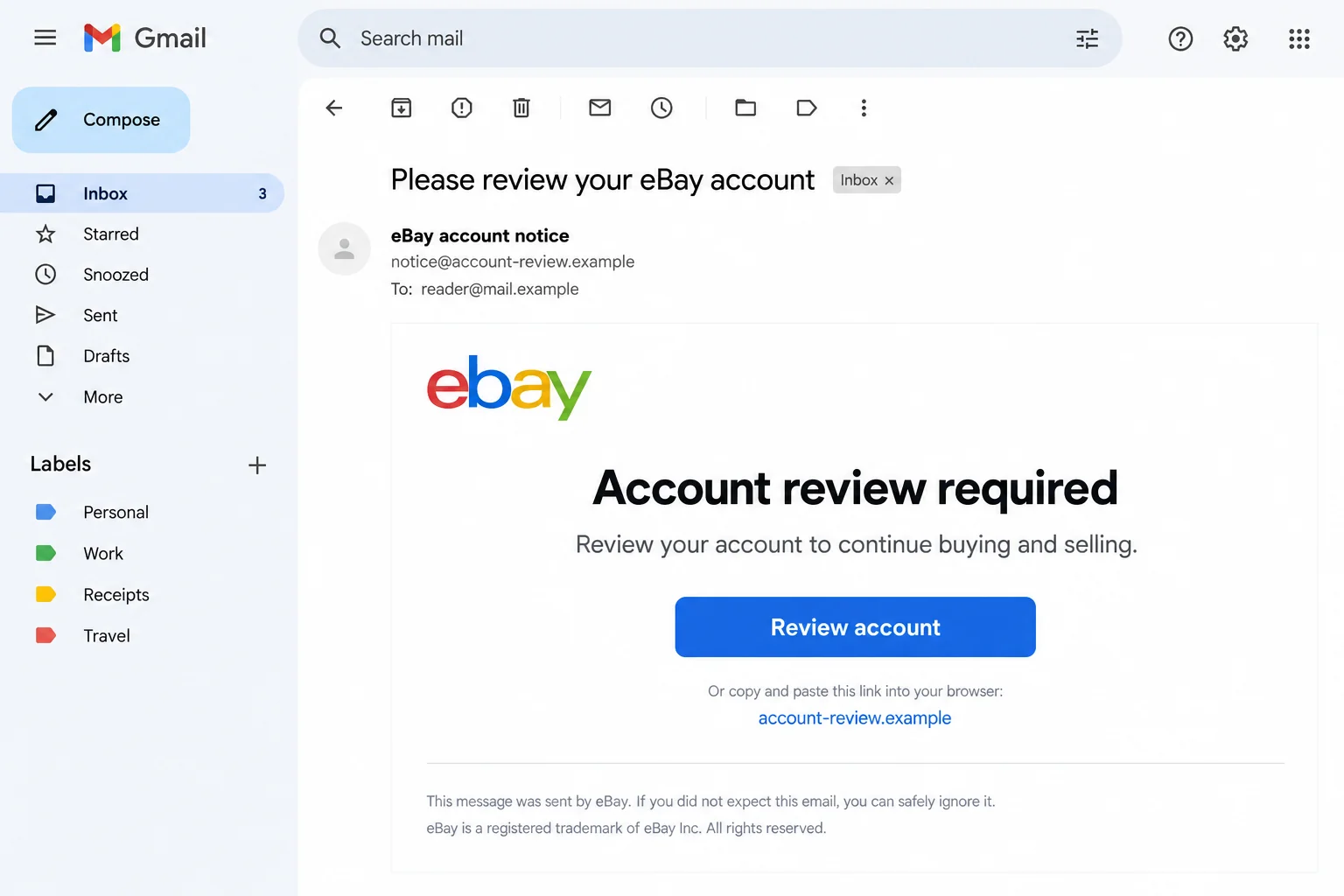
The lead image is an illustrative imitation with fictional addresses. It does not reproduce a verified attack email or establish who operated a particular campaign.
The request matters more than the reassuring appearance
Pause if the message wants you to:
- Sign in on a page reached through an unexpected account warning.
- Supply card details to prevent an alleged restriction.
- Open an unsolicited attachment to recover an order.
- Send a security code to someone claiming to help.
- Move a payment or conversation away from the established transaction.
Leave the email where it is and open your usual eBay app. You can check the account without following the sender’s shortcut.
Why an Ordinary Shopping Email Can Catch You Off Guard
You may already be expecting several different updates
An auction ends, a seller dispatches a parcel, and a return moves forward. Those are all plausible reasons for eBay-related mail to appear.
A fraudulent message does not need to know which one applies. A vague account review can make you supply the missing explanation yourself.
You might connect it to the purchase you made yesterday, even though the sender never identified that transaction. Check your own order record before making that connection.
If a message names a real purchase, still verify the requested action. Accurate background information and a safe payment destination are separate questions.
A button can conceal the most important change
The email can use a familiar color scheme while sending you somewhere unrelated. The label on a button is not the address of the page behind it.
A destination containing the word eBay somewhere in its address is not automatically part of eBay. Read the complete destination, not just the recognizable fragment.
If you cannot inspect it comfortably, leave the link alone. You lose nothing by opening your normal app and checking the alleged issue there.
Do not open the destination merely to see whether it looks convincing. An imitation can copy the same design that made the email persuasive.
Good spelling does not make the request appropriate
Phishing advice often emphasizes mistakes, but polished wording can be deceptive too. You should not have to find a typo before refusing an unexpected request for secrets.
Likewise, an awkward legitimate notification may deserve a support inquiry rather than instant dismissal. Use a separate trusted route to settle the question.
Ask what the message needs from you. An order update should not become an excuse to provide unrelated banking credentials or approve an unfamiliar sign-in.
How the eBay No-Reply Email Scam Works
Step 1: The email borrows a familiar marketplace identity
The message arrives under an eBay-style name, often with an automated-looking address. Its subject presents an order problem, security concern, or account restriction.
The sender wants recognition to happen before scrutiny. If you regularly buy or sell, the name already has a place in your everyday routine.
You may read the warning as an extension of an existing transaction. Before responding, identify which purchase, listing, or account setting supposedly needs attention.
Do not reply with information to help the sender locate the issue. You can inspect your actual account without giving an unknown person more context.
Step 2: An account problem creates a reason to act now
A threatened restriction can feel especially urgent to a seller expecting orders or payouts. A buyer may worry that a payment or delivery will be lost.
The message offers a quick resolution, usually through its own button, form, attachment, or contact. That convenience is also what keeps you inside its chosen route.
Pause before doing anything consequential. Read the same issue in your genuine account and compare the details, including the action requested.
If you cannot find an explanation, use official help. Absence of a matching record is a reason to ask the real service, not trust the email more.
Step 3: The link turns a warning into a sign-in request
A phishing page may resemble the normal login screen. Entering a username and password then feels like checking the account rather than giving access away.
But a form controlled by an impostor can receive the information you enter. The familiar appearance does not connect that form to your real account.
Do not test it with a real credential or retry after an error. An error message cannot tell you whether an earlier entry was collected.
A connection padlock also does not prove the operator is eBay. It describes the connection, not the honesty or identity of the business behind a page.
Step 4: Additional requests can reach beyond the first password
Some versions may ask for payment information, a verification code, or a download. Those are possible extensions, not steps every phishing email necessarily contains.
Read genuine security notifications carefully. A code that approves a login or account change should not be shared just because another page calls it a routine check.
If a message asks you to install software, stop there. A supposed account notice is not authority to let an unknown program access your device.
Write down what you actually did. Reading the email, typing a password, and installing a program call for different kinds of help.
Step 5: A quiet ending can delay account recovery
The page may display an error, return you to an ordinary website, or simply stop. None of those outcomes confirms that your information remained private.
Meanwhile, you may be waiting for the promised account review to finish. If you disclosed a secret, do not wait for the suspicious sender to explain.
Open genuine account controls and record what changed. Review unfamiliar purchases, listings, addresses, and contact information with the people authorized to use your account.
Keep support and financial conversations separate from the original email. A reply from the same thread is not independent confirmation that help is genuine.
Check the Account Without Following the Message
Use your own route into eBay Messages
Open the genuine eBay app or type the known website address. Navigate to Messages from inside the account rather than using a mailbox button.
Look for the important notice the email claims to represent. Compare its subject and purpose, not just whether the account contains some unrelated recent communication.
A missing notice does not require you to investigate the suspicious form. Contact official support if a restriction or payment concern still needs clarification.
Inspect purchases and selling activity separately
A message can claim an order was canceled while your real purchase remains unchanged. Check the transaction through purchase history and the established seller conversation.
For a selling account, inspect your listings and bids as well. An account that still opens normally may nevertheless contain an unauthorized change.
Do not cancel genuine orders or accuse a buyer solely because of the phishing email. Confirm which activity belongs to the actual account first.
Keep the mailbox secure too
Your email account can receive password resets and support responses. If you reused a disclosed password there, protecting eBay alone leaves another important route exposed.
Follow your email provider’s recovery process and check unfamiliar access through its controls. Use different credentials for the marketplace and the mailbox.
When several people manage a shop, tell the account owner what happened. Quietly changing one password may leave teammates following the same fraudulent message.
What to Do if You Have Fallen Victim to This Scam
-
Stop using the email’s link and preserve the message. Keep the sender information, destination, time, and a short record of what you entered.
Avoid returning to collect more screenshots if that means opening the risky page again. Evidence already in your inbox or transaction record is a useful starting point.
Never include actual passwords or security codes in a public complaint. Describe the type of information disclosed without repeating the secret.
-
Secure your eBay account through genuine controls. The company’s hacked-account guide explains what to check and when to contact support.
If you can sign in, replace the exposed password and examine contact information, shipping addresses, payment details, bids, and listings.
If access has stopped working, reach official support independently. Do not purchase recovery from a stranger introduced by another unsolicited message.
-
Protect reused credentials and the recovery mailbox. Change the same password anywhere else you used it, starting with accounts that control money or password resets.
Review available account security options and enable stronger sign-in protection where appropriate. A replacement password should be unique, not a variation shared across services.
Tell support if contact details changed or a verification code was disclosed. Explain the sequence so they can address more than the first login.
-
Address unauthorized buying or selling activity. Record the affected transactions and ask eBay for help with bids or listings you did not create.
Check with anyone legitimately using the account before classifying their activity as fraud. Preserve the details of changes you cannot explain.
Do not arrange a private payment with a supposed support agent to reverse an order. Work through the verified account and its existing case process.
-
Contact your financial provider if card details or money were involved. Use its established app or the number printed on your card.
Explain whether you disclosed a card, approved a payment, or found an unfamiliar charge. Ask about protection, replacement, disputes, and any available reversal.
Keep the provider’s reference and follow its deadlines. Reporting to eBay is useful, but does not automatically open a card dispute or guarantee reimbursement.
-
Check software exposure if you downloaded or installed anything. Get trusted assistance rather than running another tool supplied by the suspicious sender.
Malwarebytes can help find malicious software. It cannot restore an auction, reverse a payment, or determine every account action performed with stolen credentials.
AdGuard can reduce intrusive advertising and some harmful destinations. It is an additional browsing safeguard, not proof that an account email is authentic.
-
Send the suspicious email to eBay’s published reporting address. Its guidance asks for the message as an attachment at spoof@ebay.com.
Preserve it before deleting it, and use your mailbox’s phishing-report option where available. Follow workplace reporting rules if a business mailbox received the request.
You can also report fraud in the U.S. through ReportFraud.ftc.gov. Keep the report factual and separate from your account-recovery request.
-
Watch for a second approach using the first incident. A caller who knows your case or transaction details still needs independent verification.
Return to the official support route you established, especially if someone requests a fee, remote access, or a fresh security code.
Once the immediate response is complete, confirm that normal purchases, listings, and recovery messages work as intended. Keep your records until the case is resolved.
Frequently Asked Questions
Does a no-reply sender automatically mean the email is fake?
No. Automated notifications can be genuine. Check important messages and the actual account issue independently instead of deciding from the sender label alone.
Can a message look as though it came from eBay?
Yes. eBay warns about counterfeit From addresses and copied branding. The destination and requested information still need scrutiny.
Should every marketing email appear in eBay Messages?
Do not stretch the rule that far. eBay’s guidance refers to important account messages. Verify the specific account claim and contact official help if uncertain.
What if the email includes my real username?
That detail does not authorize a request for secrets. Inspect the real transaction or notice through the account you open yourself.
Does an error after entering a password mean it was not stolen?
No. A fraudulent form can collect an entry before showing an error. Protect the disclosed credential without waiting for another email.
What if I read the email but did nothing else?
Reading it alone does not establish account theft. Avoid its unverified route, check any genuine concern separately, and report the suspicious message.
The Bottom Line
Do not sign in or disclose secrets through an unverified eBay no-reply email. A familiar sender label cannot authenticate the page asking for your information.
If you already responded, secure the affected account, check its activity, and involve the relevant payment provider. Use genuine eBay support, not the original email, for recovery.

Join the discussion
0 commentsShare your experience or ask a question about this article.
Discussion
Start the conversation
Have a question or something useful to share? Add the first comment.