

An order confirmation lands in your inbox for something expensive you never bought. The retailer is familiar, and a helpline appears right inside the order details.
Your first instinct may be to call and cancel before the purchase goes through. Before dialing, look closely at where that number has been placed.
Overview
The email pipeline can be legitimate while the helpline is not
Cisco Talos documented campaigns abusing Dell and Staples order notifications to carry attacker-controlled support numbers in transaction fields.
The research counted roughly 1,400 messages across those two campaigns. That is an observed message total, not a count of callers, infections, or people who lost money.
The aim was to make an unexpected purchase look urgent and direct the recipient into a phone conversation with the attacker.
The suspicious instruction appears where an address should be
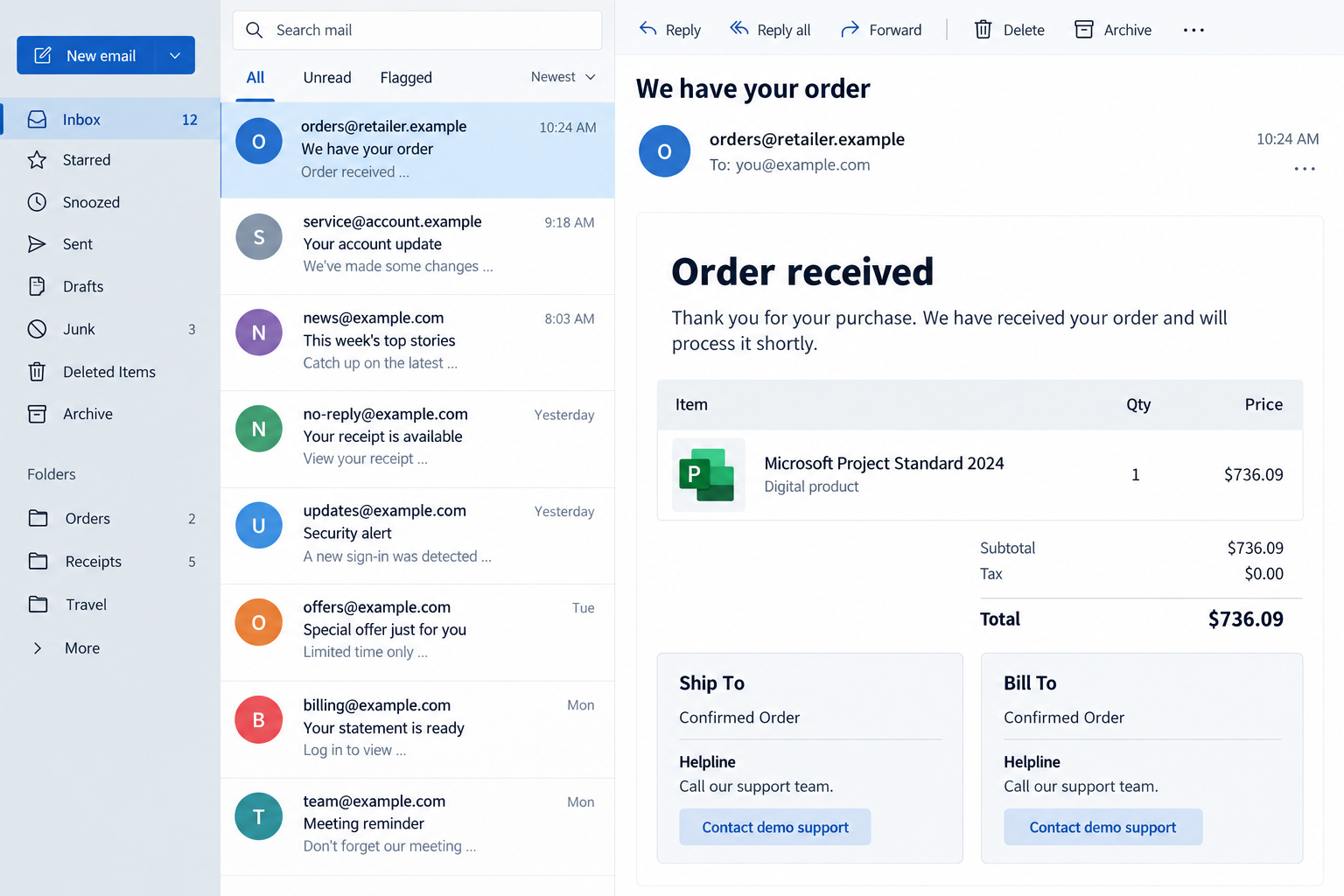
One sample presented a Staples iPad order. Another showed Microsoft Project Standard 2024 in a Dell notification, totaling $736.09.
Supposed helpline instructions appeared in shipping or billing fields. Those details describe the lure, not proof that the recipient bought the item or incurred a charge.
Sender authentication passed in the documented examples. Dell and Staples are legitimate retailers; the finding does not establish that their networks were breached.
Use the order details as something to check, not instructions to obey
- An unrecognized purchase is paired with a number positioned as the quickest way to resolve it.
- Fields intended for a name or address contain cancellation or support language instead.
- The sender’s familiar domain is being used to make the embedded request feel trustworthy.
- The message pressures you to contact its helpline before checking your actual account or payment records.
The image is an illustration with a fictional sender and demo support controls. The $736.09 product example comes from the research; no actual recipient’s order is shown.
How the Dell and Staples Order Email Scam Works
Step 1: The unexpected purchase creates a problem to solve
You don’t need to want an iPad or project-management software for this lure to work. The point is that somebody appears to have bought it without your permission.
A substantial price makes the email difficult to ignore. The recipient may concentrate on stopping the apparent charge before considering whether the message’s proposed solution is trustworthy.
Start with a separate question: does a matching transaction exist in the account or card record you normally use? The email cannot answer that by itself.
Do not invent an explanation that turns uncertainty into a confirmed purchase. An order number printed in a message is still something to verify.
Step 2: A trusted template gives untrusted text a convincing setting
Automated order emails contain details supplied through transaction workflows. A retailer can control the template without endorsing every word that appears in a customer-controlled field.
In this campaign, that distinction allowed support instructions to appear where ordinary shipping or billing information should have been.
The familiar footer, layout, and delivery language make the inserted text easier to accept as another official part of the confirmation.
But a helpline inside an address block is an instruction from that field, not proof of the retailer’s genuine support route.
Step 3: Sender checks make the wrapper reassuring
SPF, DKIM, and DMARC are email-authentication mechanisms. They help receiving systems assess whether a message’s delivery and domain claims meet technical checks.
They do not establish that you placed the order or that a telephone number inside the message belongs to customer service.
That limitation is easy to miss if you have learned that the main defense against phishing is spotting a slightly misspelled sender.
Checking the sender remains useful. It simply needs to sit alongside a check of the request itself: why am I being directed to this particular number?
Step 4: The supplied helpline moves the conversation off email
The requested action is a call. There need not be a visibly suspicious website link for the message to create a dangerous handoff.
Once you call, the person answering can frame the apparent order problem and tell you what supposedly needs to happen next.
A caller may encounter requests for credentials, payments, codes, or remote support in this broader kind of fraud. Those outcomes were not established for every Talos sample.
Judge any request by what it authorizes. A conversation about canceling an order should not give an unfamiliar person control over your computer or financial accounts.
Do not call just to discover whether the number is fraudulent. You can check the order through the real retailer without entering the attacker’s conversation.
Step 5: Apparent cancellation can become another unverified promise
If someone says the order has been canceled, check that through the genuine account or retailer. Their assurance is not an independent transaction record.
The same applies to a promised refund. A number in an email does not gain authority to issue refunds merely because the email looked authentic.
If a caller claims they refunded too much and asks you to send money back, stop. Let the bank verify actual transactions before you move funds.
A genuine transaction record, checked independently, matters more than a convincing explanation from the person asking you to move money.
How to Check an Order You Don’t Recognize
Open the retailer’s app or website through your usual route. Do not let the email’s number, reply address, or cancellation button choose your verification channel.
Review your order history and relevant payment records. Compare the item, amount, date, payment method, and delivery information where available.
If you find no matching order, contact the retailer through its established support page. Explain that an unexpected confirmation contains a number in the address fields.
If a matching charge exists, tell the retailer and payment provider. A fraudulent helpline does not prove that every associated financial concern is imaginary.
A pending card entry may need a different process from a completed transaction. Ask the issuer how it should be handled instead of following the caller’s instructions.
For a shared household account, check with other authorized users through your normal conversation. Do not provide their details to the email’s supposed support agent.
Keep the original message available for reporting. You can preserve it without keeping the fake helpline involved in resolving the actual account question.
What to Do if You Called the Number
- End the unverified call. Do not let the person transfer you to a supposed bank, fraud team, or technician. Choose those contacts independently.
- Identify what you disclosed. Note passwords, card details, identity information, authentication codes, approvals, payments, and any software you installed. Do not call back to reconstruct events.
- Check real transactions. Use your bank’s established app or phone number. Report any unauthorized charge or transfer and explain the relevant payment method.
- Replace exposed credentials. Change affected passwords through genuine services and review account sessions. Prioritize an exposed email account used for password recovery.
- Tell the bank about approvals. Explain any code you supplied or request you confirmed in an app. An approval may relate to more than order cancellation.
- Contain remote access if granted. Disconnect the affected device and contact workplace IT or qualified support. Secure sensitive accounts from a separate trusted device.
- Report the planted helpline. Use the genuine retailer’s reporting route. Provide the original email privately so investigators can examine its delivery and transaction fields.
- Keep case references and evidence. Save transaction receipts, call times, support tickets, and screenshots. Avoid posting account numbers or personal order details publicly.
The FTC’s recovery guidance covers payment and information exposure. Contact the relevant provider promptly rather than waiting for the caller’s promised correction.
If you only read the email and did not call, pay, disclose information, or run software, that alone does not establish compromise.
Likewise, making a call is not proof that malware was installed. Describe the actual actions so the response matches the exposure.
If remote access was involved, a later reassurance from the same caller is not a cleanup assessment. Use independent help to determine whether the device can be trusted.
For Work Inboxes and Shared Purchasing Accounts
A confirmation sent to finance or purchasing can look especially plausible. Those teams handle real orders and may not immediately recognize every item.
Check the request against the organization’s purchasing records before contacting a number embedded in the message. An internal purchase-order reference needs its own verification.
If a colleague forwarded the email, ask what they verified. A trusted coworker’s forwarding note does not change the origin of the suspicious helpline.
Give IT the original message rather than a cropped image alone. Headers and forwarding details can matter when a genuine notification pipeline was abused.
Keep financial investigation with the appropriate team. One employee should not approve a transfer to resolve an order that no one has matched to company records.
If staff received several similar messages, coordinate the warning through a clean internal route. Tell people which action to avoid, especially calling the planted number.
Do not describe the entire retailer as fraudulent in that warning. The useful finding is narrower: support instructions inside these notifications are attacker-controlled.
What to Notice Inside the Shipping and Billing Blocks
An address field normally identifies a person or destination. It should not be the place that persuades you how to cancel an unfamiliar charge.
Read such blocks as transaction data, not as an extension of the retailer’s help center. A phone number printed there can have a different origin.
Watch for repeated instructions that appear in both shipping and billing sections. Repetition can make the same planted request feel more official without adding another source.
A genuine corporate address elsewhere in the email does not validate the neighboring helpline. Familiar details can sit beside untrusted content.
You do not need to understand message-signing cryptography to use this check. Notice the mismatch, then reach the retailer through the contact route you independently trust.
A polished message can be worth reporting even without spelling mistakes. What makes this case deceptive is where the support instruction came from and where it leads.
Keep the Fraud Report Separate From the Refund Request
Reporting a malicious email tells the retailer about abuse. Requesting help with an actual charge asks it or the payment provider to resolve a financial record.
One does not automatically complete the other. Ask which team is handling each issue and retain the relevant references.
If no payment occurred, do not claim a financial loss merely because the email showed a price. Describe an attempted callback scam and the planted instructions.
If money did leave your account, keep that evidence. A subsequent reassuring email should not replace confirmation from the financial provider handling your case.
Be wary of anyone who approaches you afterward offering recovery for another fee. The original message does not authorize a stranger to become your refund agent.
If You Are Helping a Relative Check the Email
Start by asking whether they called the number and what happened next. That is more urgent than debating how authentic the retailer’s logo looks.
Help them open the real account or find support through an established website. Avoid using the planted helpline as a shortcut while explaining why it is suspicious.
Ask whether anyone requested a code, a transfer, a refund correction, or remote access. Specific questions are easier to answer than asking whether they were hacked.
If money moved, help them contact their payment provider promptly. Keep them involved in that conversation and let the provider explain its next steps directly.
Preserve the original email before deleting anything. A forwarded screenshot may omit the address-field placement that made this particular request deceptive.
Do not blame them for believing an authenticated message. The useful lesson is that a genuine email system can still deliver somebody else’s support instructions.
Agree to check any follow-up refund or security call independently. A reassuring second caller should not inherit trust simply by knowing about the original order email.
Frequently Asked Questions
Can a real retailer’s email contain a scam number?
Yes. Talos documented attacker-controlled instructions appearing inside legitimate order-notification workflows. The message’s outer delivery can be authentic while the helpline is untrustworthy.
Does a passing DMARC result prove the purchase is genuine?
No. Email authentication does not verify your purchase history, authorize a charge, or establish ownership of a telephone number inside the message.
Did Dell or Staples necessarily suffer a network breach?
The cited finding does not establish that. It concerns abuse of notification content and workflows, not proof that the retailers’ networks were compromised.
Were 1,400 people defrauded?
The research describes roughly 1,400 observed messages across two campaigns. It does not provide a corresponding number of callers, successful scams, or financial losses.
Should I call the number to cancel?
No. Use the retailer’s genuine website or app to find support and check the order. Do not make the suspicious message’s helpline your verification route.
Does receiving the email mean my computer is infected?
No. Receiving an order notice alone does not demonstrate infection. Device assessment becomes relevant if you ran software or allowed remote access during a follow-up conversation.
The Bottom Line
Do not call a helpline planted in an unexpected order’s shipping or billing fields. Check the purchase through the real retailer and your payment records.
If you already called, act on what you actually disclosed or approved. Contact the bank for financial exposure and independent technical help for any remote access.

Join the discussion
0 commentsShare your experience or ask a question about this article.
Discussion
Start the conversation
Have a question or something useful to share? Add the first comment.