

You search for Amazon Business and open a sponsored result. The sign-in page looks familiar, and a quick human check seems like a normal extra step.
Then the instructions leave the browser. Before you follow them, stop and look at what this supposed verification is asking your computer to do.
Overview
An Amazon-themed search ad led to a fake verification page
Huntress documented a malicious Amazon Business search-ad campaign that led visitors through a fake sign-in page into a ClickFix prompt.
The campaign affected at least three Huntress customers. The analyzed Windows chain delivered multiple threats, including Lumma Stealer and a pirated NetSupport remote-access client.
Google had removed the malicious ad by the time of the report. That does not establish whether every related page or replacement promotion has disappeared.
The dangerous action is disguised as proving you are human
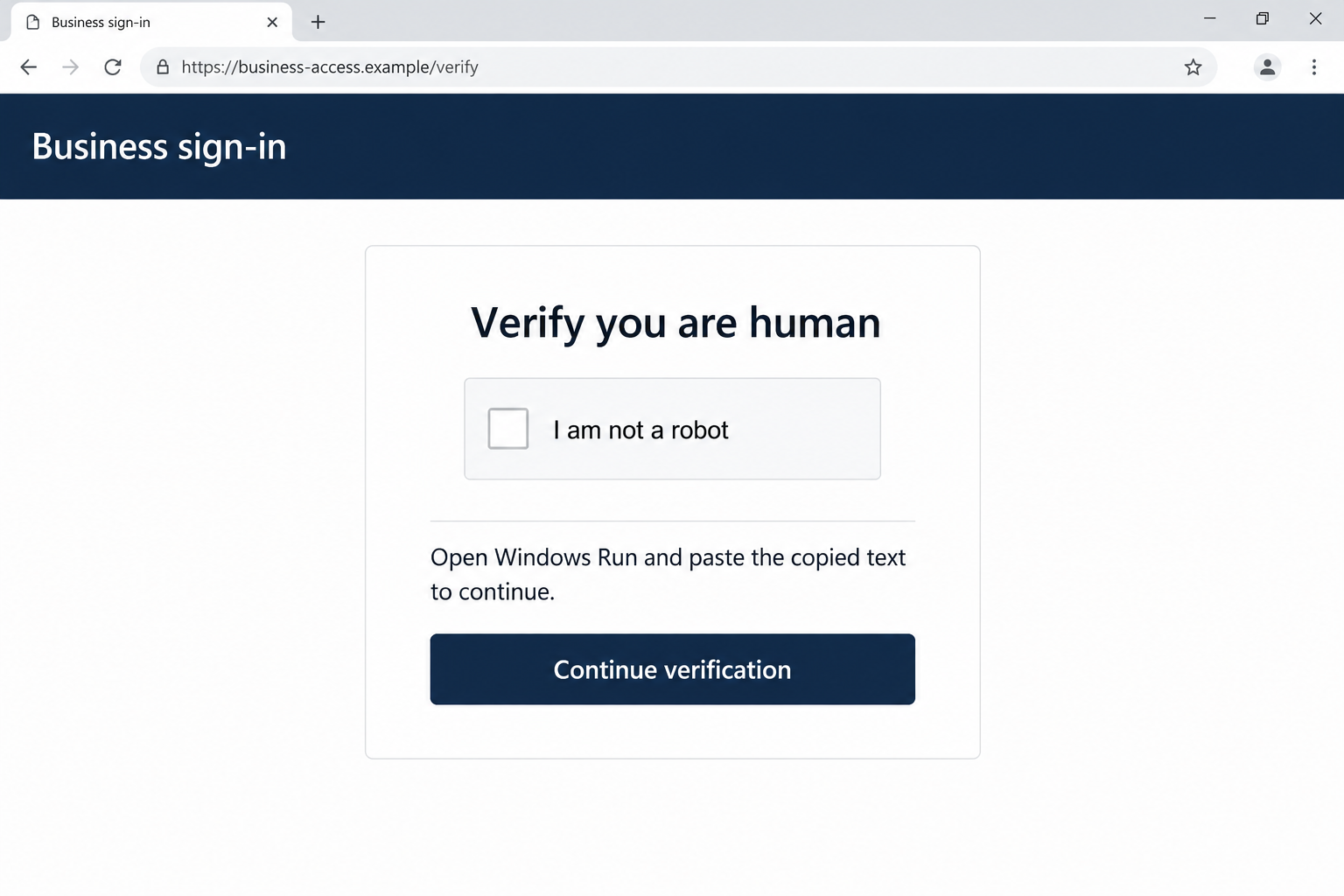
The fake CAPTCHA copied a command to the clipboard and told the visitor to run it through Windows. That command started the malware-delivery chain.
Some of the command was visually concealed by spacing. A Run box appearing to show a harmless instruction did not reveal everything that would execute.
Amazon Business and Google are real services being impersonated or abused. The finding is about the deceptive advertisement and its destination, not ordinary Amazon shopping.
Stop when the page asks for system commands
- A shopping or login page tells you to open Windows Run, PowerShell, or a terminal to complete a CAPTCHA.
- It asks you to paste clipboard content you did not deliberately write or inspect.
- The address uses familiar brand words inside a longer, unrelated domain.
- A failed verification becomes a reason to disable protection or repeat the command.
The image is a fictional interface illustration with a reserved example address. It contains no operational command and is not an original Amazon or campaign screenshot.
How the Amazon Business CAPTCHA Scam Works
Step 1: The sponsored result catches a routine search
The original task is ordinary: reach a business-shopping account. A prominent search placement offers a quick route, especially when you are already focused on buying or checking orders.
The reported lure used an Amazon-themed subdomain beneath an unrelated parent domain. Familiar words on the left did not make the destination part of Amazon.
A sponsored placement is a way for an advertiser to reach you. It is not a personal guarantee that its login and verification instructions are safe.
Use a bookmark or independently established address for an account you access regularly. That removes the search advertisement from the sign-in decision.
Step 2: A copied login page keeps the journey believable
The researched route led to a fake Amazon sign-in hosted through Google Sites. A recognizable hosting service did not make the page an authorized Amazon login.
That distinction is easy to miss when the page presents the expected colors, account fields, and business language. The attacker controls the content inside the hosted page.
Before entering an account identifier, check the destination. If you already supplied an email address, do not let that small disclosure persuade you to complete the remaining steps.
Step 3: The CAPTCHA changes from a browser check to a computer instruction
Many legitimate websites use human-verification tools. The scam takes advantage of that familiarity, then introduces an action a normal shopping CAPTCHA should not require.
The boundary is clear: you are being told to leave the page’s controls and run text through the operating system.
You do not need to understand the command to refuse it. A shopping page has no good reason to make you execute an unexplained command to prove your identity.
If a page claims this is a new security process, verify that independently with the real service. Its own explanation cannot authenticate its own instructions.
Step 4: The clipboard carries instructions you did not choose
The click on the fake verification control placed attacker-supplied content in the clipboard. Pasting then moved that content into a place where Windows could execute it.
That is different from copying a booking reference or product name. The destination of the paste changes what the text can do.
Do not paste suspicious clipboard contents into Run to inspect them. The risk is especially acute if habit makes you press Enter immediately afterward.
If you have copied something but not executed it, stop. Tell your helper that distinction instead of trying the command again to establish what it was.
Step 5: Built-in tools start a longer download chain
The Windows chain used the built-in finger utility as an early stage. A program being present in Windows does not make every use of it harmless.
One short command can download and launch more software. What fits inside the Run box may be only the beginning of what the computer will do.
You do not have to reproduce that technical chain to recognize the trap. The request to execute untrusted text is already enough reason to leave.
For administrators, preserve execution and detection records through the organization’s response process. Home users should avoid experimenting with the command or its download addresses.
Step 6: Different payloads create different recovery needs
An information stealer puts credentials and saved account access at risk. Remote-control software creates a separate concern about who can interact with the computer.
Finding one component does not settle whether another one ran. Nor does a quiet desktop prove that no information was taken.
The research also observed alternative Mac instructions, but their destination was offline during that analysis. Do not assume the documented Windows payloads describe every Mac visitor’s outcome.
Report the platform and actions you actually took. That helps the response focus on your exposure instead of treating every reader as infected in the same way.
How Far Did the Verification Go?
If you only saw the sponsored result, don’t open it again to investigate. Reach Amazon through your normal trusted route and report the questionable advertisement where appropriate.
If you visited the page but did not enter details or execute anything, close it. A page visit alone is not proof that the documented command chain ran.
If you entered an account password, replace it through the actual service. Check account activity and change any other account protected by the same password.
If you clicked the fake CAPTCHA but did not paste into a system tool, say that. Clipboard copying and code execution are different stages.
If you pasted into Run and pressed Enter, treat that as possible execution even if the window vanished or an error appeared.
Do not repeat a command to obtain a clearer result. A second attempt can create more activity while making the original timeline harder to reconstruct.
What to Do if You Ran the Verification Command
- Disconnect the suspect Windows device. Stop its network access and avoid banking, work logins, or password changes on it while the exposure is assessed.
- Notify workplace security promptly. Describe the Amazon Business search, fake CAPTCHA, command paste, and approximate time. Do not dismiss it as an ordinary login error.
- Preserve useful details. Retain the advertisement destination, browser history entry, detection names, and any screenshots already taken. Avoid reopening the malicious route.
- Protect accounts using another trusted device. Prioritize email, financial access, business accounts, and an unlocked password manager. Review sessions and recovery information as well as passwords.
- Check financial activity when relevant. Contact the genuine provider if you see an unauthorized transaction or believe banking credentials were exposed.
- Ask for a full device assessment. Mention both information-stealing and remote-access payloads. Removing a single visible program may leave the investigation incomplete.
- Plan trustworthy recovery. If persistence or system changes cannot be confidently resolved, discuss a clean reinstall with qualified support before using the computer normally.
A reinstall can erase data. Preserve needed evidence and personal documents first, and avoid restoring unknown scripts or downloads into the clean installation.
If you are unsure what executed, keep that uncertainty explicit. Your response team can work with incomplete recollection better than with an unjustified assurance that nothing happened.
Windows Checks After a Suspected ClickFix Infection
Use these as part of recovery, not proof that all stolen information or remote access has been undone. Company equipment should remain under the security team’s direction.
- Keep containment in place. Arrange advice from a separate device. Do not reconnect the suspect PC merely to download a cleaner from another search result.
- Consider the installed offline scanner. In Windows Security, select Virus & threat protection, open Scan options, and choose Microsoft Defender Antivirus (offline scan) when available.
- Save work before restarting. The offline scan reboots the computer. Afterwards, review Protection history and retain the results for the person helping you.
- Use a verified secondary scanner if advised. A technician can arrange Malwarebytes and select the relevant drives through its Custom Scan settings.
- Quarantine identified threats. Follow requested removal and restart steps. Do not restore a detected component because its filename resembles a legitimate utility.
- Investigate what remains. Repeated detections, unexplained remote software, or uncertain persistence require further review. A clean result is not a substitute for a trusted recovery decision.
Microsoft explains its scan options in the Windows Security guidance. Avoid disabling protection to make a verification page or removal procedure work.
When Malwarebytes is appropriate, use the established MalwareTips download route. Ignore cleaners offered by the fake page or an unsolicited support caller.
The vendor’s Custom Scan instructions use the Scanner tile’s three-dot menu, Advanced Scan, then Custom Scan. Configure the drives or folders before starting.
Custom Scan is currently listed as free. The Premium option is paid and optional; ongoing protection does not certify that this incident is resolved.
The Address Can Contain Amazon Without Belonging to Amazon
The reported advertising destination placed Amazon-related words in a subdomain of advancedfences[.]com. Reading only the familiar words would miss who controlled the parent domain.
Do not use that example as the only name to avoid. The reusable check is whether your actual destination is the service you intended to reach.
Similarly, Google Sites can host pages written by other people. Recognizing the hosting platform does not authenticate the page’s claim to represent Amazon.
For regular business purchasing, keep a shared, verified access route for staff. That is more dependable than having each employee select a fresh sponsored result.
Keep security reporting separate from normal shopping support. The real retailer can help with account and order concerns, while IT investigates any command executed on the computer.
If You Pasted Into Run but Did Not Press Enter
Do not continue to complete the supposed check. Cancel the Run dialog without executing its contents, then leave the page that supplied the instruction.
That can be an important stopping point. Pasting text into a dialog and launching it are different events, so describe which one happened as accurately as you can.
If you are unsure whether Enter was pressed, tell your helper. Do not replay the sequence to reconstruct it or test whether the command would have worked.
Keep suspicious clipboard content away from command windows. You can replace the clipboard by copying harmless text that you typed yourself, without running any system command.
Do not rely on the visible end of the pasted text to explain the whole instruction. The research showed how spacing could hide the meaningful part from casual view.
If IT needs the command for investigation, ask how it should be preserved safely. You do not have to execute it or publish it in a help request.
For unresolved personal-PC problems, use the established MalwareTips malware-removal help forum. Describe the incident and follow the helpers’ evidence-collection process.
Keep passwords, personal documents, and financial records out of public posts. A helper can ask for appropriate diagnostic information without taking over your bank account.
If the original shopping task is still unfinished, open Amazon independently after addressing the incident. Do not return to the advertisement to resume where you stopped.
Frequently Asked Questions
Is it normal to open Windows Run for an Amazon CAPTCHA?
No. Do not execute a command to complete this shopping-page verification. Leave the page and reach the genuine service independently.
Can a search advertisement lead to malware?
Yes. Huntress documented this sponsored-search route across multiple affected customers. Advertising placement does not authenticate the destination’s sign-in or system instructions.
Does clicking the checkbox always infect the computer?
The documented Windows chain depends on executing the supplied command. Clicking, copying, pasting, and pressing Enter are distinct actions and should be reported accurately.
Is the Windows finger utility itself malicious?
No. The campaign abused a built-in utility as part of its delivery chain. Do not delete legitimate Windows components solely because an attacker used them.
Did the same Windows malware infect Macs?
The researchers saw alternative Mac instructions, but that destination was offline during analysis. The documented Windows findings do not establish the same infection on every platform.
Will removing NetSupport settle the whole problem?
Not necessarily. Multiple payloads were involved, including information stealing. The device and potentially exposed accounts both need assessment; one removed program does not complete recovery.
The Bottom Line
Do not run commands to pass a CAPTCHA on an Amazon-themed shopping page. Leave the advertisement’s route and open your account through a trusted address.
If you already executed the instruction, contain the device and get qualified help. Secure potentially exposed accounts from another trusted device while recovery is assessed.

Join the discussion
0 commentsShare your experience or ask a question about this article.
Discussion
Start the conversation
Have a question or something useful to share? Add the first comment.