

A message arrives about your upcoming holiday. It knows where you booked, when you are staying, and enough details to sound like the reservations desk.
Then it says something needs fixing before your arrival. Before following the link, compare that request with the booking you already made.
Overview
Real reservation information is being used in fraudulent messages
RMS has confirmed phishing messages targeting accommodation guests through WhatsApp, text messages, and email. They quote genuine booking information and ask for card details or payment.
Some threaten to cancel the reservation unless the guest acts quickly. The linked website is not operated by RMS or the property it claims to represent.
RMS is a real accommodation-management provider. This warning concerns criminals misusing booking information and impersonating the provider or its customers.
The provider’s incident and a fake payment page are separate risks
RMS says a subset of guest contact and reservation information held in its system is involved. Its update says payment and credit-card details were not involved.
That does not make the linked payment form harmless. A guest who enters a card there may expose fresh financial information directly to the impostor.
The RMS incident page remains the place for provider updates. An operational service indicator is not a verdict that every related phishing message has disappeared.
What should trigger an independent booking check
- A message quotes your real stay dates but introduces a new payment or card-verification link.
- The sender threatens cancellation unless you respond outside your normal booking route.
- You are asked to confirm card details or make a payment through WhatsApp.
- The message’s contact information differs from the property details you already trusted when booking.
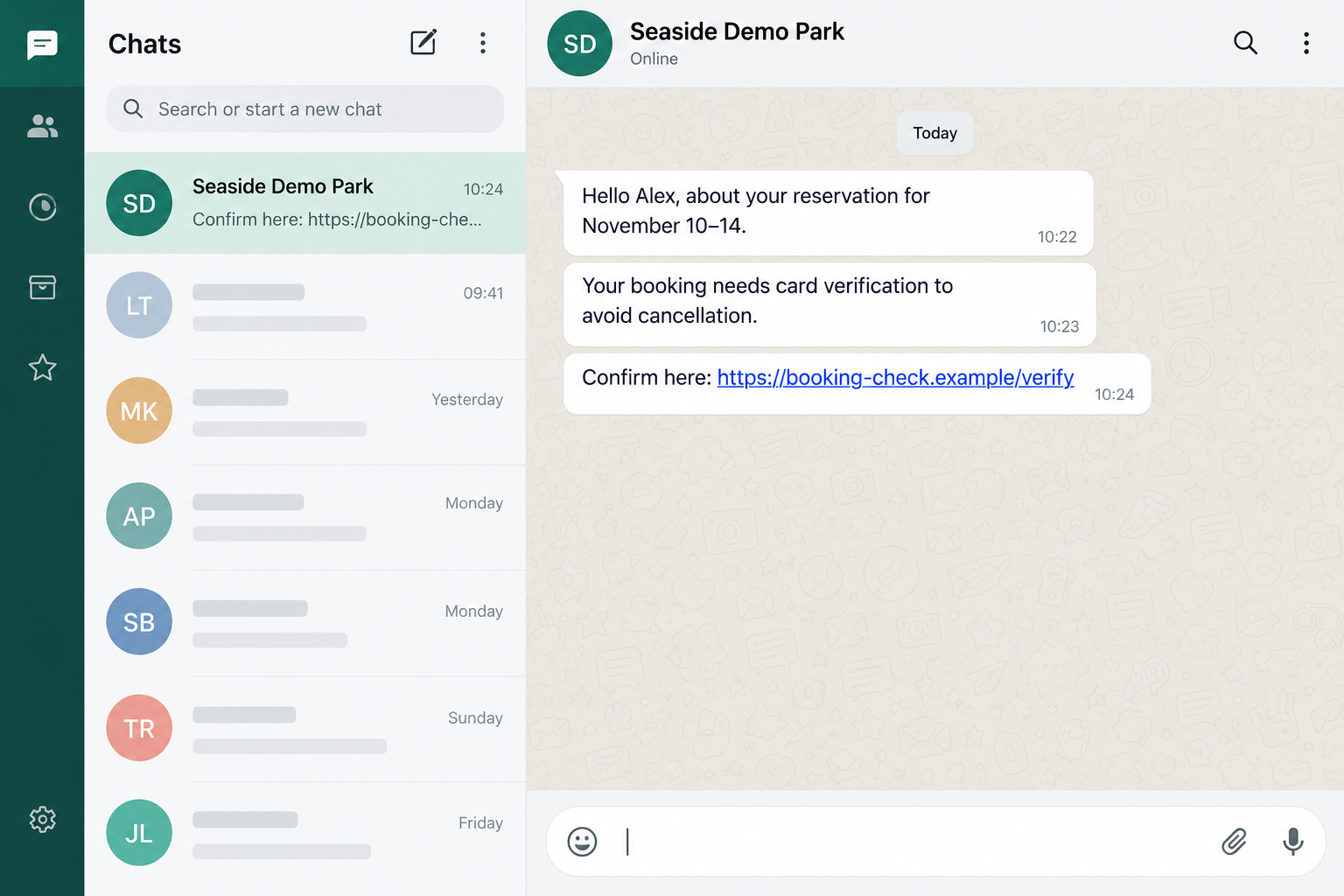
The image illustrates the pitch with fictional names, stay dates, and an example link. Seaside Demo Park and Alex do not represent an actual property or guest.
How the RMS Booking Message Scam Works
Step 1: Accurate details make the approach feel expected
Your holiday is already a real event. A message mentioning the same property and dates appears to fit something you know is happening.
That is much more convincing than a generic notice about an unknown reservation. The sender can borrow credibility from the plans you have already paid for.
Still, knowing a booking reference is not the same as being authorized to collect payment. Treat the information as context, not proof of identity.
Do not complete the sender’s picture by volunteering other reservations, your home address, travel companions’ details, or the card used for the original payment.
Step 2: A routine confirmation becomes an urgent problem
The supposed issue is framed as something small that you can fix now. Card verification sounds easier than losing accommodation shortly before a trip.
The cancellation threat changes the decision from whether you trust the request to whether you can afford to ignore it.
Pause at that change. A claim in a message does not itself alter your booking, and urgency does not establish that the sender controls the reservation.
You can check with the actual property before making any new payment. Use contact information you obtained independently of this message.
Step 3: The link moves payment away from your established route
A website can repeat your stay dates and still be controlled by an impostor. Information copied between the message and form is not independent confirmation.
Likewise, a familiar property photograph or booking-system layout can be copied. Focus on where you arrived and what you are being asked to disclose.
Do not use the page’s live chat to verify the page itself. That may simply keep you speaking with the person who supplied the fraudulent link.
If a page is blocked or fails to load, leave it. Do not disable browser warnings or try another device to finish the supposed verification.
Step 4: A guest may hand over information the incident did not expose
This is the key distinction for anyone reading the provider’s reassurance about payment data. Information not exposed in the incident can still be stolen afterward through deception.
A new form asking for your card number, security code, or banking approval creates a new decision. The original reservation does not authorize that request.
Read payment approvals carefully. If an approval concerns a purchase, transfer, or unfamiliar merchant, do not assume it is merely checking that your booking card works.
Should you reach this point, stop and contact your card issuer through its genuine app or established number. Explain what you entered and approved.
Step 5: The conversation can continue after you leave the link
A sender may offer reassurance when you hesitate or claim a failed attempt needs repeating. Neither explanation has been independently verified.
Do not submit another card because the first one supposedly failed. A rejected-looking screen cannot prove that the original details were discarded.
Save the conversation instead. The property and your bank will find the actual message and payment timeline more useful than an argument with the impostor.
How to Check Your Reservation Without Using the Message
Start with the confirmation you received when making the genuine booking. Use a trusted bookmark, the original booking account, or independently established property contact details.
Ask whether the property sent the specific request, whether your reservation remains valid, and whether any payment is actually due under the original terms.
Explain that the message knew real booking details. That helps staff understand why it looked credible without asking them to assume the new link is legitimate.
If you booked through an intermediary, open that service independently. Use its normal account and support route instead of a number supplied in the suspicious conversation.
Do not cancel and rebook simply because the message threatens cancellation. That can create extra costs while leaving the original reservation issue unresolved.
Keep any legitimate payment dispute separate. A real outstanding balance should be confirmed through the property’s established process, not settled through the unfamiliar message’s link.
RMS says it will not ask guests for card details or payment through WhatsApp. That is a concrete reason to stop this route and check elsewhere.
What to Do if You Entered Card Details or Paid
- Stop the verification attempt. Do not provide another card, authentication code, or payment approval. Leave the linked website and end the unverified conversation.
- Contact your card issuer immediately. Report that you entered details into a booking-related phishing page. Ask about blocking or replacing the card and reviewing attempted transactions.
- Describe every approval. Tell the bank if you entered a one-time code or confirmed a request in its app. Include the time, amount, and merchant shown.
- Report any actual payment accurately. Give the provider the transaction reference and payment method. Ask which fraud or dispute process applies, without assuming a refund is guaranteed.
- Verify the real reservation. Contact the accommodation through trusted details. Ask staff to record the impersonation attempt and confirm any genuine outstanding balance.
- Secure credentials if disclosed. Replace an exposed booking-account or email password through the real service, and change it elsewhere if you reused it.
- Keep useful evidence. Preserve the message, sender identifier, link, screenshots, and payment records. Share them privately with the property, bank, or relevant reporting service.
- Warn your travel companions. Tell anyone involved in the reservation that the payment request is being checked. Prevent another person from paying on your behalf.
The FTC’s payment-recovery guidance explains why contacting the payment provider promptly matters. The available options depend on how the money was sent.
A card replacement does not automatically resolve an existing charge. Ask the issuer which transactions need separate reporting and keep its case reference.
If the page asked for identity documents, mention that as well. Card protection and identity exposure require different follow-up.
Do not publish your booking confirmation or card statement in a public complaint. Those records can contain exactly the information another impersonator would like to reuse.
If You Only Received the Message
Receiving a targeted notice does not mean you paid a scammer or installed malware. Avoid the link and check your booking through the trusted route.
If you clicked but entered nothing, close the page and report the contact. Tell your helper if you downloaded a file or allowed browser permissions.
You do not need to scan your phone merely because WhatsApp displayed the message. Match the response to what happened rather than to the sender’s threats.
Once you have saved any needed evidence, use the messaging service’s normal block and report controls. Do not stay engaged to see whether the sender admits the fraud.
Remember that a second message can reuse the same details. A different account claiming to be the property’s security team still needs independent verification.
For Reception and Reservations Staff
Guests may be anxious because the fraudulent message contains details that seem available only to the property. Acknowledge that concern before explaining how to check the request.
Give staff one clear route for recording reports and escalating them to the responsible team. Avoid asking guests to post screenshots in public channels.
Explain your normal payment process in plain language. Guests need to know how your genuine requests arrive and where they can confirm a balance safely.
Do not ask guests to send card details back by email as part of the investigation. Direct financial exposure to the bank’s established fraud process.
Use RMS’s official incident guidance and customer-support channels for operational updates. An unexpected message about integration credentials should be verified with your usual support contact.
Keep those administrative steps separate from guest payments. A precaution involving integration credentials is not an instruction for guests to re-enter cards on a new page.
When reassuring a caller, confirm what your own records show. Avoid promising that no guest has lost money simply because payment information was not involved in the provider incident.
Before You Change Your Travel Plans
Write down the actual problem you are trying to solve. It may be a false message, an exposed card, or a genuine booking question, and each has a different contact.
The accommodation can confirm its reservation. The card issuer can address card exposure and transactions. RMS publishes provider-level incident information.
No single unfamiliar caller should take over all three jobs. Be cautious if someone claiming to help wants to supervise your bank conversation or obtain another approval code.
Keep records of what each genuine organization tells you. A short note of the date, case reference, and agreed action can prevent confusing the scammer’s instructions with real advice.
If you are traveling soon, contact the property early through its established route. You can resolve arrival questions without rushing into the message’s payment demand.
If the Message Arrives While You Are Traveling
A last-minute warning can be especially stressful when you are already on the road. The practical aim is to reach the real property without exposing more information.
Use the contact saved with your original booking, or open the booking provider’s app directly. Do not let the message’s reply button become your only available help.
If reception is busy or closed, keep trying through established channels. An impatient sender does not gain authority because the genuine staff cannot answer immediately.
Ask a travel companion to help check the original confirmation while you contact the property. Make sure neither person sends a separate payment during the verification.
Avoid entering financial information on a public or borrowed computer. Use your own trusted device and the bank’s normal route if card protection is needed.
If you are already at the accommodation, speak with reception directly. Show the message privately, without reading card numbers or authentication codes aloud.
Keep any genuine travel disruption separate from the phishing demand. The property can discuss arrival arrangements while the bank handles an exposed card.
You do not need to accept a second unfamiliar link merely to keep the trip moving. Confirm the reservation and payment position with the organizations that hold those records.
Once the situation is clarified, save the genuine response with your booking documents. That makes later messages easier to assess without repeating the whole conversation.
Frequently Asked Questions
How can the sender know my real booking details?
RMS says a subset of guest contact and reservation information is involved in its ongoing incident. Accurate details do not authenticate the person asking you to pay.
Did RMS say credit-card details were exposed?
No. Its update says payment and credit-card details were not involved. Entering a card into the fraudulent page can create a separate exposure afterward.
Will my booking be canceled if I ignore the link?
The message’s threat does not establish that. Check the reservation and any genuine balance directly with the property or your original booking service.
Is a WhatsApp card-verification request from RMS genuine?
RMS explicitly says it will not ask guests for card details or payment through WhatsApp. Leave that conversation and use independently verified contacts.
Does an operational status page mean the phishing is over?
No. Service availability and an unresolved phishing incident are separate facts. Read the incident updates rather than relying only on operational indicators.
Should I pay again through a second link?
Do not retry through another unverified link. Check with the property and bank first, especially if the first page claimed your card or payment failed.
The Bottom Line
Do not verify a card or send money through this booking-message link. Real reservation details are being used to make a fraudulent request look personal.
Check the booking with the actual property. If you already entered financial information or approved a payment, contact your bank immediately and preserve the message.

Join the discussion
0 commentsShare your experience or ask a question about this article.
Discussion
Start the conversation
Have a question or something useful to share? Add the first comment.