

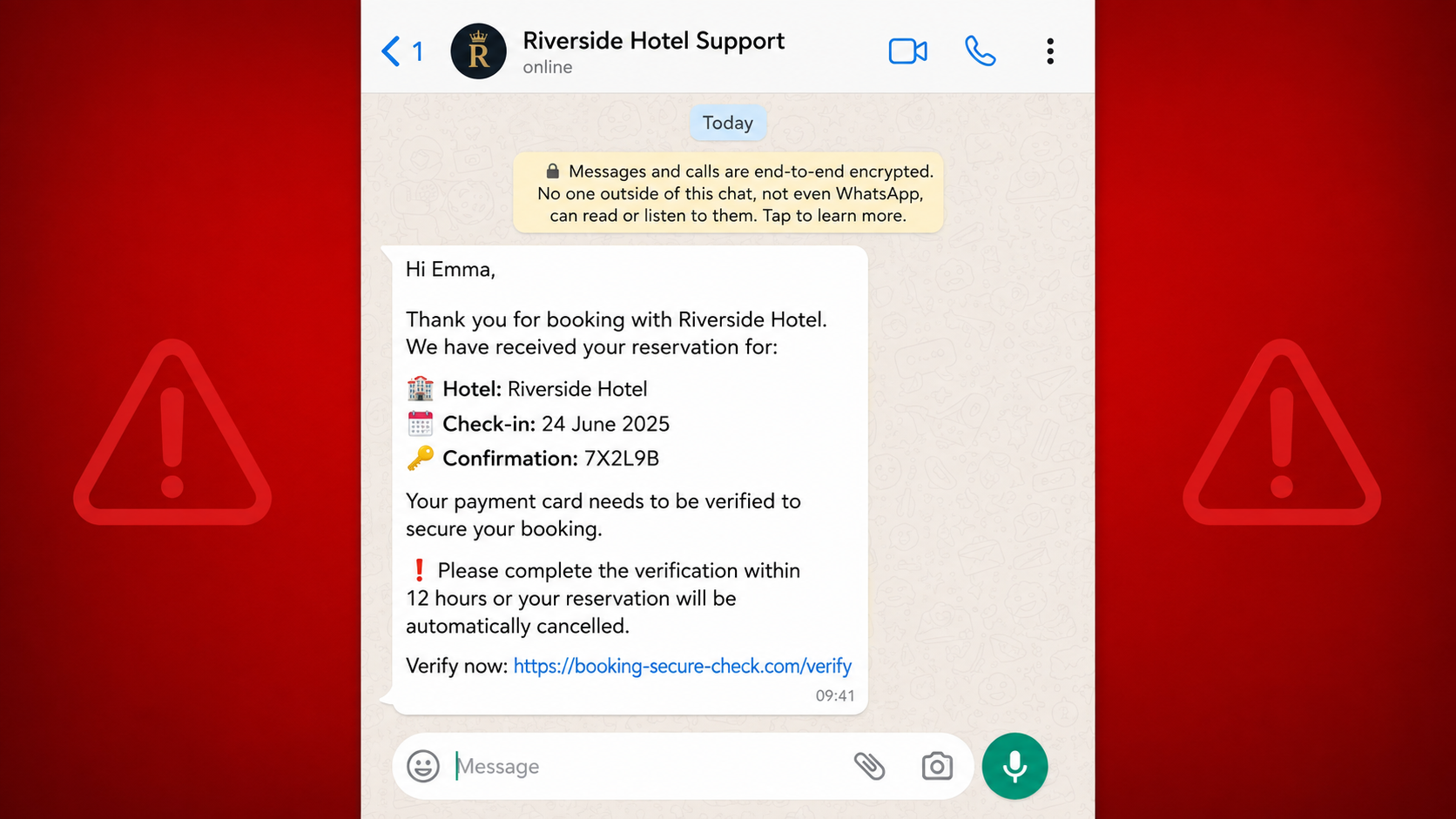
The message arrives while a real trip is already on your mind. It knows your name, the hotel, the dates, and perhaps even the reservation number. It says one final card check is required to keep the room.
That level of detail is what makes the hotel booking verification scam so convincing. The message does not look like random spam. It looks like a problem attached to a purchase you actually made.
Before you tap the link, pause. A real reservation can be used as bait for a completely fake payment page.
Overview
The message borrows details from a real booking
In this scam, a traveler receives an unexpected WhatsApp message, text, or email that appears to come from a hotel or booking platform. The sender may know the guest’s full name, the accommodation, arrival and departure dates, amount paid, or confirmation number.
The message claims the card must be verified again, the payment did not go through, or the hotel needs proof that the guest is legitimate. A short deadline follows. Complete the check within 12 or 24 hours, the sender says, or the reservation will be cancelled.
Those accurate details do not prove the message is genuine. Criminals have repeatedly abused compromised hotel or travel-industry accounts and stolen reservation data to make phishing messages feel personal. In some cases, the message may even appear inside a familiar booking conversation.
The link leads to a payment page controlled by criminals
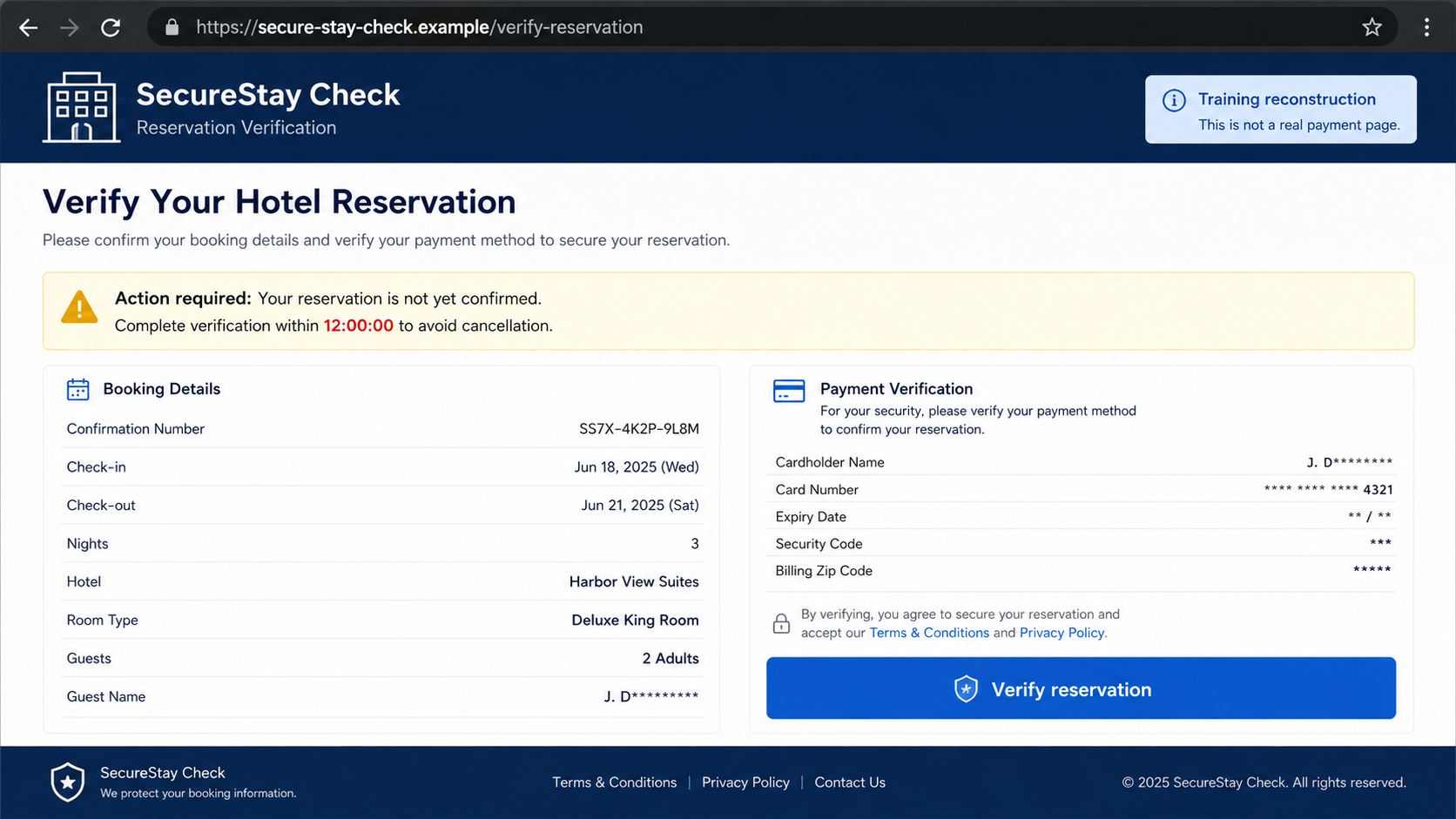
The button or URL opens a site designed to resemble a hotel checkout, a booking portal, or a card-verification service. It may display the same reservation details again, use a padlock icon, and show a support chat that answers questions in real time.
The page then asks for a card number, expiration date, security code, billing address, bank login, or one-time passcode. Some versions place a temporary charge on the card and promise it will be refunded. Others repeatedly claim the verification failed so the victim tries another card.
Nothing on that page protects the booking. The form sends the information to the operator, who can use it for purchases, wallet enrollment, account access, or a fraudulent transfer.
The hotel and booking platform may both be real
This is an impersonation attack. The real hotel may have no knowledge of the message, and the real booking platform is not the owner of a lookalike domain sent through WhatsApp.
Booking.com’s traveler safety guidance specifically warns that phishing messages can contain convincing stay details and urgent requests to reshare payment information. It also says card details should not be provided through email, phone, text, or WhatsApp.
Common warning signs include:
- An unexpected message moves the conversation to WhatsApp or text.
- The sender knows genuine reservation details but uses a new contact channel.
- A deadline threatens automatic cancellation.
- The link does not use the hotel’s or booking platform’s exact domain.
- The page asks for the full card again after the booking was confirmed.
- A support agent insists that a charge is only a reversible verification.
- The victim is asked for a one-time bank code.
- The page reports an error and asks for a second card.
- The message discourages calling the hotel directly.
How the Hotel Booking Verification Scam Works
Step 1: A real reservation creates the perfect moment
The target has already booked a room through a travel platform or hotel website. They expect messages about check-in, payment policies, late arrival, taxes, and identification. A request connected to the trip therefore feels more believable than an unrelated bank alert.
The attacker may obtain booking details from a compromised accommodation account, a stolen employee login, malware on a travel-business computer, or data passed through an exposed system. The exact source is not always visible to the traveler, so it is important not to accuse a particular hotel employee without evidence.
Step 2: The attacker sends a personalized warning
The message names the property and dates, then introduces a plausible problem. The card supposedly failed a pre-authorization, the reservation triggered an anti-fraud check, or a new policy requires identity confirmation.
The sender may use a hotel logo and a polite service tone. A WhatsApp Business-style profile can add a category, address, or picture, but those fields are not proof that the account belongs to the property.
Step 3: A cancellation deadline suppresses questions
The victim is told the room will be released if verification is not completed quickly. This is especially effective when the trip is close, the hotel is sold out, or replacement rooms would cost more.
The deadline does more than sound dramatic. It keeps the traveler inside the scammer’s process instead of calling the hotel, checking the original confirmation, or asking the booking platform for help.
Step 4: The fake page repeats the stolen booking details
After the link opens, the page may show the guest’s name, reservation number, price, and hotel photograph. Seeing the same data in two places feels like independent confirmation, but both the message and website can be controlled by the same operator.
A live-chat box may answer questions and explain that no new payment will be taken. The agent’s purpose is to prevent the target from leaving while the card form is completed.
Step 5: Card details and security codes are collected
The form asks for everything needed for a card-not-present transaction. If a bank sends a one-time code or approval prompt, the fake page labels it as reservation verification.
The real bank message may describe a purchase, wallet addition, or transfer. Read it literally. Entering that code can authorize the criminal’s action, not confirm a hotel room.
Step 6: Failed verification becomes a reason to try again
Some victims see a spinner followed by an error. The page says the bank declined the verification and requests another card. Each attempt gives the operator another usable payment method.
A small pending charge can also be used as reassurance. Criminals may reverse one transaction, make a larger one later, or test the card before selling its details. A refund does not prove the process was legitimate.
Step 7: The criminal cashes out and the booking remains unchanged
After the information is captured, the attacker may buy goods, add the card to a digital wallet, initiate transfers, or sell the data. The fake support account can disappear as soon as the bank blocks the first transaction.
The original reservation may still be valid because it was never the real target. In other cases, a compromised hotel account may be disrupted separately. Only the hotel and booking platform can confirm the actual status.
Why Accurate Reservation Details Are Not Proof
People are trained to look for generic greetings and obvious spelling mistakes. This campaign removes those easy clues. It uses information that only a guest, hotel, or booking service should know, so the victim naturally assumes the sender must be part of the transaction.
Official warnings show that this is not a hypothetical concern. The Swiss National Cyber Security Centre reported an increase in fraudulent WhatsApp messages containing real booking details. The Singapore Police Force has also documented hotel-related phishing that moves travelers to fake payment pages and captures card details and one-time passwords.
The correct test is not whether the message knows something private. The correct test is whether the request can be confirmed through a channel the sender did not provide.
Open the booking app yourself, type the platform address manually, or call the accommodation using the number on its official website. Do not use a phone number, link, or chat button inside the suspicious message.
A Two-Minute Check Can Expose the Fake
Leave the message closed and look at the reservation from a second route. If the official app shows the room as confirmed and contains no payment warning, the WhatsApp deadline has already lost much of its credibility.
Next, call the property using a number from its own website or your original confirmation, not the number displayed by the sender.
Ask one narrow question: does this reservation require a new card verification today? You do not need to explain the link or repeat card details. A genuine hotel can answer from its reservation system.
If the property cannot see the demand, forward the suspicious message to the booking platform’s fraud team and let them investigate the account.
This independent check also protects you when the message arrives inside a legitimate conversation. The communication channel may be real while the person using it is not. The safest evidence comes from a second channel that the sender cannot control.
Company, Address, and Fulfillment Checks
Verify the hotel through a separate source
Find the property website independently and call its published number. Ask whether the reservation is active and whether any payment action is genuinely required. A real employee should be able to locate the booking without asking you to read a card number over WhatsApp.
Inspect the complete website address
A domain containing words such as booking, hotel, secure, guest, or verify can still belong to anyone. The decisive portion is the registered domain immediately before the final extension. A long subdomain or HTTPS padlock does not create ownership.
Compare the payment policy with the original confirmation
Review when and how the property said it would charge you. A sudden request for a second payment method, refundable authorization, or bank transfer that conflicts with the confirmation needs independent verification.
Treat changing contacts and domains as part of the campaign
These operators rotate WhatsApp numbers, profile names, and websites. Searching one phone number may produce no results even when the scam pattern is widespread. Focus on the behavior: stolen booking details, urgent cancellation, an outside link, and a request for financial secrets.
What to Do if You Have Fallen Victim to This Scam
- Stop using the page and end the chat. Do not retry with another card, send a screenshot, or follow instructions from a person claiming to reverse the transaction.
- Call the card issuer immediately. Use the number printed on the card or inside the official banking app. Explain that the details were entered on a hotel booking phishing page.
- Replace exposed cards. Ask the issuer to block the number, review pending authorizations, stop wallet tokens, and watch for recurring or delayed transactions.
- Report any one-time code you entered. Tell the bank exactly what the real code message said. It may have approved a purchase, new device, wallet enrollment, or transfer.
- Secure the booking account and email. Change unique passwords from a clean device, sign out other sessions, review recovery details, and enable multifactor authentication.
- Confirm the reservation independently. Contact the hotel and booking platform through official channels. Ask them to record the phishing report and tell you whether the stay remains active.
- Preserve evidence. Save the message, profile, full URL, screenshots, timestamps, card alerts, and transaction references. Do not revisit the phishing link merely to collect more.
- Check the device. If a file, app, profile, or browser extension was installed, disconnect it from sensitive accounts and run a full Malwarebytes scan.
- Reduce exposure to repeat links. After the device is clean, a tool such as AdGuard can block many known phishing and malicious-ad destinations. It cannot authenticate a hotel message, so independent verification is still required.
- Report the fraud. Notify the messaging platform, the booking service, the hotel, and the relevant national fraud-reporting authority. Financial loss should also be reported to local law enforcement when appropriate.
- Ignore recovery offers. A stranger who promises to recover card payments for an upfront fee is attempting a second scam.
Frequently Asked Questions
How did the scammer know my real hotel and dates?
The information may have come from a compromised accommodation account, stolen employee credentials, malware, or another exposed travel system. Accurate details prove access to data, not authority to request a payment.
Can a hotel legitimately ask me to verify a card?
Hotels can have genuine payment and pre-authorization policies. The safe response is to contact the property through a number you found independently and complete any necessary action only through its confirmed process.
Is a message inside a booking platform automatically safe?
No. If an accommodation account is compromised, criminals may send messages through a real conversation. Treat an unexpected outside link or new payment demand as suspicious regardless of where it appears.
What if I clicked but entered nothing?
Your risk is usually much lower if you submitted no information, downloaded nothing, and granted no permissions. Close the page, remove any download, update the browser, and monitor the account for follow-up messages.
Will cancelling my card cancel my hotel reservation?
Not necessarily, but payment policies differ. Tell the hotel and booking platform that the card was replaced after phishing and ask whether a valid payment method must be updated through the official account.
Should I trust a verification charge that is refunded?
No. A small authorization or refund can be used to test a stolen card and build confidence. Confirm the entire request independently, and replace the card if its full details were submitted to a fraudulent page.
The Bottom Line
The hotel booking verification scam succeeds because the story begins with a real reservation. Names, dates, prices, and confirmation numbers make the warning feel private, but they do not make the sender or link legitimate.
Never protect a booking by surrendering card details or a bank code through an unexpected message. Open the official app, call the hotel using a published number, and let an independent channel tell you whether anything is actually wrong.

Join the discussion
0 commentsShare your experience or ask a question about this article.
Discussion
Start the conversation
Have a question or something useful to share? Add the first comment.