

A defragmenter for SSD? Is it need it?
- Thread starter nsm0220
- Start date
You are using an out of date browser. It may not display this or other websites correctly.
You should upgrade or use an alternative browser.
You should upgrade or use an alternative browser.
- Status
- Not open for further replies.
D
Deleted member 178
SSD = no defragmenter needed unless you want reduce its lifespan, you have TRIM function for it, and even Windows can defrag it.

How do i use the TRIM?SSD = no defragmenter needed unless you want reduce its lifespan, you have TRIM function for it, and even Windows can defrag it.

Here you go: Verify That TRIM Is Enabled In Windows 7 - gHacks Tech NewsHow do i use the TRIM?
Ghacks said:The second option requires no third party software. Users need to start a command prompt with elevated rights. This is done by clicking on the start orb, then All Programs, Accessories, right-clicking on Command Prompt and selecting Run as Administrator.
Now execute the command fsutil behavior query DisableDeleteNotify and take a look at the result.
Two results are possible:
If TRIM is not active on the system, which can be the case if the SSD has not been properly recognized, if it is to slow or if drivers have not been properly installed.
- DisableDeleteNotify = 0: This indicates that TRIM is enabled and working on the operating system.
- DisableDeleteNotify = 1: This means that TRIM is not enabled, and that SSDs will therefor not benefit from it.

As far as defrag goes, as @Umbra said, there is no need do this for a SSD.

You must never defrag an SSD, as @Umbra stated the TRIM feature is responsible for optimum performance of your SSD. I another way when you defrag your SSD it will be generate more writes over the device and gradually if you have it in warranty then you might get it expired soon as well as the lifespan will be reduced.

Good that I saw this post. I just upgraded my HDD to SSD  and RAM from 8 GB to 12 GB
And I must say .. I am really liking the SSD. Should have upgraded earlier
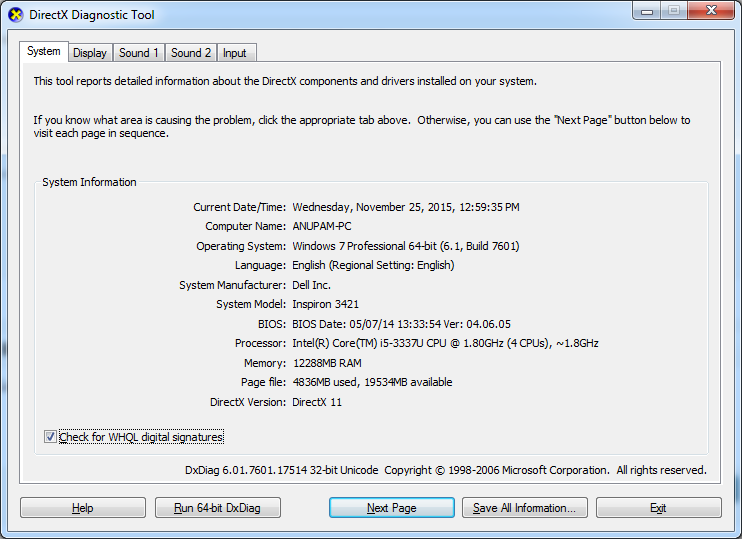
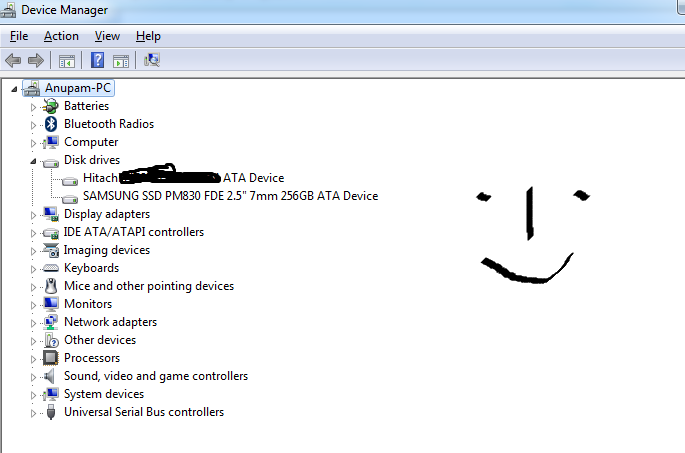
and RAM from 8 GB to 12 GB And I must say .. I am really liking the SSD. Should have upgraded earlier
Last edited:
L
LabZero
SSD defragmentation is unnecessary.
The drive reads the data at the same rate in all cells, so if the data is contiguous or fragmented is exactly the same, there is not a decrease in performance. In the long time It's damaging.
SSD defrag. it is totally useless and, even if someone says otherwise, we know that an SSD has a fairly long life cycle, but well defined: arrived at some limit of write/erase disk operations, It will stop working. It's therefore very important to save the write/erase cycles, so it's best to avoid unnecessary loops, such as those caused by defragmentation.
TRIM allows the operating system to indicate the data blocks that are no longer used on an SSD: for example the free areas (after deleting one or more files ).
This doesn't happen on the traditional HDD where files are only marked as "deleted" (it's so easy for you to retrieve them).
On SSD, if the operating system supports TRIM, the files are permanently deleted and they are unrecoverable. So it is useless to any operation of wiping that, as in the case of defragmentation, because of the large number of writes performed, reduce the life of the unit.
The drive reads the data at the same rate in all cells, so if the data is contiguous or fragmented is exactly the same, there is not a decrease in performance. In the long time It's damaging.
SSD defrag. it is totally useless and, even if someone says otherwise, we know that an SSD has a fairly long life cycle, but well defined: arrived at some limit of write/erase disk operations, It will stop working. It's therefore very important to save the write/erase cycles, so it's best to avoid unnecessary loops, such as those caused by defragmentation.
TRIM allows the operating system to indicate the data blocks that are no longer used on an SSD: for example the free areas (after deleting one or more files ).
This doesn't happen on the traditional HDD where files are only marked as "deleted" (it's so easy for you to retrieve them).
On SSD, if the operating system supports TRIM, the files are permanently deleted and they are unrecoverable. So it is useless to any operation of wiping that, as in the case of defragmentation, because of the large number of writes performed, reduce the life of the unit.

As others said, SSD does not need defragmentation method; as the concept goes of not using mechanical component + the lifespan are very sensitive which why installing and removing other files will definitely affect and only TRIM method should remove unneeded blocks.
Just appreciate the overall benefits of having SSD for the meantime.
Just appreciate the overall benefits of having SSD for the meantime.
As others said, SSD does not need defragmentation method; as the concept goes of not using mechanical component + the lifespan are very sensitive which why installing and removing other files will definitely affect and only TRIM method should remove unneeded blocks.
Just appreciate the overall benefits of having SSD for the meantime.
Is SSD's lifespan very small compared to magnetic disk? Is there a way to check health of SSD ( other than Intel)? I am getting little worried now
because it costed me a good amount of money ( I could have both 2 TB of normal HDD in the same money of 256 GB SSD )
Is SSD's lifespan very small compared to magnetic disk? Is there a way to check health of SSD ( other than Intel)? I am getting little worried now
If you feels your SSD speed is getting slower and slower every day( no malware), than that indicate it about to die. Which is not bad consider HDD just randomly die, and when that happen you lost all your important files permanently. Unlike SSD, it alert you and give you time to back up before it about to die. Also, SSD intend to last longer than HDD because it consume less power, no moving parts, and less heat generate which result longer life span and reliable.

@Anupam You connected the drive on sata 3?
Just get crystaldiskinfo and take a screenshot so we can check if you are on sata 3, if your drive is aligned and if trim is on. Linked you to the portable version. Btw maybe hide your serial number from the screenshot
Just get crystaldiskinfo and take a screenshot so we can check if you are on sata 3, if your drive is aligned and if trim is on. Linked you to the portable version. Btw maybe hide your serial number from the screenshot
Code:
http://jaist.dl.osdn.jp/crystaldiskinfo/63423/CrystalDiskInfo6_5_2.zip
Last edited:
@Anupam You connected the drive on sata 3?
Just get crystaldiskinfo and take a screenshot so we can check if you are on sata 3, if your drive is aligned and if trim is on. Linked you to the portable version. Btw maybe hide your serial number from the screenshot
Code:http://jaist.dl.osdn.jp/crystaldiskinfo/63423/CrystalDiskInfo6_5_2.zip
Thanks for the info. Also I removed the serial number with the help of my artistic talent
You could find a reliable program in order to monitor your hard disk health status, and I use the same software until now, and I trust its work.Is SSD's lifespan very small compared to magnetic disk? Is there a way to check health of SSD ( other than Intel)? I am getting little worried now
Its called Hard Disk Sentinel.
With this software you can also monitor other hard disks and other storage drives simultaneously. It show how many days your HDD life remains and with number of days used. Check it out and you will love this program.
Apart from this if your manufacturer has provided any software with the SSD, you can install it and it may also function the same way as HD Sentinal.
I edited my 1st post. Are you not able to see the picture in it? :S I can see it though. Not sure what is the problem.@Anupam Can't see the image mate. You forgot to attach it?
No clue i just see the first 2 images. Even checked with another browser. Maybe try pming me the link if you want or check of your own if you have sata/600 in transfer mode and trim in features.


I'm very satisfied with this soft...
Tweak-SSD for SSD 'drives' on Windows 7, Windows 8 and Windows 10 - Totalidea Software
Tweak-SSD for SSD 'drives' on Windows 7, Windows 8 and Windows 10 - Totalidea Software
No clue i just see the first 2 images. Even checked with another browser. Maybe try pming me the link if you want or check of your own if you have sata/600 in transfer mode and trim in features.
here you go ..

Jealous just a bit.Good that I saw this post. I just upgraded my HDD to SSD
And I must say .. I am really liking the SSD. Should have upgraded earlier
View attachment 76947 View attachment 77004
- Status
- Not open for further replies.
You may also like...
-

-
-
-
 Advice Request At What TBW Percentage Do You Start Taking Action to Reduce Writes to the SSD as Much as Possible?
- Started by lokamoka820
- Replies: 32
-