Security News AI-generated passwords are a security risk

Brownie2019

Level 23
Thread author
Verified
Well-known
Forum Veteran
Mar 9, 2019
969
4,663
2,168
Germany
Using Artificial Intelligence (AI) to generate your passwords is a bad idea. It’s likely to give that password to a criminal who can then use it in a dictionary attack—which is when an attacker runs through a prepared list of likely passwords (words, phrases, patterns) with automated tools until one of them works, instead of trying every possible combination.
AI cybersecurity firm Irregular tested ChatGPT, Claude, and Gemini and found that the passwords they generate are “highly predictable,” and not truly random. When they tested Claude, 50 prompts produced just 23 unique passwords. One string appeared 10 times, while many others shared the same structure.
This could turn out to be a problem.
Traditionally, attackers build or download wordlists made of common passwords, real‑world leaks, and patterned variants (words plus numbers and symbols) to use in dictionary attacks. It requires almost no effort to add a thousand or so passwords commonly provided by AI chatbots.
AI chatbots are trained to provide answers based on what they’ve learned. They are good at predicting what comes next based on what they already have, not at inventing something completely new.
As the researchers put it:
“LLMs work by predicting the most likely next token, which is the exact opposite of what secure password generation requires: uniform, unpredictable randomness.”
In the past, we explained why computers are not very good at randomness in the first place. Password managers get around this fact by using dedicated cryptographic random number generators that mix in real‑world entropy, instead of the pattern‑based text generation you see with LLMs.
In other words, a good password manager doesn’t “invent” your password the way an AI does. It asks the operating system for cryptographic random bits and turns those directly into characters, so there’s no hidden pattern for attackers to learn.
A website or platform where you submit such passwords may tell you they’re strong, but the same basic reasoning as to why you shouldn’t reuse passwords applies. What use is a strong password if cybercriminals already have it?
As always, we prefer passkeys over passwords, but we realize this isn’t always an option. If you have to use a password, don’t let an AI make one up for you. It’s just not safe. And if you already did, consider changing it and add multi-factor authentication (2FA) to make the account more secure.
 
The core takeaway in that quote is correct: using a public LLM (ChatGPT/Claude/Gemini, etc.) as a “password generator” is not a safe replacement for a proper cryptographic random generator.

Why AI-generated passwords tend to be risky
  • Predictability / patterns: LLMs are designed to produce likely-looking text. Even when they output “random-looking” strings, they commonly reuse structures (word+digits+symbol, certain lengths, common substitutions, etc.). That makes them more “wordlist-friendly” than truly random passwords.
  • Not uniform randomness: Secure password generation needs uniform, high-entropy randomness (CSPRNG). LLM output is influenced by training data and token probabilities, which is fundamentally the wrong goal for password generation.
  • Operational risk (privacy): If you ever paste a real password (or anything close to it) into an AI prompt for “improvement,” you’re disclosing a secret to a third party. Even if a provider claims not to “store” something long-term, it’s still unnecessary exposure.

What to do instead (safe options)
  • Use a reputable password manager’s built-in generator (Bitwarden, 1Password, KeePass, etc.). These use the OS CSPRNG and can generate long, truly random passwords.
  • Prefer passkeys when available (they avoid the “guessable secret” problem entirely for most common attack paths).
  • Enable MFA/2FA (authenticator app or hardware key is generally stronger than SMS).
  • If you need a memorable option: use a long passphrase made with a real random method (for example, diceware-style word selection), not “a phrase the AI invents.”

If someone already used an AI-generated password
  • Change it to a password-manager-generated random one (longer is better; 16+ characters is a common baseline, 20–30 is even better if the service allows).
  • Turn on MFA/2FA.
  • Make sure it is not reused anywhere else.

Bottom line: LLMs are fine for explaining security concepts, but password generation should be done with a cryptographic random generator (password manager/OS), not with AI text generation.
 
  • Like
Reactions: [correlate]
Trusting AI to create passwords is like asking a poet to roll dice: it may do it with grace, but never with real entropy. Security doesn’t live in metaphors, but in mathematical chaos. Let AI teach us concepts, yes; let it generate keys, never. In the end, code is the tool, but security is the purpose. 🔒🎲📐
 
Are online password generators using AI?

 
When needed, I use F-Secure's online password generator.

Online password generators like F-Secure generally do not use AI to create passwords; they use cryptographically secure pseudo-random number generators to produce random strings of characters. While AI (like ChatGPT) can generate passwords, they are often predictable or less secure compared to traditional, truly random algorithms, making dedicated tools more secure.
 
Last year I found a powershell script that a good friend of mine made for me, I thought I had lost it before I found it back. So now everytime I need a strong password I use that script in Powershell, and it works great for me that way.
 
If a PowerShell script is correctly implemented with a cryptographically secure generator, it can be a good option. In practice, for those of us who do not have those skills, without reviewing the code there are no guarantees, and it is usually more reliable to use the built-in generator of a recognized password manager, because it eliminates doubts about the quality of the algorithm and entropy.🔐📊🌐
 
Last edited by a moderator:
Standard AI models are pattern-matching engines, meaning they are intrinsically bad at true randomness. If you ask an AI to just "make up a password," it generates a predictable sequence that looks random to humans but is easily cracked by hackers using automated tools.

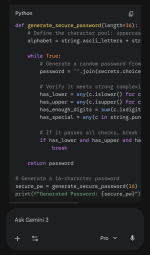
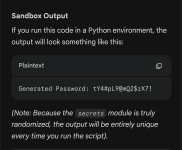
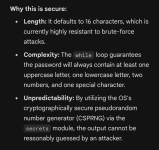
To get a truly secure password, we don't let the AI guess. Instead, we instruct the AI to act as a programmer and write a secure Python script inside an isolated "Sandbox." Python has built-in, cryptographically secure tools designed specifically to generate true randomness. By running the code, the AI taps into the operating system's secure random number generator. It’s the exact difference between asking someone to pick a random number out of thin air versus handing them a pair of casino dice and having them roll for you.

1000013906.png

1000013904.png


1000013905.png
 
Last edited by a moderator:
Are online password generators using AI?

No, they don't. They use algorithms to generate passwords.
 
Why do you suspect they use AI? I don't think the Bitwarden online generator is open-sourced (though it may be derived from it), but if they used AI for the product's generators, there would most likely have been outcries, or there soon will be.
I do not know if they are using or not, but being online make the suspicion justifiable.
I would stick to Keepassxc pw generator as a precaution.
 
I do not know if they are using or not, but being online make the suspicion justifiable.
I would stick to Keepassxc pw generator as a precaution.
It's much more straight-forward for a website just to use tried-and-true algorithms. I can't imagine justifying AI queries in this case.

You can't go wrong using a reputable password manager to generate passwords. I let Proton Pass do it for me. It even has a neat option for memorable random passwords.
 
You can't go wrong using a reputable password manager to generate passwords
While using Keepassxc, I utilize its generator, but sometimes I keep credentials as txt inside password protected archiver, here I resort to online generator.
 
Standard AI models are pattern-matching engines, meaning they are intrinsically bad at true randomness. If you ask an AI to just "make up a password," it generates a predictable sequence that looks random to humans but is easily cracked by hackers using automated tools.

To get a truly secure password, we don't let the AI guess. Instead, we instruct the AI to act as a programmer and write a secure Python script inside an isolated "Sandbox." Python has built-in, cryptographically secure tools designed specifically to generate true randomness. By running the code, the AI taps into the operating system's secure random number generator. It’s the exact difference between asking someone to pick a random number out of thin air versus handing them a pair of casino dice and having them roll for you.

View attachment 295791

View attachment 295792


View attachment 295793
What about passphrases? Our creating 4 to 5 random words with random keyboard symbols in-between or/and at the beginning and end, for those who may not use, want to use or instruct AI?
 
It's much more straight-forward for a website just to use tried-and-true algorithms. I can't imagine justifying AI queries in this case.

You can't go wrong using a reputable password manager to generate passwords. I let Proton Pass do it for me. It even has a neat option for memorable random passwords.
I use Proton Pass too, but at times I found it a little "glitchy" where it may not remember a new password I created, so I open F-Secure's in Chrome, and in Brave or the desktop app I open Proton, edit a password and copy and paste the new one in, and make sure it takes. I still have the Chrome browser open so I can verify it in Proton, the newly created password before I close out of it.
 
What about passphrases? Our creating 4 to 5 random words with random keyboard symbols in-between or/and at the beginning and end, for those who may not use, want to use or instruct AI?
To clarify, my original example was mostly to prove a point, the author of that article clearly doesn't know how to use AI, because the technology is actually very capable of generating highly complex passwords if prompted correctly.

However, for real-world use, your point is excellent. What you are describing, a 'passphrase,' is exactly what cybersecurity professionals recommend. Because length is the most important factor in defeating brute-force attacks, a 25-character phrase made of 4 or 5 random words is incredibly secure, yet much easier on the human brain than a string of random letters. Throwing in those keyboard symbols perfectly handles the strict 'must contain a special character' rules that most sites have. Your instinct to keep actual passwords out of AI is spot on, using a physical dictionary, dice, or an offline password manager is definitely the way to go.