

Appguard's News Thread (2017)

  • Thread starter Thread starter Deleted member 178
  • Start date Start date
Status
Not open for further replies.
So these are the popups I want to get rid of (but still keep appearing).

Also, after I captured this ss and tried to open the file, I got a message that it could be a possible virus. Assume this is due to Appguard as I have never had a problem like this until after installing AG.

Thanks.
 

Attachments

  • Capture.png
    Capture.png
    19.4 KB · Views: 542
So these are the popups I want to get rid of (but still keep appearing).

Also, after I captured this ss and tried to open the file, I got a message that it could be a possible virus. Assume this is due to Appguard as I have never had a problem like this until after installing AG.

Thanks.
All blocks from appguard give that msg. It's normal and it doesn't mean it's a virus. Appguard doesn't care what it blocks, it only cares where it's launched from.
 
All blocks from appguard give that msg. It's normal and it doesn't mean it's a virus. Appguard doesn't care what it blocks, it only cares where it's launched from.

Oh I realize it is not a virus, my question is. How can I open the file?
 
So these are the popups I want to get rid of (but still keep appearing).

Also, after I captured this ss and tried to open the file, I got a message that it could be a possible virus. Assume this is due to Appguard as I have never had a problem like this until after installing AG.

Thanks.

In that alert at the bottom there should be a blue line that says don't show this alert again. Just select it.

AppGuard does not notify that something may or may not be a virus. It just blocks by default with pop-up, toaster alert and blinking tray icon.

Look in the Activity Report for what was blocked.
 
  • Like
Reactions: Trooper
In that alert at the bottom there should be a blue line that says don't show this alert again. Just select it.

AppGuard does not notify that something may or may not be a virus. It just blocks by default with pop-up, toaster alert and blinking tray icon.

Look in the Activity Report for what was blocked.

Ok will do next time I see it. This is something else then I guess. I got a full dialog box saying it could be a virus. Strange since it clearly is not.
 
You have to provide more infos. Copy-paste the block event from the Activity Report.

Will do. It is my home PC so don't have access to it at the moment. Thanks.

P.S. Hope your sales gets things squared away soon. :)
 
Ok will do next time I see it. This is something else then I guess. I got a full dialog box saying it could be a virus. Strange since it clearly is not.

That isn't an AppGuard dialog box. AppGuard has no such alert and never has. It's likely a Windows alert.

Whatever was blocked is logged in the Activity Report. All you have to do is open the Activity Report, look at what was blocked, copy-paste it here.
 
  • Like
Reactions: Trooper
That isn't an AppGuard dialog box. AppGuard has no such alert and never has. It's likely a Windows alert.

Whatever was blocked is logged in the Activity Report. All you have to do is open the Activity Report, look at what was blocked, copy-paste it here.

Will do. Well the only other security thing I have running is EIS.
 
So these are the popups I want to get rid of (but still keep appearing).
Also, after I captured this ss and tried to open the file, I got a message that it could be a possible virus. Assume this is due to Appguard as I have never had a problem like this until after installing AG.
Thanks.
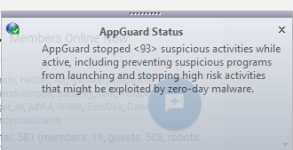
on v4.x , i dont have those lines , just that something was blocked.
semantic : suspicious because it wasn't allowed by your policy so it is suspicious :D (im not joking ^^ )
 
  • Like
Reactions: Trooper
on v4.x , i dont have those lines , just that something was blocked.
semantic : suspicious because it wasn't allowed by your policy so it is suspicious :D (im not joking ^^ )

Lol we shall see! :cool:
 
Well guys turns out I am an idiot. It was indeed EIS that was blocking it! Turns out photos.exe likes to phone home. I guess I created a rule to block it, but by doing so EIS will not allow you to launch it. Edited the rule and all is well.

Now to wait for that Appguard popup to appear again. :D
 
I will tell you honestly with AG , you don't really need Emsisoft , unless you need its firewall.

The firewall is nice and seems to alert me more than the built in Windows Firewall. As I am still new to AG, I want to get a bit more used to it and customizing it etc. So AG is that good to not use EIS? Interesting. I think you just run Windows Defender on your rig correct?
 
  • Like
Reactions: meltcheesedec
The firewall is nice and seems to alert me more than the built in Windows Firewall.
Definitely , WinFW doesn't alert about outgoing connections.

As I am still new to AG, I want to get a bit more used to it and customizing it etc. So AG is that good to not use EIS? Interesting. I think you just run Windows Defender on your rig correct?
Yes it is , and indeed i just use WinDef because it is built-in and become quite efficient lately, so i won't bother to add a 3rd party one. However i use complementary security mechanism to give me more control over my system.
- sandboxes : Sandboxie and ReHIPS
- anti-exploits: HMPA .
i can live without them but because AG isn't a security suite , i like to use and in fact play) with them.
 
Add it to Guarded Apps list. Allowed to launch, but with limited rights. Deleting that temp directory is permissible with limited rights.
So I installed AppGuard, and I added this audio file converter app to the guarded apps list. Thanks for your help. After I excluded from user space the temp folder that it creates, the app runs without hitch.
 
  • Like
Reactions: meltcheesedec
So I installed AppGuard, and I added this audio file converter app to the guarded apps list. Thanks for your help. After I excluded from user space the temp folder that it creates, the app runs without hitch.

Please send me a PM with a couple of screenshots to show what you did in your policy.
 
  • Like
Reactions: shmu26
Please send me a PM with a couple of screenshots to show what you did in your policy.
You are asking about this app? In the end, the setup for this app is actually simpler than I described. Because I moved this portable app out of user space, and made a folder for it in program files, to make life easier. So at that point, all I needed to do was exclude from user space the temp folder that it creates in AppData. Because it runs an exe file from the temp folder, so it needed to be excluded. I suppose I could have just excluded the exe file itself.
 
  • Like
Reactions: meltcheesedec
You are asking about this app? In the end, the setup for this app is actually simpler than I described. Because I moved this portable app out of user space, and made a folder for it in program files, to make life easier. So at that point, all I needed to do was exclude from user space the temp folder that it creates in AppData. Because it runs an exe file from the temp folder, so it needed to be excluded. I suppose I could have just excluded the exe file itself.

OK, thanks. Now I understand what you did.

Are you running the portable app as a Guarded Apps as well ?
 
Status
Not open for further replies.

You may also like...