

Application Control turned offI've noticed that many users have Application Control turned off in their security settings. Why? Is it supposed to be a security enhancement? Thanks
Question Application Control turned off
- Thread starter micasayyo
- Start date
- Featured
You are using an out of date browser. It may not display this or other websites correctly.
You should upgrade or use an alternative browser.
You should upgrade or use an alternative browser.
Please provide comments and solutions that are helpful to the author of this topic.

Personally I always had it on Evaluation Mode and it never automatically turned on.
I believe first you have to enable optional diagnostic data in Windows setup.
Once AC is control is turned off, you cannot turn it back on. That would require a clean windows installation or reset.
I believe first you have to enable optional diagnostic data in Windows setup.
Once AC is control is turned off, you cannot turn it back on. That would require a clean windows installation or reset.

If SAC is on evaluation mode, it will determine whether to turn itself on or off according to the pattern of apps you install.
For me, it turns itself off few hours after installing Windows and installing my apps, so the first thing I do after installing Windows is to turn it on manually.
For me, it turns itself off few hours after installing Windows and installing my apps, so the first thing I do after installing Windows is to turn it on manually.
I turn the optional diagnostic data off during Windows install and SAC works after manually turning it on.I believe first you have to enable optional diagnostic data in Windows setup

It would appear that in Windows 11 Build 26220.7070, users can easily enable Smart App Control without having to reinstall the operating system.
So it's just a matter of time... we need to wait.
So it's just a matter of time... we need to wait.


Personally I always had it on Evaluation Mode and it never automatically turned on.
I believe first you have to enable optional diagnostic data in Windows setup.
Once AC is control is turned off, you cannot turn it back on. That would require a clean windows installation or reset.
turn on smart app control WinRE
reg load HKLM\xxxxx C:\Windows\System32\config\SYSTEM
This will load the System Hive into the temporary key. xxxxx.
Open Regedit and go to:
HKEY_LOCAL_MACHINE\xxxxx\SYSTEM\CurrentControlSet001\Control\CI\Policy
Modify VerifiedAndReputablePolicyState = 2
HKEY_LOCAL_MACHINE\xxxxx\SYSTEM\CurrentControlSet001\Control\CI\Protected
Modify VerifiedAndReputablePolicyStateMinValueSeen = 2
After making the changes, unload Hive with:
reg unload HKLM\xxxxx
reg load HKLM\xxxxx C:\Windows\System32\config\SYSTEM
This will load the System Hive into the temporary key. xxxxx.
Open Regedit and go to:
HKEY_LOCAL_MACHINE\xxxxx\SYSTEM\CurrentControlSet001\Control\CI\Policy
Modify VerifiedAndReputablePolicyState = 2
HKEY_LOCAL_MACHINE\xxxxx\SYSTEM\CurrentControlSet001\Control\CI\Protected
Modify VerifiedAndReputablePolicyStateMinValueSeen = 2
After making the changes, unload Hive with:
reg unload HKLM\xxxxx

Even if you can temporarily turn off SAC to allow running a blocked installer, what will happen when SAC blocks the installed app after turning it on again?It would appear that in Windows 11 Build 26220.7070, users can easily enable Smart App Control without having to reinstall the operating system.
So it's just a matter of time... we need to wait.
I use WDAC only for "exceptions".

Why? Is it supposed to be a security enhancement?
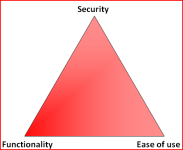
Literally MS definition, more security, less usability, even MS apps like VisualC++ and DirectX9 fail to run.

Unless I disable Smart App Control, I can not use Windows, it is literally the first thing I disable, followed by Defender.
Even if you can temporarily turn off SAC to allow running a blocked installer, what will happen when SAC blocks the installed app after turning it on again?
I use WDAC only for "exceptions".
I assume that when Microsoft engineers implement this new feature, they will apply improvements that we hope will be well tested.
With MS, I do not assumeI assume that when Microsoft engineers implement this new feature, they will apply improvements that we hope will be well tested.


You do not use any AV at all, right?followed by Defender
I am doing perfectly fine breaking OS myself, I do not need AV for that.You do not use any AV at all, right?

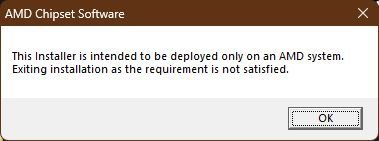
I wish AV fans read that while fighting each other for higher 0.001% detection rate of their favorite AVs.

AVs run with SYSTEM rights and it can make OS vulnerable. DoubleAgent definitely made that clear.I wish AV fans read that while fighting each other for higher 0.001% detection rate of their favorite AVs.

Now, to answer your question, Smart App Control (SAC) is a native Windows 11 security feature that automatically blocks malicious, untrusted, or unsigned apps, protecting against threats and unwanted behavior.The vast majority of users have Smart App Control (SAC) disabled due to the Evaluation Mode that automatically activates in the security settings that works in conjunction with Microsoft Defender, because initially, SAC works in "evaluation mode" to understand usage before blocking anything. As you use Windows 11, it ends up disabling SAC based on your usage profile. For example: if you have applications installed on your computer/laptop without a digital signature, unknown applications, and even legitimate applications as @TairikuOkami mentioned in post #8, MS applications such as VisualC++ and DirectX9 do not work with SAC enabled. So, in the end, Windows ends up disabling SAC. I myself had to disable SAC on my laptop because I use Hasleo Backup Suite to make backups, but Hasleo's executable files and services were blocked by SAC, preventing me from using Windows to perform the backup because the Hasleo Backup Suite files do not have a digital signature.Application Control turned offI've noticed that many users have Application Control turned off in their security settings. Why? Is it supposed to be a security enhancement? Thanks
Important notes:
If a secure application is blocked, SAC may have considered the program to be untrustworthy (false positive).
Vulnerabilities in SAC and SmartScreen have already been identified, making it important to keep the system up to date.
SAC offers protection based on reputation and code, reducing the need for third-party software for the same purpose.
I hope I have clarified your question about how Smart App Control (SAC) works and why many people have SAC disabled or end up disabling it.

In my case, it was in evaluation mode for a while, but one day it suddenly became activated. However, I wanted to reinstall Windows 11 using the ISO downloaded from Microsoft, but it wouldn't let me install it. That's why I had to deactivate it. I realized that some users on this forum also have it deactivated, but what I didn't know was that I wouldn't be able to reactivate it.Now, to answer your question, Smart App Control (SAC) is a native Windows 11 security feature that automatically blocks malicious, untrusted, or unsigned apps, protecting against threats and unwanted behavior.The vast majority of users have Smart App Control (SAC) disabled due to the Evaluation Mode that automatically activates in the security settings that works in conjunction with Microsoft Defender, because initially, SAC works in "evaluation mode" to understand usage before blocking anything. As you use Windows 11, it ends up disabling SAC based on your usage profile. For example: if you have applications installed on your computer/laptop without a digital signature, unknown applications, and even legitimate applications as @TairikuOkami mentioned in post #8, MS applications such as VisualC++ and DirectX9 do not work with SAC enabled. So, in the end, Windows ends up disabling SAC. I myself had to disable SAC on my laptop because I use Hasleo Backup Suite to make backups, but Hasleo's executable files and services were blocked by SAC, preventing me from using Windows to perform the backup because the Hasleo Backup Suite files do not have a digital signature.
Important notes:
If a secure application is blocked, SAC may have considered the program to be untrustworthy (false positive).
Vulnerabilities in SAC and SmartScreen have already been identified, making it important to keep the system up to date.
SAC offers protection based on reputation and code, reducing the need for third-party software for the same purpose.
I hope I have clarified your question about how Smart App Control (SAC) works and why many people have SAC disabled or end up disabling it.
Not exactly; UAC is bypassable by user, SAC is not.SAC is basically full UAC all over again. Good in theory, bad in practice. MS never sticks around to polish it, MS just releases random features and hopes for the best.

Task Failed Successfully !

I intentionally enabled SAC and use it without issues. SAC works by blocking low prevalence files and also protects against other dangerous and abused file types. You may find out more about SAC here New Update - Smart App Control - Windows 11 22H2 feature promises significant protection from malware
There is a lot of misinformation about SAC and has many haters, expecially on forums like MT.
Some important things to know about SAC:
Note: Attempting to enable SAC via registry does not work because SAC will not function while still showing as "enabled" in settings.
There is a lot of misinformation about SAC and has many haters, expecially on forums like MT.
Some important things to know about SAC:
- SAC requires users to enable "Send Optional Diagnostic Data" to MS.
- SAC may block part of a program but it may still be fully or partially usable.
- Users may report blocked apps by submitting the file, e.g installers, via the Feedback Hub for human review and a final determination. I have found that the reviews usually happen rather promptly, usually a matter of days.
- Unsigned files may be allowed to run based on other factors used by SAC. I use an unsigned app successfully after submission to MS.
Note: Attempting to enable SAC via registry does not work because SAC will not function while still showing as "enabled" in settings.
Last edited:
You may also like...
-
 Malware News AI-Driven Obfuscated Malicious Apps Bypassing Antivirus Detection to Deliver Malicious Payloads
- Started by Brownie2019
- Replies: 2
-
 Google Chrome now lets you turn off on-device AI model powering scam detection
- Started by Parkinsond
- Replies: 3
-

