Hello guys, I need your help right now. I messed up the registry key on push notifications. You can trace it below:
HKEY_CURRENT_USER\Software\Microsoft\Windows\CurrentVersion\PushNotifications
I was trying to change a registry key in my Windows 10 Pro 64 bit on Push notifications and I misunderstood the instructions. I was not able to back up my registry key because I am not a techie guy, my knowledge in computer is only limited. I just want to turn on Notifications in my computer because it is greyed out. There is a message saying "Some settings are managed by your organization".
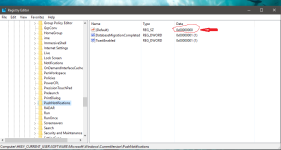
I attached a screenshot of the registry key. I changed the value on the default key which is highlighted on the screenshot. Please help me what is the right value. Can you show me a screenshot of your registry key please?
HKEY_CURRENT_USER\Software\Microsoft\Windows\CurrentVersion\PushNotifications
I was trying to change a registry key in my Windows 10 Pro 64 bit on Push notifications and I misunderstood the instructions. I was not able to back up my registry key because I am not a techie guy, my knowledge in computer is only limited. I just want to turn on Notifications in my computer because it is greyed out. There is a message saying "Some settings are managed by your organization".
I attached a screenshot of the registry key. I changed the value on the default key which is highlighted on the screenshot. Please help me what is the right value. Can you show me a screenshot of your registry key please?