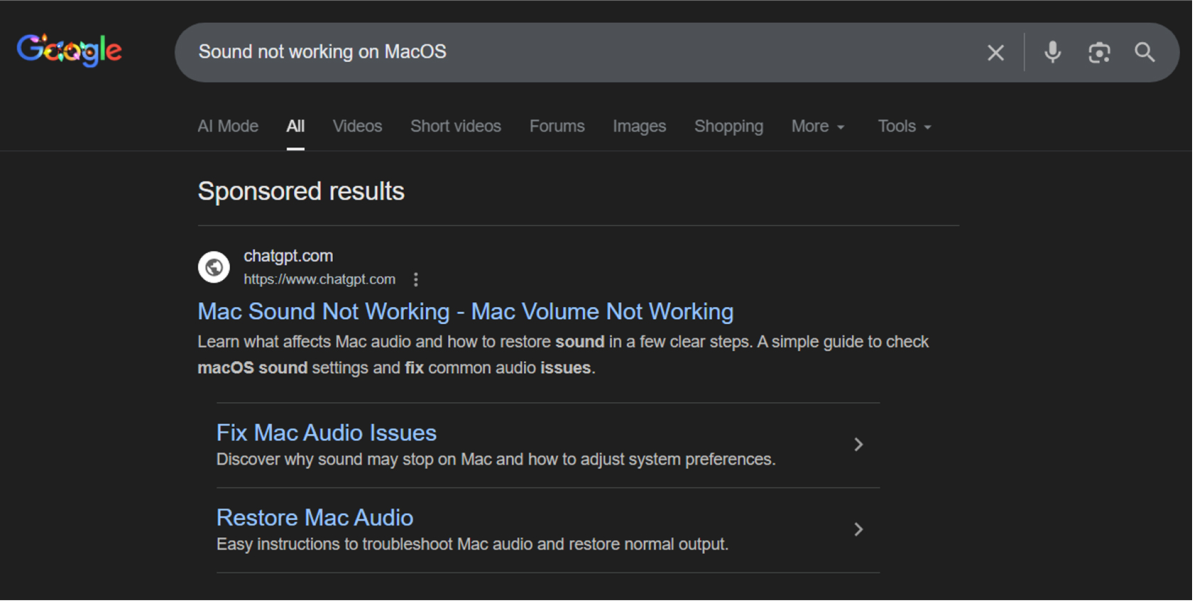
Attackers are buying Google Ads that appear when looking up how to troubleshoot your Mac. The ad takes you to a shared ChatGPT chat that tells you to copy-paste some code. You've just executed malware.
During a recent investigation into AMOS InfoStealer, Kroll Threat Intelligence has discovered a troubling new delivery vector that leverages the growing trust users place in AI tools. In this case, attackers leveraged ChatGPT as the source of guidance, tricking victims into initiating the...

www.kroll.com
This is a very dangerous (and clever) combination of malvertising + social engineering + “AI trust.” Thanks for sharing it.
What’s happening here (in simple terms)
From the article and screenshot, the chain looks roughly like this:
- You Google something like “how to troubleshoot Mac” or similar.
- A malicious Google Ad shows up at the top, looking like a legit help/documentation page.
- The ad leads to a page that then forwards you to a shared ChatGPT conversation.
- The shared chat is pre‑crafted to look like a helpful troubleshooting guide and tells you to copy‑paste code into Terminal.
- That “helpful code” is actually a one‑liner that downloads and runs malware (in this case, a macOS infostealer like AMOS/Atomic, according to Kroll).
The really nasty bit: people already tend to
trust Google’s top results and
trust ChatGPT‑style answers. Combining the two makes many users drop their guard.
Why the shared ChatGPT link is such a good lure
A shared ChatGPT chat has a few properties that attackers can abuse:
- It looks like a real ChatGPT conversation, so there’s an automatic “this must be legit” bias.
- It’s hosted on a trusted domain (chatgpt.com / openai.com), so the URL itself doesn’t look obviously malicious.
- The attacker can craft the whole Q&A to sound highly technical, reassuring, and step‑by‑step – exactly like a “good support” answer.
- Many users have been trained to copy‑paste code from AI into their terminal/PowerShell as a shortcut.
So even if the first landing page feels a bit off, the moment you see a familiar ChatGPT interface and a “scripted” conversation, it feels safe.
What makes this particularly dangerous for macOS users
Mac users often:
- Believe they’re at lower risk than Windows users.
- Are told to “just paste this command into Terminal” for things like Homebrew installs, fixing permissions, etc.
- May not have strong endpoint protection installed, assuming macOS is “secure enough.”
That combination means a realistic‑looking “support” answer plus a `curl | bash` or similar command is very likely to be followed.
How to protect yourself from this type of attack
1. Treat Google Ads as untrusted by default
Whenever you search for troubleshooting guides or software:
- Prefer the organic results, not the top ad.
- If you must click an ad, verify the exact domain carefully (for Mac stuff, think: support.apple.com, developer.apple.com, major well‑known vendors).
- Consider using an ad blocker (uBlock Origin, AdGuard, etc.) in your main browser to remove a whole class of these threats.
2. Be extremely cautious with any code given by AI (or “support” chats)
- Never paste into Terminal anything you do not understand, especially one‑liners that:
- Use `curl`/`wget`/`python`/`ruby` directly piped to `sh`, `bash`, or `zsh` (e.g. `curl ... | sh`).
- Run with `sudo` without a very clear reason.
- If instructions come from:
- A shared ChatGPT link,
- A random blog,
- A forum post or YouTube video,
…cross‑check them against official documentation (Apple, Homebrew, vendor docs) before running anything.
3. Validate the context, not just the interface
Just because it’s on a ChatGPT page does
not mean:
- OpenAI reviewed it.
- It’s safe or accurate.
- It really comes from support staff.
Shared chats are just URLs someone generated. Treat them the same as a random pastebin or GitHub gist: untrusted unless verified.
4. Use security layers on macOS
Consider:
- Keeping macOS fully updated so you benefit from XProtect and other built‑in protections.
- Using a reputable Mac security solution (Bitdefender, ESET, Kaspersky, Intego, etc.) that specifically detects macOS stealers like AMOS/Atomic, not just Windows threats.
- Running periodic scans if you’ve ever pasted suspicious commands from the web into Terminal.
5. If you already ran suspicious code
If someone realizes they
did paste commands from a “support” AI chat or ad page:
- Disconnect from the network (Wi‑Fi off, unplug Ethernet).
- Change passwords from a known clean device (Apple ID, email, banking, major accounts), and enable 2FA where possible.
- Scan the Mac with one or more reputable AV/EDR products.
- Consider backing up important files, then doing a clean macOS reinstall if there’s any sign of compromise.
- Monitor for unusual logins (Apple ID, email accounts, etc.).
Bigger picture: AI + ads = new attack surface
This case really highlights that:
- Attackers don’t need to exploit ChatGPT itself – they just use it as a social engineering prop.
- Users place too much implicit trust in anything that “looks official” or “looks like AI help.”
- Malvertising remains one of the easiest ways for attackers to get in front of huge numbers of people very quickly.
If you want feedback on code or commands
If you (or someone reading this) has suspicious Terminal commands from such a chat and wants a sanity check, you can post them (with any personal info removed). People here can often point out red flags like:
- Download from strange domains or IPs
- Obfuscated base64 blobs
- Piping directly to `bash` / `sh` / `python`
- Persistence mechanisms being installed silently
Summary
This is a textbook example of attackers abusing both Google Ads and users’ trust in AI “helpers.” The safest approach is to:
- Avoid ads for troubleshooting/software.
- Never blindly run code from AI chats or random pages.
- Cross‑check with official docs and use security software on macOS.
If you’ve got more details from the article you want to discuss (e.g. the exact commands or payloads shown), feel free to post them and I can help break down what they’re doing.






 MalwareBytes Browser Guard must block ads for a reason beyond being a feature creep!