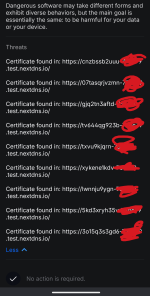
Advice Request BD Online Threat Prevention Critical Warning

Please provide comments and solutions that are helpful to the author of this topic.
Ive checked my email and BD support replied hours ago but I did not receive a notification for the email for some reason.

An unmatching security certificate will trigger a detection from Bitdefender, and this is the expected behavior. Regular and well known websites have sub-domain URLs used for their newsletters, promotional campaigns and other purposes. Sometimes, they are using certificates with another name than the domain used by the website and this may trigger the detection, even multiple times in a short period of time. But if the domain is trusted, an exception can be set for the respective URL and this will help mitigate the notifications as well.

In such cases, the website owner should normally sort out their certificate mismatch.

The reply was based on the screenshots I provided to support, but I'll wait till they reply and comment on the logs I sent them.
 
  • Like
Reactions: Sorrento
BD support does not answer the question of why MsEdge was connecting to moneytize without any interaction on your part. Or, maybe it is a banner ad on a page you visited ?
Or a sub frame on a page which you visited, linking to moneytize ? But No, they weren't because you don't use MsEdge.
 
Last edited:
The problem is that MsEdge is connecting outbound without any interaction on your part navigating to the site moneytize.
Maybe it was because of Edge Main webpage which includes a lot of junk?

Maybe Edge was updating in the background and that's why it made connections. Since the main page in Edge is full of different articles, it might be the cause of the connection to th blocked domain.
 
  • Like
Reactions: Sorrento
BD support does not answer the question of why MsEdge was connecting to moneytize without any interaction on your part. Or, maybe it is a banner ad on a page you visited ?
Or a sub frame on a page which you visited, linking to moneytize ? But No, they weren't because you don't use MsEdge.
I agree the reply is generic and does not address my issue.

Regarding Edge, no I never use it, but since this was a clean install of Windows maybe it was updating in the background?
 
  • Like
Reactions: Sorrento
When I reenabled the encrypted web scan feature the issue occurred again.
Screenshot_20251203-135720.png
 
  • Like
Reactions: Parkinsond
How did tech support answer your questions? Is the entire problem resolved ?
 
Modern Windows components (Search Highlights, News & Interests, Widgets, and Lock Screen Spotlight) utilize the Edge WebView2 runtime or a headless msedge.exe process to fetch dynamic web content. These processes bypass standard "browser closed" settings because they are system-level calls, not user-level browser sessions. When Windows fetches "News" or "Search Highlights," it loads a web page in the background. This page often contains ad slots. The ad server's SSL certificate likely expired or was issued to a different domain (e.g., a CDN host). Bitdefender blocked the connection to protect the user from a potential Man-in-the-Middle (MitM) attack, but the file msedge.exe itself is clean.
 
Modern Windows components (Search Highlights, News & Interests, Widgets, and Lock Screen Spotlight) utilize the Edge WebView2 runtime or a headless msedge.exe process to fetch dynamic web content. These processes bypass standard "browser closed" settings because they are system-level calls, not user-level browser sessions. When Windows fetches "News" or "Search Highlights," it loads a web page in the background. This page often contains ad slots. The ad server's SSL certificate likely expired or was issued to a different domain (e.g., a CDN host). Bitdefender blocked the connection to protect the user from a potential Man-in-the-Middle (MitM) attack, but the file msedge.exe itself is clean.
That perfectly explains what happened in my case.

But what disappointed me was the fact that BD support failed to explain what happened though I provided them with the requested logs.
 
That perfectly explains what happened in my case.

But what disappointed me was the fact that BD support failed to explain what happened though I provided them with the requested logs.
But, compared to @Divergent who had the time to focus in on this one issue, BD support probably receives 100s if not more log files in a day, and at times may just go through the motions of how deep or complex they reply with? 🤷‍♂️
 
That perfectly explains what happened in my case.

But what disappointed me was the fact that BD support failed to explain what happened though I provided them with the requested logs.
The support team likely failed to provide this explanation not because the logs were insufficient, but because their operational workflow is designed to identify active infections, not complex system behaviors.