Best setting for lightness?

Status
Not open for further replies.

StannisTheMannis

New Member
Thread author
Jul 13, 2014
3
0
2
29
Hello,I have been lurking on this site for quite some time and every time someone wants an AV recommendation,users suggest ESET since its light.I decided to create an account in order to ask what are the best settings or what to tweak to get minimal ESET impact.My ESET NOD32 (latest version) is using around 98mb of ram which isnt high but isnt really considered light.Is 98mb normal usage for ESET NOD32?
A small off-topic question but how does smart optimization work during real time protection?Statistics show that the real time protection scans alot of files which were scanned before,it even scans random applications folder which I didnt access.
Thanks
 
I run a budget gaming system and even with Eset tweaked to max it does not slow down anything whatsoever. Just 1 setting i leave unticked as the program itself warns not too for performence sake. Don't have it installed right now so can't tell you wich option that is but ditto on not needing to tweak it down.
 
  • Like
Reactions: StannisTheMannis
.My ESET NOD32 (latest version) is using around 98mb of ram which isnt high but isnt really considered light.Is 98mb normal usage for ESET NOD32?

rule 1 : low RAM usage doesn't mean Light AV; ESET is light because it caches its signatures in the RAM (so moderate RAM usage) instead on the disk , so low CPU usage and access time, so it is indeed a light AV.

A small off-topic question but how does smart optimization work during real time protection?Statistics show that the real time protection scans alot of files which were scanned before,it even scans random applications folder which I didnt access.

at first scan, the files are referenced and tagged as safe, in the subsequent scans those safe-tagged files are compared to a list , to check if they were changed, if not the files are skipped , if not , they are rescanned.
 
Thanks all for the replies,guess as you all said there is nothing to tweak.My last off topic question since I dont want to open another thread,during gaming is it advisable to change real time protection to scan only .exe files or should I just exclude the games folder ?
 
Not necessary, just turn on gaming mode (if you have ESET installed).
 
There are definitely some settings you can tweak to make it lighter :)
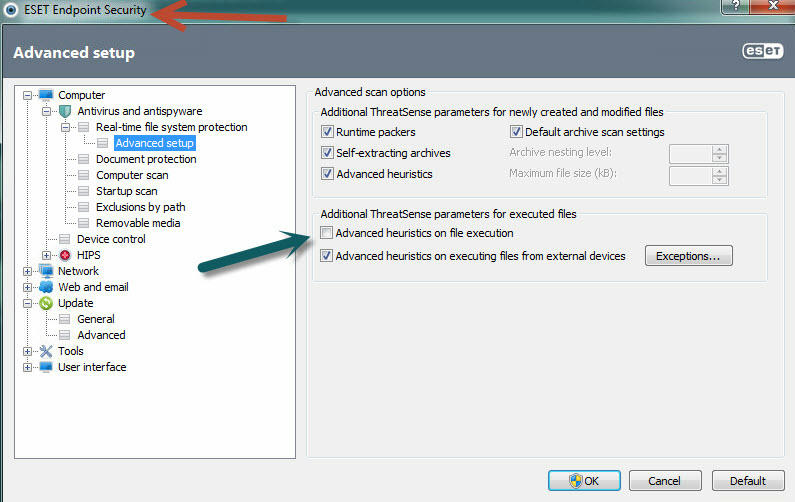
You can start with the default settings that come with Endpoint versions. These are business versions and they have to be lighter due to the workload for businesses compared to casual at home motions.

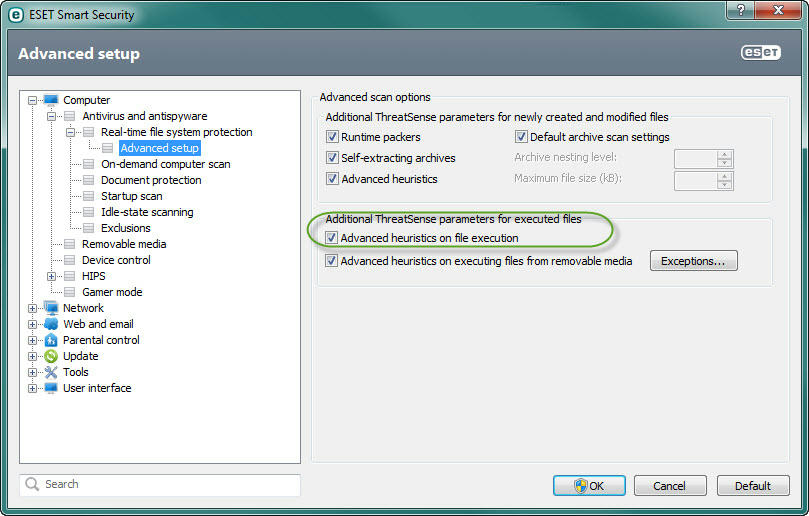
One of them being do not scan every single file with heuristics, but only newly created and modified files.
Any adjustments made to real-time protection will increase performance for your system as well. Just be careful not to turn off detections that malware can slip through.
Make sure smart optimization is enabled on real-time as well as any scans you perform under Threatsense engine parameters.

If i can find the best way to add pictures around here i will add. I guess URL is the only option.:(

https://www.mediafire.com/convkey/ace8/ye9s716b28eilvr6g.jpg
https://www.mediafire.com/convkey/2f6c/xz0xbcdhvd9x1q46g.jpg
 
Last edited:
Judging by my avatar that's not for sure.:D

There are definitely some settings you can tweak to make it lighter :)
You can start with the default settings that come with Endpoint versions. These are business versions and they have to be lighter due to the workload for businesses compared to casual at home motions.

One of them being do not scan every single file with heuristics, but only newly created and modified files.
Any adjustments made to real-time protection will increase performance for your system as well. Just be careful not to turn off detections that malware can slip through.
Make sure smart optimization is enabled on real-time as well as any scans you perform under Threatsense engine parameters.

If i can find the best way to add pictures around here i will add. I guess URL is the only option.:(

https://www.mediafire.com/convkey/ace8/ye9s716b28eilvr6g.jpg
https://www.mediafire.com/convkey/2f6c/xz0xbcdhvd9x1q46g.jpg
@Arakasi, kind of off-topic, but press the icon on top with the moon and the mountain (picture icon) and enter the picture URL. For example these are your pictures:
ye9s716b28eilvr6g.jpg

xz0xbcdhvd9x1q46g.jpg
 
  • Like
Reactions: Arakasi
Thanks chromatin, i know a little BB code, but usually i am lazy to apply, and so far the only thing i have found i dislike here at MT is all those buttons up there are grey. Really makes my skin itch lol, most likely its why i did not start out using that little picture or overlooked it is more likely the conclusion.
Thanks for helping me friend. :D
 
Lightness of an Antivirus isn't reflected by it's RAM usage. It's how it performs on your PC, if you can open and edit files without much delay from your security then I don't see why you'd want to make (or see how) to make a product "lighter". You could make the product scan less file types and uncheck archive scanning, though the default should work most of the time.

If you're using ESET Nod32 with Windows Firewall, you may want to disable the AV when you play games, or add the game folder to exclusions, but leave Windows Firewall switched on. (Example of WFW Alert: http://malwaretips.com/threads/what-a-windows-firewall-security-alert-looks-like.27211/ )
 
Thanks all for the suggestion.It wasnt heavy on my laptop,but i was just wondering if the ram usage was normal.Now,thanks to this thread I know that its normal.I use Comodo Firewall along with ESET Nod,so i guess i'll turn off the AV and leave the firewall on.
 
Status
Not open for further replies.