
Question Bitdefender service blocked by ASR rule

Bitdefender
4 Replies 1,591 Views
Help answer the author's question with clear explanations and useful steps.

Zartarra

Level 9
Verified
Well-known
Forum Veteran
Hello,

I am testing Bitdefender Total. I used local GPO's to config my system including MS Defender policies. This morning I got an interesting warning from a MS Defender ASR rule. It seems that a Bitdefender service is blocked because it use a signed driver that is being exploited.
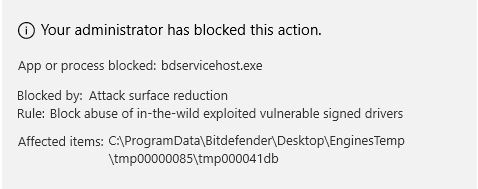
1710493700839.png


I contacted Bitdefender support. So I am waiting what the have to say.

Anyone else with the same error?

Kind regards,

Zartarra
 
@Zartarra thanks for sharing

As far as I know, the ASR rules only apply when Microsoft Defender still is your active antivirus. Probably your group policy settings prevent MD from being deactivated.

I just installed BitDefender Free without problems with Malware Defender on MAX (using Configure Defender to enable all ASR rules).

On a site note: the Online Protection part checking on misused certificates and certificates of non trustworthy issuers (or issuers with misused certificates) is very chatty. I disabled that setting (has a few false positives because it also blocks websites connections of web services using certificates of issuers with a past problem, e.g. Github). Browsers have sufficient (HTTPS) certificate protection.
 
Last edited by a moderator:
@Zartarra thanks for sharing

As far as I know, the ASR rules only apply when Microsoft Defender still is your active antivirus. Probably your group policy settings prevent MD from being deactivated.

I just installed BitDefender Free without problems with Malware Defender on MAX (using Configure Defender to enable all ASR rules).

On a site note: the Online Protection part checking on misused certificates and certificates of non trustworthy issuers (or issuers with misused certificates) is very chatty. I disabled that setting (has a few false positives because it also blocks websites connections of web services using certificates of issuers with a past problem, e.g. Github). Browsers have sufficient (HTTPS) certificate protection.
User WHHL or H_C to enable ASR rules and not Configure Defender since your not using Microsoft Defender as your AV. You can then Whitelist if needed inside WHHL or H_C.
 

Recently browsing

Members who viewed this thread in the last 5 minutes

Back
Top