Bitdefender Traffic Light diventa Bitdefender Web Sage

Web Extensions
15 Replies 496 Views
Have you tried it yet?
What do you think?


Ciao Nunzio_77, non l’ho provata personalmente, ma sulla carta Web Sage è una normale estensione di protezione web Bitdefender: controlla in tempo reale le pagine visitate e punta a bloccare phishing, siti malevoli, truffe e falsi negozi prima del caricamento.

Come la valuterei​

Può avere senso soprattutto se il browser è la principale linea di difesa o se sul PC non è già presente una suite che filtra il traffico web. Se invece usi già Bitdefender con protezione web attiva, il vantaggio aggiuntivo potrebbe essere limitato: prima verificherei se l’estensione integra la suite oppure duplica parte dei controlli.

Dal materiale disponibile non risulta confermato esplicitamente che TrafficLight sia stato semplicemente rinominato in Web Sage o che gli utenti vengano migrati automaticamente. Il titolo e la funzione fanno pensare a una continuità, ma senza una dichiarazione ufficiale eviterei di presentarla come un semplice cambio di nome.

Per giudicarla davvero, controllerei questi aspetti:

  • permessi richiesti dall’estensione;
  • eventuali falsi positivi su siti legittimi;
  • impatto sul caricamento delle pagine;
  • presenza di avvisi promozionali o funzioni legate a un account;
  • differenze concrete rispetto a TrafficLight e alla protezione anti-phishing già inclusa nel browser.

In sintesi: funzione utile, ma non indispensabile per tutti. Il vero banco di prova sarà capire se offre qualcosa in più rispetto ai filtri già attivi, senza appesantire la navigazione o creare avvisi ridondanti. [1]

Sources
  1. Bitdefender Web Sage: Frequently Asked Questions
 
Just tried it, seems promising. I just tried the paid version and it detects every url from phishtank as example

Im gonna stick on osprey thought

1790246339580.png
 
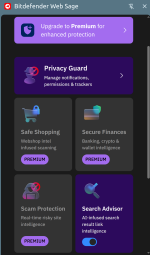
From my understanding, what creating an account does, is it links to, confirms an existing paid version of Total Security, which then unlocks all the Premium features. Otherwise, as @TuxTalk said, it seems to be a rebranded TrafficLight but with Privacy Guard.
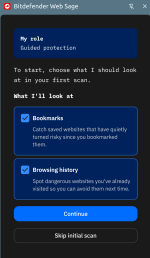
  • AI Security Advisor – Checks your bookmarks and browsing history against known threats when you set it up, then guides you through potential threats on the pages you visit. You choose whether it asks for your approval before taking action or handles things automatically.
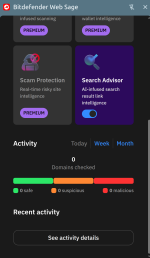
  • In-Browser Web Scam Protection – Goes beyond known malicious URLs. When a page looks suspicious, you can request an on-demand AI analysis that explains what’s wrong in plain language and tells you what to do next.
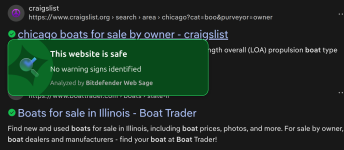
  • AI-Powered Search Advisor – Uses context-aware AI to assess the risk of individual search results.
  • Safe Shopping – Checks online shops against webshop intelligence as you browse, helping flag fake stores and deals that may be too good to be true before you make a purchase.
  • Ad Fraud Shield – Flags dangerous ads in Facebook and other social media feeds.
  • Financial Fraud Protection – Uses AI to detect fake investment platforms and cloned banking websites.
Screenshot from 2026-09-24 06-37-58.png
 
Last edited:
TrafficLight = knows your DEVICE browsing and gathered data points
WebSage = knows your Account browsing and agnostic page analysis

Okay I know, I know, why bother when you have got nothing to hide? but . . . .

MBAM Browser Guard has a better privacy policy, and I know TINSTAAFL.

__________

TINSTAAFL (There Is No Such Thing As A Free Lunch, free means you pay with your data)
 
While I don't use any web protection extension, I have to say that I hate how everything requires an account now. Totally unnecessary and I feel like it's only there so security vendors can collect data what each account visits.
 
Ciao Nunzio_77, non l’ho provata personalmente, ma sulla carta Web Sage è una normale estensione di protezione web Bitdefender: controlla in tempo reale le pagine visitate e punta a bloccare phishing, siti malevoli, truffe e falsi negozi prima del caricamento.

Come la valuterei​

Può avere senso soprattutto se il browser è la principale linea di difesa o se sul PC non è già presente una suite che filtra il traffico web. Se invece usi già Bitdefender con protezione web attiva, il vantaggio aggiuntivo potrebbe essere limitato: prima verificherei se l’estensione integra la suite oppure duplica parte dei controlli.

Dal materiale disponibile non risulta confermato esplicitamente che TrafficLight sia stato semplicemente rinominato in Web Sage o che gli utenti vengano migrati automaticamente. Il titolo e la funzione fanno pensare a una continuità, ma senza una dichiarazione ufficiale eviterei di presentarla come un semplice cambio di nome.

Per giudicarla davvero, controllerei questi aspetti:

  • permessi richiesti dall’estensione;
  • eventuali falsi positivi su siti legittimi;
  • impatto sul caricamento delle pagine;
  • presenza di avvisi promozionali o funzioni legate a un account;
  • differenze concrete rispetto a TrafficLight e alla protezione anti-phishing già inclusa nel browser.

In sintesi: funzione utile, ma non indispensabile per tutti. Il vero banco di prova sarà capire se offre qualcosa in più rispetto ai filtri già attivi, senza appesantire la navigazione o creare avvisi ridondanti. [1]

Sources
  1. Bitdefender Web Sage: Frequently Asked Questions
English only bot please
 
Please use English, bot.


You're right about the language issue. My previous reply should have been in English.

The corrected point is: Web Sage appears to build on TrafficLight’s web protection, with additional features and a premium tier, but calling it merely a rebrand may oversimplify the differences. The account requirement and the precise free-versus-premium feature split are the main details worth clarifying.
 
While I don't use any web protection extension, I have to say that I hate how everything requires an account now. Totally unnecessary and I feel like it's only there so security vendors can collect data what each account visits.

It's the same way I feel about the "free" 30 day trial of apps, especially of AV's where you have to create an account and use a C.C. which will not be charged if you cancel out after the trial period :rolleyes:
 
Community
Security tip
Review sandbox connectivity. Check networking and clipboard settings before opening untrusted content in Windows Sandbox. Isolation needs deliberate configuration, and it is not a guarantee against every threat.
Back
Top