


What I like about AVG is that it responds quickly to samples of malicious software or false positives, typically within one or two days with a result.

 malwaretips.com

I haven't noticed that mostly because I play at locked FPS much below the max refresh rate of display (locked @90 fps on a 144Hz display), to keep things cool for longer gaming sessions. I will keep a closer eye on that from now. Thanks.The one issue I had with AVG was I had demonstrably lower CPU performance only in gaming situations. CPU scores 3DMark were about 8% lower. And FPS in high FPS games like Fortnite and Call of Duty were also 8% or so slower. I even submitted all the screenshots I had showing this to them. That was 2022. I tested again in 2023 a year or so later and it hadn’t changed. Not a big deal, and I’m not sure if it’s still the case these days.
Ah, on competitive stuff I always run it max at 170hz. It gets hot in my office haha. If I capped it even at 120 I would never have noticed.I haven't noticed that mostly because I play at locked FPS much below the max refresh rate of display (locked @90 fps on a 144Hz display), to keep things cool for longer gaming sessions. I will keep a closer eye on that from now. Thanks.


Most likely yes, but I want to be sure if it's the AV or the VPN. I have set VPN service to manual now instead of automatic to see if that solves the issue.Maybe AVG ?

I found the issue. Previous update of AVG (dated 20 June) messed something up and was causing system unable to access internet. Uninstalled both AVG IS and VPN, cleaned previous drivers & files, reinstalled AVG IS & VPN from website and everything works fine now as it should.Second day in a row, I have the same issue. Idk what's causing this, it's not an Ethernet driver issue as I haven't changed them for more than a year now and never had this issue before. I have to disable and reenable Ethernet in device manager and then do a restart to resolve this

Actually you are not going crazy i had my first issue with avg today not sure why i can't X out of the VPN's GUI i have to close it by the control Pannell. This happened with that new version of the VPN. Also avg's live support has been down for a few days now im unable to access to report my issue.I found the issue. Previous update of AVG (dated 20 June) messed something up and was causing system unable to access internet. Uninstalled both AVG IS and VPN, cleaned previous drivers & files, reinstalled AVG IS & VPN from website and everything works fine now as it should.
Did a reinstall fix the issue for you as well?Actually you are not going crazy i had my first issue with avg today not sure why i can't X out of the VPN's GUI i have to close it by the control Pannell. This happened with that new version of the VPN. Also avg's live support has been down for a few days now im unable to access to report my issue.
no the vpn issue is separate i just filed a report other than that malware detection is amazing running great with adguard.Did a reinstall fix the issue for you as well?

FYI, the next time try the repair option first before doing an uninstallation and reinstallation. On Avast forum I have seen that doing this usually fix issues caused by an update.I found the issue. Previous update of AVG (dated 20 June) messed something up and was causing system unable to access internet. Uninstalled both AVG IS and VPN, cleaned previous drivers & files, reinstalled AVG IS & VPN from website and everything works fine now as it should.
Let's hope I won't have to use this trick next time.FYI, the next time try the repair option first before doing an uninstallation and reinstallation. On Avast forum I have seen that doing this usually fix issues caused by an update.
Even Avast officials often reply on Avast forum regarding fixing issues and asking for logs and then pushing a bug fix update without needing to contact support, But the thing is, they won't respond if you say that you're using AVG since that's Avast forum even though they are the exact same product except the GUI.

Avast support totally not supportive, basically very rude.Let's hope I won't have to use this trick next time.
If you want to access AVG VPN menu, here is a workaround:Actually you are not going crazy i had my first issue with avg today not sure why i can't X out of the VPN's GUI i have to close it by the control Pannell. This happened with that new version of the VPN. Also avg's live support has been down for a few days now im unable to access to report my issue.
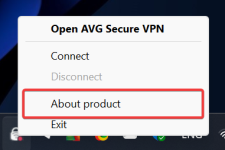
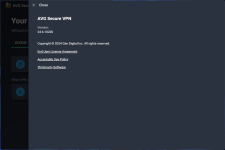
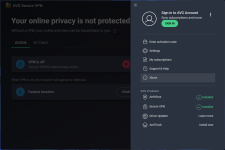
You're not alone. It's something I also felt even in my portable Chrome browsers which is stored on the HDD. As it was discussed before in a uBO thread it could be due to the fact that for uBO Lite the main blocking is done by the browser itself instead of the extension.Is it just me or uBO Lite is considerably faster than uBO? I miss the custom filters for blocking YT video end cards though.

For me it doesn't matter if its faster, but does it block ads as well, that is the question me matey.Is it just me or uBO Lite is considerably faster than uBO? I miss the custom filters for blocking YT video end cards though.
I think it has. Could be placebo too idkBTW, did you AVG get faster after a deep scan with changing those persistent cache related options in geek:area?

So, far it hasn't failed me. It's working well on YT. I will updateFor me it doesn't matter if its faster, but does it block ads as well, that is the question me matey.

So far on a couple of PC's, this has been a nice set upI found the issue. Previous update of AVG (dated 20 June) messed something up and was causing system unable to access internet. Uninstalled both AVG IS and VPN, cleaned previous drivers & files, reinstalled AVG IS & VPN from website and everything works fine now as it should.


