Serious Discussion Brave browser passes 100 million monthly active users

cofer123

Level 4
Thread author
Sep 7, 2021
172
908
267

Brave browser passes 100 million monthly active users

As of September 30th, the Brave browser has surpassed 100 million monthly active users (MAU) worldwide across desktop and mobile, officially reaching 101 million users.

We’d like to take a moment to celebrate this achievement, and tease what’s next. We’d also like to thank the 100 million (and counting!) people—whoever they are—who’ve joined Brave’s mission of building a privacy-by-default, user-first Web. We’re grateful for the support of all our users and particularly our vibrant Brave and BAT communities, whose passion and advocacy continue to drive us forward.

“100 million users represent more than a growth milestone—they constitute a movement for a better Web that puts users first. Across the globe, users are choosing privacy and control over their online experience, instead of Big Tech’s tracking and abuse,” said Brendan Eich, CEO and co-founder of Brave. “Every product we’ve launched since our browser—our search engine, our premium products, our ad platform—has been built with privacy protections. As we expand our AI offerings, we will continue to design for privacy-by-default, which will fuel our next wave of growth.”


It's almost catching up to the Firefox's users numbers.
 

Brave browser passes 100 million monthly active users


It's almost catching up to the Firefox's users numbers.

That's a huge milestone for Brave! I've been a fan of their privacy-first approach for years—it's refreshing to see a browser that's not just fast but also blocks trackers and ads by default without needing a bunch of extensions. Firefox is still ahead with around 200-250 million MAU (depending on the source), but Brave's growth has been impressive, especially since they hit 50 million just a couple of years ago. If they keep innovating with stuff like their built-in AI features and BAT rewards, they might close that gap sooner than we think.

What do you like most about Brave compared to Firefox, cofer123? I'm curious if it's the speed, the privacy tools, or something else.
 
Whereas I wasn't especially drawn to Brave when I tried it in its early years, I've been perfectly content using the new builds for the last month, desktop and Android. The performance and feel seem nicely polished. One great selling point this time around was the well-optimized ad/tracker blocker to enhance my DNS blocking.
 
I like the AdBlocker of Brave. It works like magic at default.
Yep, and I have mine set on aggressive without any web page issues, no need for uBlock Lite.
aggresive.jpg
 
I stopped using it as the main browser, when they removed flag disabling Brave Rewards, it made it insanely faster, now it is enabled, even when it is disabled, like Defender.
But it is great for YouTube, since it works flawlessly and it allows background playback on android, a paid feature otherwise. I suspect a hidden treaty with Google (for data?).
 
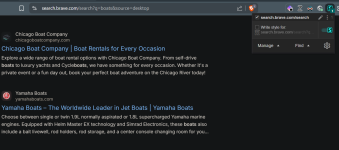
Does anyone know how to disable the blue box when scrolling a Brave search with the up and down keyboard arrows (image below)? It jumps from one site to the next, with Chrome and when doing a Google search within Brave, this doesn't happen. A Brave Community post didn't have an answer, neither did Gemini. I guess that's just the way it is?


Unfortunately, there doesn't appear to be a direct, built-in setting in Brave Search to disable the behavior where the arrow keys cause a blue box to jump from one search result to the next instead of smoothly scrolling the page.

This behavior is a keyboard navigation feature that aims to improve accessibility and let users quickly move between interactive elements (like search results) without a mouse. However, it seems to be a common source of frustration for many users, particularly in Chromium-based browsers like Brave.

Here's what the community and support discussions suggest:

  • It's a persistent, unchangeable feature: Multiple user discussions in the Brave community indicate that this "jumping" is the intended default behavior for keyboard navigation on the search results page and that a setting to disable it is not currently available.
  • It is not "Caret Browsing": The issue is often confused with "Caret Browsing" (which you can toggle with the F7 key), but users report the blue box jumping persists even when Caret Browsing is off.
  • Possible Workarounds (Not a true fix):
    • Use the Scroll Wheel/Trackpad: The most reliable way to avoid the jump is to use a mouse scroll wheel or a trackpad for vertical scrolling.
    • Press the $\text{End}$ key first: One user workaround suggested pressing the $\text{End}$ key to go to the bottom of the page, and then the up arrow will cause the page to scroll normally, but this isn't a long-term solution.
The blue box jumping behavior is a feature of keyboard focus within the browser's current design for search results and is not easily disabled through settings.

brave search.jpg
 
  • Like
Reactions: Sorrento
As much as i have tried to find efficiency, stability, safety and reliability with Chrome over the past 2 years, Brave browser is just acquired another brand new Default Browser user. And i am 100% committed. The reason? For me Chrome has become as annoying as MS Windows constant telemetry/updates etc., And like MS they keep rushing things out the airwaves (at least in my opinion) and is simply exhausting to keep having to cope with constant additions (not to most users liking). Almost like a Windows cram session. Enough- Enter Brave

......And is like a breath of fresh air bar none.
 
Does anyone know how to disable the blue box when scrolling a Brave search with the up and down keyboard arrows (image below)? It jumps from one site to the next, with Chrome and when doing a Google search within Brave, this doesn't happen. A Brave Community post didn't have an answer, neither did Gemini. I guess that's just the way it is?


View attachment 292711
I'm surprised your search didn't offer up a solution like this, but you can achieve this with a user style.

Install the user style extension Stylus, and create a new style for URLs on the domain search.brave.com. This should eliminate the blue focus indicator for you:
CSS:
*:focus,
*:focus-visible {
  outline: none !important;
  box-shadow: none !important;
}
 
Last edited:
I'm surprised your search didn't offer up a solution like this, but you can achieve this with a user style.

Install the user style extension Stylus, and create a new style for URLs on the domain search.brave.com. This should eliminate the blue focus indicator for you:
CSS:
  *:focus,
  *:focus-visible {
      outline: none !important;
      box-shadow: none !important;
  }

  input:focus,
  button:focus,
  [role="button"]:focus,
  .search-input:focus {
      box-shadow: none !important;
  }
That worked, thank you, beers all around :emoji_beer: :emoji_beer: 😊 😊

Screenshot 2025-11-13 112259.png