Solved Browser keeps opening ads by itself

Freakyboo

New Member
Thread author
Apr 16, 2018
8
0
2
Indonesia
Hello,

My firefox keeps opening ads by itself, I have ran a few solutions using rkill, malwarebytes, and AdwCleaner but it doesn't help.

Resetting or changing default browser didnt help either.

I am using AVG antivirus Free.

Attached are my FRST.txt and Addition.txt logs hoping it would speed up the removal process.

Thank you in advance.
 

Attachments

Hello,


FRST.gif
Fix with Farbar Recovery Scan Tool

icon_exclaim.gif
This fix was created for this user for use on that particular machine.
icon_exclaim.gif

icon_exclaim.gif
Running it on another one may cause damage and render the system unstable.
icon_exclaim.gif

Download attached fixlist.txt file and save it to the Desktop:

Both files, FRST and fixlist.txt have to be in the same location or the fix will not work!

  • Right-click on
    FRST.gif
    icon and select
    RunAsAdmin.jpg
    Run as Administrator to start the tool.
    (XP users click run after receipt of Windows Security Warning - Open File).
  • Press the Fix button just once and wait.
  • If for some reason the tool needs a restart, please make sure you let the system restart normally. After that let the tool complete its run.
  • When finishes FRST will generate a log on the Desktop, called Fixlog.txt.

Please attach it to your reply.
 

Attachments

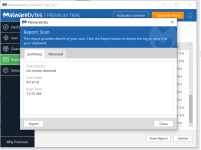
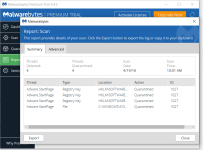
yesterday scan result shows nothing detected, but I scan it one more time today and it detects 4 threats but the ad pop up is still happening.

Attached is the result.
 

Attachments

  • MalwareBytes18.4.PNG
    MalwareBytes18.4.PNG
    53 KB · Views: 16
  • MalwareBytes19.4.PNG
    MalwareBytes19.4.PNG
    55 KB · Views: 18
Threats removed but my browser still opening ads. Did the same thing all over again, farbar scan, farbar fix using your fixlist, then another malwarebytes threat scan but nothing found. What should I do?

Attached is the result of the farbar scan and fixlog.
 

Attachments

Please run the fix from Administrator account.


FRST.gif
Fix with Farbar Recovery Scan Tool

icon_exclaim.gif
This fix was created for this user for use on that particular machine.
icon_exclaim.gif

icon_exclaim.gif
Running it on another one may cause damage and render the system unstable.
icon_exclaim.gif

Download attached fixlist.txt file and save it to the Desktop:

Both files, FRST and fixlist.txt have to be in the same location or the fix will not work!

  • Right-click on
    FRST.gif
    icon and select
    RunAsAdmin.jpg
    Run as Administrator to start the tool.
    (XP users click run after receipt of Windows Security Warning - Open File).
  • Press the Fix button just once and wait.
  • If for some reason the tool needs a restart, please make sure you let the system restart normally. After that let the tool complete its run.
  • When finishes FRST will generate a log on the Desktop, called Fixlog.txt.

Please attach it to your reply.
 

Attachments

I am sorry. I made a dumb mistake. My UAC control was turned off. Here is the fixlog. Firefox still showing ads. Doing another Malwarebytes scan right now.
 

Attachments

You may also like...