Browser Protection - Homepage/toolbar/Extension/Addons

Anupam

Level 21
Thread author
Verified
Well-known
Jul 7, 2014
1,017
2,322
1,968
Hi All,


I have a computer which is used by few inexperienced users. Every few days I find the browsers are infected with changed homepage, lots of toolbars, extensions.

Is there anyway to lock any changes made to the browsers? System details provided below.

1. Win7 32 Bit with UAC/Firewall enabled.
2. They can only use the standard users and they don't have administrative privileges.
3. Avast Free with PUP enabled and Norton Class C DNS.
 
Hi All,


I have a computer which is used by few inexperienced users. Every few days I find the browsers are infected with changed homepage, lots of toolbars, extensions.

Is there anyway to lock any changes made to the browsers? System details provided below.

1. Win7 32 Bit with UAC/Firewall enabled.
2. They can only use the standard users and they don't have administrative privileges.
3. Avast Free with PUP enabled and Norton Class C DNS.
Anupam, I had experienced this while using Cyberfox portable version. Specifically "window.com" became my sometimes unwanted homepage even after uninstalling the browser from the external flash drive. Switching flash drives rid us of the annoyance. Here's an article that addresses a similar occurrence.
http://domainnamewire.com/2014/10/01/warning-do-you-know-where-your-parked-domain-traffic-is-going/
الشمس, thanks for the techtrickz link, and I agree Winpatrol has been a very good protection as well!:):)
..although we haven't incorporated it on Windows 8.1 yet.
 
  • Like
Reactions: Moose and Anupam
Anupam, I had experienced this while using Cyberfox portable version. Specifically "window.com" became my sometimes unwanted homepage even after uninstalling the browser from the external flash drive. Switching flash drives rid us of the annoyance. Here's an article that addresses a similar occurrence.
http://domainnamewire.com/2014/10/01/warning-do-you-know-where-your-parked-domain-traffic-is-going/

الشمس, thanks for the techtrickz link, and I agree Winpatrol has been a very good protection as well!:):)
..although we haven't incorporated it on Windows 8.1 yet.


Does winpatrol throws a pop up when browser settings are being changed? As I told the user's are very very inexperienced, i do not want to scare them.
 
Add-ons: AVG Privacy Fix, BetterPrivacy, Click&Clean, Privacy Badger Firefox,
Self-Destructing Cookies, Trafficlight and Translator. And/or Avira add on.


Kind regards,;)
 
Last edited:
Does winpatrol throws a pop up when browser settings are being changed? As I told the user's are very very inexperienced, i do not want to scare them.
WinPatrol does, if I remember correctly, open a small window near the startup programs that asks: "Do you want to allow (program)..to change your settings"; and it makes a cute little "Rruufff!" that's not scary in the least.:D
 
  • Like
Reactions: Anupam
What browser do they use?

First, if they do not use IE but have it installed. I recommend the following:
- Update to the latest version using Windows Update.
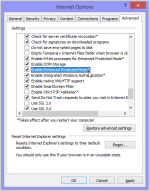
- Enable Enhanced Protected Mode (Internet Options > Advanced > Checkbox 'Enable Enhanced Protected Mode'.
upload_2014-10-4_12-5-6.png
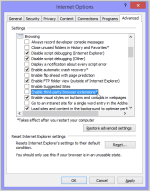
- Not tested, but you could un-check 'Third-Party browser extensions'. May cause undesired affects if dependent on IE extensions.
upload_2014-10-4_12-8-48.png
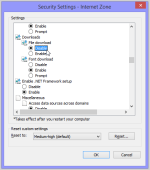
- Disable File Downloads (Internet Options > Security > Select the Internet Zone > Custom Level > Scroll 50% down and choose boolean Disable under Downloads | File download.
upload_2014-10-4_12-4-4.png

You will need to restart Windows after applying these settings.

Remember Firefox and Chrome can be installed without administrative privileges, so add-ons and extensions can easily be added/removed/disabled etc. The added benefit of Chrome over Firefox, is the inclusion of Flash Player which gets automatically updated which reduces the security risk, and saves on background resources as Firefox requires the Flash Player plugin with it's own Adobe updating service.

You may want to look in to Supervised Users for Chrome, https://support.google.com/chrome/answer/3463947

Unchecky.com to prevent toolbar and other unwanted software installations. Uses almost zero resources and runs silently, can also protect your Admin account from accidental undesired changes. For example; Considering avast! offers Google Chrome, Google Toolbar or even Dropbox software during Program Updates.
Read more: http://malwaretips.com/threads/avast-online-installer-offers-dropbox-software.33315/

About avast! Reputation Service options:
Make sure you have disabled 'Check for newer versions when downloading installation files'
Read more: http://malwaretips.com/threads/avas...s-softonic-partnership-and-free-adware.27402/
 
  • Like
Reactions: Moose
How about Sandboxie set to save book marks and delete on close ? Delete all other internet icons forcing users to use the sandboxed web icon.

Or maybe Toolwiz Timefreeze all changes flushed from the system at reboot.Dont enable the floating toolbar and the users wont even know they`re using it.

Both are very effective,free and light on resourses.

Regards Eck:)