Serious Discussion Browser vs. Third-Party Password Manager: Which Is Best For You?

lokamoka820

Level 37
Thread author
Verified
Top Poster
Well-known
Mar 1, 2024
2,689
3
8,093
3,569
Banana Republic
The browser vs third-party managers debate is no longer as simple as it once was. Many assume third-party managers are always superior due to dedicated vaults. Yet, browser options in Chrome, Edge, Firefox, and others have improved significantly with stronger encryption, biometric locks, and passkey support. This guide compares both sides to help you choose.

Which Should You Choose?​

If you mostly stick to just one browser like Chrome on all your devices, go with a browser password manager. Also, if you want something dead simple with no cost, and don’t need fancy extras. Just make sure to turn on biometrics and on-device encryption.

On the other hand, pick a third-party password manager if you bounce between browsers. Or if you want more features like secure sharing, password health checks, handling lots of sensitive info across devices, or just want more control and privacy. Here you can find the best password managers for every platform.
 
The “one browser = use the built-in manager” advice is a bit too simplistic, because the deciding factor usually isn’t convenience—it’s your threat model and how well the product enforces protections when something goes wrong (device theft, session hijack, malware/infostealers, account takeover, etc.).

What the excerpt gets right
  • Browser password managers have improved a lot in usability and do support modern authentication like passkeys in many cases.
  • If you truly live inside one ecosystem and want minimal friction, built-in options can be “good enough” for many people—especially if you already have strong device security and strong account security.
  • “Security depends on how you use it” is broadly true: weak device security and weak account recovery settings will undermine any manager.

Where it needs more nuance (important security details)
  • “Turn on biometrics” is not a universal security upgrade. Biometrics are mainly a convenience gate on a specific device. If an attacker steals an already-unlocked browser session, steals cookies/tokens, or compromises the OS, biometrics often don’t help much. Treat biometrics as an extra local barrier, not the core protection.
    [*]Encryption claims vary by vendor and configuration. “Stronger encryption” and “on-device encryption” are not consistent, standardized features across browsers, and the real question is: is your vault end-to-end encrypted with a separate secret, or is it only protected by your signed-in account + device security? Those are different risk profiles.
    [*]Account takeover risk is often higher with browser managers. If your browser manager syncs through your Google/Microsoft/Apple account, then the security of that account (MFA strength, recovery settings, device enrollment, phishing resistance) becomes critical. A dedicated password manager can still be cloud-synced, but typically puts more emphasis on a separate vault secret and explicit “vault unlock” boundaries.
    [*]“No cost” can hide tradeoffs. Free/built-in managers may be fine, but you may lose key controls people actually need in real incidents: stronger sharing controls, organization features, granular vault auditing, better export/backup workflows, clearer device/session management, etc.
    [*]Browser vs third-party isn’t the only choice. Some people are better served by an offline-first/open-source manager (with their own sync) if privacy/control is the top priority—at the cost of more setup and responsibility.


Practical decision guidance (security-first, not marketing-first)
  • If you choose a browser password manager:
    • Use a strong, unique password for the underlying account (Google/Microsoft/Apple) and enable phishing-resistant MFA where possible (security key/passkey), not SMS.
    • Review account recovery options (email/phone/recovery codes). Weak recovery can undo strong MFA.
    • Harden the device: full-disk encryption, strong device PIN/password, OS updates, and avoid running untrusted software (infostealers are a common real-world failure mode).
    • Be cautious with autofill: convenience features can increase exposure to malicious pages/forms. Many users prefer “click-to-fill” rather than automatic filling.
  • If you choose a third-party password manager:
    • Pick a well-known, reputable vendor with a strong security track record and clear documentation on encryption and threat model.
    • Use a long master password (or passphrase) and enable strong MFA for the account.
    • Turn on vault timeout/lock, and protect exports/backups (exports are often plain text).

Bottom line
Built-in browser managers can be a reasonable baseline for low-to-moderate risk users who keep devices and primary accounts well secured, but the “just enable biometrics and encryption” framing understates how often real compromises come from session theft, account takeover, or endpoint malware. If you want stronger separation of concerns, better auditing/sharing controls, or you switch browsers/devices a lot, a reputable third-party password manager is usually the more robust choice.
 
The “one browser = use the built-in manager” advice is a bit too simplistic, because the deciding factor usually isn’t convenience—it’s your threat model and how well the product enforces protections when something goes wrong (device theft, session hijack, malware/infostealers, account takeover, etc.).

What the excerpt gets right
  • Browser password managers have improved a lot in usability and do support modern authentication like passkeys in many cases.
  • If you truly live inside one ecosystem and want minimal friction, built-in options can be “good enough” for many people—especially if you already have strong device security and strong account security.
  • “Security depends on how you use it” is broadly true: weak device security and weak account recovery settings will undermine any manager.

Where it needs more nuance (important security details)
  • “Turn on biometrics” is not a universal security upgrade. Biometrics are mainly a convenience gate on a specific device. If an attacker steals an already-unlocked browser session, steals cookies/tokens, or compromises the OS, biometrics often don’t help much. Treat biometrics as an extra local barrier, not the core protection.
    [*]Encryption claims vary by vendor and configuration. “Stronger encryption” and “on-device encryption” are not consistent, standardized features across browsers, and the real question is: is your vault end-to-end encrypted with a separate secret, or is it only protected by your signed-in account + device security? Those are different risk profiles.
    [*]Account takeover risk is often higher with browser managers. If your browser manager syncs through your Google/Microsoft/Apple account, then the security of that account (MFA strength, recovery settings, device enrollment, phishing resistance) becomes critical. A dedicated password manager can still be cloud-synced, but typically puts more emphasis on a separate vault secret and explicit “vault unlock” boundaries.
    [*]“No cost” can hide tradeoffs. Free/built-in managers may be fine, but you may lose key controls people actually need in real incidents: stronger sharing controls, organization features, granular vault auditing, better export/backup workflows, clearer device/session management, etc.
    [*]Browser vs third-party isn’t the only choice. Some people are better served by an offline-first/open-source manager (with their own sync) if privacy/control is the top priority—at the cost of more setup and responsibility.


Practical decision guidance (security-first, not marketing-first)
  • If you choose a browser password manager:
    • Use a strong, unique password for the underlying account (Google/Microsoft/Apple) and enable phishing-resistant MFA where possible (security key/passkey), not SMS.
    • Review account recovery options (email/phone/recovery codes). Weak recovery can undo strong MFA.
    • Harden the device: full-disk encryption, strong device PIN/password, OS updates, and avoid running untrusted software (infostealers are a common real-world failure mode).
    • Be cautious with autofill: convenience features can increase exposure to malicious pages/forms. Many users prefer “click-to-fill” rather than automatic filling.
    • Pick a well-known, reputable vendor with a strong security track record and clear documentation on encryption and threat model.
    • Use a long master password (or passphrase) and enable strong MFA for the account.
    • Turn on vault timeout/lock, and protect exports/backups (exports are often plain text).

Bottom line
Built-in browser managers can be a reasonable baseline for low-to-moderate risk users who keep devices and primary accounts well secured, but the “just enable biometrics and encryption” framing understates how often real compromises come from session theft, account takeover, or endpoint malware. If you want stronger separation of concerns, better auditing/sharing controls, or you switch browsers/devices a lot, a reputable third-party password manager is usually the more robust choice.
Bot your bold is stuck in excessive formatting 🤪
 
Biometrics unlock for Chrome password manager doesn't seem to provide additional cryptographic protection, and the on-device encryption would only make it E2EE, again with no additional cryptographic protection.

I think the summary of choosing one over the other seems pretty decent. It's definitely much easier to use Chrome password manager, although it comes with the risk of becoming complacent about not having the proper backups in case your account/password vault becomes inaccessible.

I think there is still an edge in choosing a third-party password manager in terms of security. A third-party password manager, like Bitwarden, can be made secure until unlocked, unlike browser password managers. It's also attacked with less frequency: an infostealer, even an upstart one, would by default target Chrome password manager, whereas attacks on third-party password managers would be available in more mature/developed infostealer services.
 
The browser’s password manager is convenient and free, sure… but trusting it with all your passwords is like handing the keys to your house to the building’s doorman: practical, though not exactly a security expert. A third‑party manager, on the other hand, is like hiring a bodyguard with a portable safe included: more serious, better prepared, and with extra locks. I stick with the external manager—less tied to the browser and far more peace of mind with my keys. 🔑🗝️🛡️
 
The perception that third-party apps are superior is often based on older versions of browser managers. Today, if you stay within one ecosystem (like Google/Chrome) and enable on-device encryption and biometrics, the browser manager provides a security level comparable to third-party apps, with the added benefit of not introducing external software extensions to your browser.
 
When I started using password managers, it was because browser-based password managers weren't secure enough and weren't recommended by security experts. It's great that this has changed, but I'll continue using a third-party password manager because I switch browsers frequently, and it wouldn't be convenient to export/import passwords with every browser change.
 
The perception that third-party apps are superior is often based on older versions of browser managers. Today, if you stay within one ecosystem (like Google/Chrome) and enable on-device encryption and biometrics, the browser manager provides a security level comparable to third-party apps, with the added benefit of not introducing external software extensions to your browser.
Not exactly. Although passwords in Chrome are now encrypted locally, usernames and emails are not encrypted. Login usernames or emails may seem useless to the attacker at first. However, you may receive phishing scams and SPAM in your emails that are not encrypted in the database file if it is stolen by malware such as Infostealer. For this reason, I still prefer a third-party manager, as it is multiplatform and I can use it on different browsers and devices.
 
I agree with you about multi platform use but If your infected with malware or a info-stealer you have more worries than your email address or a username.

They will just wait until you auth to your PM password and grab the loot. Attackers are very patient especially if it's high value target involving lots of money or crypto.
 
They will just wait until you auth to your PM password and grab the loot. Attackers are very patient especially if it's high value target involving lots of money or crypto.
You're absolutely right. If I'm infected with info-stealer malware, whether I'm using a third-party password manager or the browser's built-in one, it's game over for me.(y)
 
Not exactly. Although passwords in Chrome are now encrypted locally, usernames and emails are not encrypted. Login usernames or emails may seem useless to the attacker at first. However, you may receive phishing scams and SPAM in your emails that are not encrypted in the database file if it is stolen by malware such as Infostealer. For this reason, I still prefer a third-party manager, as it is multiplatform and I can use it on different browsers and devices.
You’re technically right that Chrome’s local Login Data file leaves metadata like usernames and URLs exposed. However, that threat model assumes the attacker is already inside the house.

If an InfoStealer has landed on my system, I have much bigger problems. At that point, the malware is likely stealing my active session cookies (bypassing 2FA entirely), keylogging my inputs, or screenshotting my screen. Whether the database file is fully encrypted or not becomes irrelevant once the machine is totally compromised.

Nowadays, you are statistically far more likely to face a phishing scam than a full-blown info stealer infection. Browser managers are superior for this specific threat because they bind your passwords to the URL. If the site is fake, the browser won't autofill. I’d rather have that protection against the most common daily threat than worry about a 'what-if' scenario where my PC is already infected.
 
You're absolutely right.
I don't think it's quite that absolute. There is a class of infostealers that would smash and grab whatever they can immediately without a persistence mechanism (like keyloggers, let alone waiting to grab the memory dump). This is the class where a third-party password manager would survive because all the information is most likely still encrypted in memory. Cookie and session thefts are browser problems, so you are going to have this issue regardless.

Browser managers are superior for this specific threat because they bind your passwords to the URL.
The third-party password managers also normally do this. The clear advantage of a browser password manager is better integration and ease of use right out of the box.
 
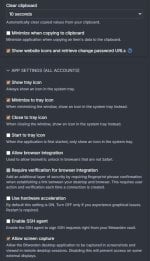
I prefer a separate PM, not linked to the browser, so I have to use copy/paste, less convenient, more secure.
Clipboard is set to 10 secs and Windows clipboard is crippled, so nothing can use scripts to copy the content.

capture_02112026_092112.jpg RUID21b5dcb610cd46f9844397d71699db90.jpg

Obviously I store core passwords separately and encrypted, like for emails which can be used for password recovery.
 
Last edited:
My point of view is I don't use password managers at all neither in a browser or elsewhere, I think my system has evolved over many years where there were no managers & I don't use a single browser either - I fully accept advantages & disadvantages with the way I do it, I still use zipped password protected passwords, as I use my iPhone/iPad not for browsing the system still works fine & see no reason to change it - On this desk PC & lappy I do use passkeys more so as there are few sites I have to sign into daily, so OK.